Another Tesla Coil Starts

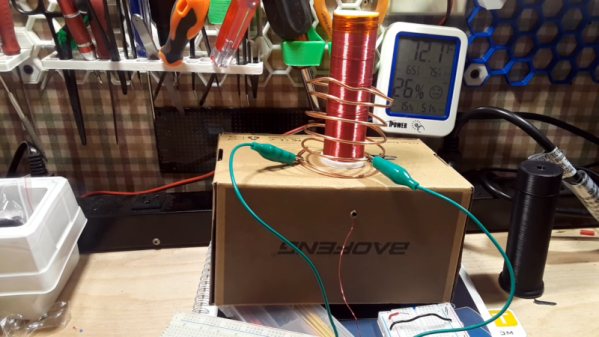
Everyone interested in electronics should build at least one Tesla coil. But be careful. Sure, the high voltage can be dangerous, but the urge to build lots of coils is even worse. [Learnelectronics] shows how to build a slayer exciter using a 3D-printed core, and lots of wire of course. You can see the coil, an explanation of the design, and a comparison to a cheap kit in the video below.

Of course, you hear about Tesla coils, but it is really more of a Tesla transformer. The 3D-printed core holds the many turns of the secondary coil. The larger Tesla coil, amusingly, upset the camera which made it hard to get close-up shots.

Continue reading “Another Tesla Coil Starts”

Putting The C In C64

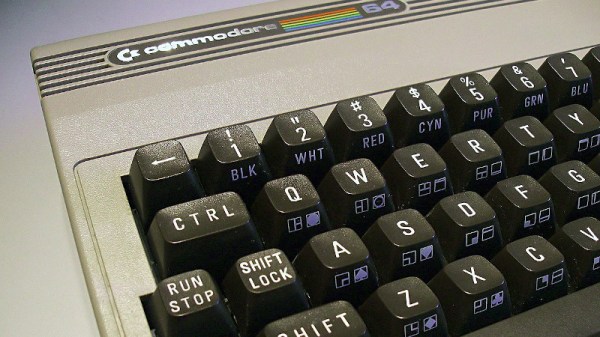
Older CPUs and some fairly modern microcontrollers are not made to readily support C compilers. Among those are the 1802, some 8-bit PICs, and the 6502 at the heart of the Commodore 64. That’s not to say you can’t make a C compiler for any of them, but the tricks required to handle the odd word sizes, lack of stack manipulation, or whatever other reason C isn’t a good fit tends to make compiled code bloated and possibly slower. [Dr. Mortal Wombat] took a different approach. The oscar64 compiler takes C source code and compiles it to a virtual machine code or native machine code for cases where performance might be important.

Turns out, the penalty for using native code isn’t as much as predicted, at least in some cases, The performance penalty for using the interpreter, however, can be significant in many common cases. The 6502 has a small stack that is hard to address, and indexing into a user-maintained stack is slow. The word size problem also produces lots of code as you have to break 16-bit operations into multiple 8-bit ones. The compiler aims to be C99-compliant, including floating point, recursion, multiple dimensions for arrays, and pointers to structures.

There are a few things left to hammer out. The linker doesn’t support external libraries, and the floating point code doesn’t understand NaN. On the other hand, many C++ features are available, like namespaces, reference types, templates, and more. The compiler can target several Commodore machines from the C128 to the PET. It also works with some Nintendo and Atari systems and can create various cartridge formats.

If you are writing code for any kind of 6502, it is probably worth checking out. Compiling C for the 6502 is no small feat, but then, so it is targeting PowerPoint. Don’t have a C64? Build one.

Image: [MOS6502], CC-BY-SA 3.0

Recreating The Jupiter ACE

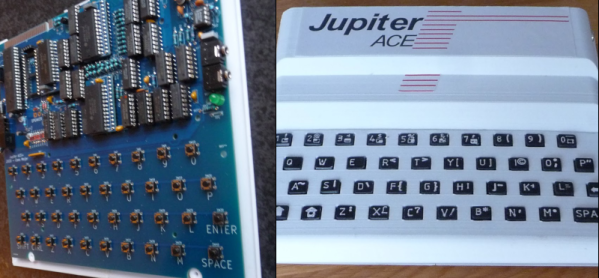
What looks like a Sinclair ZX81 but runs Forth? If you said a Jupiter ACE, you get a gold star. These are rare because ordinary people in 1982 didn’t want Forth, so only about 5,000 of the devices were sold. [Cees Meijer] assumes they are unaffordable, so he built a replica and shows you how you can, too. [Scott Baker] built one recently; you can see his video below.

The resemblance to the Sinclair computer wasn’t just a coincidence. Richard Altwasser and Steven Vickers were behind the computer, and both had worked for Sinclair previously. In addition to being famous for using Forth, the machine initially had a badly manufactured case and an unreliable keyboard. A later version tried to correct these issues, but there were fewer than 1,000 made. [Cees’] replica used a design from [Grant Searle] with some modifications.

We liked the realistic look of the 3D printed keyboard. The keyboard uses white plastic with raised letters. A quick black spray paint followed by sanding gives the appearance of black keys with white printed text.

Overall, this is a good-looking build of a computer you probably won’t see in person. We wish Forth had caught on in the early PC world, but it didn’t. [Grant] was prolific with replica computers, and [Cees] isn’t the only one who used that work as a starting point for their own projects. If you want real old-school Forth, you have to go back a few more years.

Continue reading “Recreating The Jupiter ACE”

[Thomas Sanladerer] Gets New Threads

If you do much practical 3D printing, you eventually need some sort of fastener. You can use a screw to bite into plastic. You can create a clearance hole to accommodate a bolt and a nut or even build in a nut trap. You can also heat-set threaded inserts. Which is the best? [Thomas] does his usual complete examination and testing of the options in a recent video you can watch below.

[Thomas] uses inserts from [CNCKitchen] and some cheap inserts for 3D printing and some for injection molding. There are differences in the configuration of the teeth that bite into the plastic. [Thomas] also experimented with thread adapters that grab a 3D-printed thread.

Continue reading “[Thomas Sanladerer] Gets New Threads”

A Look Inside The Smallest Possible PNG File

What’s inside a PNG file? Graphics, sure. But how is that graphic encoded? [Evan Hahn] shows you what goes into a single black pixel inside a 67-byte file. Why so many bytes? Well, that is exactly what the post is about.

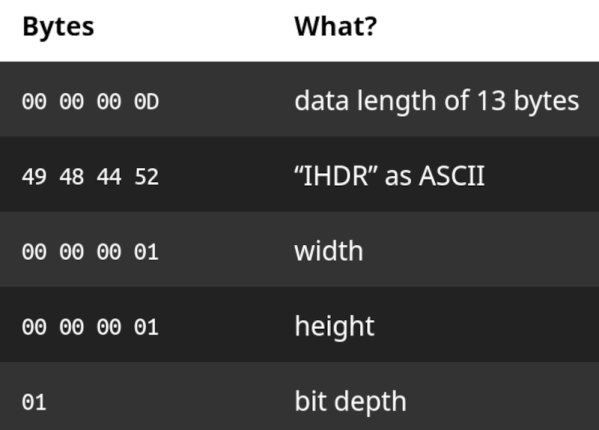
You had to guess there is some overhead, right? There is an 8-byte header. Next up is a 25-byte metadata block. That single pixel takes 22 bytes, and then there is a 12-byte marker for the end of file. Turns out, you could put a bit more in the file, and would still take 67 bytes. The metadata is in a chunk — a block of data with a type, length, and CRC. That’s why it takes 25 bytes to store the dimensions of the image. A chunk has to be at least 12 bytes long. The metadata includes the image dimensions, the bit depth, and so on.

The next chunk, of course, is the data. The data is compressed, but in the case of one pixel, compression is a misnomer. There will be ten data bytes in the data chunk. That doesn’t include the 12 bytes of the chunk overhead so that one pixel takes a whopping 22 bytes.

The end of file marker is another chunk with no data. The total? 67 bytes. However, you can add more than one bit and still wind up with 67 bytes. For all the details, check out the post.

Luckily, it is easy to pronounce PNG. You can even use the format for circuit simulation.

No DAC? Try PDM

Ever notice that the ESP32-S3 doesn’t have a digital-to-analog converter? [Chris] did and asserts that he doesn’t care because he can just use the PDM system to get the same result. PDM — pulse density modulation — is similar to PWM and, like PWM, requires a filter that could range from a simple RC network to an active filter. You can see the result in the video below.

There are several ways [Chris] could produce the output he wanted. PWM was one choice, and some example code uses a timer to do PDM. However, that is not very efficient. The other alternative is to use the I2S output. However, this does require a few workarounds.

In particular, the I2S output is always stereo and incorporates a clock output that isn’t needed for this application. [Chris] simply output the same value on both channels and routed the clock to some pins that are normally used for startup options. That means they can’t easily be used for your own inputs, but it’s OK to use them for unimportant outputs.

We always enjoy seeing solutions like this because it can give you ideas for use in your own projects. Of course, this won’t apply to every project where you need a DAC, but it still might give you some ideas.

We have looked at PDM before. You could, too, build your own DAC hardware.

Continue reading “No DAC? Try PDM”

Pinball With No Computers

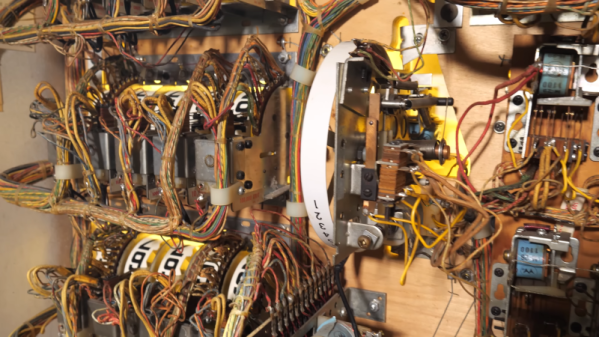
Pinball machines were the video games of their day. Back when they were king, there were no microcontrollers — everything was electromechanical. We know from experience that fixing these was difficult but we imagine that designing complex play behavior with a bunch of motors, relays, clutches, contacts, and more would have been excruciatingly difficult. [Technology Connections] has several videos about an old Aztec machine and he promises more to come. You can watch the first two below.

To give you an idea of what’s involved, imagine a very simple pinball machine that supports a single player and a handful of targets. When the ball hits a target, that could trigger a micro-switch. The switch closure could trigger a relay that closes a contact for a short period of time. That contact energizes a solenoid that advances the score wheels. So now, when a ball hits a target, the score wheel will spin enough to award ten points. To make sure there is enough time for the score to advance, the relay uses something like a mechanical flip flop.

Sound complicated? That’s nothing. Don’t forget, the machine also has to reset the score at the start of the game, count the ball in play, and end the game when the last ball returns. Then consider a real game. There will be multiple players and fancy sequences (e.g., hit the red target three times to award double scores for other targets).

While we knew a fair bit about the design of pinball machines already, we did learn a lot about their history and where the idea came from. The video also explains why it is called pinball since modern machines don’t really have pins — these were like relay-based computers with strange electromagnetic I/O devices.

While pinball machines were the best example of this sort of thing, there were also things like bowling machines and ladder-logic industrial control systems. We’ve even seen an electromechanical phone answering machine.

Continue reading “Pinball With No Computers”