Chip Tester Knows If Your Old Chips Are Working

[Noel’s Retro Lab] has looked at retro chip testers before, but in a recent video you can see below he’s looking at the Chip Tester Pro, a preassembled chip tester for vintage chips, especially those used in Commodore computers. The device looks good on the surface with a form factor like a calculator or cell phone, an LCD display, and a 48 pin ZIF socket.

The user interface is pretty simple. A rotary encoder and a big red button are about it. However, there are also some headers where you have to use jumpers to wire signals to the chip. The firmware gives you specific directions, but it is reminiscent of programming old punchcard machines with jumper wires. Luckily, it looks like you only route the power to the device so you don’t have many wires to connect (usually two or three).

Continue reading “Chip Tester Knows If Your Old Chips Are Working”

Vacuum Forming With 3D Printed Buck Tutorial

[Matterhackers] has a nice video tutorial on using vacuum forming to create plastic items. Sure, you have a 3D printer, but vacuum forming has some advantages if you are making thin and flexible items quickly. But don’t feel bad. The master item in the process is from a 3D printer. Like a mold, the forming won’t produce a duplicate of the master, called a buck. Rather, the buck provides something like a die that the plastic wraps around.

While obvious vacuum-formed items include such things as take-out food containers and plastic blister packaging for retail items, you can also make more substantial items. Apparently, all theStar Wars movies in the original trilogy used vacuum forming to create stormtrooper armor.

Continue reading “Vacuum Forming With 3D Printed Buck Tutorial”

Mystery HP Gear Teardown

What’s round, has what looks like a vacuum tube in the center, and was made in the 1950s by HP? We don’t know either, but [The Signal Path] restored one and shows us this mystery instrument in a recent video that you can see below. We aren’t going to spoil the surprise over what the device is, but we will share that he does reveal what it is very early in the video, so there’s not much of a tease.

We will, however, give you a few hints. Looking at it, you can guess that it is meant for high voltage use and, in fact, it is rated for up to 25 kV. We’ll also drop the hint that it is made for use with AC, not DC. The shape of the plug at the end of the wire is also a clue, we think.

There isn’t much inside the unusual round case (another clue, by the way), but there are some vintage parts we haven’t seen in quite awhile. One last clue: Why is there a metal rod and ball sticking out of one side of the device?

Honestly, the insides are a bit underwhelming so unlike some teardown videos we’ve seen, the real star of this video is the unusual device more so than its inner workings. If you have a hankering for a more sophisticated HP exploration, check out the HP3458A repair we covered earlier. Or go old school and peek inside an HP 150A.

Continue reading “Mystery HP Gear Teardown”

Mechanical Linkage CAD For Everyone

As much as some of us don’t like it, building things for real requires some mechanical component. Maybe it is something as simple as an enclosure or even feet for a PCB, but unless you only write software or play with simulators, you’ll eventually have to build something. It is a slippery slope between drilling holes for a front panel and attempting to build things that move. Sometimes that’s as simple as a hinge and a spring, or maybe it is a full-blown robot articulated arm.  That’s why [RectorSquid] built Linkage, a “program that lets you design and edit a two-dimensional mechanism and then simulate the movement of that mechanism” (that quote is from the documentation.

The program has had a few versions and is currently up past 3.15. To get an idea of the program’s capabilities, the first video below shows an older version simulating a ball lift. The second video shows the actual mechanism built from the design. The associated YouTube channel has more recent videos, too, showing a variety of simulations.

Continue reading “Mechanical Linkage CAD For Everyone”

Raspberry Pi Tablet Gets Radio Surgical Enhancement

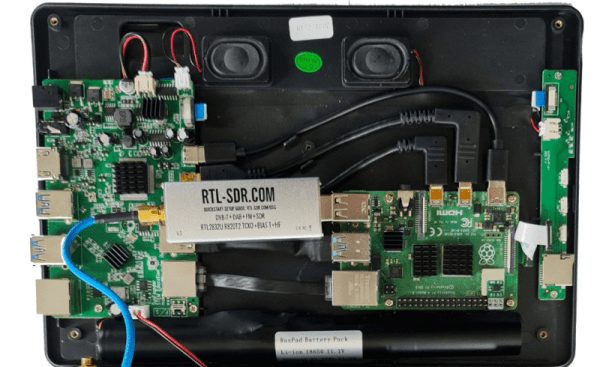
We always get excited when we buy a new tablet. But after a few months, it usually winds up at the bottom of a pile of papers on the credenza, a victim of not being as powerful as our desktop computers and not being as convenient as our phones. However, if you don’t mind a thick tablet, you can get the RasPad enclosure to fit around your own Raspberry Pi so it can be used as a tablet. Honestly, we weren’t that impressed until we saw [RTL-SDR] add an SDR dongle inside the case, making it a very portable Raspberry Pi SDR platform.

The box is a little interesting by itself, although be warned it costs over $200. For that price you get an LCD and driver board, a battery system, speakers, and an SD extension slot with some control buttons for volume and brightness. There’s a video of the whole setup (in German) below.

Continue reading “Raspberry Pi Tablet Gets Radio Surgical Enhancement”

Bright Lightbulb Saves Old Radios

If you work on old equipment, you know that there’s always that tense moment when you first plug it in and turn it on. No matter how careful you have been, there’s some chance your garage sale find is going to go up in smoke. [BasinStreetDesign] built a little box that can help. On one side is a variac and the device you want to test goes into the other side.

In the middle? A lightbulb, a few switches, and a meter to monitor the current. The magic happens because the lightbulb will stay relatively cool and only light dimly if the device under test is drawing an appropriate amount of current. You match the bulb wattage with the approximate watts you expect the load to draw. If the device’s power is shorted to ground, though, the bulb will light brightly and this causes the lightbulb’s resistance to increase, thus helping to protect the device.

Continue reading “Bright Lightbulb Saves Old Radios”

Tech In Plain Sight: Glucose Meters

If you or someone you know is diabetic, it is a good bet that a glucose meter is a regular fixture in your life. They are cheap and plentiful, but they are actually reasonably high tech — well, at least parts of them are.

The meters themselves don’t seem like much, but that’s misleading. A battery, a few parts, a display, and enough of a controller to do things like remember readings appears to cover it all. You wouldn’t be surprised, of course, that you can get the whole affair “on a chip.” But it turns out, the real magic is in the test strip and getting a good reading from a strip requires more metrology than you would think. A common meter requires a precise current measurement down to 10nA. The reading has to be adjusted for temperature, too. The device is surprisingly complex for something that looks like a near-disposable piece of consumer gear.

Of course, there are announcements all the time about new technology that won’t require a needle stick. So far, none of those have really caught on for one reason or another, but that, of course, could change. GlucoWatch G2, for example, was a watch that could read blood glucose, but — apparently — was unable to cope with perspiration.

Even the meters that continuously monitor still work in more or less the same way as the cheap meters. As Hackaday’s Dan Maloney detailed a few years back, continuous glucose monitors leave a tiny sensor under your skin and measure fluid in your body, not necessarily blood. But the way the sensor works is usually the same.

For the purposes of this article, I’m only going to talk about the traditional meter: you insert a test strip, prick your finger, and let the test strip soak up a little bit of blood.

Continue reading “Tech In Plain Sight: Glucose Meters”