Hacking Surgery: Suspended Animation May Be Here

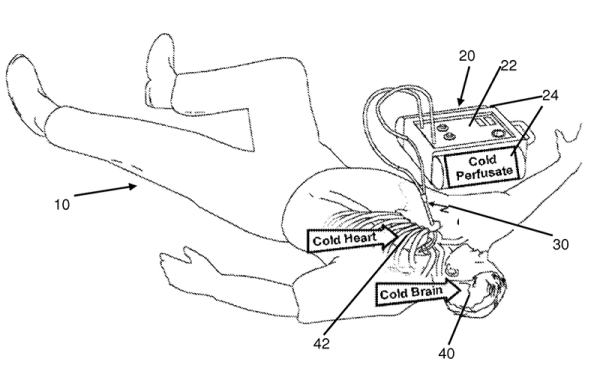
Suspended animation is a staple of science fiction. Need to take a 200 year trip to another star system? Go to sleep in some sort of high-tech coccoon and wake up at your destination. We saw it in Star Trek, 2001, and many other places. Doctors at the University of Maryland have reprtedly put at least one patient in suspended animation, and it isn’t to send them to outer space. The paper (behind a paywall, of course) is available if you have the medical background to wade through it. There’s also a patent that describes the procedure.

Trauma surgeons are frustrated because they often see patients who have been in an accident or have been shot or stabbed that they could save if they only had the time. A patient arriving at an ER with over half their blood lost and their heart stopped have a less than 5% chance of leaving the ER without a toe tag. By placing the patient in suspended animation, doctors can gain up to two hours to work on injuries that previously had to be repaired in mere minutes.

Continue reading “Hacking Surgery: Suspended Animation May Be Here”
University Makes Bulletproof 3D Prints

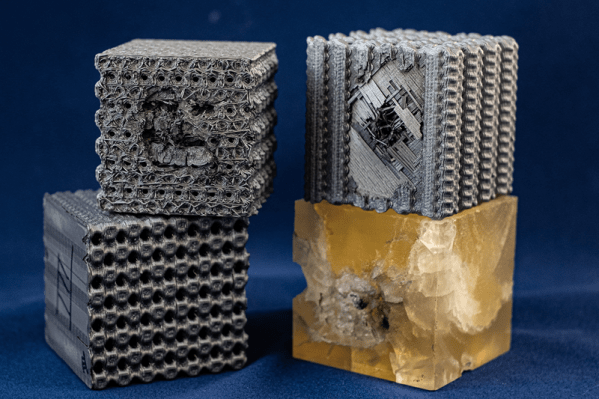
Researchers at Rice University are studying 3D printing plastic structures that mimic tubulanes — theoretical nanotube structures predicted to have extraordinary strength. The result has been very strong and very compressible structures that can actually resist bullets.

As an experiment, the researchers fired projectiles at 5.8 km/s at a block of plastic and at a block of simulated tubulanes. The structure of the tubulane block stopped the bullet at the second layer with no significant structural damage beyond the second layer. The reference block had a large hole and cracks throughout its volume.

Continue reading “University Makes Bulletproof 3D Prints”

Texas Tesla Tower Titillates

One of the nice things about a road trip is you often get to see something that really surprises you. A recent trip through Texas may have resulted in my second most surprising sighting. There’s a strange tower that looks oddly like a Tesla tower in the middle of rural Texas, right off the main interstate. What is it? Although Google did answer the question — sort of — I’m still not sure how legitimate its stated purpose is.

First Sighting

I was driving between Wimberly and Frisco — two towns that aren’t exactly household names outside of Texas. Near Milford, there’s a very tall structure that looks like a giant mechanical mushroom on top of a grain silo. If the mushroom were inverted or pointing towards the horizon, it would be easy to imagine it was some very odd antenna. This dish, however, is pointed right down its own odd-shaped mast. The top of the thing sure looks like the top of a Van de Graf generator.

Continue reading “Texas Tesla Tower Titillates”

Bamboo Skewers Launch Airship

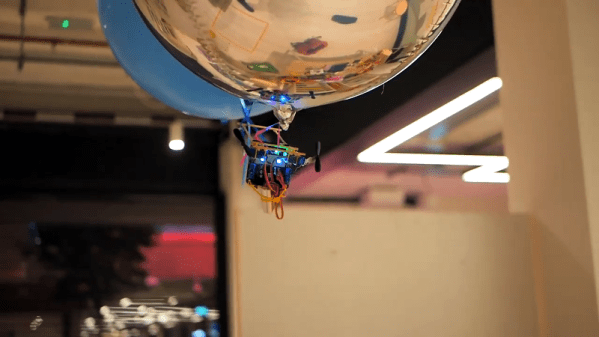
We have to admit, we like airships. There’s something about the image of a stately zeppelin floating over Manhattan that just makes us imagine the future. There are not many airships anymore, but you can always build your own. [Crafty Robot] shows how to use one of their boards to make a simple and easy controlled balloon. Honestly, they don’t give you many details, but we know how to turn motors and servos. We loved their construction with hot glue and bamboo. Effective, and fun to say.

The bamboo skewers are easy to find and make a lightweight frame. Some drone motors provide thrust and some simple RC servos control the angle of the props. Nice and simple.

Continue reading “Bamboo Skewers Launch Airship”

SiCK Mechanical Keyboard Is 3D Printed

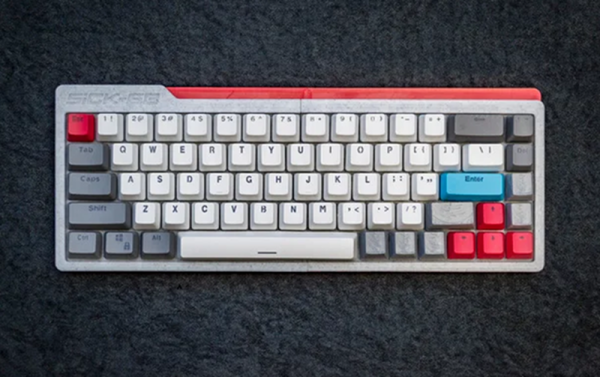
We’ve noticed a rash of builds of [ FedorSosnin’s] do-it-yourself 3D-printed mechanical keyboard, SiCK-68 lately. The cost is pretty low — SiCK stands for Super, Inexpensive, Cheap, Keyboard. According to the bill of materials, the original cost about $50. Of course, that doesn’t include the cost of the 3D printer and soldering gear, but who doesn’t have all that already?

The brains behind this is a Teensy that scans the hand-wired key matrix. So the only electronics here are the switches, each with a companion diode, and the Teensy. The EasyAVR software does all the logical work both as firmware and a configuration GUI.

If you look at the many different builds, each has its own character. Yet they look overwhelmingly professional — like something you might buy at a store. This is the kind of project that would have been extremely difficult to pull off a decade ago. You could build the keyboard, of course, but making it look like a finished product was beyond most of us unless we were willing to make enough copies to justify having special tooling made to mold the cases.

PCBs are cheap now and we might be tempted to use one here. There are quite a few methods for using a 3D printer to create a board, so that would be another option. The hand wiring seems like it would be a drag, although manageable. If you need wiring inspiration, we can help.

For ultimate geek cred, combine this with Ploopy.

Rotary Dial Becomes USB Keyboard

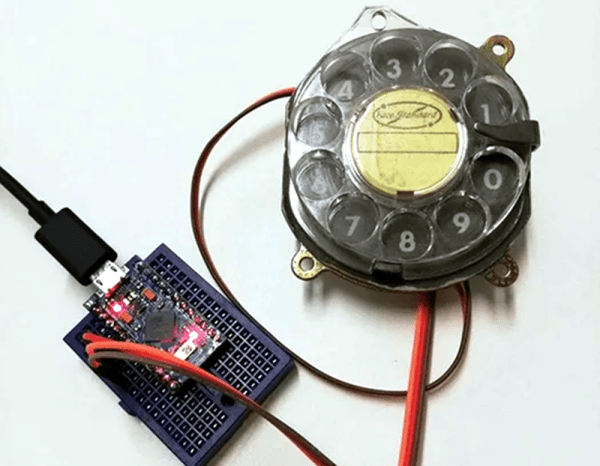
[Max] had a rotary dial from an old telephone and — unsurprisingly — had nothing in particular to do with it. The simple answer? Use an Arduino Leonardo to turn it into a USB keyboard device.

Of course, the Leonardo can easily impersonate a USB keyboard, so that’s the easy part of the project. Interfacing to the dial requires an understanding of how the phone system works.

While today, TouchTone phones are most common, they were quite uncommon for many years. Early phones required you to have an operator connect your circuit to another person’s circuit. Unfortunately for the operators, the system was inherently unscalable and also cost prohibitive.

There were a variety of schemes tried and — supposedly — an undertaker who was angry that the operator was connecting his customers to her husband’s competing mortuary invented the dial telephone.

The details are pretty simple. A typical dial has two contacts. There’s a normally open contact that closes when you spin the dial to any position. It says closed until the spring returns the dial to the home position.

The other contact is normally closed and makes or breaks the phone line. Each time the dial rewinds past a position, the contact opens briefly. Of course, this is a mechanical system, so the software has to debounce the inputs, but that’s easy enough.

If you don’t have access to a dial, you could always print one. Sort of.

Arduino Does Multitouch

A lot of consumer gadgets use touch sensors now. It is a cheap and reliable way to replace a variety of knobs and switches on everything from headphones to automobiles. However, creating a custom touch controller for a one-off project can be daunting. A recent ACM paper shows how just about any capacitive sensor can work as a multitouch sensor with nothing more than an Arduino although a PC running processing interprets the data for higher-level functions.

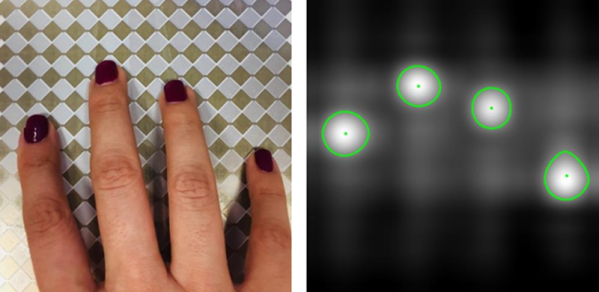
The key is that the Arduino excites the grid using PWM and then examines the signal coming out of the grid. Finger poking changes the response quite a bit and the Arduino can sense it using the analog to digital converters onboard. You can find the actual software kit online. The tutorial document is probably more interesting than the ACM paper if you only want to use the kit.

The optimum drive frequency is 10 MHz. The examples rely on harmonics of a lower frequency PWM signal to get there. The analog conversion, of course, isn’t that fast but since your finger touch rate is relatively slow, they treat the signal as an amplitude-modulated input which is very easy to decode.

The sensors can be conductive ink, thread, or copper strips. There are several example applications, including a 3D printed bunny you can pet, a control panel on a sleeve, and an interactive greeting card.

The sensor forms an image and OpenCV detects the actual touch configuration. It appears you can use the raw data from the Arduino, too, but it might be a little harder.

We imagine aluminum foil would work with this technique. If you get to the point of laying out a PCB, this might come in handy.