Antennas That You Install With A Spray-Can

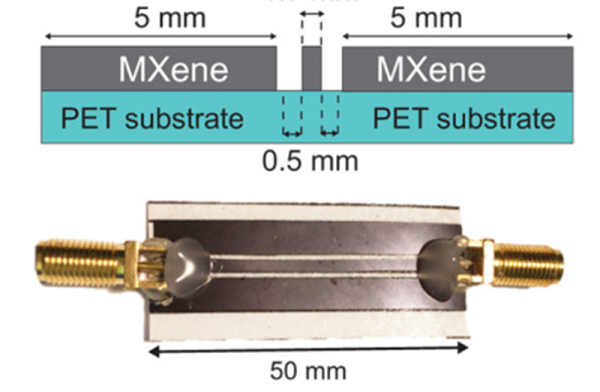
With the explosion in cell phones, WiFi, Bluetooth, and other radio technologies, the demand for antennas is increasing. Everything is getting smaller and even wearable, so traditional antennas are less practical than ever. You’ve probably seen PCB antennas on things like ESP8266s, but Drexel University researchers are now studying using titanium carbide — known as MXene — to build thin, light, and even transparent antennas that outperform copper antennas. Bucking the trend for 3D printing, these antennas are sprayed like ink or paint onto a surface.

A traditional antenna that uses metal carries most of the current at the skin (something we’ve discussed before). For example, at WiFi frequencies, a copper antenna’s skin depth is about 1.33 micrometers. That means that antennas have to be at least thick enough to carry current at that depth from all surfaces –practically 5 micrometers is about the thinnest you can reasonably go. That doesn’t sound like a lot, but when you are trying to make something thin and flexible, it is pretty thick. Using MXene, the researchers made antennas as thin as 100 nanometers thick — that’s 10% of a micrometer and only 2% of a conventional antenna.

Continue reading “Antennas That You Install With A Spray-Can”
Three Part Deep Dive Explains Lattice ICE40 FPGA Details

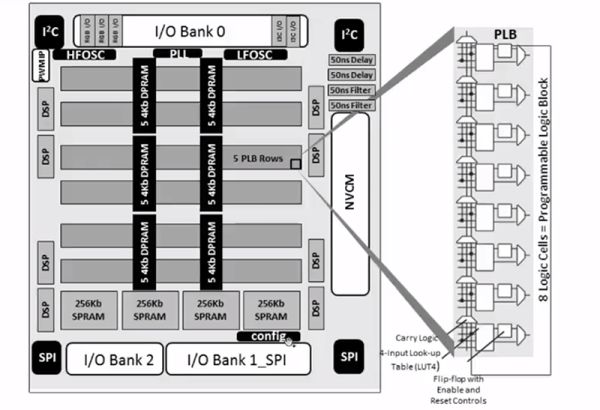
It is no secret that we like the Lattice iCE40 FPGA. It has a cheap development board and an open source toolchain, so it is an easy way to get started developing low-cost, low-power FPGA designs. There are a few members of the family that have similar characteristics including the top-of-the-line UltraPlus. [Steve] from Lattice and [Michael Klopfer] from the University of California Irvine have a three-part video series that explain the architecture of the devices. Altogether, the videos are about an hour long and — of course — they use the official tools, not IceStorm. But it is still a great time investment if you have an iCE40 board and you want to understand what the chip has under the hood.

The first part is fairly short and talks a lot about applications. There’s also a nod to the hobbyist use of FPGAs. Keep in mind that the iCE40 FPGAs come in different sizes and variants, so don’t get excited when you see them mention a RISC-V — that isn’t going to fit in your iCEStick, that we know of. The iCEstick has a HX-1K onboard, which is the high-performance variant with 1,280 logic elements, as opposed to the low-power (LP) version.

Continue reading “Three Part Deep Dive Explains Lattice ICE40 FPGA Details”

Learn Verilog In Your Browser

We are big fans of tools in the browser for education. You have a consistent environment maintained by someone else, you don’t have to install anything, and you can work from any computer you happen to find yourself. The HDLBits site has a great set of Verilog “exams” that would be a big help to anyone trying to learn or brush up on their Verilog skills.

The site offers a range of topics that go from the silly (output a constant 1 or 0) to full-blown state machines and testbenches. The site isn’t tutorial in nature, instead it offers a problem, an optional hint, and an editing window with some code already in place. You add your code and hit submit. Behind the scenes, the site runs Intel Quartus and Modelsim to test your work. It will either show you the results or tell you that you failed.

Continue reading “Learn Verilog In Your Browser”

Nim Writes C Code — And More — For You

When we first heard Nim, we thought about the game. In this case, though, nim is a programming language. Sure, we need another programming language, right? But Nim is a bit different. It is not only cross-platform, but instead of targeting assembly language or machine code, it targets other languages. So a Nim program can wind up compiled by C or interpreted by JavaScript or even compiled by Objective C. On top of that, it generates very efficient code with — at least potentially — low overhead. Check out [Steve Kellock’s] quick introduction to the language.

The fact that it can target different compiler backends means it can support your PC or your Mac or your Raspberry Pi. Thanks to the JavaScript option, it can even target your browser. If you read [Steve’s] post he shows how a simple Hello World program can wind up at under 50K. Of course, that’s nothing the C compiler can’t do which makes sense because the C compiler is actually generating the finished executable, It is a bit harder though to strip out all the overhead yourself.

Continue reading “Nim Writes C Code — And More — For You”

Infection? Your Smartphone Will See You Now

When Mr. Spock beams down to a planet, he’s carrying a tricorder, a communicator, and a phaser. We just have our cell phones. The University of California Santa Barbara published a paper showing how an inexpensive kit can allow your cell phone to identify pathogens in about an hour. That’s quite a feat compared to the 18-28 hours required by traditional methods. The kit can be produced for under $100, according to the University.

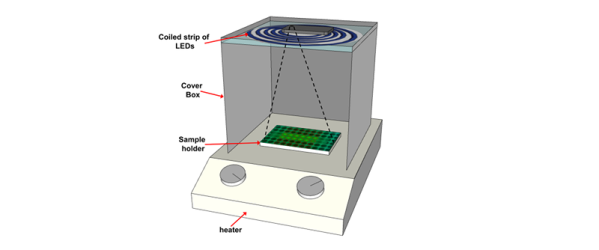
Identifying bacteria type is crucial to prescribing the right antibiotic, although your family doctor probably just guesses because of the amount of time it takes to get an identification through a culture. The system works by taking some — ahem — body fluid and breaking it down using some simple chemicals. Another batch of chemicals known as a LAMP reaction mixture multiplies DNA and will cause fluorescence in the case of a positive result.

Continue reading “Infection? Your Smartphone Will See You Now”

Easy GUI Front Ends For Arduino, Rasberry Pi, And More With MyOpenLab

If you want to integrate a nice graphical interface with a microcontroller or single-board computer for a useful piece of custom equipment, how will you go about it? MyOpenLab is a platform that makes it easy to design virtual interfaces your electronic builds. If you want controls and readouts for Arduino, Raspberry Pi, Android, or anything with a serial port, this is worth a try.

MyOpenLab reminds me of LabView. Not so much modern LabView with all of its add-ons and extras, but LabView back when it did just a few things but did them really well. The open source MyOpenLab project has been around for a while. The website and documentation are not in English, which may have kept some people from giving it a try, but the software itself is available in German, English, and Spanish. I took the plunge and found the language barrier didn’t cause me trouble.

As an example of what you can do, image you want to build a custom bench tool. You build virtual device (they call it a “VirtualMachine”) that uses your computer as the control panel and readout, and your electronic project as the physical interface. In myOpenLab your device will consist of two parts: a diagram and a front panel. Some things only live on the diagram, like a timer or a connection to an Arduino. But some things live on both like switches, LEDs, graphs, and so on. You can connect all the little boxes together to build up applications. They can stand alone, but the power comes in being able to connect to an Arduino or Raspberry Pi (or a few other options) for I/O.

Continue reading “Easy GUI Front Ends For Arduino, Rasberry Pi, And More With MyOpenLab”

Golf Practice Made Easy With Robotics

When you think of sports, you usually think of something that takes a lot of physical effort. Golf is a bit different. Sure, you can get some walking in if you don’t take a cart. But mostly golfing is about coordination and skill and less about physical exertion. Until you want to practice driving. You hit a bucket of balls and then you have to go walk around and pick them up. Unless you have help, of course. In particular, you can delegate the task to a robot.

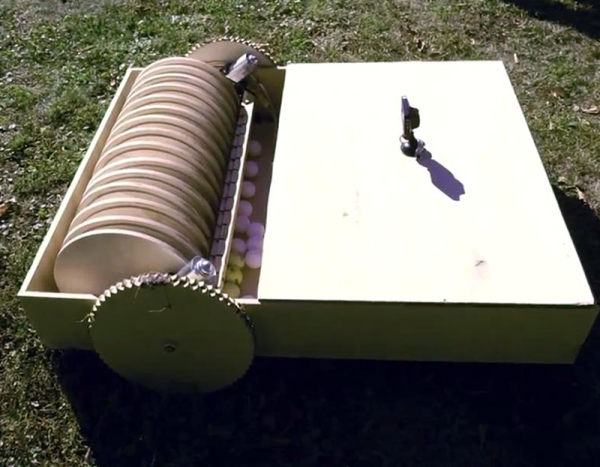
The robot that [webzuweb] built looks a little like a plywood robot vacuum. However, instead of suction, it uses some plywood disks to lift the balls and deposit them in a hopper. The electronics consist of an Arduino and an Orange Pi Lite. A GPS tells the robot where it is and it develops a search pattern based on its location.

Continue reading “Golf Practice Made Easy With Robotics”