Build A Tiny (Unstable) Bugging Device

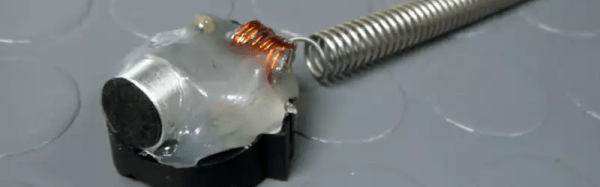
We don’t know who the [amgworkshop] wanted to listen in on, but they apparently went searching for a small FM wireless transmitter. There’s plenty of circuits around, but they wanted something smaller. The original circuit had a variable capacitor to tune the output frequency. The new design uses a fixed capacitor and a spring for an antenna. You can see the build steps in the video below, but don’t expect a lot of frequency stability or fidelity out of a single transistor transmitter.

The parts list is minimal. In addition to a coin cell holder (which serves as the construction base), you need a transistor, two resistors, three capacitors, a homemade inductor (very easy to make with some wire and a drill bit), and an electret microphone. Of course, you need a battery, too. The whole thing is potted with hot glue.
Continue reading “Build A Tiny (Unstable) Bugging Device” →

Pan And Tilt With Dual Controllers

It wasn’t long ago that faced with a controller project, you might shop for something with just the right features and try to minimize the cost. These days, if you are just doing a one-off, it might be just as easy to throw commodity hardware at it. After all, a Raspberry Pi costs less than a nice meal and it is more powerful than a full PC would have been not long ago.

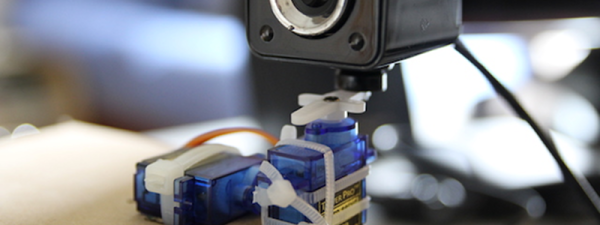
When [Joe Coburn] wanted to make a pan and tilt webcam he didn’t try to find a minimal configuration. He just threw a Raspberry Pi in for interfacing to the Internet and an Arduino in to control two RC servo motors. A zip tie holds the servos together and potentially the web cam, too.

You can see the result in the video below. It is a simple matter to set up the camera with the Pi, send some commands to the Arduino and hook up to the Internet.

Continue reading “Pan And Tilt With Dual Controllers” →

Shell Game

A lot of us spend a lot of time switching between Windows and Linux. Now that platforms like the Raspberry Pi are popular, that number is probably increasing every day. While I run Linux on nearly everything I own (with the exception of a laptop), my work computers mostly run Windows. The laptop is on Windows, too, because I got tired of trying to get all the fancy rotation sensors and pen features working properly under Linux.

What I hate most about Windows is how hard is it to see what’s going on under the hood. My HP laptop works with a cheap Dell active stylus. Sort of. It is great except around the screen edges where it goes wild. Calibration never works. On Linux, I could drill down to the lowest levels of the OS if I were so inclined. With Windows, it is just tough.

War is Shell

One place where Linux always used to have an advantage over DOS and Windows was the shell. There are lots of variations available under Linux, but bash seems to be the current pick for most people. If you want more power, you can move to some alternatives, but even bash is pretty powerful if you learn how to use it and have the right external programs (if you don’t believe it, check out this web server).

Continue reading “Shell Game” →

Citizen Scientist Radio Astronomy (and More): No Hardware Required

We sometimes look back fondly on the old days where you could–it seems–pretty easily invent or discover something new. It probably didn’t seem so easy then, but there was a time when working out how to make a voltage divider or a capacitor was a big deal. Today–with a few notable exceptions–big discoveries require big science and big equipment and, of course, big budgets. This probably isn’t unique to our field, either. After all, [Clyde Tombaugh] discovered Pluto with a 13-inch telescope. But that was in 1930. Today, it would be fairly hard to find something new with a telescope of that size.

However, there are ways you can contribute to large-scale research. It is old news that projects let you share your computers with SETI and protein folding experiments. But that isn’t as satisfying as doing something personally. That’s where Zooniverse comes in. They host a variety of scientific projects that collect lots of data and they need the best computers in the world to crunch the data. In case you haven’t noticed, the best computers in the world are still human brains (at least, for the moment).

Their latest project is Radio Meteor Zoo. The data source for this project is BRAMS (Belgian Radio Meteor Stations). The network produces a huge amount of readings every day showing meteor echoes. Detecting shapes and trends in the data is a difficult task for computers, especially during peak activity such as during meteor showers. However, it is easy enough for humans.

Continue reading “Citizen Scientist Radio Astronomy (and More): No Hardware Required” →

Really Easy Jacob’s Ladder

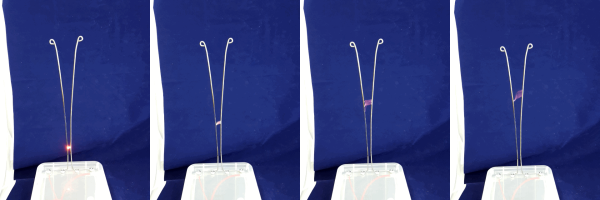
There was a time when making a high voltage project like a Jacob’s ladder took time to build or scrounge some kind of high voltage circuit. The neon sign transformer, Marx generator, or voltage multiplier was the hard part of the project. But nowadays you can get cheap high voltage modules that are quite inexpensive. [PaulGetson] picked up one for under $20 and turned it into a quick and easy Jacob’s ladder.

Honestly, once you have high voltage, making a Jacob’s ladder is pretty simple. [Paul] used a cheap plastic box, some coat hanger wire, and some stainless steel bolts.

Continue reading “Really Easy Jacob’s Ladder” →

Raspberry Pi Hive Mind

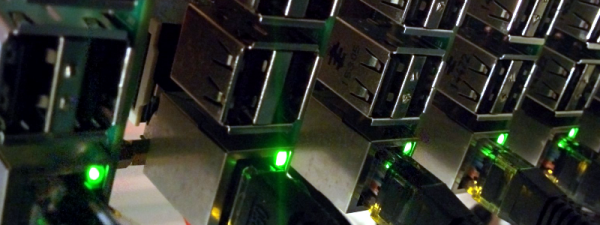
Setting up a cluster of computers used to be a high-end trick used in big data centers and labs. After all, buying a bunch of, say, VAX computers runs into money pretty quickly (not even counting the operating expense). Today, though, most of us have a slew of Raspberry Pi computers.

Because the Pi runs Linux (or, at least, can run Linux), there are a wealth of tools out there for doing just about anything. The trick is figuring out how to install it. Clustering several Linux boxes isn’t necessarily difficult, but it does take a lot of work unless you use a special tool. One of those tools is Docker, particularly Docker Swarm Mode. [Alex Ellis] has a good video (see below) showing the details of a 28 CPU cluster.

Continue reading “Raspberry Pi Hive Mind” →

Low Noise Floor Microphone

[Matt] likes to make videos (and he’s pretty good at it judging by the quality of his videos). But video isn’t much without audio. Handheld recorders with small built-in microphones have a fairly high noise floor so [Matt] has a Rode NT1-A — a pricey but very quiet microphone. However, for field work, it isn’t handy since it requires a power supply and preamp to go along with it.

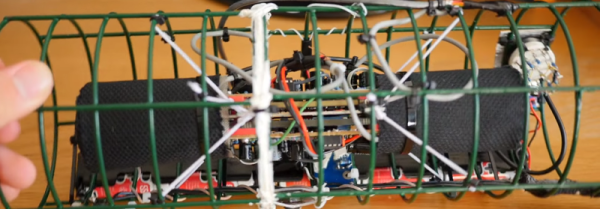
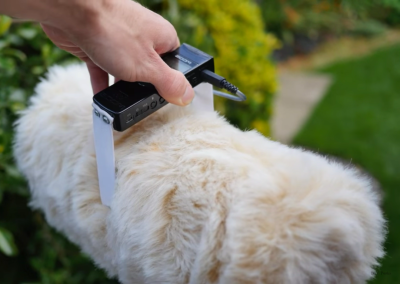
low-noise-floor-binaural-microphoneAnother problem is that for stereo recording you need two and because they are quiet, they tend to pick up handling noise so you probably need to mount them on tripods. That’s all too much to carry around, especially on a hike. So [Matt] cannibalized two microphones. He repackaged them in a shock mount (made from a bird feeder and elastic), and added a battery pack and a custom preamp. The shock mount eliminates the handling noise and the custom PC boards mean you don’t have to carry a lot of extra gear.

The end result (see the video below) looks like someone made a purse out of a tribble, but it does sound good. If you hang on through most of the video (of fast forward to about 7:25), you can hear the microphones picking up thunderstorms, the ocean, the wind, and even [Matt’s] heartbeat.

Continue reading “Low Noise Floor Microphone” →