Running Power And Data Over Just Two Wires

When you’re hooking up equipment across a vehicle, you’re often stuck sending power and data to and from things like sensors or actuators. The more wires you have to run, the more hassle, so it’s desirable to get this number as low as possible. That’s an especially big deal in the world of cycling electronics, where every additional gram is considered a drawback. To this end, companies have developed two-wire methods of sending power and data together, and now, [Keith Wakeham] has devised his own way of doing so.

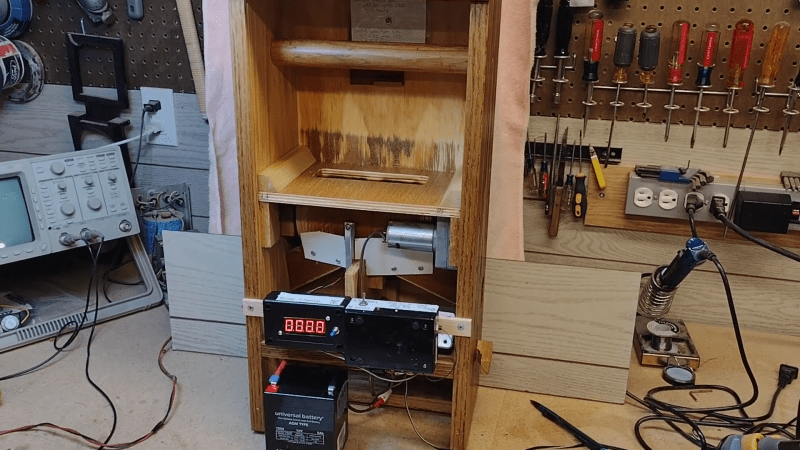
[Keith] was inspired by Shimano’s E-Tube system which is fairly fancy in its encoding schemes, but he went his own way. His concept relied on old-school On-Off Keying methods to take a signal and capacitively couple a signal into power lines. He explains the theory behind the method, and shares schematics that can be used to actually communicate over power lines. Then, he shows off the real hardware that he built to test the concept for himself.

The results? Good! [Keith] was able to maintain speeds of 57,600 bits/second even with an electrically-noisy gear motor operating on the lines. That’s more then enough for all kinds of applications.

If you’ve got your own data-over-powerline hacks, don’t hesitate to let us know. Continue reading “Running Power And Data Over Just Two Wires”

The Greenhouse Effect Isn’t For Greenhouses

Think of a greenhouse. It’s a structure with glass walls that lets light in and traps heat, all for the benefit of the plants inside. As for how it works, that’s elementary! It’s all down to the greenhouse effect… right?

Alas, no. So many of us have been mislead. Let’s rexamine how we think greenhouses work, and then explore what’s actually going on.
Continue reading “The Greenhouse Effect Isn’t For Greenhouses”

Modern Microcontroller Boosts Classic Logic Analyzer To New Heights

[Ted Fried] recently found a beautiful HP 1600A/1607A logic analyzer set. State of the art in 1975, it looks like glorious Space Age equipment today. He decided to hook it up some modern gear to put it through its paces.

Wanting to give the equipment a proper shakedown, he enlisted a Teensy 4.1 to spit a deluge of logic at the HP unit. The microcontroller was tasked with generating 32 data signals along with two clock outputs to give the analyzer plenty to analyze. The HP 1600A handled this no problem, so [Ted] kept tinkering.

His next feat was to explore the addressable “MAP” function of the unit, which allowed writing to the 64×64 pixel display. The Teensy 4.1 was easily able to send images to the display, but [Ted] isn’t stopping there. He’s got plans to do the usual thing and get Bad Apple going on the hardware.

Getting a logic analyzer to analyze logic isn’t much of a hack, sure. But it’s instructive of how to approach working with such hardware. If you want to spit a bunch of logic out fast, a Teensy 4.1 is a great choice because it’s got a ton of IO and a ton of clock cycles to tickle it with.

We enjoyed seeing this old piece of hardware light up the phosphors once more. If you’ve got your own projects going on with classic bits of HP test gear, don’t hesitate to let us know!

Faux Silkscreen On A PCB Made With A Laser Cutter

If you’re getting PCBs professionally made, silkscreen usually comes free as part of the package. However, if you’re making your own, the job is on you. [Tony Goacher] makes his own PCBs on a CNC router, so he’s not getting any silkscreening as part of that bargain. But he wondered—could he do something analogous with a laser cutter?

The answer is yes. The silkscreen layer was first exported from DesignSpark, with the file then sent to LightBurn to prep it for laser cutting. The board outline layer was first engraved on to a piece of scrap as an alignment aid. Then, the board was placed in the laser cutter, with the silkscreen scorched directly on to the fiberglass.

The results are encouraging, if imperfect. [Tony] says he ran at “quite fast speed at quite high power.” The markings are all there, but they’re a little melty and difficult to read. He noted at lower speeds and lower power, the results were a bit more readable.

PCBs aren’t really an ideal engraving or laser marking material, but this technique could be servicable for some basic markings on DIY PCBs. We look forward to seeing how [Tony] improves the process in future. Video after the break.
Continue reading “Faux Silkscreen On A PCB Made With A Laser Cutter”

Simple NTP Clock Uses Custom RGB 7-Segment Displays

A great majority of hackers build a clock at some point. It’s a great way to get familiar with electronics and (often) microcontrollers, and you get to express some creativity along the way. Plus, you get something useful when you’re done! [Tadas Ustinavičius] recently trod this well-worn path and built a neat little NTP clock of their own.

The build uses an ESP 12F as the core of the operation. It’s charged with querying an NTP time server via its WiFi connection in order to maintain accurate timekeeping around the clock. For display, it drives a series of custom 7-segment displays that [Tadas] built using 3D-printed housings. They use WS2812B addressable LEDs and thus can display a rainbow of colors.

For initial configuration, the phone creates its own WiFi hotspot with a web interface for changing settings. Once configured, it connects to the Internet over WiFi to query an NTP server at regular intervals.

It’s a simple build that does a simple job well. Projects like these can be very valuable, as they teach you all kinds of useful skills. If you’ve been working on your own clock design, don’t hesitate to let us know. You can use a microcontroller, relays, or even a ball.

Creating A Numbers Station Of Your Very Own

Numbers stations are a weird phenomenon where odd voices read out long strings of numbers or random codewords to the confusion of the vast majority of the listening audience. If you’ve ever wanted to build one of your own, you could follow the example of [AudioWanderer].

NumberMumble, as it’s called, is a numbers station emulator. It doesn’t signal spy networks or reveal national secrets. Instead, it randomly plays audio samples using an Arduino, including characteristic bursts of white noise that make it sound more authentic. It relies on the Mozzi library to help with audio tasks, including generating white noise and playing back samples. It’s also kitted out with a filter knob for varying the tone. Audio output is via PWM.

If you want to confuse your neighbours with oddball audio, put this thing on a radio transmitter and get broadcasting. But don’t, because that’s illegal without the proper licenses or — you know — if you happen to be a real spy. Video after the break.

Continue reading “Creating A Numbers Station Of Your Very Own”

Arduino Turned Into Something Kinda Like A Pager

Video may have killed the radio star, but cell phones and smart phones all but killed the pager. They still exist, of course, but only in very niche applications. [João Santos] wanted a pager-like experience for himself, though, so he enlisted an Arduino and got to work. Watch a video of the system working below.

The build uses an Arduino Uno to drive a simple HD44780 LCD display with 16 characters each across two lines of text. It’s hooked up to a Wemos D1, which uses its WiFi connection to get online. To this end, it’s capable of talking to a web application which allows users to enter text messages. It receives these messages, passes them to the Arduino Uno over I2C, and then the Uno shuttles the message to the display. It’s overkill, but [João] just found it quicker to get everything up and running via this route.

Continue reading “Arduino Turned Into Something Kinda Like A Pager”