Arduino Plays The Glasses

Have you ever been on a city street and seen a busker playing music on glasses? Each glass has a different amount of water and produces a different note when tapped. [Cyberlab] must have seen them and created an Arduino robot to play tunes on glasses. You can see the result in the video below.

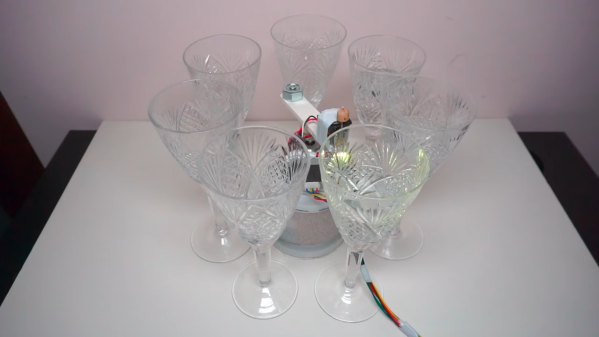
If we had done this, we might have had a solenoid per glass or used some linear component like a 3D printer axis to pick different glasses. [Cyberlab] did something smarter. The glasses go in a circle and a stepper motor points at the correct glass and activates a solenoid. The result is pretty good and it is a lot simpler than any of our ideas.

If you aren’t musically inclined, you might wonder how you’d program the songs. There’s an example of taking a music box score from a website — apparently, there are lots of these — and removing any polyphony from it. The site mentioned even has an editor where you can import MIDI files and work with them to produce a music box strip that you could then convert. Then you encode each note as a number from 0 to 6.

Of course, you also have to fill your glasses with the right amount of water. A piano tuning phone app should be useful. We’ve seen this done in a linear fashion before. You can even use a single glass for many notes with a little ingenuity.

Continue reading “Arduino Plays The Glasses”

Gaming On An Arduino Uno Q In Linux

After Qualcomm’s purchase of Arduino it has left many wondering what market its new Uno Q board is trying to target. Taking the ongoing RAM-pocalypse as inspiration, [Bringus Studios] made a tongue-in-cheek video about using one of these SoC/MCU hybrid Arduino boards for running Linux and gaming on it. Naturally, with the lack of ARM-native Steam games, this meant using the FEX x86-to-ARM translator in addition to Steam’s Proton translation layer where no native Linux game exists, making for an excellent stress test of the SoC side of this board.

Technically, this is a heatsink. (Credit: Bringus Studios, YouTube)

We covered this new ‘Arduino’ board previously, which features both a quad-core Cortex-A53 SoC and a Cortex-M33 MCU. Since it uses the Uno form factor, all SoC I/O goes via the single USB-C connector, meaning that a USB-C docking station is pretty much required to use the SoC, though there’s at least 16 GB of eMMC to install the OS on. A Debian-based OS image even comes preinstalled, which is convenient.

With a mere 2 GB of LPDDR4 it’s not the ideal board to run desktop Linux on, but if you’re persistent and patient enough it will work, and you can even play 3D video games as though it’s Qualcomm’s take on Raspberry Pi SBCs. After some intense gaming the SoC package gets really quite toasty, so adding a heatsink is probably needed if you want to peg its cores and GPU to 100% for extended periods of time.

As for dodging the RAM-pocalypse with one of these $44 boards, it’s about the same price as the 1 GB Raspberry Pi 5, but the 2 GB RPi 5 – even with the recent second price bump – is probably a better deal for this purpose. Especially since you can skip the whole docking station, but losing the eMMC is a rawer deal, and the dedicated MCU could be arguably nice for more dedicated purposes. Still, desktop performance is a hard ‘meh’ on the Uno Q, even if you’re very generous.

Despite FEX being a pain to set up, it seems to work well, which is promising for Valve’s upcoming Steam Frame VR glasses, which are incidentally Qualcomm Snapdragon-based.

Continue reading “Gaming On An Arduino Uno Q In Linux”

Arduino Auto-Glockenspiel Looks Proper In Copper

What is it about solenoids that makes people want to make music with them? Whatever it is, we hope that solenoids never stop inspiring people to make instruments like [CamsLab]’s copper pipe auto-glockenspiel.

At first, [CamsLab] thought of striking glasses of water, but didn’t like the temporary vibe of a setup like that. They also considered striking piano keys, but thought better of it when considering the extra clicking sound that the solenoids would make, plus it seemed needlessly complicated to execute. So [CamsLab] settled on copper pipes.

That in itself was a challenge as [CamsLab] had to figure out just the right lengths to cut each pipe in order to produce the desired pitch. Fortunately, they started with a modest 15-pipe glockenspiel as a proof of concept. However, the most challenging aspect of this project was figuring out how to mount the pipes so that they are close enough to the solenoids but not too close, and weren’t going to move over time. [CamsLab] settled on fishing line to suspend them with a 3D-printed frame mounted on extruded aluminium. The end result looks and sounds great, as you can hear in the video after the break.

Of course, there’s more than one way to auto-glockenspiel. You could always use servos.

Continue reading “Arduino Auto-Glockenspiel Looks Proper In Copper”

The Future’s So Bright, You Gotta Wear Arduglasses

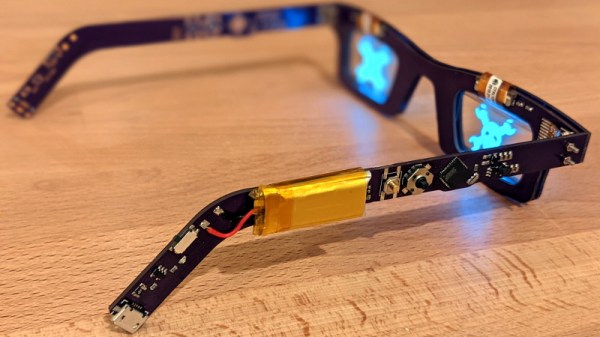
Tiny OLED displays are an absolute must-have in the modern parts bin, so what better way to show your allegiance to the maker movement than with a pair of Arduino-compatible OLED glasses? Created by Arduboy mastermind [Kevin Bates], these digital spectacles might not help you see any better — in fact, you’ll see a bit worse — but they’ll certainly make you stand out in the crowd at the next hacker con. (Whenever we can have one of those again, anyway.)

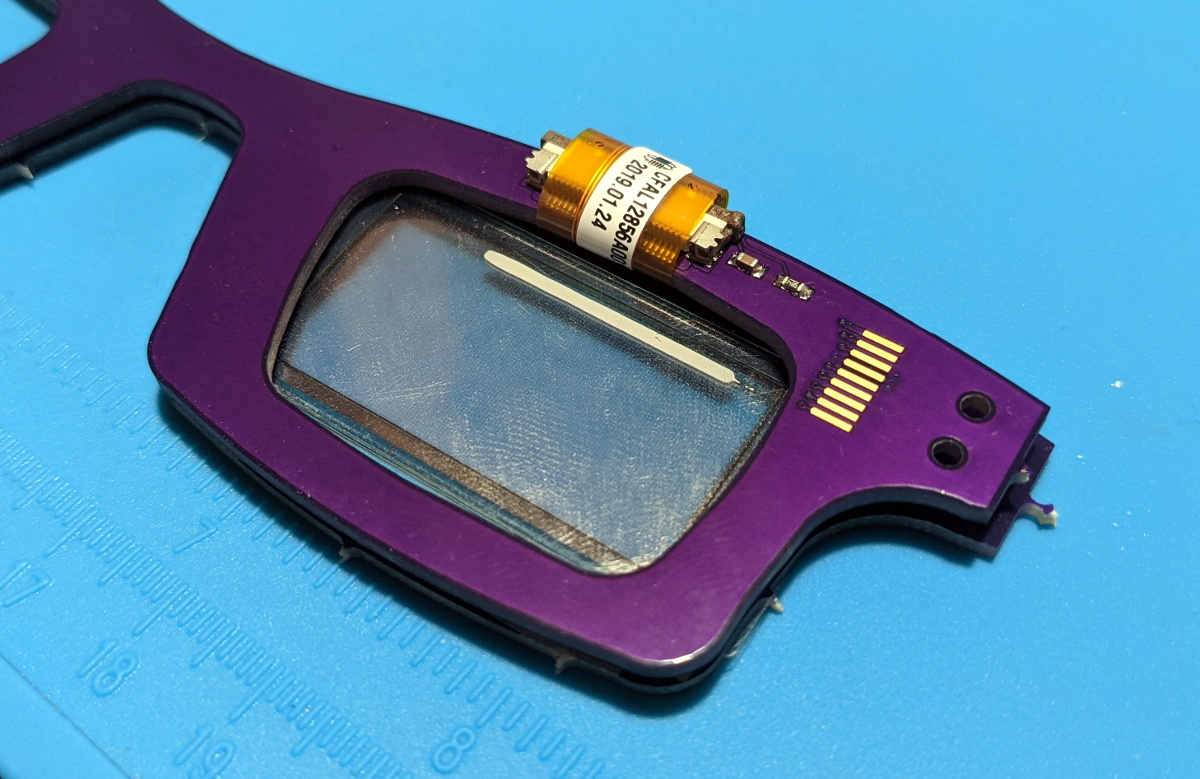
The key to this project is a pair of transparent CrystalFonts OLED displays, just like the ones [Sean Hodgins] recently used to produce his gorgeous volumetric display. In fact, [Kevin] says it was his success with these displays that inspired him to pursue his own project. With some clever PCB design, he came up with some boards that could be manufactured by OSH Park and put together with jewelry box hinges. Small flexible circuits, also from OSH Park, link the boards and allow the frames to fold up when not being worn.

The Arduglasses use the same ATmega32U4 microcontroller as the Arduboy, and with a few basic controls and a small 100 mAh rechargeable battery onboard, they can technically run anything from the open source handheld’s extensive software library. Of course, technically is the operative word here. While the hardware is capable of playing the games, [Kevin] reports that the OLED displays are too close to the wearer’s eyes to actually focus on them. That said the ability to easily create software for these glasses offers plenty of opportunity for memes, as we see in the video below.

For reasons that are probably obvious, [Kevin] considers the Arduglasses an experiment and isn’t looking to turn them into a commercial product or kit. But if there’s interest, he’s willing to put the design files up on GitHub for anyone who wants to add a pair of Arduino glasses to their cyberpunk wardrobe.

Continue reading “The Future’s So Bright, You Gotta Wear Arduglasses”

Automatic Sunglasses, The Electromechanical Way

These days, photochromic lenses are old-hat. Sure, it’s useful to have a pair of glasses that automatically tints due to UV light, but what if you want something a little more complex and flashy? Enter [Ashraf Minhaj]’s SunGlass-Bot.

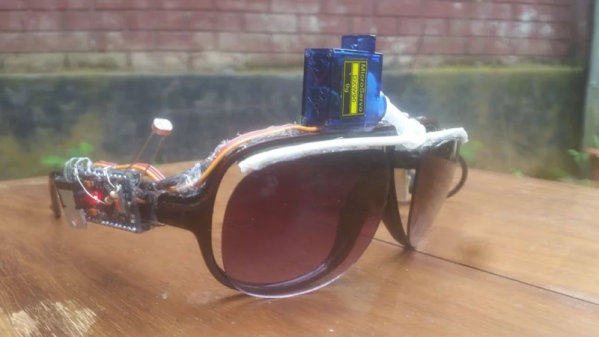
The build is simple, beginning with an Arduino Pro Mini for reasons of size. Connected to the analog input is a light-dependent resistor for sensing the ambient light level. This reading is then used to decide whether or not to move the servo which controls the position of the lenses. In low light, the lenses are flipped up to allow clear vision; in brighter light, the lenses flip down to protect the eyes. Power is supplied by a homebrew powerbank that it appears [Ashraf] built from an old phone battery and a small boost converter board. All the files to recreate the project are available on Github, too.

It’s a fun build that [Ashraf] shows off in style. While this may not be as effortless as a set of Transition lenses or as quick as a welding mask filter, it has a certain mechanical charm that wouldn’t be out-of-place in a certain sci-fi aesthetic.

Hungry for more? Check out these self-blending sunglasses we featured a while back. Video after the break.

Continue reading “Automatic Sunglasses, The Electromechanical Way”

Automatic Sunglasses For The Lazy Hacker

[Andreas] may have created the ultimate lazy hacker accessory: automatic sunglasses, or “Selfblending sunglasses” as he creatively titled his video. If you can’t tell from the name, these are glasses that you never have to take off. If the light is dim, they move away from your eyes. Going back outside to bright light? The glasses move to protect your eyes.

The glasses consist of a couple of micro servos which move tinted lenses toward or away from the user’s eyes. A side-mounted Arduino Uno reads a CdS cell light sensor and drives the servos.  Why an Uno rather than a much more wearable Arduino Nano? It’s what [Andreas] had lying around.

Yes, a good portion of the fun of this build is [Andreas’] comedy. But the best part comes when he tests the glasses out — in an actual car on the highway. The glasses work better than expected — moving the lenses into and out of [Andreas] field of view as he drives through tunnels. You can actually see how surprised [Andreas] is that it works so well.

These aren’t the first automatic sunglasses we’ve seen, nor are they the most peril-sensitive. Still, it’s a fun project and the video gave us a few chuckles.

Continue reading “Automatic Sunglasses For The Lazy Hacker”

Hackaday Prize Entry: Safety Glasses Are Also Hands-Free Multimeter

It seems like the multimeter is never easy to see during a project. Whether it’s troubleshooting a vehicle’s electrical system and awkwardly balancing the meter on some vacuum lines and the intake manifold, or installing a new solar panel and hoping the meter doesn’t fall on the ground while the leads are in both hands, it seems like there’s never a good way to see the meter while actually using it. Some meters have a small magnet and strap that can be used to hang them temporarily, but this will only get you so far.

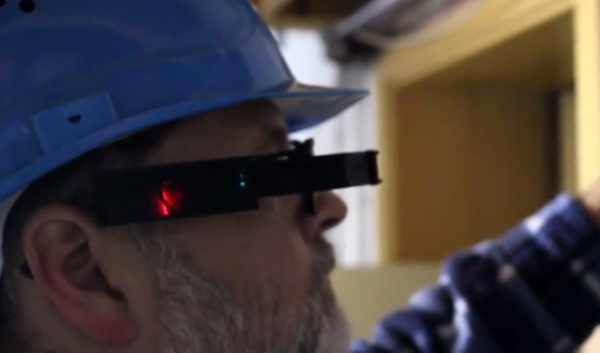
[Alain Mauer]’s entry into the Hackaday Prize looks to solve this glaring problem. Using a heads-up Bluetooth display mounted to a pair of safety glasses, a multimeter can be connected to the device in order to display its information directly to its user. Based on his original idea which used a normal pair of prescription glasses as its foundation, [Alain]’s goal is to reduce safety hazards that might arise when using a multimeter in an awkward or dangerous manner that might not otherwise be possible.

The device uses an Arduino Pro Micro to connect to the multimeter and drive the display. [Alain] notes that the real challenge is with the optical system, however. Either way though, this would be a welcome addition to any lab, workspace, or electrician’s toolbox. Be sure to check out the video of it in action after the break.

Continue reading “Hackaday Prize Entry: Safety Glasses Are Also Hands-Free Multimeter”