Writing An Optimizing Tensor Compiler From Scratch

Not everyone will write their own optimizing compiler from scratch, but those who do sometimes roll into it during the course of ever-growing project scope creep. People like [Michael Moroz], who wrote up a long and detailed article on the why and how. Specifically, a ‘small library’ involving a few matrix operations for a Unity-based project turned into a static optimizing tensor compiler, called TensorFrost, with a Python front-end and a shader-like syntax, all of which is available on GitHub.

The Python-based front-end implements low-level NumPy-like operations, with development still ongoing. As for why Yet Another Tensor Library had be developed, the reasons were that most of existing libraries are heavily focused on machine learning tasks and scale poorly otherwise, dynamic control flow is hard to implement, and the requirement of writing custom kernels in e.g. CUDA.

Above all [Michael] wanted to use a high-level language instead of pure shader code, and have something that can output graphical data in real-time. Taking the gamble, and leaning on LLVM for some parts, there is now a functional implementation, albeit with still a lot of work ahead.


Ordering Pizza On Your Sega Dreamcast Is Very Clunky Indeed

If you’re ordering pizza these days, you’re probably using a smartphone app or perhaps still making a regular old phone call. If you’re creative and a little bit tricky, though, you can order pizza right from your Sega Dreamcast. You just need to jump through a few hoops, as demonstrated by [Delux] and [The Dreamcast Junkyard] in the recent past.

You used to be able to order pizza on the Dreamcast natively, all the way back in 1999. However, the modern Domino’s website doesn’t really work on the ancient Dreamcast browser anymore. The simple fact is that web technology has advanced a long way in the last couple of decades, and Sega didn’t exactly spend a lot of time maintaining a browser on a console that died mere months after its rivals hit the market.

Thus, to place a pizza order on the Dreamcast these days, you need to work within its limitations. [Delux] uses the Dreamcast with the Broadband Adapter to access a PC on the local network via the XDP web browser. That PC is hosting Web Rendering Proxy, a tool which converts complicated modern websites into something a simpler machine can parse. From there, it’s a matter of connecting to the Domino’s website, and slowly clicking through the online ordering pages. Between the proxy delay, the Dreamcast’s glacial processing speed, and the clunky Domino’s ordering interface, it takes ages. Never before has adding coupons felt like such a hassle. Still, after 15 minutes of fuss, the order is completed… and a short time later, a hot fresh pizza arrives.

It’s a fun hack, but really it’s the PC running the proxy that’s doing the heavy lifting. In 2026, it’s far more elegant to order a pizza from your Nintendo Wii.

Continue reading “Ordering Pizza On Your Sega Dreamcast Is Very Clunky Indeed”

Hackaday Podcast Episode 355: Person Detectors, Walkie Talkies, Open Smartphones, And A WiFi Traffic Light

Another chilly evening in Western Europe, as Elliot Williams is joined this week by Jenny List to chew the fat over the week’s hacks.

It’s been an auspicious week for anniversaries, with the hundredth since the first demonstration of a working television system in a room above a London coffee shop. John Logie Baird’s mechanically-scanned TV may have ultimately been a dead-end superseded by the all-electronic systems we all know, but the importance of television for the later half of the 20th century and further is beyond question.

The standout hacks of the week include a very clever use of the ESP32’s WiFi API to detect people moving through a WiFi field, a promising open-source smartphone, another ESP32 project in a comms system for cyclists, more cycling on tensegrity spokes, a clever way to smooth plaster casts, and a light sculpture reflecting Wi-Fi traffic. Then there are a slew of hacks including 3D printed PCBs and gem-cut dichroic prisms, before we move to the can’t-miss articles. There we’re looking at document preservation, and a wallow in internet history with a look at the Netscape brand.

As usual all the links you need can be found below, so listen, and enjoy!

Or download the podcast old-school, with a direct link to the MP3 file in question.

Continue reading “Hackaday Podcast Episode 355: Person Detectors, Walkie Talkies, Open Smartphones, And A WiFi Traffic Light”

Whipping Up A Quick Adapter To Hack The Xbox 360

[Androxilogin] had a problem. An Xbox 360 Slim had shown up in the post, but failed to give much more than a beep when turned on. Disassembly revealed some missing components, but replacing them failed to breathe life into the beleaguered console. Deeper repair was needed, and that would require a special adapter which [Androxilogin] was able to whip up from scratch.

When it comes to the Corona models of the Xbox 360, it’s often necessary to use something called a “post-fix adapter” to do certain diagnostic and repair tasks. These adapters consist of a bracket which wraps around the CPU, and probes the solder ball for the POST_OUT signal which is otherwise difficult to access on the motherboard itself. Adapters are readily available online, and are usually manufactured as a PCB with a protruding contact to make a connection.

For [Androxilogin], though, time was short. Rather than wait for adapters to ship, it was quicker to whip up a custom piece to do the same job. This was achieved with a 3D print which was able to clamp around the CPU, while snugly holding a piece of tinned 30 AWG wire to poke the critical point beneath the chip. After a couple of attempts to get the sizing just right, [Androxilogin] was able to make the necessary connection which enabled installing Xell Loader on to the machine to bring it back to life.

If you’re eager to make your own post-fix adapter, files are available on Printables, with more details over on Reddit to boot. While the Xbox 360 is starting to suffer some awkward symptoms of age. we nevertheless still see a steady stream of hacks come in for this vintage machine. If you’re tackling your own retro console mods, be sure to notify the tipsline.

Comprehensive Power Management For The Raspberry Pi

The Raspberry Pi has been a revolutionary computer in the maker space, providing a full Linux environment, GUI, and tons of GPIO and other interfacing protocols at a considerably low price. This wasn’t its original intended goal, though. Back in the early 2010s it was supposed to be an educational tool for students first, not necessarily a go-to for every electronics project imaginable. As such there are a few issues with the platform when being used this way, and [Vin] addresses his problems with its power management in his latest project.

[Vin]’s main issue is that, unlike a microcontroller, the Raspberry Pi doesn’t have a deep sleep function. That means that even when the operating system is shut down the computer is still drawing an appreciable amount of current, which will quickly drain some batteries. We’ve covered [Vin]’s farm and his use case for the Raspberry Pi in the past, but a quick summary is that these boards are being used in a very rugged environment where utility power isn’t as reliable as he would like.

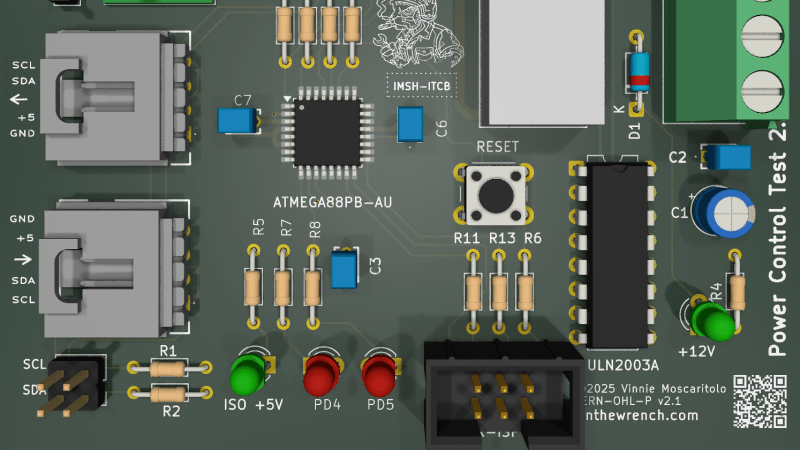
In [Vin]’s post he not only outlines his design for the board but goes through his design process, starting by using discrete logic components and then trying out various microcontrollers until settling on an ATmega88. The microcontroller communicates with the Raspberry Pi over I2C where the Pi can request a power-down as well as a time for future power-on. A latching relay controlled by the microcontroller ensures the Pi doesn’t drain any battery while the ATmega can put itself into actual sleep in the meantime.

The build for this project goes into an impressive amount of detail, and not only are the designs and code available on the project’s GitHub page but [Vin] also wrote another blog post which uses this project to go over his design philosophy more broadly.

Lazarustorm Lets A PiStorm Live Outside Your Old Amiga

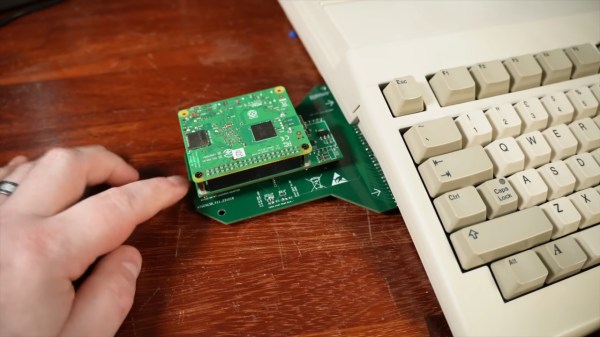
The PiStorm is nothing new; if you’re familiar with the retrocomputer scene, you’ve probably heard of it. By replacing the 68k processor in an old Amiga (or some models of Atari) the PiStorm accelerator gives a multiple order of magnitude speedup. It’s even a reversable mod, plugging in where the original CPU was. What’s not to love? Well, some people would simply prefer to keep their original CPUs in place. [TME Retro] has a video highlighting the solution for those people: the Lazarustorm by [arananet].

It makes perfect sense to us– back in the day, you could plug a whole x86 PC-compatible ‘sidecar’ into your Amiga, so why not a PiStorm? The whole bus is right there for the taking.The Lazarusstorm, as a project, is bog simple compared to the PiStorm itself. A PCB and the connectors to get it plugged into the expansion port on the Amiga side, and the connectors to plug the PiStorm into it on the other. A couple of jumpers and a few passives, and that’s it. [TME Retro] also took the time to come up with a case for it, which sits on felt feet to relieve stress on the PCBs. It’s a nice bit of CAD, but we rather wish he’d done it in beige.

As for the upgraded Amiga, it runs just as fast as it would had the 68k been replaced with a Pi3 and PiStorm internally, which is to say it’s practically a supercomputer by 1980s standards. You get the SD card to serve as a hard drive and can even access the internet via modern WiFi, something Commodore engineers likely never expected an A500 to do. Of course, just connecting to the network is only half the battle when getting these retro machines online. When these accelerators were new, the 68k emulation ran on top of Linux, but now that the EMU68k project has it bare metal and even faster.

This isn’t the first Raspberry-flavoured slice of Amiga sidecar we’ve featured: here’s one running Spotify. If you haven’t got an Amiga, there’s a PiStorm for the FPGA-based MiniMig, too. Continue reading “Lazarustorm Lets A PiStorm Live Outside Your Old Amiga”

A man cutting wood with a circular bench saw

Ultimate Picture Frame Combines Walnut And 3D Printing

[Make Something] boasts he has made probably the fanciest picture frame you’ll ever see. He started with an original sign purchased on eBay and then made it to be bigger, brighter, and better. The frame is of solid walnut with back-lighting for the imagery all chasing that classic mid-century modern style. The backlit photo was taken the “hard way”, with an actual film camera and a road-trip to the picturesque site at Yellowstone. [Make Something] then developed the film himself in his home studio.

For the chimney [Make Something] used a new trick he learned in Autodesk Fusion: you take a photo of an object, convert to black and white, and then use the light/dark values to emboss or deboss a surface. To do this he took photos of the brick wall outside his shop and used that as the basis of the textured chimney he made with his 3D printer.

If you’re interested in other projects made from solid walnut, check out 3D Printed Spirograph Makes Art Out Of Walnut and Walnut Case Sets This Custom Arduino-Powered RPN Calculator Apart From The Crowd.

Continue reading “Ultimate Picture Frame Combines Walnut And 3D Printing”