Learning Morse Code The Ludwig Koch Way

Most countries have dropped the requirement for learning Morse code to become a ham radio operator. Because of that, you might think Morse code is dead. But it isn’t. Some people like the nostalgia. Some like that you can build simple equipment to send and receive Morse code. Others like that Morse code is much more reliable than voice and some older digital modes. Regardless of the reason, many people want to learn Morse code and it is still a part of the ham radio scene. The code has a reputation of being hard to learn, but it turns out that is mostly because people haven’t been taught code in smart ways.
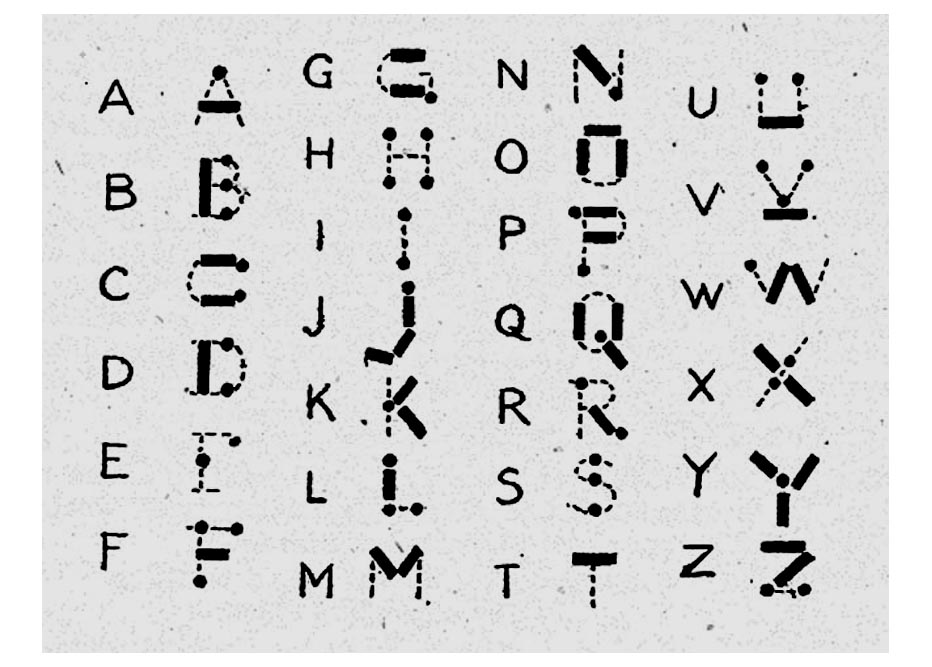
I don’t know if they still do, but some youth organizations used to promote some particularly bad ways to learn the code. The second worse way is to learn “dots and dashes” and many people did learn that way. The very worst way was using an image like the adjacent one to try to map the dots and dashes into letter shapes. This chart dates back to at least 1918 when a Girl Guides handbook printed it.

Even if you are a visual learner, this is a bad idea. The problem is, it is nearly impossible to hear sounds at 20 or 30 words per minute and map them to this visual representation. Another visual method is to use a binary tree where left branches are dots and right branches are dashes.

If you only need to master 5 words per minute to get a merit badge, you might get away with this. But for real use, 5 words a minute is very slow. For example, this sentence would take about 3 minutes to send at that speed. Just that one sentence.

So what are the better ways? Let’s take a look.

Continue reading “Learning Morse Code The Ludwig Koch Way”

Hackaday Podcast 055: The Most Cyberpunk Synthesizer, Data In Your Cells, Bubbly In Your Printer, And The Dystopian Peepshow

Hackaday editors Mike Szczys and Elliot Williams discuss the many great hacks of the past week. Just in case you missed the fact that we’re living in the cyberpunk future, you can now pop off your prosthetic hand and jack directly into a synthesizer. The robot headed for Mars has a flying drone in its belly. Now they’re putting foaming agent in filament to make it light and flexible. And did you ever wonder why those pinouts were so jumbled?

Take a look at the links below if you want to follow along, and as always tell us what you think about this episode in the comments!

Take a look at the links below if you want to follow along, and as always, tell us what you think about this episode in the comments!

Direct download (60 MB or so.)

Continue reading “Hackaday Podcast 055: The Most Cyberpunk Synthesizer, Data In Your Cells, Bubbly In Your Printer, And The Dystopian Peepshow”

ATtiny Name Badges Are Hugely Creative

We’re not sure exactly why [Justin Garrison] decided to make these awesome name badges for himself and his coworkers at Disney+ streaming, but it’s fun to imagine them all lighting up a team-building ride down Space Mountain, isn’t it? Whatever the reason, they sure do look good.

Each badge has an ATtiny85 that drives the ten individually-addressable RGB LEDs, and both the wire and the LEDs are powered by the EL power inverter. [Justin] bought the thinnest EL wire he could find, which is conveniently also the brightest and probably the easiest to manipulate.

Nevertheless, we can’t get over how good the names look, and wonder if [Justin] missed his calling as a neon artist. He cleverly stuck wires through the protoboard to help form the letters, and then used superglue to hold them in place. [Justin] has the code up on GitHub and an album full of build pictures if you want to give this a go.

If this has made you want to give EL bending another go, try using a 3D printed frame to help get it into shape.

This Week In Security: DNSSEC Temporarily Lost Their Keys, FIDO, And One Weird Windows Trick

DNSSEC is the system that allows for cryptographically secure DNS. It’s all based on a root cryptographic key, maintained by the Internet Assigned Numbers Authority (IANA). Ever wondered where the root Key Signing Key is stored, and how it’s accessed? Four times a year, a ceremony is held where the root key is pulled out of a physical safe, and maintenance tasks are performed in front of a group of witnesses.

Such an event was scheduled for February 12th, but a teensy problem was discovered. One of the safes that holds the key media had a broken lock, and the root key signing key was inaccessible for a few days while repairs were effected. The open nature of IANA means that much of their operations are publicly reported, and you can even watch the key signing ceremony, which was finally held on February 16th.

Continue reading “This Week In Security: DNSSEC Temporarily Lost Their Keys, FIDO, And One Weird Windows Trick”

Relive The Glory Days Of Cable TV With This Retro Weather Feed

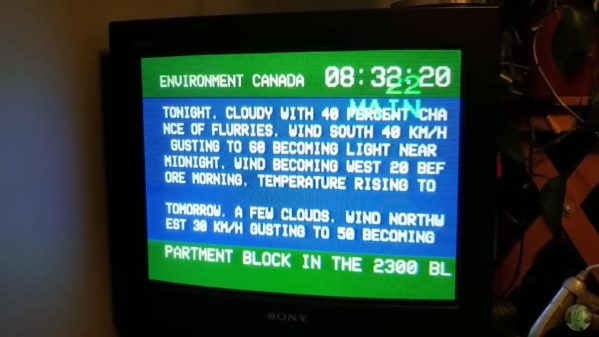
This may surprise younger readers, but there was once a time when the reality programming on The Weather Channel was simply, you know, weather. It used to be no more than a ten-minute wait to “Local on the Eights”, with simple text crawls of local conditions and forecasts that looked like they were taken straight from the National Weather Service feed. Those were the days, and sadly they seem to be gone forever.

Or perhaps not, if this retro weather channel feed has anything to say about it. It’s the product of [probnot] and consists of a simple Python program that runs on a Raspberry Pi. Being from Winnipeg, [probnot] is tapping into Environment Canada for local weather data, but it should be easy enough to modify to use your local weather provider’s API. The screen is full of retro goodness, from the simple color scheme to the blocky white text; the digital clock and local news crawl at the bottom complete the old school experience. It doesn’t appear that the code supports the period-correct smooth jazz saxophone, but that too should be a simple modification.

All jibing aside, this would be a welcome addition to the morning routine. And for the full retro ride, why not consider putting it in an old TV case?

Continue reading “Relive The Glory Days Of Cable TV With This Retro Weather Feed”

Bluetooth Intervalometer Makes Time Lapses Easy

Taking timelapses is a fun pastime of many a photographer. While most modern cameras have some features to pull this off, if you want to get really into it, you’ll want an intervalometer to run the show. Chasing just that, [Zach] decided that rather than buying off-the-shelf, a DIY build was in order.

The build relies on an Arduino Nano to run the show, in combination with the popular HC-05 Bluetooth module. The Bluetooth module allows the device to communicate with a smartphone app which [Zach] created using RoboRemo. This is a platform that makes creating custom USB, WiFI and Bluetooth apps easy for beginners. The app sends instructions to the intervalometer regarding the number of photos to take, and the time to wait between each shot. Then, it triggers the time lapse, and the Arduino triggers the camera by shorting the relevant pins on a TRS plug inserted into the camera.

It’s a straightforward build that most hackers could probably complete with parts from the junk box. Plus, building your own offers the possibility of customising it exactly to your needs. Of course, you can eschew modernity and do things mechanically instead. Video after the break.

Continue reading “Bluetooth Intervalometer Makes Time Lapses Easy”

Irrigation Controller Uses Google Calendar To Make Things Easy

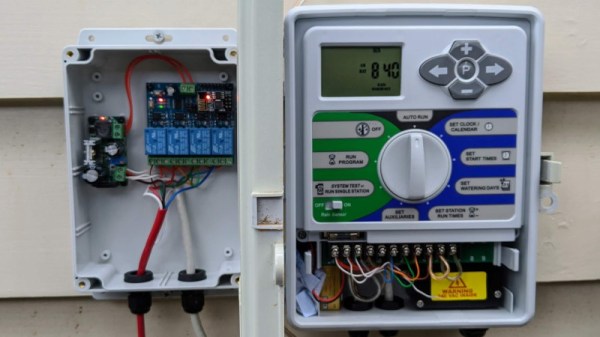
Irrigation controllers have been around for a long time, often using similar hardware inside that would be familiar to the average maker. However, many of the products on the shelf at your local hardware store can be quite expensive for what amounts to a microcontroller, display, and relay board. [oscillatory] had such a rig, but wanted to bring it into the 21st century, IOT style.

The existing Holman irrigation system consisted of a control box, hooked up to four solenoid valves controlled by relays. [oscillatory] decided that replacing this with something fancier would thus be straightforward. A relay board packing an ESP8266 was sourced, and flashed with the Tasmota firmware. This was then hooked up to run off the Holman’s 24 VAC supply via a CCTV power supply, allowing the new controller to be run in parallel with the existing hardware, just in case. Scheduling is then controlled by Google Calendar, in concert with Home Assistant.

[oscillatory] now has a watering system that can be controlled over the web, and without the need to install any custom apps. Simply creating a calendar entry is enough for the system to spring into action. We’ve seen others use a similar approach, too.  It’s a great example of using off-the-shelf parts to whip up a useful custom home automation setup!