Back To Video Basics With An ESP32 VGA Display

In a world where standards come and go with alarming speed, there’s something comforting about VGA. It’s the least common denominator of video standards, and seeing that chunky DB15 connector on the back of a computer means that no matter what, you’ll be able to get something from it, if you can just find a VGA cable in your junk bin.

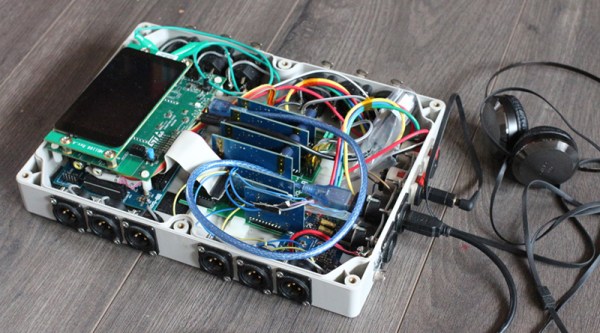
But that’s the PC world; what about microcontrollers? Can you coax VGA video from them? Yes, you can, with an ESP32, a handful of resistors, and a little bit of clever programming. At least that’s what [bitluni] has managed to do in his continuing quest to push the ESP32 to output all the signals. For this project, [bitluni] needed to generate three separate signals – red, green, and blue – but with only two DACs on board, he had to try something else. He built external DACs the old way using R/2R voltage divider networks and addressed them with the I2S bus in LCD mode. He needed to make some compromises to fit the three color signals and the horizontal and vertical sync pulses into the 24 available bits, and there were a few false starts, but the video below shows that he was able to produce a 320×240 signal, and eventually goosed that up to a non-native 460×480.

It’s a pretty impressive hack, and we learned a lot about both the ESP32 and the VGA standard by watching the video. He’s previously used the ESP32 to build an AM radio station and to output composite PAL video, and even turned his oscilloscope into a vector display with it. They’re all great learning projects too.

Continue reading “Back To Video Basics With An ESP32 VGA Display”

Yell At Your Desk To Get Up In The Morning

Standing desks are great conversation starters in the office – whether you like it or not. How do you know someone’s got a standing desk? Don’t worry, they’ll tell you. Standing desks have their benefits, but for maximum flexibility, many people choose a desk that can raise and lower depending on their needs. [Wassim] had just such a desk, but found pushing the buttons too 20th century for his tastes. Naturally, Google Assistant integration was the key here.

[Wassim] started out intending to capture and then spoof the desk controller’s signals to the motors, before realising it was likely easier to simply spoof button presses instead. This was achieved through a handful of NPN transistors and an Onion Omega2+ microcontroller board. Then it was a simple case of coding the controller to press the various buttons in response to HTTP requests received over WiFi. Google Assistant integration was then handled with IFTTT, though [Wassim] also discusses the possibility of implementing the full Smart Home API.

It’s entertaining to watch [Wassim] issue commands and have the desk slowly rise in response. Of course, there are other approaches, like this sneaky use of PVC to hack the office furniture.

https://medium.com/@wassimchegham/hey-google-set-my-desk-to-standing-mode-b21dcc40d4b5

Well-Loved Toy Turned Into Robotic Glockenspiel

If there’s a happier word ever imported into the English language than “Glockenspiel”, we’re not sure what it is. And controlling said instrument with a bunch of servos and an Arduino makes us just as happy.

When [Leon van den Beukel] found a toy glockenspiel in a thrift store, he knew what had to be done – Arduinofy it. His first attempt was a single hammer on a pair of gimballed servos, which worked except for the poor sound quality coming from the well-loved toy. The fact that only one note at a time was possible was probably the inspiration for version two, which saw the tone bars removed from the original base, cleaned of their somewhat garish paint, and affixed to a new soundboard. The improved instrument was then outfitted with eight servos, one for each note, each with a 3D-printed arm and wooden mallet. An Arduino runs the servos, and an Android app controls the instrument via Bluetooth, because who doesn’t want to control an electronic glockenspiel with a smartphone app? The video below shows that it works pretty well, even if a few notes need some adjustment. And we don’t even find the servo noise that distracting.

True, we’ve featured somewhat more accomplished robotic glockenspielists before, but this build’s simplicity has a charm of its own.

Continue reading “Well-Loved Toy Turned Into Robotic Glockenspiel”

Tesla Eyes Ultracapacitor Future With Maxwell Acquisition

As reported by Bloomberg, Tesla has acquired the innovative energy storage company Maxwell Technologies for $218 Million. The move is a direct departure from Tesla’s current energy storage requirements; instead of relying on lithium battery technology, this acquisition could signal a change to capacitor technology.

The key selling point of capacitors, either of the super- or ultra- variety, is the much shorter charge and discharge rates. Where a supercapacitor can be used to weld metal by simply shorting the terminals (don’t do that, by the way), battery technology hasn’t yet caught up. You can only charge batteries at a specific rate, and you can only discharge them at a specific rate. The acquisition of an ultracapacitor manufacturer opens the possibility of these powerhouses finding their way into electric vehicles.

While there is a single problem with super- and ultra-capacitors — the sheer volume and the fact that a module of ultracaps will hold much less energy than a module of batteries of the same size — the best guess is that Tesla won’t be replacing all their batteries with caps in the short-term. Analysts think that future Teslas may feature a ‘co-battery’ of sorts, allowing for fast charging and discharging through a series of ultracapacitors, with the main energy storage in the car still being the lithium battery modules. This will be especially useful for regenerative braking, as slowing down a three thousand pound vehicle produces a lot of energy, and Tesla’s current battery technology can’t soak all of it up.

How One Company Cracked The GameCube Disc Protection

The Nintendo GameCube was the first console from Big N with disc-based media. Gone were the cartridges that were absurdly expensive to manufacture. In theory games could be cheaper (yeah, right), and would hold more textures, pictures, and video. Around the time the GameCube hit shelves, your basic home computer started getting DVD burners, and you could walk into Circuit City and buy those tiny little DVD-Rs. But you couldn’t do it. You couldn’t burn GameCube games, at least without advanced soldering skills.

One company did. Datel, a British company that produced the Action Replay, the ‘Game Genie of the GameCube’ figured out how to get around the GameCube’s disc protection. Not only that, but in a decade and a half since the Action Replay came to market, no one has managed to copy their methods. In a fascinating video, [Nathan] takes us around the disc to see how this disc protection scheme actually worked, and how to exploit it to load homebrew games from an SD card.

The Nintendo GameCube disc format is almost, but not quite, the same as a DVD format. On (nearly) every DVD, and almost every GameCube disc, there’s a ‘barcode’ of sorts on the inside of the optical tracks. This burst cutting area (BCA) is unique to every copy that comes off a single master. Additionally, this BCA can only be cut with a YAG laser that’s significantly more powerful than the laser diode in a DVD writer.

But the Action Replay disc from Datel didn’t have this BCA. Why not? The BCA effectively writes over the pits and lands in the first blocks of data in a DVD. Since the BCA is written over data that is already there, you can just encode whatever data the BCA should hold into the raw data of the pits and lands. It’s a brilliant technique that allows consumer equipment to create the Action Replay disc. But surprisingly, this technique wasn’t popularized with the GameCube homebrew scene.

Not that it really mattered, anyway; modchips existed, and with the SD to Memory Card adapter you could run homebrew works without having to burn a disc. That’s exactly what [Nathan] did with his GameCube setup, you can check out the video below.

Continue reading “How One Company Cracked The GameCube Disc Protection”

Arduboy Brings New Life To Dreamcast VMU

The Dreamcast VMU was a curious piece of hardware. Part memory card, part low-end LCD gaming toy, its fate was sealed once SEGA abandoned the console platform on January 31, 2001. With a limited market penetration and no major killer app, the VMU is a largely forgotten piece of ephemera from a past era. All the more reason to refit one with an Arduboy, instead.

[sjm4306] has taken the Arduboy and repurposed it into a VMU-friendly form factor. The PCB is designed to fit snug inside the plastic case, with conductive traces for the original rubber membrane buttons already in place on the main board. There are some minor fit and finish issues with the first prototype – problems with drill sizes, and connectors that don’t quite fit flush with the housing. Mistakes like these are familiar to any maker who has built a custom PCB or two in their time, and [sjm4306] is confident the bugs will be worked out in the second revision.

It’s a fun project that brings some fun gaming action to an otherwise forgotten platform. If an Arduboy isn’t enough, you could always try to fit a Pi Zero instead. And if you don’t have a VMU, you can always emulate one. Video after the break.

Continue reading “Arduboy Brings New Life To Dreamcast VMU”

ESP8266 And Alexa Team Up To Tend Bar

After a hard day of soldering and posting memes online, sometimes you just want to yell at the blinking hockey puck in the corner and have it pour you out a perfectly measured shot of your favorite libation. It might not be the multi-purpose robot servant we were all hoping to have by the 21st century, but [Jake Lee] figures it’s about as close as we’re likely to get for under fifty bucks or so (Jake’s security certificate seems to have expired a few days ago so your browser may warn you, here’s an archived version).

From the hardware to the software, his Alexa-enabled drink pouring machine is an exercise in minimalism. Not that there’s anything wrong with that, of course. The easiest solutions are sometimes the best ones, and we think the choices [Jake] made here strike a perfect balance between keeping things simple and getting the job done. It’s by no means the most complete or capable robotic bartender we’ve ever seen, but it’s perhaps the one most likely to be duplicated by others looking to get in on the voice-controlled drinking game.

So how does it work? For one, [Jake] didn’t go through the trouble of creating a “proper” Alexa skill, that’s quite a bit of work just to pour a shot of rum. Instead, he took the easy way out and used the FauxMo library on his ESP8266 to emulate a few WeMo smart switches. Alexa (and pretty much every other home automation product) has native support for turning these on and off, so with the proper code you can leverage it as an easy way to toggle the chip’s digital pins.

Using the Alexa’s “Routines” capability, these simple toggles can be chained together and associated with specific phrases to create more complex actions. For example, you could chain the dispensing alcohol, lowering the room lighting, and playing music all to a single voice command. Something like “I give up”, perhaps.

When Alexa tells the drink dispenser to turn on, the ESP8266 fires a relay which starts up a small 12 V air pump. This is connected to the bottle of rum though a glass tube that [Jake] bent with a blow torch, and starts to pressurize it. With the air at the top of the bottle pushing down on it, a second glass tube gives the liquid a way to escape. This method of dispensing liquid is not only easy to implement, but saves you from having to drink something that’s passed through some crusty eBay pump.

If you prefer the “right” way of getting your device talking to Amazon’s popular home surveillance system, our very own [Al Williams] can get you headed in the right direction. On the other hand, if the flowing alcohol is the part of this project that caught your attention, well we’ve got more than a few projects that cover that topic as well.