Reverse Engineer A PSU To Change Its Output Voltage

reverse-engineering-psu

[Semicolo] has a bunch of old PSUs on hand which he pulled out of some Lexmark dot matrix printers. In their stock form they put out 40V, which is close to the 35V max he needs to run the stepper motors on a 3D printer he’s been building. So he reverse engineered the PSU to change its output.

On the left you can see the top of the PCB. [Semicolo] flipped it over and snapped a picture of the traces on the bottom of the board. With a bit of work in The Gimp (FOSS image editing software) he was able to convert the traces to black and white. Overlaying the picture of the top with a 50% transparency of the traces made it rather easy see the connections and generate a schematic for the hardware. That’s a really cool trick!

Figuring out how it’s supposed to work is a big step in achieving his goal. The next step was to see if he could bend the circuit to his will. He had previously run across ATX PSU hacks which changed the reference voltage in order to alter the output. He grabbed a datasheet for the HA17431 variable shunt regulator. It lays out how to tune the output based on values of a few external components. He dropped in one resistor and the output measured 31V, well within his target range.

LED Module Used To Display Load, Traffic, And Status Data For Your PC

cpu-monitoring-block

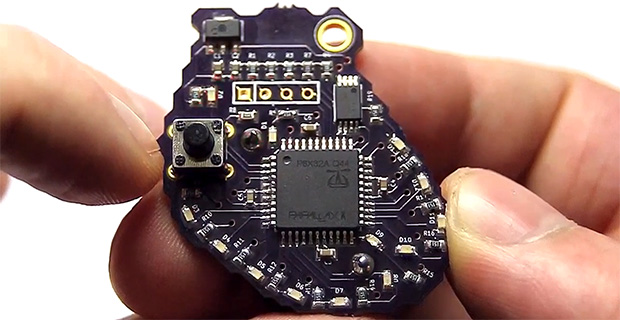
You’re going to like [Ivan’s] write-up for this LED computer status monitor. Of course he didn’t just show-and-tell the final product — if he had you’d be reading this in a Links post. But he also didn’t just detail how he put the thing together. Nope, he shared pictures and details of every iteration that got him here.

It started off with a tachometer. Yeah, that analog display you put on the dashboard of your car which reads out RPM. He wanted to make it into a USB device which would read out his CPU load. But that’s an awful lot of work when it can only display one thing at a time. So he decided to add an 8×8 LED module which would display the load for each individual core of his CPU. It looks great next to the illuminated tachometer. From there he added resolution by transitioning to an RGB module, which ended up sucking him into a coding project to extend the data pushed to his embedded hardware. In the end his ReCoMonB (Real Computer Monitoring Block) displays CPU load, RAM usage, several aspects of HDD activity, as well as the network up and down traffic.

We think he’s probably squeezed all that he can from this little display. Time to upgrade to a TFT LCD.

Continue reading “LED Module Used To Display Load, Traffic, And Status Data For Your PC”

Water Cooled Raspberry Pi

If your Raspberry Pi is running a bit hot you can add a few hunks of salvaged heat sink, or you can go all out and machine your own water cooling system.

Remember when everyone had a giant desktop computer which was a perfect receptacle for cool lighting effects and somewhat ridiculous cooling systems? Relive that experience with [Phame’s] multi-page forum post that serves as the build log. With the exception of the tiny pump itself, this one’s a fully custom job.

The image on the left shows the machined parts being tried on for side. There is a slug which contacts the ICs on the RPi board, conducting the heat to the chambers inside through which the liquid will flow. The upright rectangular enclosure serves as the reservoir which dissipates the collected heat as the water flows through it. The image on the right shows the finished project. It uses the power pins on the GPIO header to drive the pump.

[Thanks PL via Bit-Tech]

Energy Harvesting To Build A Carbon Monoxide Detector With No Battery

no-battery-carbon-monoxide-detector

There are a few devices that work tirelessly to protect our lives. We’re talking about smoke detectors and carbon monoxide detectors. Increasingly these either need to be hardwired into the home, or have a sealed battery which is good for ten years (in the case of smoke detectors). [Gelmi] recently had to change the battery in his Carbon Monoxide detector — which happens very rarely — and he it got him to thinking. If the batteries need to be changed so rarely, how hard would it be to harvest energy to power the device?

Our first thought was that he’d use inductance like those spy birds which perch on power lines. But instead he went for the heat lost from using the hot water spigot. Above you can see his test rig which attached a Peltier device to the faucet in his bathroom. Whenever you turn on the hot water the faucet also heats up. The differential between faucet temperature and ambient room temperature generates a small amount of power. This is a suitable source, but only if he could also cut the amount of power needed by the detector. This adventure takes him down the rabbit hole, learning about how the sensors work and designing for reliability at the lowest consumption level possible.

The faucet application might seem peculiar. But if you use a natural gas water heater you want a carbon monoxide detector near it. Attach the Peltier to the outflow and every time any hot water tap in the house is opened your system will get a bit of a recharge.

Continue reading “Energy Harvesting To Build A Carbon Monoxide Detector With No Battery”

Building An Aquarium Into Your Walls

built-in-aquarium

We looked through the build log for this in-wall aquarium and were a bit horrified by the before pictures. You look at the original basement photo and there’s wood paneling, an incredibly rusty plumbing stack, and good god what is that wire jumble hanging from the ceiling? But the project’s not about building codes, it’s about the infrastructure that supports this fish tank.

This corner of the basement has a window and the electrical panel in it. It needs to be this big in order to enclose that window, but that offered the opportunity to add in the aquarium while still allowing easy access for feeding and cleaning. Hot and cold water pipes were run over to the location for easy filling. There’s even a drain line running to a utility sink in a different part of the basement for easy cleaning.

This seems like a bit of an upgrade when compared to the coffee pot fish bowl.

[via Reddit]

Interviews With The Hand-Makers

Want some inspiration to launch your own Handmade adventure? [Anne Hollowday] wrote in to share a series of short films she’s been posting called Makers of Things.

So far there are just four episodes but we hope she makes many more. Above you can see the latest, entitled Woodworker. It’s a monologue-style interview with masters of their crafts. The first installment looks at an engineering club called SMEE that builds a wide range of intricately engineered things like clocks. There’s another maker who builds miniature models of machines. And of course, The Problem Solver whose high-tech endeavors parallel the subjects of interest found on our main site.

Embedded DMX Controller For Burning Man

embedded-dmx-controller

This is the lighting controller [Paul Stoffregen] built for Burning Man. They wanted to go with DMX controlled lighting this year but that most often includes a computer to run the lighting sequences. This board runs the preprogrammed DMX sequence using a hacked lighting design file.

The choreography for the lighting was planned out using a program called Vixen 2. There is one newer version of the software, but [Paul] needed to translate the output file for use with a microcontroller and version 2 makes this a bit easier than version 3. Speaking of conversion, he didn’t want to start from square one and a bit of searching led to a tutorial which [Bill Porter] posted last year on converting Vixen files for use with Arduino. It wasn’t exactly what he had in mind, but most of the ground work was there.

A few code tweaks bent the script to [Paul’s] will. He changed the XML parsing function to ignore all but the main channels in the file. He also had it output a text file which can be stored on the SD card. Because the output is not being flashed to a chip this greatly increases the storage available paving the way for much longer and more complex shows.

Want to learn more about the protocol used by DMX equipment? Check out this primer.