Y Combinator And Upverter Host Hardware Hackathon

Y Combinator + Upverter Hackathon

Startup accelerator Y Combinator and Upverter are joining forces to run a hardware hackathon. This event aims to encourage hardware hackers to get together and design new products in a twelve hour sprint. Startups including Pebble, Octopart, and Lockitron will also be participating.

It’s a free event, and the winning teams will get their design manufactured. Participants will retain the rights to their designs, get free professional Upverter accounts, and have the chance to chat with some of the Y Combinator partners. This makes it a great opportunity for people looking to create their own hardware startup.

The event takes place on February 23rd at the Y Combinator offices in Mountain View, CA. Registration is open until February 8th. If you’re in the Bay Area and do hardware, you should check this event out.

Siri Controlled Arduino Using Ruby

siri-proxy-ruby-arduino

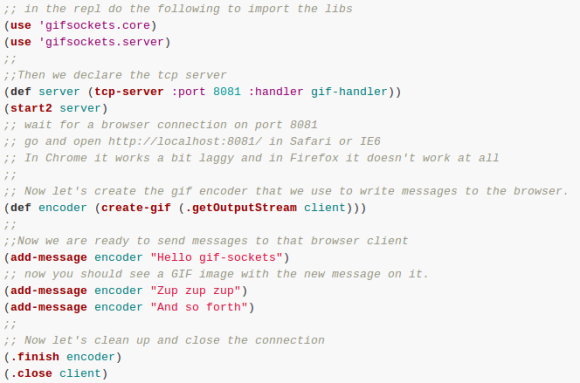
This snippet of Hello World code lets [Nico Ritschel] turn the Pin 13 LED on his Arduino on and off using Siri, the voice-activated helper built into iPhones. The trick here is using the Ruby programming language to get Siri Proxy talking to Arduino via the USB connection. He calls the project siriproxy-arduino.

On one end of the hack resides SiriProxy, a package not approved by Apple which is capable of intercepting the Siri messages headed for Apple’s own servers. The messages are still relayed, but a copy of each is available for [Nico’s] own uses. On the other side of things he’s building on the work of [Austinbv’s] dino gem; a Ruby package that facilitates control of the Arduino. It includes a sketch that is uploaded to the Arduino board, opening up a Ruby API. The collection of code seen above defines the pin with the LED connected and then listens for a specific Siri commands to actuate it.

Take a look at [Nico’s] explanation of the module in the video after the break.

Continue reading “Siri Controlled Arduino Using Ruby”

Reverse Engineering Salvaged Part Footprints

reverse-engineering-component-footprints

So you just pulled a fancy component off of a board from some broken electronics and you want to use it in your own project. What if the data sheet you found for it doesn’t include measurements for the footprint? Sure, you could pull out your digital calipers, but look at the measurements in the image above. How the heck are you supposed to accurately measure that? [Steve] found an easy answer for this problem. He uses microscope software to process an image of the board.

One common task when working with a microscope is measuring the items which are being viewed under magnification. [Steve] harnessed the power of a piece of free software called MiCam. One of its features is the ability to select an area of the photograph so serve as the measuring stick. To get the labels seen in the image above he selected the left and right edges of the board as the legend. He used his digital calipers to get a precise measurement of this area, then let the software automatically calculate the rest of the distances which he selected with his cursor.

MiCam is written for Windows machines. If you know of Linux or OSX alternatives please let us know in the comments.

Tweeting Beer Dispenser Requires Co-worker Approval

tweeting-beer-dispenser

Having been faced with an empty beer fridge one too many times the team at Metalworks came up with an approval system for dispensing malted beverages. The trick was to remove the physical controls on a can dispenser. The only way you can get a cold one is to ask the machine via its twitter account. If there’s beer inside, it waits for one of your approved co-workers to give the go-ahead.

There are two versions of the machine. The first is a hacked refrigerator with a dispenser hole cut in the door. This resides in their Sydney office, apparently doesn’t work all that well, and is only shown in the video after the break.

The image above is version 2.0 which is located at their Singapore branch. It’s a much smaller device, but works very well since it started as a commercially available can dispenser. You can see the Arduino Leonardo and breadboard which make up the driver circuits.

There aren’t a ton of details on this, but it’s not hard to find about a million examples of an Arduino using Twitter. Here’s one that takes Morse code as an input and posts the message as a Tweet.

Continue reading “Tweeting Beer Dispenser Requires Co-worker Approval”

Infra Is A Television Made Of Infrared Pixels

ir-television-using-625-tv-remotes

This television is perfect except for its low resolution and the fact that it can’t be seen by the naked eye. [Chris Shen’s] art installation, Infra, uses 625 television remotes as pixels for a TV screen. There’s a little bit of insight to be gained from the details which [Chris] shared with EMSL.

The remote controls were all throw-aways. Even if there are problems with the buttons, battery connectors, or cases, chances are the IR led in each was still functional. So [Chris] patched into them using about 500 meters of speaker wire.

Why 625 pixel? Because that’s how many LEDs the Peggy board can handle. We’ve seen this open source LED board driving video in other projects. Here it’s been connected to each remote using Molex connectors. Each of the headers has the same pitch as a through-hole 5mm LED. The entire board was filled with them, and a mating crimp connector terminates the end of the wire coming out of each remote. This makes setup quite easy as the remotes don’t have to be installed in any particular order as long as the physical location matches Peggy’s grid.

You can get a glimpse of the piece playing video in the clip after the break.

Continue reading “Infra Is A Television Made Of Infrared Pixels”

12-axis Sensor Adds Auto Screen Orientation To This Older Tablet PC

[Mal’oo] has one of those laptop computers whose screen swivels to turn it into a tablet. But the thing is a few years old and didn’t come with an orientation sensor that changes the screen between landscape and desktop, but also knows which side is up. His solution was to add a 12-axis sensor via the mini PCI express header.

The hardware comes in two pieces. The first is a mini-PCIe card to USB interface. This is handy if you want to add a Bluetooth dongle permanently to your computer. But he’s got other things in mind for it. After hacking the BIOS (which for some reason limits what you can plug into this slot) he moved onto the second part which is a USB 12-axis sensor. This picture shows the wires before they were soldered to the USB card. [Mal’oo] couldn’t just plug it in because the sensor wouldn’t have been oriented correctly in relation to the computer. The final product is quite response, as shown in the clip after the jump. Continue reading “12-axis Sensor Adds Auto Screen Orientation To This Older Tablet PC”

How A Dial-up Modem Handshake Works

If you’re old enough to have used a dial-up modem we’d bet you can do an imitation of the sounds it made while connecting. Those not-so-beautiful sounds heralded the dawning of a technological era. But few actually know what each of those distinct sounds were doing. Now’s your chance to learn. This post explains each step in the dail-up handshake process.

This may be the most useful infographic we’ve ever seen. Normally we just seem them as gimmicks, but [Oona Räisänen] really put together something special with this one. Her blog post includes an audio clip so that you can play back the full handshake sounds. The main box on the graphic shows the audio spectrum from that clip, with an explanation below it. But you’ll also want to read through her full write-up for a more narrative description.

The part we found the most interesting is that these modems needed to disable the echo suppression used by the telephone system in order to operate at full-duplex. Apparently land lines disabled the speaker while you were talking so that you didn’t hear your own voice. This was a problem if the modem was trying to send and receive at the same time.

[via Reddit]