One Console To Rule Them All

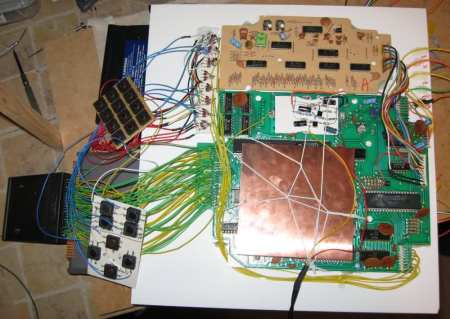
[Bacteria] retro console modder extraordinaire, is back at it with a rather massive project. “Unity”(originally Dubbed Alpha Omega), this will be a single unit that can play games from 20 different console systems. It will run from one power supply, have one video output, and strangely enough, one controller.

[Chris Downing] was nice enough to tip us off to a video of the Unity controller in action.  The controller isn’t quite as bulky as we would have assumed with the extensive list of consoles it has to support, but that could be, in part, due to the fact that you actually swap out the brains for the controller for each system’s compatibility.

Continue reading “One Console To Rule Them All”

Hackaday Links: June 3, 2012

When pigs fly…. close enough.

There are too many jokes to be made about this one. It’s a quadcopter made out of a dead cat. [Bert Jansen], the artist behind this, calls him Orville. He died from natural causes, and what better way to remember a feline friend that liked chasing birds?

Refurbishing an Apple ][

That thirty year old computer in your parent’s attic isn’t going to clean itself, is it? [Todd] put up a series of videos tearing down a 1982 Apple ][ plus, cleaning everything along the way, and doing a very nice demo of AppleSoft BASIC. This is where the revolution started, people.

Ohm sweet Ωhm

Cross stitch isn’t for grandmothers anymore. Adafruit put up a cross stitch tutorial to go along with their resistor color code cross stitch kit. Now down to Hobby Lobby to find black cross stitch cloth and make the ‘ol skull ‘n wrenches.

Welcome! To the world of yesterday!

Boing Boing found an amazing cyberpunk photo spread that appeared in the Mondo 2000 ‘zine back around 1992 or 1993. Even when keeping in mind that this is a self-parody, it’s still incredible. Hackers have laser pointers? And pagers?

Making Arduino projects smaller

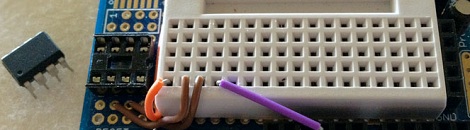
[Scott] caught wind of a way to shrinkify Arduino projects, so he turned an Arduino protoboard into an ATtiny85 programmer. As a neat bonus, [Scott] can use the attached breadboard to build circuits around the ’85.


Copying Complex Objects In Wood

[Matthias], eminent woodworker he is, designed and built an awesome machine to make copies of just about any object imaginable. With a few scrap 2x4s, and a few bolts, screws, and skateboard bearings, you too can copy anything into a solid block of wood.

The theory of operations for [Matthias]’ copy carver is mounting a router and ‘follower’ to the same piece of wood. Put that on an XY table with a rotation axis, and just about any object can be copied in wood or plastic. It’s not too dissimilar to a Dulplicarver, a routing machine meant to copy everything from gun stocks to guitar and violin bodies.

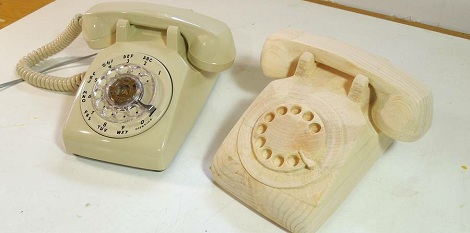
So far, [Matthias] has copied a rotary phone and a sadly non-functional wrench.  It’s the perfect follow-up for [Matthias]’ 3 axis pantograph router that can copy and enlarge any random flat object you can throw at it.

via Make

Piping Micrometer Data To A VGA

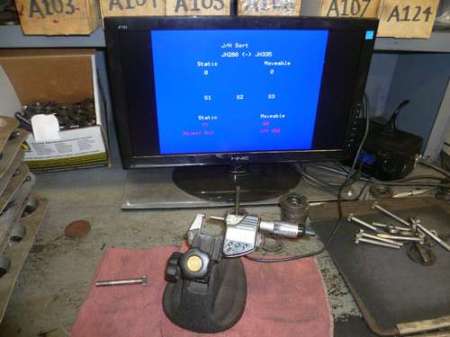
[sspence] found himself in need of a way to push the data from his digital micrometer to a VGA panel for easy display. His micrometer had a data port, so he figured he could plug it into a micro controller and have that push data to a VGA. The micrometer spits out a 52 character data stream in reverse order, so he had to reassemble it in the correct order in software. After a bit of reverse engineering the funky data stream, he had an Arduino pulling the serial data. All that was left was the addition of a VGA shield for output.

He wanted to extend this a bit further though, so he added a foot switch and finger switch to allow for taking multiple measurements and display an average. In the end, he was left with a nice huge display for his micrometer that gave him exactly what he wanted.

We expect that someone will ask why he chose to use an arduino and a shield instead of designing a custom circuit with less components and cost. Our guess would be that his goal was to “generate bin numbers for gear sets” and he just needed an upgraded tool. His goal wasn’t to research design and implement the most efficient circuit. That being said, if anyone feels like designing a smaller package for this, feel free to share with the rest of us!

Building An RGB Mood Lamp Using An IKEA Mylonit

[Toon Beerten] had been experimenting with LED lamp construction. He had already built a pretty neat pyramid of LEDs as a mood lamp but wanted something a little higher quality for his living room. He ran out and picked up an IKEA lamp, which you can see above. From the store, the lamp can only display one color, and has a clear construction. [Toon] wanted RGB and an opaque finish, so he sanded the lamp and built a custom circuit.

He tore out the lamp circuit and replaced it with his own, consisting of a 3W LED, a heatsink, and a PIC 16F628 (and the supporting components). The main circuit actually fits underneath the lamp pretty well. You can download the full schematics and code from his site if you’d like to replicate it.

As you can see in the video, the effect is quite nice.

Continue reading “Building An RGB Mood Lamp Using An IKEA Mylonit”

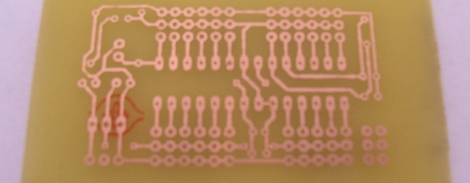
PCB Manufacturing Tutorial

There comes a time in every maker’s career where solderless breadboards won’t do, perfboard becomes annoying, and deadbug is impossible. The solution is to manufacture a PCB, but there’s a learning curve. After learning a few tricks from [Scott]’s awesome DIY PCB guide, it’s easy to make your own printed circuit boards.

There are a few basic steps to making a PCB. First is designing the board in Eagle or KiCad. The next step, putting the design into copper, has a lot of techniques to choose from. Photo transfer, direct printing, and CNC milling have huge benefits, but by far the most common means hobbyists produce boards is with toner transfer using a laminator.

Unless you’re doing SMD-only circuits, a drill is required. Most people can get away with a Dremel or other rotary tool, but Hackaday has a favorite drill press that is perfect for drilling holes in FR-4. In part two of [Scott]’s tutorial, he goes over solder masks, silk screens before jumping into vias. These small bits of copper conducting electricity through a circuit board are extremely hard for the garage-bound builder to achieve on their own, but there are a few solutions – copper rivets (anyone have a US source for these?) and copper foil can be used, but sometimes the most effective solution is just hitting the board with a lot of solder and heat.

Thanks [Upgrayd] for the title pic.

Manga Guide To SMD

For those that have always felt a bit treppidatious when approaching SMD, you can relax. Here’s a simple guide to walk you through your first shaky steps into surface mount devices. Distributed freely under the creative common license, the Manga Guide to SMD is an 18 page comic that has a goal of making SMD producers out of all of us. There’s a good visual explanation of what SMT is and why we use it, as well as a thorough walk through of how to solder the tiny devices with your soldering iron. They don’t go into dealing with a small reflow oven in this issue.

If this fits well with your learning style, you might also be interested in the Manga Guide to Electricity.