Two-Part, Four-Wire Air Quality Meter Shows How It’s Done

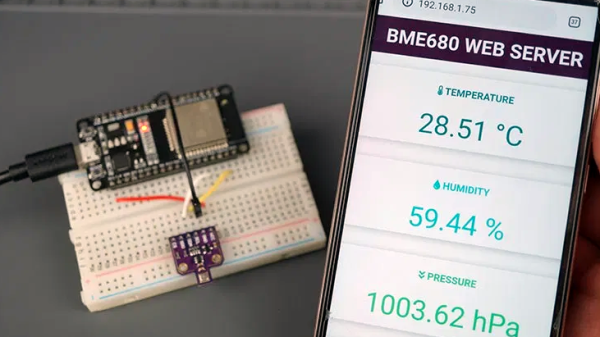
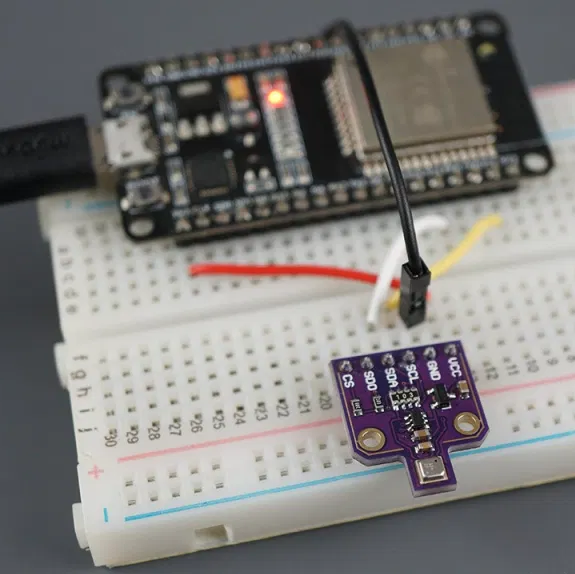
The Bosch BME680 is a super-capable environmental sensor, and [Random Nerd Tutorials] has married it to the ESP32 to create an air quality meter that serves as a great tutorial on not just getting the sensor up and running, but also in setting up a simple (and optional) web server to deliver the readings. It’s a great project that steps through everything from beginning to end, including how to install the necessary libraries and how to program the ESP32, so it’s the perfect weekend project for anyone who wants to learn.

The BME680 is a small part that communicates over SPI or I2C and combines gas, pressure, temperature, and humidity sensors. The gas sensor part detects a wide range of volatile organic compounds (VOCs) and contaminants, including carbon monoxide, which makes it a useful indoor air quality sensor. It provides only a relative measurement (lower resistance corresponds to lower air quality) so for best results it should be calibrated against a known source.
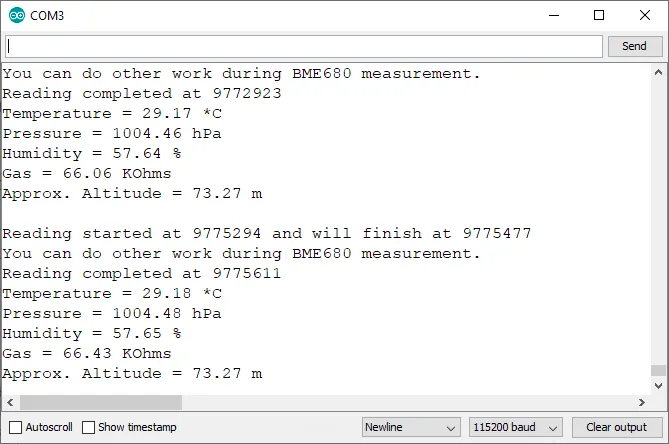
The tutorial uses the Arduino IDE with an add-on to support the ESP32, and libraries from Adafruit. Unfamiliar with such things? The tutorial walks through the installation of both. There’s a good explanation of the source code, and guidance on entering setup values (such as local air pressure, a function of sea level) for best results.

Once the software is on the ESP32, the results can be read from the serial port monitor. By going one step further, the ESP32 can run a small web server (using ESPAsyncWebServer) to serve the data to any device wirelessly. It’s a well-written tutorial that covers every element well, and complements this other BME680-based air quality meter that uses MQTT and Raspberry Pi.

Assistive Gloves Come In Pairs

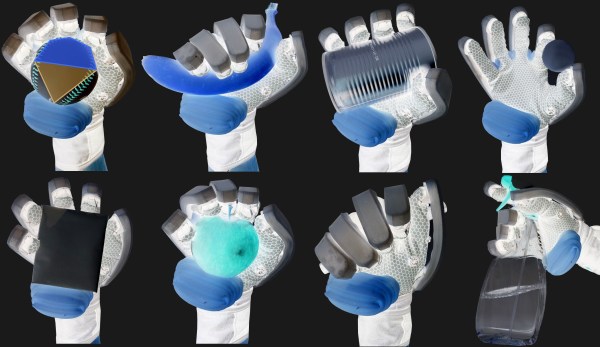
We have to hand it to this team, their entry for the 2020 Hackaday Prize is a classic pincer maneuver. A team from [The University of Auckland] in New Zealand and [New Dexterity] is designing a couple of gloves for both rehabilitation and human augmentation. One style is a human-powered prosthetic for someone who has lost mobility in their hand. The other form uses soft robotics and Bluetooth control to move the thumb, fingers, and an extra thumb (!).

The human-powered exoskeleton places the user’s hand inside a cabled glove. When they are in place, they arch their shoulders and tighten an artificial tendon across their back, which pulls their hand close. To pull the fingers evenly, there is a differential box which ensures pressure goes where it is needed, naturally. Once they’ve gripped firmly, the cables stay locked, and they can relax their shoulders. Another big stretch and the cords relax.

In the soft-robotic model, a glove is covered in inflatable bladders. One set spreads the fingers, a vital physical therapy movement. Another bladder acts as a second thumb for keeping objects centered in the palm. A cable system draws the fingers closed like the previous glove, but to lock them they evacuate air from the bladders, so jamming layers retain their shape, like food in a vacuum bag.

We are excited to see what other handy inventions appear in this year’s Hackaday Prize, like the thumbMouse, or how about more assistive tech that uses hoverboards to help move people?

Continue reading “Assistive Gloves Come In Pairs”

ESP32 Altair Emulator Gets Split Personality

If you wanted me to demo CP/M running on an emulated Altair 8800, I’d pull out a tiny board from my pocket. You might wonder how I wound up with an Altair 8800 that runs CP/M (even WordStar), that fits in your pocket and cost less than $10. Turns out it’s a story that goes back to 1975.

When the Altair 8800 arrived back in 1975, I wanted one. Badly. I’d been reading about computers but had no hands-on experience. But back then, as far as I was concerned, the $400 price tag might as well have been a million bucks. I was working for no real pay in my family’s store, though in all fairness, adjusted into today’s money that was about $2,000.

I’d love to buy one now, but a real Altair costs even more today than it did back then. They also take up a lot of desk space. Sure, there are replicas and I’ve had a few. I even helped work the kinks out of Vince Briel’s clone which I’ve enjoyed. However, the Briel computer has two problems. First, it takes a little work to drive a serial port (it uses a VGA and a PS/2 keyboard). Second, while it’s smaller than a real Altair, it is still pretty large — a byproduct of its beautiful front panel.

So to quickly show off CP/M to someone, you need to haul out a big box and find a VGA monitor and PS/2 keyboard — both of which are becoming vanishing commodities. I made some modifications to get the serial port working, but it is still a lot to cart around. You could go the software route with a simulator like SIMH or Z80pack, but now instead of finding a VGA monitor and a PS/2 keyboard, you need to find a computer where you can install the software. What I really wanted was a simple and portable device that could boot CP/M.

Continue reading “ESP32 Altair Emulator Gets Split Personality”

Airlines Seek Storage For Grounded Fleets Due To COVID-19

Ask any airline executive what their plans were back in January 2020, and you’d probably get the expected spiel about growing market share and improving returns for shareholders. Of course, the coronovirus pandemic quickly changed all that in the space of just a few months. Borders closed, and worldwide air travel ground to a halt.

Suddenly, the world’s airlines had thousands of planes and quite literally nowhere to go. Obviously, leaving the planes just sitting around in the open wouldn’t do them any good. So what exactly is involved in mothballing a modern airliner?

Continue reading “Airlines Seek Storage For Grounded Fleets Due To COVID-19”

The Mask Launcher; Like An Airbag For Your Face

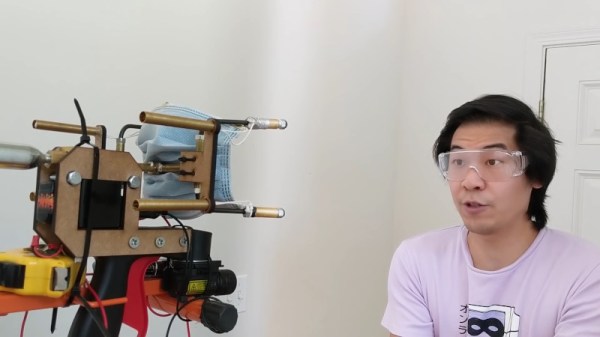
One of the most effective ways to slow the spread of pathogens like the novel coronavirus is to have individuals wear facemasks that cover the nose and mouth. They’re cheap, and highly effective at trapping potentially infectious aerosols that spread disease. Unfortunately, wearing masks has become a contentious issue, with many choosing to go without. [Allen Pan] was frustrated by this, and set out to make a launcher to quite literally shoot masks directly onto faces.

To fire the masks, Allan built a pneumatic system that gets its power from a compact CO2 canister. This is hooked up to a solenoid, which is fired by the trigger. The high-pressure CO2 then goes through a split to four separate barrels cleverly made out of brake line ([Allen] says it’s faster to get parts from the automotive supply than the home store these days). Each barrel fires a bola weight attached to one of the strings of the mask, in much the same way a net launcher works. The mask is then flung towards the face of the target, and the weights wrap around the back of the neck, tangling and ideally sticking together thanks to neodymium magnets.

Amazingly, the mask worked first time, wrapping effectively around a dummy head and covering the nose and mouth. Follow-up shots were less successful, however, but that didn’t deter [Allen] from trying the device on himself at point-blank range. Despite the risk to teeth and flesh, the launcher again fires a successful shot.

While it’s obviously never meant to be used in the real world, the mask launcher was a fun way to experiment with pneumatics and a funny way to start the conversation about effective public health measures. We’ve featured similar projects before, too. Video after the break.

Continue reading “The Mask Launcher; Like An Airbag For Your Face”

Quick 3D-Printed Airfoils With These OpenSCAD Helpers

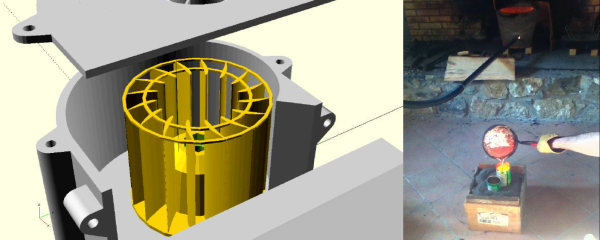
You know how it is. You’re working on a project that needs to move air or water, or move through air or water, but your 3D design chops and/or your aerodynamics knowledge hold you back from doing the right thing? If you use OpenSCAD, you have no excuse for creating unnecessary turbulence: just click on your favorite foil and paste it right in. [Benjamin]’s web-based utility has scraped the fantastic UIUC airfoil database and does the hard work for you.

While he originally wrote the utility to make the blades for a blower for a foundry, he’s also got plans to try out some 3D printed wind turbines, and naturally has a nice collection of turbine airfoils as well.

If your needs aren’t very fancy, and you just want something with less drag, you might also consider [ErroneousBosch]’s very simple airfoil generator, also for OpenSCAD. Making a NACA-profile wing that’s 120 mm wide and 250 mm long is as simple as airfoil_simple_wing([120, 0030], wing_length=250);

If you have more elaborate needs, or want to design the foil yourself, you can always plot out the points, convert it to a DXF and extrude. Indeed, this is what we’d do if we weren’t modelling in OpenSCAD anyway. But who wants to do all that manual labor?

Between open-source simulators, modelling tools, and 3D printable parts, there’s no excuse for sub-par aerodynamics these days. If you’re going to make a wind turbine, do it right! (And sound off on your favorite aerodynamics design tools in the comments. We’re in the market.)

Analyzing Water Quality With A Pair Of Robots

To adequately study a body of water such as a lake, readings and samples need to be taken from an array of depths and locations. Traditionally this is done by a few researchers on a small boat with an assortment of tools that can be lowered to the desired depth, which is naturally a very slow and expensive process. As the demand for ever more granular water quality analysis has grown, various robotic approaches have been suggested to help automate the process.

A group of students from Northeastern University in Boston have been working on Project Albatross, a unique combination of semi-autonomous vehicles that work together to provide nearly instantaneous data from above and below the water’s surface. By utilizing open source software and off-the-shelf components, their system promises to be affordable enough even for citizen scientists conducting their own environmental research.

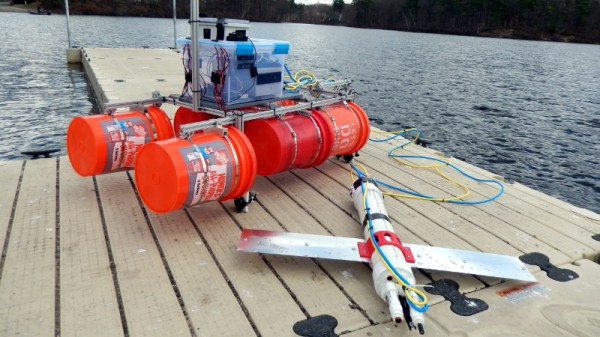
The surface vehicle, assembled from five gallon buckets and aluminum extrusion, uses a Pixhawk autopilot module to control a set of modified bilge pumps acting as thrusters. With ArduPilot, the team is able to command the vehicle to follow pre-planned routes or hold itself in one position as needed. Towed behind this craft is a sensor laden submersible inspired by the Open-Source Underwater Glider (OSUG) that won the 2017 Hackaday Prize.

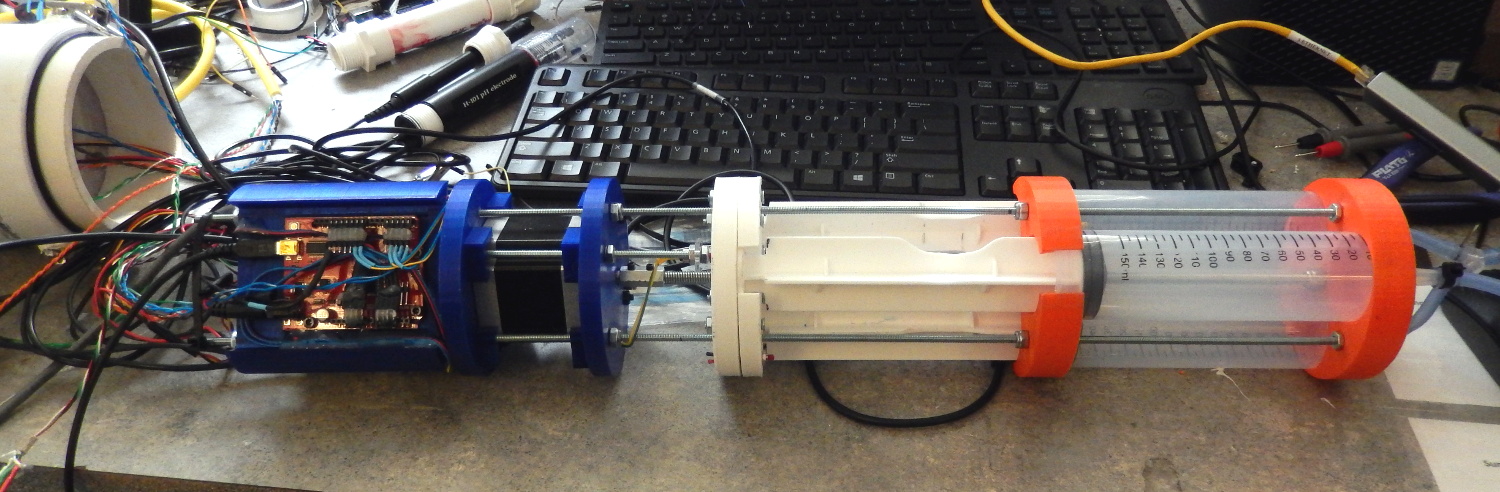
Using an array of syringes operated by a NEMA 23 stepper motor, the glider is able to control its depth in the water by adjusting its buoyancy. The aluminum “wings” on the side of the PVC pipe body prevent the vehicle from rolling will moving through the water. As with the surface vehicle, many of the glider components were sourced from the hardware store to reduce its overall cost to build and maintain.

The tether from the surface vehicle provides power for the submersible, greatly increasing the amount of time it can spend underwater compared to internal batteries. It also allows readings from sensors in the tail of the glider to be transmitted to researchers in real-time rather than having to wait for it to surface. While the team says there’s still work to be done on the PID tuning which will give the glider more finely-grained control over its depth, the results from a recent test run already look very promising.