Mini Quadrocopter Is Crazy Awesome

crazyflie_quadrocopter

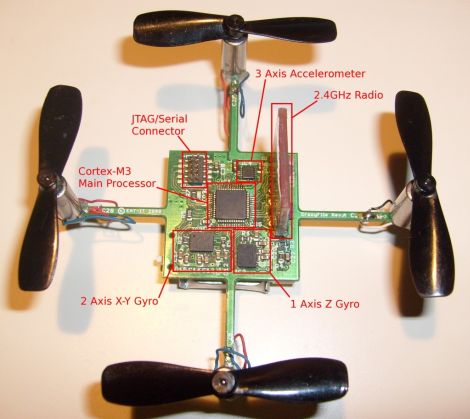
Quadrocopters are all the rage lately, and while we have seen our fair share of large devices, [Arnaud Taffanel, Tobias Antonsson, and Marcus Eliasson] have been dutifully working to buck that trend. Their CrazyFlie is a miniature quadrocopter that uses its PCB as the main structure of the device.

Since the goal was to use a PCB as its frame, the copter’s footprint from the edge of one motor to the other is a modest 8cm, and it weighs in at a measly 20 grams! The entire platform runs on a Cortex-M3 CPU that takes input from an accelerometer and pair of gyroscopes to help keep its balance. Wireless communications are handled via a 2.4Ghz radio transmitter, and the quadrocopter’s power is supplied by a tiny 110 mAh LIPO battery pack scavenged from an R/C plane.

All of the control and telemetry is handled by a PC, which relays control messages it receives from the pilot’s game pad to the CrazyFlie. We’d love to see if they could retain this small footprint if everything was handled by the quadrocopter itself. Either way, this thing rocks – we most definitely want one!

Stick around to see a quick video of their mini quadrocopter in action, and be sure to check out our coverage of U. Penn’s quadrocopter creations if you are interested in seeing more.
Continue reading “Mini Quadrocopter Is Crazy Awesome” →

EEG-assisted Hand Control

ipsihand

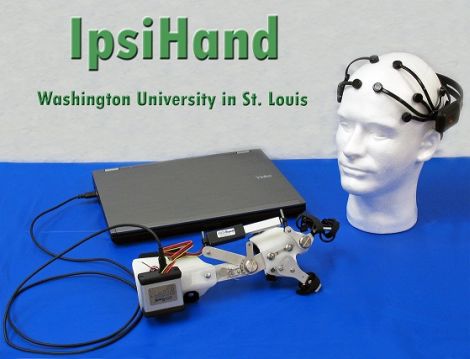
[Sam Fok], an engineering student at the Washington University School of Engineering wrote in to share a project he and his classmates [Raphael Schwartz, Mark Wronkiewicz, Charles Holmes, Jessica Zhang, Nathan Brodell, and Thane Somers] have been working on as their entry in the 2011 RESNA Student Design Competition. Their project, IpsiHand, is designed to help rehabilitate those who have suffered a stroke or other Traumatic Brain Injury (TBI).

Most motor functions in the body are controlled by the opposite hemisphere of the brain, a process called contralateral motor control. When a patient suffers from TBI, they often lose control over some portion of the body opposite the injury. Recent studies have shown however, that while most motor control is contralateral, hand movements also create ipsilateral brain activity. This means that the uninjured side of the brain can effectively control both hands, with a bit of mechanical assistance.

Their process uses an Emotiv Epoch EEG headset, which we have discussed before, to monitor the patients’ brain for activity. The data is sent wirelessly to a computer which processes the data, singling out ipsilateral brain waves. The computer then actuates a modified hand orthosis to control grasping in real time.

We think their work is fantastic, and the team’s creation has a wide array of applications in the field of therapy and assisted living. We wish them luck in their competition, and hope to see this technology put to good use in the future.

Real-time Digital Puppetry

digital_puppet_show

If it sometimes seems that there is only a finite amount of things you can do with your kids, have you ever considered making movies? We don’t mean taking home videos – we’re talking about making actual movies where your kids can orchestrate the action and be the indirect stars of the show.

Maker [Friedrich Kirchner] has been working on an application called MovieSandbox, which is an open-source realtime animation tool. A couple of years in the making, the project is cross-platform compatible on both Windows and Apple computers (with Linux in the works), making it accessible to just about everyone.

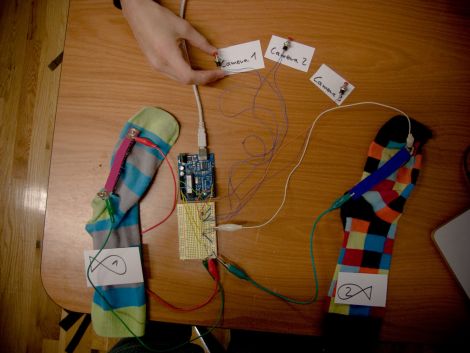
His most recent example of the software’s power is a simple digital puppet show, which is sure to please young and old alike. Using sock puppets fitted with special flex sensors, he is able to control his on-screen cartoon characters by simply moving his puppets’ “mouths”. An Arduino is used to pass the sensor data to his software, while also allowing him to dynamically switch camera angles with a series of buttons.

Obviously something like this requires a bit of configuration in advance, but given a bit of time we imagine it would be pretty easy to set up a digital puppet stage that will keep your kids happily occupied for hours on end.

Continue reading to see a quick video of his sock puppet theater in action.

[via Make]

Continue reading “Real-time Digital Puppetry” →

HDD Unlocking On The Mitsubishi Multi-Communication System

It’s a few years old, but [Brian360’s] method of unlocking the hard drive on his Mitsubishi Multi-Communication System is quite interesting. Mitsubishi describes their MMCS as a human-vehicle communication tool. It’s basically an in-dash screen and controls to display navigation maps and play music. [Brian] found that the hard drive for the MMCS in his 2008 Lancer was locked, and could not be cloned and swapped out for a larger drive. Sound familiar to anyone? Hard drive locking has been used in many systems, including the original Xbox, which we’ll get back to in a minute.

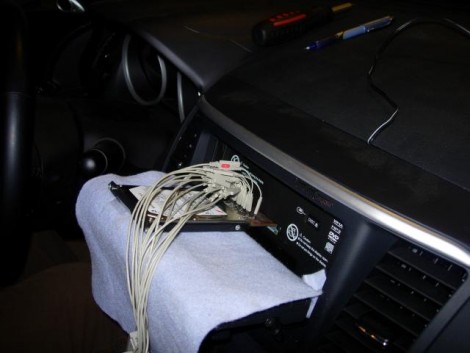
The setup seen above was used to grab the hard drive password from the system itself. A custom adapter card was built and plugged in between the hard drive and the MMCS hardware, with test points for each of the data line. [Brian] attached a digital storage oscilloscope, and after a bit of poking around, found a way to trigger the scope when the password was requested. He explains the process of converting the captured data into an ASCII string password.

With that in hand how would you unlock the drive? The favorite tool for this is hdparm, a tool which was used with early Xbox unlocking but which is still in use with other hardware today. Now brian has a disk image backup and the ability to swap out for larger hardware.

[Thanks Traitorous8]

A Beginner’s Guide To LED Matrices

led_tutorial

[Rajendra Bhatt] wrote in to share a tutorial he put together demonstrating the basics of using LED dot matrix displays. While this subject might be old hat to many out there, his helpful walkthroughs are geared more towards beginners who are exploring various electronics concepts for the first time.

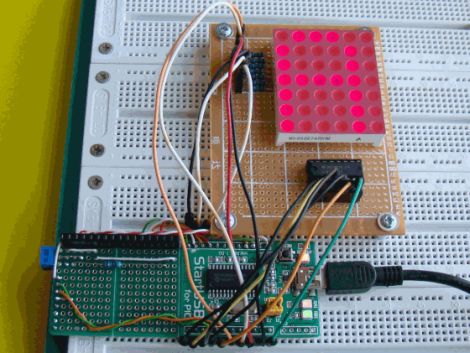
He explains the theory behind LED displays using a PIC-driven 5×7 matrix as an example. He discusses persistence of vision and how tricking the human eye can save you quite a bit of time and a whole lot of pins. Multiplexing is broken down into its most basic steps, which [Rajendra] illustrates by showing how a letter would be drawn on the LED display one column at a time. The use of a ULN2803A Darlington Array is also discussed, and he details why it is used when pulling the five columns of LEDs to ground.

The only portion of the tutorial we thought could be expanded upon was the programming section. While he does show how each letter of the alphabet can be displayed via a series of five hex values, he does not cover the “why” part of the process. Obviously while anyone familiar with binary and hex can figure it out in pretty short order, we think that it would be a great place to pause and expand the readers’ knowledge even more.

Overall it’s a useful tutorial, and most beginners would likely find it quite helpful.

[Phillip Torrone] Pleads For Companies To Open Source Discontinued Projects

[PT] just published an editorial calling on manufactures to transfer knowledge about products they are discontinuing by making them open source. He makes his case on the basis that millions of dollars and innumerable man hours go into developing these products, only to be lost when the company decides that the project is no longer (or maybe never was) profitable. We have to say he’s got a point. Granted the answer to “why not?” is that companies don’t want to give any help to their competitors. But just think of the opportunities lost to society when we can’t build on the work of others.

Now [Phillip] doesn’t stop with his plea for new policies. He goes on to list and defend a few products that are already dead and buried, for which he wishes the secrets had first been shared. These include the Palm V personal data assistant, IBM’s Deep Blue, Sony’s robotic toys/pets, and several others. For what it’s worth, we can think of one company that’s a shining example of this; the source code for Doom, which id Software released for non-profit use more than a decade ago. Good for you id!

ChronoTune: Listen To Radio By Year, Not By Frequency

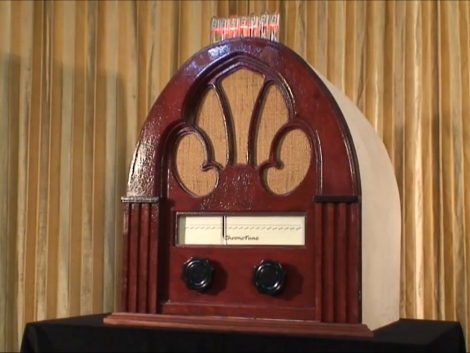
The ChronoTune is a radio that plays sounds from different eras. This project was developed as an entry for the Redbull Creation Challenge by some members of i3Detroit, a hackerspace in the motor city. It allows a user to turn the dial to tune in a new moment in history, but they can also listen in on the present day. They’ll be greeted with the sounds of a tuning radio, followed by music or audio clips common to the period displayed on the dial.

As you know from the last contest entry, each project must use an Arduino to qualify. It reads a rotary encoder attached to one of the knobs on the front of the case. This doesn’t directly move the tuning needle. Instead, it’s attached to the guts of an inkjet printer to move it back and forth. This lets the radio tune itself if need be.

The audio is played from several sources. There is an MP3 module that allows for longer clips, but there are also some ISD voice recorder chip modules that play back shorter clips. If the dial is tuned to present day, an FM radio module tunes in a station over the air.

Having trouble reading that dial? Don’t worry, there’s a simulated Nixie tube display sticking out the top of the case to provide a digital readout of the currently selected time period. Check out the video after the break to see the team walk us through each part of the ChronoTune.

Continue reading “ChronoTune: Listen To Radio By Year, Not By Frequency” →