The Start To Finish Of An Interactive Exhibit

[Andrew & Deborah O’Malley] were tapped to created an interactive exhibit. The mission was to show that social problems take continual support from a lot of people before they can be solved. The piece needed to be architectural in nature, and they ended up building this touch-sensitive model building with individually lighted windows.

The project log that the [O’Malleys] posted shows a well executed battle plan. They used tools we’re all familiar with to achieve a highly polished and pleasing result. The planning stages involved a virtual mock-up using Google SketchUp. The details needed to order the shell from a fabricator were pulled from this early work, while the team set their sights on the electronics that shed light and that make the piece interactive. The former is provided by a Shiftbrite module for each window, the latter comes from the Capacitive Sensing Library for Arduino. Despite some difficulty in tuning the capacitive grid, and getting all of those Shiftbrites to talk to each other, the exhibit went swimmingly. It’s not hard to imagine how easy it is to start a conversation once attendees are attracted by the seductive powers of touch sensitive blinky lights.
A Visual History Of The Computer Mouse

mouse

As we all go about our day to day activities, it’s easy to get lost in technology and take for granted things that have slowly evolved over long periods of time. Take for instance the mouse on your desk. Whether it’s a standard 2-button mouse with a scroll wheel or a magic mouse with no buttons at all, we’re all a bit spoiled when you think about it.

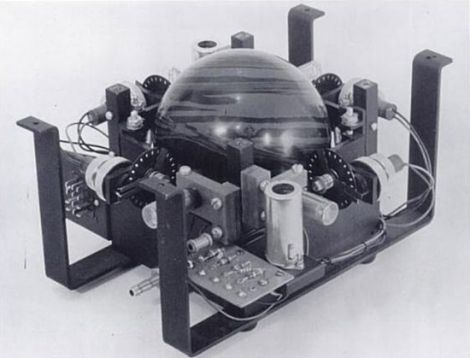
Dvice recently published a visual history of the computer mouse, which is quite interesting. The first pointing device that relied on hand motions to move a cursor was created by the Royal Canadian Navy in 1952. This trackball device, which is predates all other mechanical pointing devices, was crafted using a 5-pin bowling ball and an array of mechanical encoders that tracked the ball’s movement.

As time went on, other mouse-type devices came and went, but it was 30 years ago yesterday that Xerox unveiled the world’s first optical mouse at its PARC facility. The mouse used LEDs and optical sensors along with specialized mouse pads to track the user’s movements. The tech is primitive compared to today’s offerings, but it’s a nice reminder of the humble beginnings something you use every single day.

Be sure to swing by the Dvice site and take a look at how the mouse has evolved over the years – it’s a great way to kill a few minutes.

Wooden Bike Hopes To Set World Record, Not Catch Fire

splinterbike

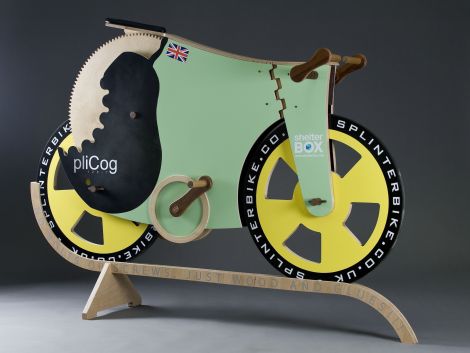
[Michael Thompson] has been hard at work for well over six months building a bicycle made entirely of wood. The project started as a bet between two friends, and has become much more over the last few months. The SplinterBike, as it is being called, has been constructed solely from wooden parts, as well as glue and paint – but not much else.

The bike uses many different woods in its construction, each chosen to fulfill a particular purpose. The axles are made from hardwood ekki, while all of the gears, wheels, and frame parts were constructed from birch plywood. Oiled ironwood was chosen to serve as a replacement for metal bearings wherever moving parts came together due to its durability. Other parts were constructed with random scraps that [Michael] had sitting around in the shop, such as the handlebars which were cut from an old broomstick.

Now that the bike is complete, [Michael] and his friend [James] are gearing up to set a wooden bike land speed world record. It should be doable, as they have calculated that the bike should hit about 31 miles per hour provided [James] can pedal fast enough. A date for the record attempt has yet to be set, but keep an eye out – it’s likely to be an entertaining show.

[via Gizmodo]

Frankenstein’s Lawnmower

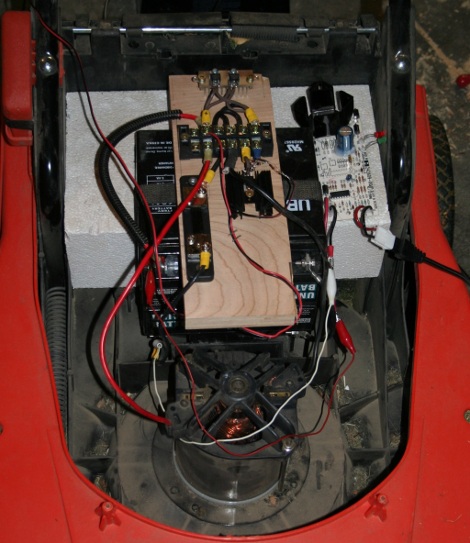
[phantompinecone] has an electric mower that worked great for about 4 seasons, and then the battery started to die. A replacement was installed but it started being a pain after the first season. Since the battery was brand new (and probably costly too) there must be something else.

Checking the brushes, which were fine, the next logical place was the switch.These mowers are just a battery, motor, and switch. Yanking it apart there was indeed a problem, they were chewed up and corroded, not allowing full electrical contact. So [phantompinecone] replaced the simple mechanical switch with a MOSFET.

Electrically there is an IRF1405 MOSFET, some resistors to pull signals around and a couple diodes to A) keep the back emf from the motor in check, and B) drop the voltage going into the fet from 24volts to 12. Problem solved, and the motor should not have anymore trouble caused by a junked up switch.

The Concepts Behind Robotic Maze Solving

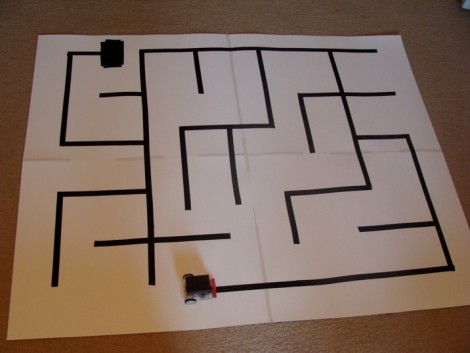
[Patrick McCabe’s] latest offering is a well-built maze-solving bot. This take on the competitive past-time is a little more approachable for your common mortal than the micro-bot speed maze solving we’ve seen. Don’t miss seeing the methodical process play out in the clips below the fold.

The playing field that [Patrick’s] robot is navigating is made up of a electrical-tape track on a white background. The two-inch tall double-decker bot is every economical. It uses an RBBB Arduino board to read an optical reflectance sensor array made by Pololu, then it drives a couple of geared motors using an L293D h-bridge breakout board. But we already know that [Patrick’s] a talented robot builder, this time around we’re happy to see his in-depth discussion of how to program a robot to solve a maze. In it he covers all of the different situations your robot might face and how to deal with them. Once you’ve dug through all of the concepts, dust off that bot you’ve got lying in the corner and start writing some new firmware.

Continue reading “The Concepts Behind Robotic Maze Solving” →

BlinkM Smart Garage Door Opener

garage_indicator

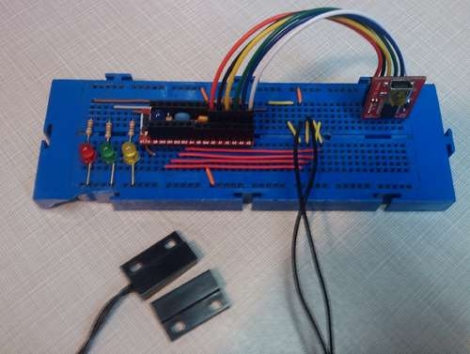
Calling Canada home, Hackaday reader [TheRafMan] has seen his share of bitterly cold winters. He also knows all too well how hard it is to get his cars started in the morning if somebody happens to leave the garage open. After the door was left open overnight for the second time this last winter, he decided that it was time to add an indicator inside the house that would alert him when the garage had not been closed .

Inspired by our BlinkM Arduino coverage a short while back, his circuit incorporates a BlinkM as well as several other components he already had on hand. He disassembled the garage door switch situated in the house and fit the BlinkM into the switch box once he had finished programming it. A set of wires was run to the BlinkM, connecting it to both a power supply located in the garage as well as the magnetic switch he mounted on the door.

The end result is a simple and elegant indicator that leaves plenty of room for expansion. In the near future, he plans on adding an additional indicator strobe to let him know when the mail has arrived, not unlike this system we covered a few months ago.

Stick around to see a quick video demonstration of his garage door indicator in action.

Continue reading “BlinkM Smart Garage Door Opener” →

IDE Bus Sniffing And Hard Drive Password Recovery

hdd_password_recovery

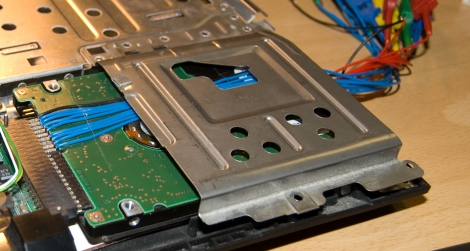
shackspace member [@dop3j0e] found himself in a real bind when trying to recover some data after his ThinkPad’s fingerprint scanner died. You see, he stored his hard drive password in the scanner, and over time completely forgot what it was. Once the scanner stopped working, he had no way to get at his data.

He brainstormed, trying to figure out the best way to recover his data. He considered reverse engineering the BIOS, which was an interesting exercise, but it did not yield any password data. He also thought about swapping the hard drive’s logic board with that of a similar drive, but it turns out that the password is stored on the platters, not the PCB.

With his options quickly running out, he turned to a piece of open-source hardware we’ve covered here in the past, the OpenBench Logic Sniffer. The IDE bus contains 16 data pins, and lucky for [@dop3j0e] the OpenBench has 16 5v pins as well – a perfect match. He wired the sniffer up to the laptop and booted the computer, watching SUMP for the unlock command to be issued. Sure enough he captured the password with ease, after which he unlocked and permanently removed it using hdparm.

Be sure to check out [@dop3j0e’s] presentation on the subject if you are interested in learning more about how the recovery was done.