Origami-Inspired, Self-locking Structures With 3D Printing

Researchers recently shared details on creating foldable, self-locking structures by using multi-material 3D printing. These origami-inspired designs can transition between flat and three-dimensional forms, locking into place without needing external support or fasteners.

The 3D structure of origami-inspired designs comes from mountain and valley fold lines in a flat material. Origami designs classically assume a material of zero thickness. Paper is fine, but as the material gets thicker things get less cooperative. This technique helps avoid such problems.

An example of a load-bearing thick-film structure.

The research focuses on creating so-called “thick-panel origami” that wraps rigid panels in a softer, flexible material like TPU. This creates a soft hinge point between panels that has some compliance and elasticity, shifting the mechanics of the folds away from the panels themselves. These hinge areas can also be biased in different ways, depending on how they are made. For example, putting the material further to one side or the other will mechanically bias that hinge to fold into either a mountain, or a valley.

Thick-panel origami made in this way paves the way towards self-locking structures. The research paper describes several different load-bearing designs made by folding sheets and adding small rigid pieces (which are themselves 3D printed) to act as latches or stoppers. There are plenty of examples, so give them a peek and see if you get any ideas.

We recently saw a breakdown of what does (and doesn’t) stick to what when it comes to 3D printing, which seems worth keeping in mind if one wishes to do some of their own thick-panel experiments. Being able to produce a multi-material object as a single piece highlights the potential for 3D printing to create complex and functional structures that don’t need separate assembly. Especially since printing a flat structure that can transform into a 3D shape is significantly more efficient than printing the finished 3D shape.

Danger-Klipper Fork Renamed To Kalico

Hobbyist 3D printers have traditionally run the open source Marlin and later Klipper firmware, but as some hobbyists push their printers to the limits, more capable and less conservative firmware was needed. This is why the aptly named ‘Danger-Klipper’ fork of the Klipper firmware comes with the motto ‘I should be able to light my printer on fire’. Because the goal of Danger-Klipper wasn’t literally to light printers on fire (barring unfortunate accidents), the project has now been renamed to Kalico by the developers, after the pirate Calico Jack to maintain the nautical theming.

The Kalico project logo.

Not only does the project get a new name, but also a cute new pirate-themed calico cat logo. Beyond these changes not much else is different, though the documentation is obviously now also at a new domain. As a Klipper fork just about any printer that can run Klipper should be able to run Kalico, though the focus is on Raspberry Pi 2, 3 or 4. The FAQ has some more details on what Kalico can run on. Obviously, Kalico makes for a great option if you are building your own customized 3D printer (or similar), and will support the typical web UIs like Fluidd, OctoPrint, etc.

For some of the differences between Klipper and Kalico, the ‘Danger Features’ section of the documentation provides an impression. Suffice it to say that Kalico is not the kind of firmware to hold your hand or provide guiderails, making it an option for advanced users for whom breaking things while pushing boundaries is just part of the hobby.

Thanks to [Vinny] for the tip.

3D Printer Eliminates The Printer Bed

Anyone who has operated a 3D printer before, especially those new to using these specialized tools, has likely had problems with the print bed. The bed might not always be the correct temperature leading to problems with adhesion of the print, it could be uncalibrated or dirty or cause any number of other issues that ultimately lead to a failed print. Most of us work these problems out through trial and error and eventually get settled in, but this novel 3D printer instead removes the bed itself and prints on whatever surface happens to be nearby.

The printer is the product of [Daniel Campos Zamora] at the University of Washington and is called MobiPrint. It uses a fairly standard, commercially available 3D printer head but attaches it to the base of a modified robotic vacuum cleaner. The vacuum cleaner is modified with open-source software that allows it to map its environment without the need for the manufacturer’s cloud services, which in turn lets the 3D printer print on whichever surface the robot finds in its travels. The goal isn’t necessarily to eliminate printer bed problems; a robot with this capability could have many more applications in the realm of accessibility or even, in the future, printing while on the move.

There were a few surprising discoveries along the way which were mentioned in an IEEE Spectrum article, as [Campos Zamora] found while testing various household surfaces that carpet is surprisingly good at adhering to these prints and almost can’t be unstuck from the prints made on it. There are a few other 3D printers out there that we’ve seen that are incredibly mobile, but none that allow interacting with their environment in quite this way.

Continue reading “3D Printer Eliminates The Printer Bed”

Optical illusion gingerbread house from an odd perspective

An Engineer’s Perspective On Baking Gingerbread Houses

If you’ve ever wanted to merge the worlds of holiday cheer and clever geometry, [Kris Wilk]’s gingerbread house hack is your ultimate inspiration. Shared in a mesmerising video, [Wilk] showcases his 2024 entry for his neighborhood’s gingerbread house contest. Designed in FreeCAD and baked to perfection, this is no ordinary holiday treat. His pièce de résistance was a brilliant trompe l’oeil effect, visible only from one carefully calculated angle. Skip to the last twenty seconds of the video to wrap your head around how it actually looks.

[Wilk] used FreeCAD’s hidden true perspective projection function—a rarity in CAD software. This feature allowed him to calculate the perfect forced perspective, essential for crafting the optical illusion. The supporting structures were printed on a Prusa MK4, while the gingerbread itself was baked at home. Precision photography captured the final reveal, adding a professional touch to this homemade masterpiece. [Wilk]’s meticulous process highlights how accessible tools and a sprinkle of curiosity can push creative boundaries.

For those itching to experiment with optical illusions, this bakery battle is only the beginning. Why not build a similar one inside out? Or construct a gingerbread man in the same way? Fire up the oven, bend your mind, and challenge your CAD skills!

Continue reading “An Engineer’s Perspective On Baking Gingerbread Houses”

New Tullomer Filament Claims To Beat PEEK

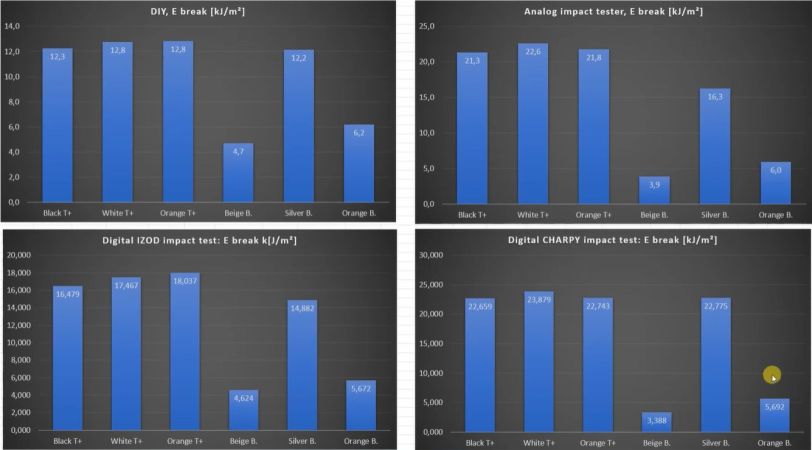
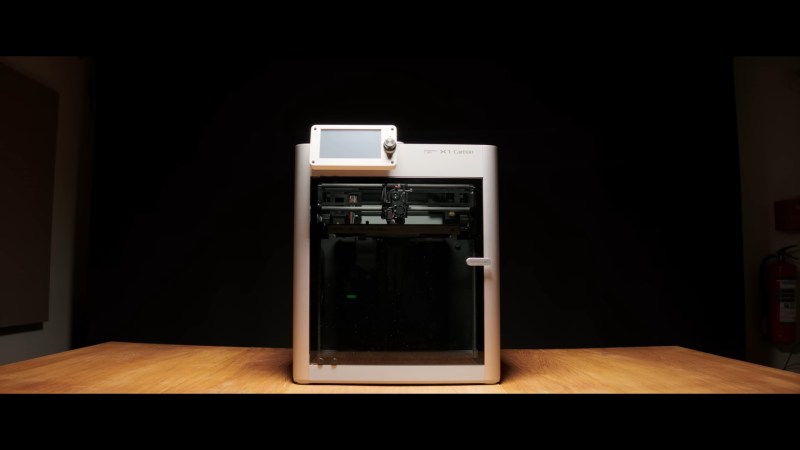
Recently a company called Z-Polymers introduced its new Tullomer FDM filament that comes with a lofty bullet list of purported properties that should give materials like steel, aluminium, and various polymers a run for their money. Even better is that it is compatible with far lower specification FDM printers than e.g. PEEK. Intrigued, the folks over at All3DP figured that they should get some hands-on information on this filament and what’s it like to print with in one of the officially sanctioned Bambu Lab printers: these being the X1C & X1CE with manufacturer-provided profiles.

The world of engineering-grade FDM filaments has existed for decades, with for example PEEK (polyether ether ketone) having been around since the early 1980s, but these require much higher temperatures for the extruder (360+℃) and chamber (~90℃) than Tullomer, which is much closer (300℃, 50℃) to a typical high-performance filament like ABS, while also omitting the typical post-process annealing of PEEK. This assumes that Tullomer can match those claimed specifications, of course.

One of the current users of Tullomer is Erdos Miller, an engineering firm with a focus on the gas and oil industry. They’re using it for printing parts (calibration tooling) that used to be printed in filaments like carbon fiber-reinforced nylon (CF-PA) or PEEK, but they’re now looking at using Tullomer for replacing CF-PA and machined PEEK parts elsewhere too.

It’s still early days for this new polymer, of course, and we don’t have a lot of information beyond the rather sparse datasheet, but if you already have a capable printer, a single 1 kg spool of Tullomer is a mere $500, which is often much less or about the same as PEEK spools, without the requirement for a rather beefy industrial-strength FDM printer.

Printing In Multi-material? Use These Filament Combos

If one has a multi-material printer there are more options than simply printing in different colors of the same filament. [Thomas Sanladerer] explores combinations of different filaments in a fantastic article that covers not just which materials make good removable support interfaces, but also which ones stick to each other well enough together to make a multi-material print feasible. He tested an array of PLA, PETG, ASA, ABS, and Flex filaments with each in both top (printed object) and bottom (support) roles.

A zero-clearance support where the object prints directly on the support structure can result in a very clean bottom surface. But only if the support can be removed easily.

People had already discovered that PETG and PLA make pretty good support for each other. [Thomas] expands on this to demonstrate that PLA doesn’t really stick very well to anything but itself, and PETG by contrast sticks really well to just about anything other than PLA.

One mild surprise was that flexible filament conforms very well to PLA, but doesn’t truly stick to it. Flex can be peeled away from PLA without too much trouble, leaving a very nice finish. That means using flex filament as a zero-clearance support interface — that is to say, the layer between the support structure and the PLA print — seems like it has potential.

Flex and PETG by contrast pretty much permanently weld themselves together, which means that making something like a box out of PETG with a little living hinge section out of flex would be doable without adhesives or fasteners. Ditto for giving a PETG object a grippy base. [Thomas] notes that flexible filaments all have different formulations, but broadly speaking they behave similarly enough in terms of what they stick to.

[Thomas] leaves us with some tips that are worth keeping in mind when it comes to supported models. One is that supports can leave tiny bits of material on the model, so try to use same or similar colors for both support and model so there’s no visual blemish. Another tip is that PLA softens slightly in hot water, so if PLA supports are clinging stubbornly to a model printed in a higher-temperature material like PETG or ABS/ASA, use some hot water to make the job a little easier. The PLA will soften first, giving you an edge. Give the video below a watch to see for yourself how the combinations act.

Continue reading “Printing In Multi-material? Use These Filament Combos”

Non-Planar Fuzzy Skin Textures Improved, Plus A Paint-On Interface

If you’ve wanted to get in on the “fuzzy skin” action with 3D printing but held off because you didn’t want to fiddle with slicer post-processing, you need to check out the paint-on fuzzy skin generator detailed in the video below.

For those who haven’t had the pleasure, fuzzy skin is a texture that can be applied to the outer layers of a 3D print to add a little visual interest and make layer lines a little less obvious. Most slicers have it as an option, but limit the wiggling action of the print head needed to achieve it to the XY plane. Recently, [TenTech] released post-processing scripts for three popular slicers that enable non-planar fuzzy skin by wiggling the print head in the Z-axis, allowing you to texture upward-facing surfaces.

The first half of the video below goes through [TenTech]’s updates to that work that resulted in a single script that can be used with any of the slicers. That’s a pretty neat trick by itself, but not content to rest on his laurels, he decided to make applying a fuzzy skin texture to any aspect of a print easier through a WYSIWYG tool. All you have to do is open the slicer’s multi-material view and paint the areas of the print you want fuzzed. The demo print in the video is a hand grip with fuzzy skin applied to the surfaces that the fingers and palm will touch, along with a little bit on the top for good measure. The print looks fantastic with the texture, and we can see all sorts of possibilities for something like this.

Continue reading “Non-Planar Fuzzy Skin Textures Improved, Plus A Paint-On Interface”