Teaching Math With 3D Printers

We’ve often thought that 3D printers make excellent school projects. No matter what a student’s interests are: art, software, electronics, robotics, chemistry, or physics, there’s something for everyone. A recent blog post from [Prusa Research] shows how Johannes Kepler University is using 3D printing to teach math. You can see a video with Professor [Zsolt Lavicza] explaining their vision below.

Instead of relying on abstract 3D shapes projected on a 2D screen, GeoGebra, educational math software, creates shapes that you can produce on a 3D printer. Students can physically handle and observe these shapes in the real world instead of on a flat screen.

One example of how the 3D printer finds use in a math class is producing “Genius Square,” a multilevel tic-tac-toe game. You can find the model for that and other designs used in the classes, on Printables. Some prints are like puzzles where students assemble shapes from pieces.

Putting 3D printers in school isn’t a new idea, of course. However, machines have become much simpler to use in recent years, so maybe the time is now. If you can’t find money for printers in school, you can always teach robotics using some low-tech methods.

Continue reading “Teaching Math With 3D Printers”

Automatically Serving Up Canned Cat Food

If there’s any one benefit to having a cat as a pet instead of a dog, it’s that they’re a bit more independent and able to care for themselves for many days without human intervention. The only thing that’s really needed is a way to make sure they get food and water at regular intervals, but there are plenty of off-the-shelf options for these tasks. Assuming your cat can be fed dry food, that is. [Ben Heck]’s cat has a health problem that requires a special canned wet food, and since there aren’t automatic feeders for this he built his own cat-feeding robot.

Unlike dry food that can dispense a measured amount from a hopper full of food, the wet food needs to be opened and dispensed every day. To accomplish this, his robot has a mechanism that slowly slides a wedge under the pull tab on the can, punctures the can with it, and then pulls it back to remove the lid. From there the food is ejected from the feeder down a ramp to a waiting (and sometimes startled) cat. The cans are loaded into 3D-printed cartridges and then stacked into the machine on top of each other, so the machine can dispense food cans until it runs out. This design has space for six cans.

Although there are many benefits to having pets of any sort, one of the fun side quests of pet ownership is building fun things for them to enjoy or to make caring for them easier. We even had an entire Hackaday contest based on this premise. And, if biological life forms aren’t your cup of tea, there are always virtual pets to care for as well.

Thanks to [Michael C] for the tip!

Continue reading “Automatically Serving Up Canned Cat Food”

Tinkercad In Color

Tinkercad is famous for having lots of colors in the interface. But once you export an STL, that file is notoriously monochrome. If you are printing with a single color printer, no problems. But if you have a color printer, what do you do? [CHEP] shows some options, including a relatively new one, in the video below.

The simple way is to “paint” the STL inside your slicer. But as [CHEP] shows, that is a pain and also has some undesirable side effects. A better approach is to export each part (or, at least, each part of the same color) into separate STL files, which you can then import together in the slicer. You still have to paint, but you don’t have to select different faces, and the resulting coloring is more what you’d expect.

Continue reading “Tinkercad In Color”

Tinkercad Continues To Grow Up

It is easy to write off Tinkercad as a kid’s toy. It is easy enough for kids to learn and it uses bright colors looking more like a video game than a CAD tool. We use a variety of CAD tools, but for something quick, sometimes Tinkercad is just the ticket. Earlier this year, Tinkercad got a sketch feature, something many other CAD programs have and, now, you can even revolve the sketch to form complex objects. Tinkercad guru [HL ModTech] shows you how in the video below.

It wasn’t long ago that we needed to cut an irregular shape out of an STL and we found the sketch feature which was perfect for that purpose. If you’ve used other CAD tools, you’ll know that sketches are typically 2D shapes that get changed into a 3D shape. The traditional thing is to simply extrude it, so if you draw a circle in 2D, you get a cylinder.

Continue reading “Tinkercad Continues To Grow Up”

Reverse Engineering STL Files With FreeCAD

If you think about it, STL files are like PDF files. You usually create them using some other program, export them, and then expect them to print. But you rarely do serious editing on a PDF or an STL. But what if you don’t have anything but the STL? [The Savvy Engineer] has a method to help you if you need to reverse engineer an STL file in FreeCAD. Check it out in the video below.

The problem is, of course, that STLs are made up of numerous little triangles. The trick is to switch workbenches and create a shape from mesh. That gets you part of the way.

Once you have a shape, you can convert it to a solid. At that point, you can create a refined copy. This gives you a proper CAD file that you can export to a STEP file. From there, you can use it in FreeCAD or nearly any other CAD package you like to use.

Once you have a proper object, you can easily use it like any other solid body in your CAD program. This is one of those things you won’t need every day, but when you do need it, it’ll come in handy.

Want to up your FreeCAD game? We can help. There are other ways to hack up STL files. You can even import them into TinkerCAD to do simple things, but they still aren’t proper objects.

Continue reading “Reverse Engineering STL Files With FreeCAD”

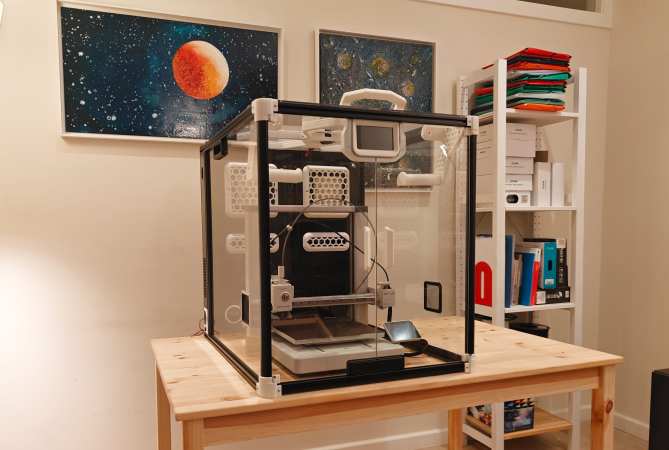
CoreXY 3D Printer Has A Scissor-Lift Z-axis So It Folds Down!

We don’t know about you, but one of the biggest hassles of having a 3D printer at home or in the ‘shop is the space it takes up. Wouldn’t it be useful if you could fold it down? Well, you’re in luck because over on Hackaday.io, that’s precisely what [Malte Schrader] has achieved with their Portable CoreXY 3D printer.

The typical CoreXY design you find in the wild features a moving bed that starts at the top and moves downwards away from the XY gantry as the print progresses. The CoreXY kinematics take care of positioning the hotend in the XY plane with a pair of motors and some cunning pulley drives. Go check this out if you want to read more about that. Anyway, in this case, the bed is fixed to the base with a 3-point kinematic mount (to allow the hot end to be trammed) but is otherwise vertically immobile. That bed is AC-heated, allowing for a much smaller power supply to be fitted and reducing the annoying cooling fan noise that’s all too common with high-power bed heaters.

Both ends of the cable bundle are pivoted so it can fold flat inside the frame!

The XY gantry is mounted at each end on a pair of scissor lift mechanisms, which are belt-driven and geared together from a single stepper motor paired with a reduction gearbox. This hopefully will resolve any issues with X-axis tilting that [Malte] reports from a previous version.

The coarse tramming is handled by the bed mounts, with a hotend-mounted BLTouch further dialling it in and compensating for any bed distortion measured immediately before printing. Simple and effective.

As will be clear from the video below, the folding for storage is a natural consequence of the Z-axis mechanism, which we reckon is pretty elegant and well executed—check out those custom CNC machine Aluminium parts! When the Z-axis is folded flat for storage, the hotend part of the Bowden tube feed is mounted to a pivot, allowing it to fold down as well. They even added a pivot to the other end of the cable bundle / Bowden feed so the whole bundle folds down neatly inside the frame. Nice job!

If you want a little more detail about CoreXY kinematics, check out our handy guide. But what about the H-Bot we hear you ask? Fear not, we’re on it.


Two geared plastic disks can be seen on a platform. One disk rotates around a central column, while the other is mounted on a platform that extends from the edge of the first disk. The second disk holds a print bed, and a print head mounted on the column is positioned just above a half-finished 3D print.

A Toolchanging Inverse SCARA 3D Printer

There are some times when a picture, or better yet a video, really is worth a thousand words, and [heinz]’s dual-disk polar 3D printer is one of those projects. Perhaps the best way to describe it is as an inverted SCARA system that moves the print bed around the hot end, producing strange and mesmerizing motion paths.

The Z-axis runs on a column through the center of the printer, while the print bed is a geared disk that can independently rotate both around its own center and around the central column. This gives the printer a simple way to use multiple extruders: simply mount the extruders at different angles around the central pillar, then rotate the bed around to whichever extruder is currently in use. (See the video demo below.) Since the extruder only moves in the Z direction, there’s also no need to make it as light as possible. In one test, it worked perfectly well with a five-filament direct-drive extruder assembly weighing two kilograms, though it proved a bit unwieldy.

[heinz] 3D printed the rotating disks and a few other parts of the printer, and used two GT2 timing pulleys and the bearings from a Lazy Susan to drive the disks and let them rotate. The print bed’s surface is made out of fiberglass, and since it’s unheated, it has a pattern of small holes drilled into it to let molten plastic seep in and adhere. One nice side effect of the rotating print bed is that it can produce a turntable effect on time-lapse videos.

We’ve covered this project once before when it was a bit earlier in development, and somehow we missed when it got upgraded to its current status. Let’s just say we’re impressed!

Polar 3D printers may make it a bit harder to visualize paths, but they can do unique things like print with four heads at a time or print in non-planar paths.

Continue reading “A Toolchanging Inverse SCARA 3D Printer”