A Slice Of Simulation, Google Sheets Style

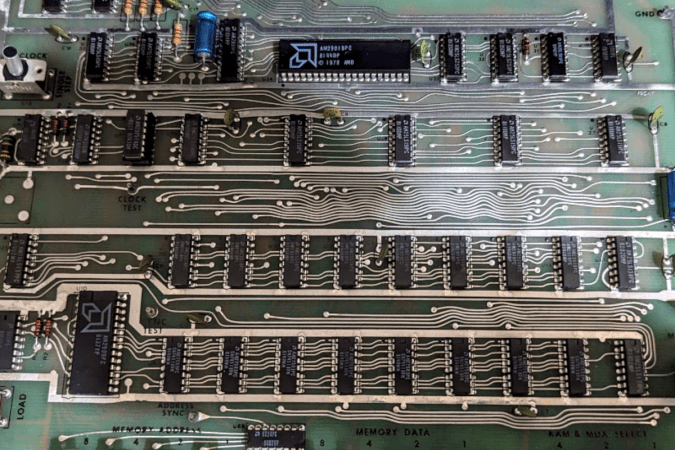
Have you ever tried to eat one jelly bean or one potato chip? It is nearly impossible. Some of us have the same problem with hardware projects. It all started when I wrote about the old bitslice chips people used to build computers before you could easily get a whole CPU on a chip. Bitslice is basically Lego blocks that build CPUs. I have always wanted to play with technology, so when I wrote that piece, I looked on eBay to see if I could find any leftovers from this 1970-era tech. It turns out that the chips are easy to find, but I found something even better. A mint condition AM2900 evaluation board. These aren’t easy to find, so the chances that you can try one out yourself are pretty low. But I’m going to fix that, virtually speaking.

This was just the second potato chip. Programming the board, as you can see in the video below, is tedious, with lots of binary switch-flipping. To simplify things, I took another potato chip — a Google Sheet that generates the binary from a quasi-assembly language. That should have been enough, but I had to take another chip from the bag. I extended the spreadsheet to actually emulate the system. It is a terrible hack, and Google Sheets’ performance for this sort of thing could be better. But it works.

Continue reading “A Slice Of Simulation, Google Sheets Style”

CP/M On An Eight Line Display

How many lines do you need on a CP/M terminal? More is usually better, of course, but the MicroOffice RoadRunner managed with an 8-row, 80-column LCD screen. That may sound anemic, but in 1983, it was high-tech, as was the RoadRunner, and [Tech Time Traveller] tells us about them in a recent video you can see below.

The intro to the video shows some really strange old laptops before it gets to the RoadRunner. The machine used a Z80 work-alike CPU and a form of CP/M with some organizer functions. The machine didn’t have floppies or other disk storage, but did have four cartridge slots that could hold more memory, a spreadsheet, BASIC, or a text editor. The memory cartridges were static RAM with battery backup, so they retained data when you pulled them from the slot. Assuming the battery didn’t die.

Inside a RoadRunner cartridge.

Unfortunately, this particular machine suffered some shipping damage. In addition to the cartridges, it also had a removable battery and modem. At around the eight-minute mark, the case comes off, and inside are — surprise — more internal cartridges.

While MicroOffice isn’t a household name today, it was founded by a former Exxon executive and tapped a CEO and investor from Timex. It was funded by the likes of Olivetti. The computer rolled out in late 1983 and lived until Telxon bought MicroOffice in 1985.

Attempts to run Zork were not fruitful. There really wasn’t enough memory, and file transfer was a bit wonky. If you want a modern Z80 laptop, we know of one with 16 cores. As clunky as the RoadRunner looks, it still beats the old suitcase computers.

Continue reading “CP/M On An Eight Line Display”

Emulate A KIM-1 With A Commodore 64

When you think about virtualization, you usually think about making some CPU pretend to be another CPU. However, there are sometimes advantages to making a computer pretend to be the same computer.

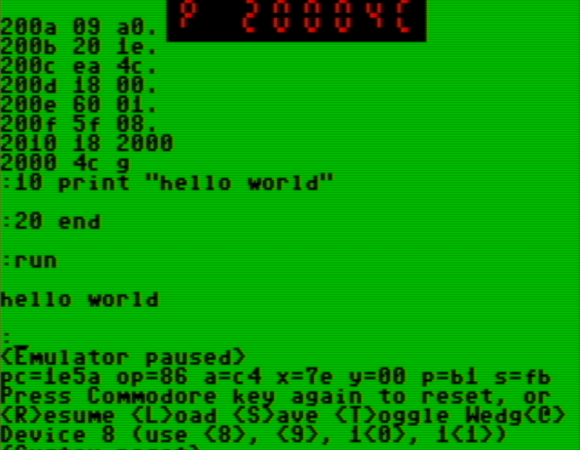
That’s the case with [oldvcr]’s KIMplement, which emulates a KIM-1 with a 6502 using a Commodore 64, which also uses a 6502.The reason this makes sense is that you have total control over an emulated CPU. If a program, for example, writes to a critical memory location or tries to take over the screen or keyboard, you can easily make the emulator do something more appropriate. Things like breakpoints and single stepping also become trivial.

The virtual machine at the heart of it is 6o6 (6502 on 6502), and it seems to perform well. By virtualizing, you can easily protect the system from programs that try to, for example, take over an interrupt vector. This is similar to how x86 protected mode can run old real-mode code in a virtual environment and intervene for certain instructions. The emulation is good enough that the emulator can run the emulator, which then runs the emulator to actually run the real target. That’s wasteful, of course, but it does speak to the completeness of the pretend CPU.

If you want a KIM-1 (and an 1802 Elf) but only have an Arduino, you can emulate a different way. At least an emulated KIM-1 doesn’t develop bad memory chips.

The film scanner [xssfox] found, in the center of a table, with other stuff strewn across the table

Answering All Your ISCSI Scanner Questions

iSCSI is a widely used protocol for exposing SCSI devices over a network connection, and some scanners have in the past been equipped with SCSI ports. So, could you have an iSCSI network scanner? [xssfox] details her journey making a Canoscan FS4000US film scanner work over iSCSI, sparked by someone’s overly-confident StackOverflow comment that it couldn’t be done. Nothing in the spec said it couldn’t actually work, however, and after figuring out a tentative architecture, a hardware setup was put together.

No flatbed scanners with SCSI ports could be found on the cheap, so a film scanner had to be procured. After figuring out a few hitches with the loading mechanism and getting a test image locally, it was time to try and build up the software setup, tearing through SCSI compatibility and cabling, driver and PCI pass-through woes, bluescreens, and intermediate software having dropped some of the necessary features by now. Still, [xssfox] eventually exported the scanner as an iSCSI target – and, on the other end of the network, successfully connected to it and completed a scan. The StackOverflow answer was wrong, after all.

It’s fun to see how far old technology can go, and get answers to questions you never knew you had. Whether you’re reminiscing about SCSI days or wondering what the technology about, we’ve talked about it aplenty, from a retrospective to modern-day experiments, repurposing old SCSI hardware for modern SATA ports, a Raspberry Pi implementation, an emulator, and a fair bit more.

We thank [Valentijn Sessink] and [adistuder] for sharing this with us!

The Minimalistic Dillo Web Browser Is Back

Over the decades web browsers have changed from the fairly lightweight and nimble HTML document viewers of the 1990s to today’s top-heavy browsers that struggle to run on a system with less than a quad-core, multi-GHz CPU and gigabytes of RAM. All but a few, that is.

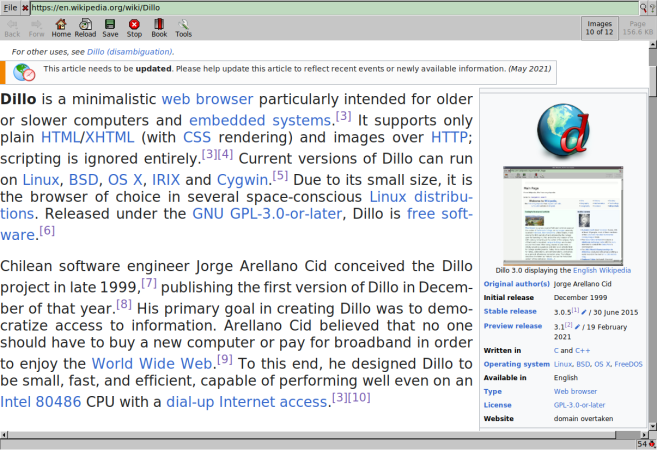
Dillo is one of a small number of browsers that requires only a minimum of system resources and will happily run on an Intel 486 or thereabouts. Sadly, the project more or less ended back in 2016 when the rendering engine’s developer passed away, but with the recent 3.10 release the project seems to be back on track, courtesy of efforts by [Rodrigo Arias Mallo].

Although a number of forks were started after the Dillo project ground to a halt, of these only Dillo+ appears to be active at this point in time, making this project revival a welcome boost, as is its porting to Atari systems. As for Dillo’s feature set, it boasts support for a range of protocols, including Gopher, HTTP(S), Gemini, and FTP via extensions. It supports HTML 4.01 and some HTML 5, along with CSS 2.1 and some CSS 3 features, and of course no JavaScript.

On today’s JS-crazed web this means access can be somewhat limited, but maybe it will promote websites to have a no-JS fallback for the Dillo users. The source code and releases can be obtained from the GitHub project page, with contributions to the project gracefully accepted.

Thanks to [Prof. Dr. Feinfinger] for the tip.

Protoboard Z80 Computer Teaches The Basics

As curious people, we’re all incredibly fortunate to live in an age where information can so easily be obtained. If you want to learn how something works, from a cotton gin to an RBMK reactor, you’re just a few keystrokes away from articles, diagrams, and videos on the subject. But as helpful as all of that information can be, we also know that there’s no substitute for hands-on experience.

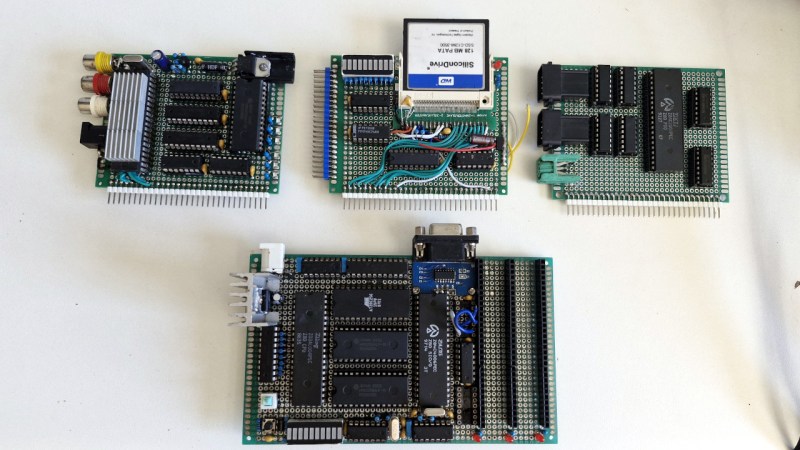
While we can’t recommend you try building a miniature graphite-moderated nuclear reactor, there’s plenty of other devices that you can study by constructing your own functioning model. For example, when [Jorisclayton] wanted to really know what was going on inside a computer, they decided to go back to basics and build their own Z80 machine. To maximize the experience, they skipped any of the existing kit designs and instead wired the whole thing up by hand across a few perfboards.

The main board contains a 4 MHz Z80 processor, paired with 32K ROM and 64K RAM. Here you’ll also find the clock generator, I/O decoder, serial port, voltage regulator, and a trio of expansion slots that use a long strip of 2.54 mm pin headers as the interface. In the first expansion slot you’ve got a primordial “graphics card” based around the TMS9918 video display controller (VDC) and 16K of additional RAM. The second expansion card has a CompactFlash reader and an LED array mapped to I/O address 0x00h so it can be used for various notifications.

[Jorisclayton] says the final expansion board is still being worked on, but the idea is for it to handle user input through a PS/2 keyboard connector, as well as provide ports for a pair of Super Nintendo (or compatible) controllers. Everything is held together with a minimalist 3D printed frame to show off all that careful soldering.

Obviously there’s no PCB design files to share for this one, but [Jorisclayton] has posted a schematic for wiring everything up if you’re looking for resources to build your own Z80 computer. Sure the chips themselves might no longer be in production, but that doesn’t mean this venerable CPU is going anywhere just yet.

The ZX Spectrum Takes To The Airwaves Again

A perk of writing for Hackaday comes in the vast breadth of experience represented by our fellow writers. Through our colleague [Voja Antonić] for example we’ve gained an unparalleled insight into the cutting edge of 8-bit computing in 1980s Yugoslavia, of his Galaksija home computer, and of software being broadcast over [Zoran Modli]’s Ventilator 202 radio show.

We’re strongly reminded of this by hearing of the Slovenian Radio Študent broadcasting the classic Slovenian ZX Spectrum text adventure game Kontrabant 2, at the behest of the  Slovenian Computer History Museum. It’s been four decades and a lot of turbulent history, but once again 8-bit code will be heard on FM in Europe.

Some of our younger readers may never have experienced the joy of loading software from cassette, but in those days it represented a slow alternative to the eye-wateringly expensive floppy drives of the day. The software was represented as a serial bitstream translated into tones and recorded on a standard cassette recorder which was standard consumer electronics back then, and when played back through a speaker it was an ear-splitting sound with something in common with that of a modem handshake from a decade or more later. This could easily be transmitted over a radio station, and a few broadcasters tried experimental technology shows doing just that.

We haven’t heard from any listeners who managed to catch the game and run it on their Spectrum, but we hope that Slovenia’s retrocomputing community were out in force even if Audacity and a n emulator replaced the original hardware. Given that more than one hacker camp in our community has sported radio stations whether legal or not, it would be nice to hear the dulcet tones of 8-bit software on the airwaves again.

Meanwhile if cassettes are too cheap for you, feast your eyes on Sir Clive’s budget storage solution.

Thanks [Stephen Walters].