A Look Behind The Canvas Of The “60 Billion Lights” Project

In May of this year, [Erich Styger] shows his project called “60 Billion Lights” off to the world.  Now he has published an update on the making of this impressive work of art. As a quick recap, “60 Billion Lights” is a canvas art piece, which has 60 dual shaft stepper motors integrated into it. Each stepper motor has forty 24-bit RGB LEDs, making for a total of 60 billion position and light combinations on the entire canvas.

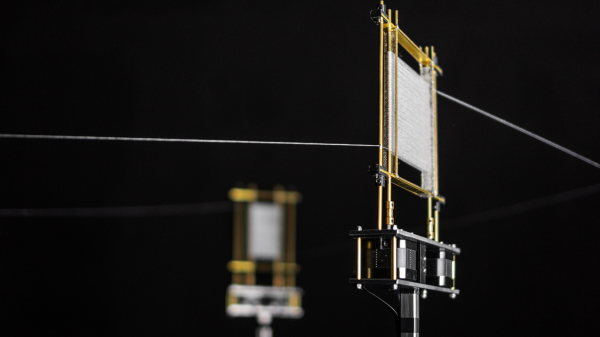
With the dual shaft stepper motors, one can control the position of laser-cut acrylic rods inside each of the forty depressions that make up a unit. Each unit has its WS2812B LEDs positioned around the inside edge.

As the embedded video (after the break) shows, it can be used to create a wide variety of effects. The whole of it is driven by 15 controller boards that run FreeRTOS on an NXP LPC845 (Cortex-M0+), connected via RS-485.

In the ‘Making Of’ video (embedded after the break) and article, more details are shown of the individual components, including the dual shaft stepper motors, stepper motor PCBs, the LED ring PCBs, and countless images of the construction, painting and assembly.

If the original article gave one the impression that this was an easy project, it is this behind the scenes look that gives one a good impression of the full scale. From the countless PCBs, controller boards, wiring, programming to the assembly and testing. Not to mention the painting of the canvas itself, which is an original work.
Continue reading “A Look Behind The Canvas Of The “60 Billion Lights” Project”

Remotely Navigate The Apocalypse In Mid-Century Style

One of the few positives to come of this pandemic is that the restrictive nature of scarcity can be a boon to creativity. Plus, the doom and gloom of it all is causing people to loosen up and do things they never felt free enough to do before in the demanding world of the before times.

For example, [ossum] makes R/C vehicles on commission to exacting standards, but took a break from perfection to build this remote control hellscape-faring van by the seat of his pants. It’s quite a resourceful build that combines pieces from previous projects with a few standard R/C parts and a handful of clever hacks.

The body is a test print of a 1957 Chevy Suburban van that [ossum] made for someone a few years back. It’s mounted on a scrap metal chassis and moves on printed tank treads designed for a different vehicle.

Since glass is a liability in an apocalypse (and because [ossum] doesn’t have a resin printer yet), the windows have fortified coverings that are printed, patina’d, and detailed with tiny rivet heads.

As far as hacks go, our favorite has to be the clothespin steering. [ossum] only had one electronic speed controller, so he used a servo to actuate a pair of spring-loaded clips, alternating between the two to move the tank-van. There’s a short video after the break that shows the rack and clothes-pinion steering, and it’s loaded up right after a brief demo of the van.

We realize that everyone’s apocalyptic needs are different, but there’s more than enough here to get you started. Don’t have access to enough R/C parts? Gear boxes and drive shafts can be printed, too.

Continue reading “Remotely Navigate The Apocalypse In Mid-Century Style”

Flexible PCB Earrings Put The Art In Art Deco

Earrings have been a hackers’ target for electronic attachment for quite a while, but combining the needed components into a package small enough to wear in that finicky location is quite a challenge. If [Sawaiz Syed]’s Art Deco Earrings are anything to go by, ear computers have a bright future ahead of them!

This is a project unusually well described by its name. It is in fact an earring, with art deco styling. But that sells it way too short. This sliver of a flex circuit board is double sided to host an ATtiny, accelerometer, LDO, and eight 2020 formfactor controller-integrated LEDs. Of course it’s motion sensitive, reacting to the wearer’s movement via LED pattern. [Sawaiz] makes reference to wearing it while dancing, and we can’t help but imagine an entire ballroom all aglow with tiny points of LED light.

The Art Deco Earrings are also set apart by the thoroughness of their documentation (have we mentioned how much we love detailed documentation?). [Sawaiz] not only drops the source in your lap, but the README in the Github repo linked at the top walks the reader through each component of the design in detail. Plus the PCBA render is so complete it includes a model of the wire loop to fit through the wearer’s ear; how cool is that? The single piece that’s still in progress is the battery. The earring itself hosts an LDO, so all that is required is stashing a battery somewhere discrete, perhaps in the user’s hair? We’re looking forward to seeing what [Sawaiz] works out.

For the full effect, check out the gif of an assembled unit in action after the break.

Continue reading “Flexible PCB Earrings Put The Art In Art Deco”

Dyeing Fabric To Create Sensors

Fabrics with electrical functionality have been around for several years, but are very rarely used in mainstream clothing. The fabrics are very expensive and the supply can be unreliable. Frustrated by this, [Counter Chemists] developed PolySense, simple open-source technology to make any fibrous material into a conductive material that can be used to sense pressure, stretch, capacitive touch, humidity, or temperature.

PolySense uses a process called in-situ polymerization, effectively dying a fabric to become piezoelectric. This is done by first soaking the fabric in a mixture of water and the organic compound pyrrole, and then adding iron chloride to trigger a reaction. The polymerization process that takes place wraps the individual fibers of the fabric in conductive polymer chains.

Instead of just uniformly coating a fabric, various masking techniques can be used to dye patterns onto the fabric for various use cases. The video after the break shows a range of these applications, including using polymerized gloves and leggings for motion capture, a zipper that acts like a linear potentiometer, and touch-sensitive fabric. The project page lists sources for the required chemicals in both Europe and the US, and we look forward to seeing what other applications the community can come up with.

The project is very well documented, with a number of scientific papers covering all the details. [Counter Chemists] will also be presenting PolySense at the 2020 Virtual Maker Faire.

This technology can also be used to make a fabric piano with a lot less effort. On the more mechanical side of things, you can also 3D print on pre-stretched fabric to make it pop into 3D shapes.

Continue reading “Dyeing Fabric To Create Sensors”

How Much Is That Plotter In The Window?

We live in a strange time indeed. People who once eschewed direct interactions with fellow humans now crave it, but to limited avail. Almost every cashier at the few stores deigned essential enough to maintain operations are sealed away behind plastic shields, with the implication that the less time one spends lingering, the better. It’s enough to turn an introvert into an extrovert, at least until the barriers are gone.

We get the idea that the need to reach out and touch someone is behind [Niklas Roy]’s “Please Leave a Message”, an interactive art installation he set up in the front window of his Berlin shop. Conveniently located on a downtown street, his shop is perfectly positioned to attract foot traffic, and his display is designed to catch the eye and perhaps crack a smile. The device consists of a large wooden easel holding the guts from an old X-Y pen plotter, an Arduino and an ESP-8266, and a couple of drivers for the plotter’s steppers. Passers-by are encouraged to scan a QR code that accesses a web page served up by the ESP-8266, where they can type in a brief message. The plotter dutifully spells it out on a scroll of paper for all to see, using a very nice font that [Niklas] designed to be both readable and easily plotted. The video below shows it in action with real people; it seems to be a crowd-pleaser.

[Niklas] has been incredibly prolific, and we’ve covered many of his interactive art installations. Just search for his name and you’ll find everything from a pressure-washer dancing waters display to a plus-sized pinball machine.

Continue reading “How Much Is That Plotter In The Window?”

A Twisted Tale Of Woven Wires

A little over a year ago, we ran a contest that challenged readers to leave the comfort of their PCBs and breadboards. We wanted to see circuits built in three dimensions, with extra points awarded for creativity and artistic flair. Truth be told there was initially some concern that the “Circuit Sculpture” contest was a bit too abstract for the Hackaday community, but the overwhelming number of absolutely gorgeous entries certainly put those doubts to rest.

In a recent video, [Michael Aichlmayr] walks viewers through the creation of his mesmerizing entry Wonderlandscape, which ended up taking honorable mention in the Circuit Sculpture contest for Best Metalworks. Though this is much more than just a simple walk-through of a project. Sure you’ll see how brass bar stock was artfully twisted and wrapped to create a metallic winterscape that looks like it could have come from Bob Ross’s hitherto unknown cyberpunk period, but that’s only half the story.

The brass bar was twisted by hand with pliers.

In the video, [Michael] recalls how he discovered the burgeoning electronic sculpture community, and points to a few exceptional examples that got him hooked on finding the beauty that’s usually hidden inside of a plastic enclosure. Eventually he heard about the Circuit Sculpture contest, and decided it was the perfect opportunity to build something of his own. That’s right, Wonderlandscape is his very first attempt at turning electronics into art.

But the best may be yet to come. [Michael] explains that, due to the time constraints of the contest, he had to use metal stock purchased from the crafts store. But his ultimate goal is actually to melt down salvaged brass and bronze components and make his own wire and rods. We can’t wait to see what he’ll be able to accomplish when he starts working with his own custom made metal, and are eagerly awaiting the future video that he says will go over the techniques he’s been working on.

This story is a great reminder of how stepping out of your comfort zone once and awhile can be a good thing. Entering the contest with no previous experience was a risk to be sure, but [Michael] came out the other side more experienced and with a few new friends in the community. So why not enter our latest contest and see where it takes you?

Continue reading “A Twisted Tale Of Woven Wires”

Making A Gorgeously-Twisty Sculpture, Using Only Flat Pieces

Closeup of unique pieces that make up the final scuplture.

The sculpture shown here is called Puzzle Cell Complex and was created by [Nervous System] as an art piece intended to be collaboratively constructed by conference attendees. The sculpture consists of sixty-nine unique flat panel pieces, each made from wood, which are then connected together without the need for tools by using plastic rivets. Everything fits into a suitcase and assembly documentation is a single page of simple instructions. The result is the wonderfully-curved gyroid pattern you see here.

The sculpture has numerous layers of design, not the least of which was determining how to make such an organically-curved shape using only flat panels. The five-foot assembled sculpture has a compelling shape, which results from the sixty-nine individual panels and how they fit together. These individual panel shapes have each been designed using a technique called variational surface cutting to minimize distortion, resulting in their meandering, puzzle-piece-like outlines. Each panel also has its own unique pattern of cutouts within itself, which makes the panels lighter and easier to bend without sacrificing strength. The short video embedded below shows the finished sculpture in all its glory.

Continue reading “Making A Gorgeously-Twisty Sculpture, Using Only Flat Pieces”