RuneScape GBA Controller Is A Nostalgic Mash-Up

For gamers, the early 2000s certainly stand out as a memorable era. The dawn of the 21st century ushered in the sixth generation of home video game consoles, with Sony, Nintendo, and Microsoft all releasing their systems within a few years of each other. Nintendo also released their Game Boy Advance at around the same time, representing a minor revolution for mobile gaming. On the PC front, a free-to-play MMORPG called RuneScape was redefining people’s expectations of browser-based software.

Now, thanks to modern technology and the expert guidance of [TiKevin83], these varied bits of video game history can be used in conjunction for maximum rose-tinting effect. Using homebrew software on the GameCube and a healthy collection of wires and adapters, the GBA can be used as a controller for your adventures through the realm of Gielinor. After nearly two decades, the dreams of gamers everywhere have come true.

Well, that might be a stretch. In fact, we’d wager that nobody in human history has ever looked at the GBA and thought it would be a particularly good controller for an MMORPG. Watching the video after the break, it’s not hard to see why. Using the handheld system’s digital pad to control the mouse in RuneScape looks to be precisely as clunky as you’d imagine. But of course, that’s hardly the point.

So how is it accomplished? A homebrew tool for the GameCube’s “Game Boy Player” accessory allows the GBA, when connected to the console via the appropriate adapter cable, to mimic a standard controller. Once the GBA is running in this mode, it can then be connected to the computer using a Wii U to USB adapter. Finally, the program JoyToKey is used to map the GBA’s buttons to mouse and keyboard input for “Old School” RuneScape.

If you’d like to do something similar but aren’t quite committed enough to collect up all the Nintendo-branded ephemera this method requires, you may be interested in this DIY adapter that allows the venerable GBA to be used as a standard Bluetooth controller.

Continue reading “RuneScape GBA Controller Is A Nostalgic Mash-Up”

Process Characterization On The Cheap With A Custom Test Rig

Testing is a key part of any product development cycle. Done right, it turns up unknown bugs and problems, and allows for them to be fixed prior to shipment. However, it can be a costly and time-consuming process. The [Bay Libre] team needed to do some work on power management, but the hardware required was just a little on the expensive side. What else does a hacker do, but build their own?

Enter the Thermo-Regulated Power Measurement Platform. It’s a device designed to control the die temperature of a chip during process characterization. This is where a chip, in this case the iMX8MQ, is run at a variety of temperatures, voltages, and frequencies to determine its performance under various conditions. This data guides the parameters used to run the chip in actual use, to best manage its power consumption and thermal performance.

The rig consists of a Peltier element with controller, a heatsink, and a fan. This is lashed up to a series of Python scripts that both control the chip temperature and run through the various testing regimes. Thanks to this automation, what would normally be a day’s work for an engineer can now be completed in just two hours.

Through a few smart component choices, the team accomplished the job at around one-tenth of the cost of commercial grade hardware. Granted, the average hacker probably won’t find themselves doing process characterization for cutting-edge silicon on a regular basis. Still, this project shows the value in building custom hardware to ease the testing process.

Testing is key to success in production. Custom jigs can make for light work when large orders come in, and we’ve run a primer on various testing techniques, too.

Running Doom On A Doomed GPS

What’s the first thing you think of when you see an old GPS navigation system for sale cheap at a garage sale? Our research indicates that 100% of people would wonder if it could run Doom; at least that’s what we conclude from the single data point we have, anyway. [Jason Gin] asked and answered the question — with a resounding yes — about his recent acquisition.

The unit in question is a Magellan RoadMate 1412 running Windows CE. After some playing, [Jason] found that simply connecting the unit to a computer via USB caused all the application files to appear as a FAT-formatted volume. Replacing the obviously-named “MapNavigator.exe” with a copy of TotalCommander/CE allowed browsing around the filesystem.

This revealed that much was missing from the CE install, including the Explorer shell and command prompt. Either could be used to launch Doom with the required command-line arguments. Luckily, [Jason] had another trick ready, namely using MortScript (a scripting engine) to launch the Doom executable. This worked like a charm, and after a few tweaks, he now has a dedicated demo box.

We say “demo box” instead of “Doom machine” because without a keyboard, you can’t actually play the game — only view the demo. In a valiant attempt, he connected a USB OTG connector, but the GPS doesn’t seem to recognize input devices, only USB storage devices. Keep at it, [Jason], we’d love to see you crack this one!

[Jason] is no stranger to hacking Windows CE devices. Last time we checked in, the target was a KeySight DSO1102G oscilloscope.

Continue reading “Running Doom On A Doomed GPS”

Trimmed Dreamcast Board Makes For Perfect Portable

In the last year or so we’ve been seeing an array of portable game system builds based around “trimmed” Wii motherboards which have literally been cut down to a fraction of their original size. It turns out that most of the board is dedicated to non-essential functions, with the core Wii system contained within one specific area that can be isolated with a steady hand. But as [Gman] shows in his latest build, the same concept can also be applied to the Sega Dreamcast.

But of course, there’s a bit more to it than just taking a hacksaw to a Dreamcast motherboard. [Gman] had to supplement the trimmed system with quite a bit of additional hardware, such as a power management board he originally designed for portable Wii projects.

Other components were specifically built for this project. For example there’s a custom PCB that handles emulating the Dreamcast controller using a PIC32MZ microcontroller. He’s also using a LM49450 to pull digital audio from the motherboard over I2S, completely bypassing the analog output.

While not currently functioning, [Gman] also included an SPI OLED display and the hardware necessary to emulate basic functionality of the system’s unique Visual Memory Unit (VMU) right in the front of the system. We’re looking forward to seeing him revisit this feature in the future when he’s got the software side of things worked out.

The Nintendo 2DS inspired enclosure is completely 3D printed. A Prusa i3 with textured PEI bed was used to achieve the gorgeous dappled look on the system’s front panel, while the buttons were done on a Form 2 SLA printer. With a mold made from the printed buttons, [Gman] was able to cast the final pieces using a variety of colors until he found a combination he was happy with.

If you’re not Team Sega and would rather hack up your own tiny versions of Nintendo’s hardware, look no further than this fully functional trimmed Wii built into an Altoids tin.

Another World On The Apple II

What’s more fun than porting an old game released for an old system such as the Apple IIgs to its 10-year-older predecessor, the Apple II from 1977? Cue [Deater]’s port of the classic video game ‘Another World‘ to the original Apple II. As was fairly obvious from the onset, the main challenges were with the amount of RAM, as well as with the offered graphics resolutions.

Whereas the Apple II could address up to 48 kB of RAM, the 16-bit Apple IIgs with 65C816 processor could be upgraded to a maximum of 8 MB. The graphics modes offered by the latter also allowed ‘Another World’ to run at a highly playable 320×200, whereas the ported version is currently limited to the ‘low resolution’ mode at 40×48 pixels.

The game itself still needs a lot of work to add missing parts and fix bugs, but considering that it has been implemented in 6502 assembler from scratch, using just the gameplay of the IIgs version as reference, it’s most definitely an achievement which would have earned [Deater] a lot of respect back in the late ’80s as well.

Feel free to check out the Github page for this project, grab a floppy disk image from the project page and get playing. Don’t forget to check out the gameplay video linked after the break as well.

Continue reading “Another World On The Apple II”

DIY Geiger Counter Is Sure To Generate Clicks

On the outside, a Geiger counter seems like a complicated thing. And you might think a device that detects a dangerous, mostly invisible threat like radiation should be complicated. But they’re actually pretty simple. The Geiger-Muller tube does most of the work, which boils down to detecting brief moments of conductivity caused by chain reactions of charged particles in radioactive materials.

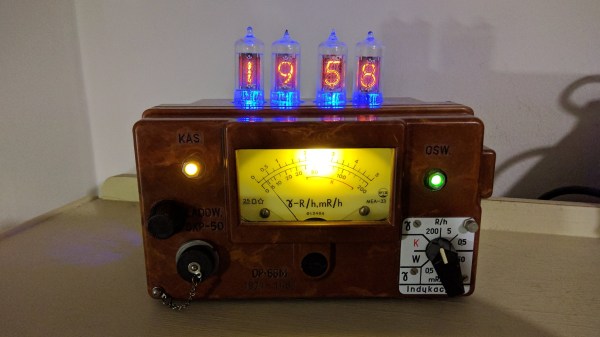
[Prabhat_] wanted to build a unique-looking Geiger counter, and we’d say that this slick, Star Trek-esque result succeeds. A well-organized display shows the effective dose rate, counts per minute, and cumulative dose, which can be displayed in either microsieverts or millirems. We dig the 3D printed case design, because we like to see form follow function.

The counter is powered by an 18650 cell that’s DC-to-DC boosted to 400+ volts. A NodeMCU processes the signal coming in from the G-M tube and expresses it in both clicks and LED blinks, both of which can be toggled on or off from the home screen. The alert threshold can be customized in the settings, which means the point at which green changes to red.

Click-click-click past the break for [prabhat_]’s great walk-through video, where he tests it with uranium ore and a thoriated gas lantern mantle.

If you want to take the opposite approach and get to clicking ASAP, well, fire up your hot glue gun and dump out your scrap bin.

Continue reading “DIY Geiger Counter Is Sure To Generate Clicks”

Electric Vehicles On Ice

This winter, a group of electric vehicle enthusiasts, including [Dane Kouttron], raced their homemade electric go-karts on the semi-frozen tundra nearby as part of their annual winter tradition. These vehicles are appropriately named Atomic Thing and Doom Sled, and need perfect weather conditions to really put them to the test. You want a glass-like race track but snowfall on ice freezes into an ice-mush intermediate that ends up being too viscous for high-speed ice vehicles. The trick is to watch for temperatures that remain well below zero without snow-like precipitation.

The group is from the community makerspace out of MIT known as MITERS and already have EV hacking experience. They retrofitted their VW Things vehicle (originally built for a high speed electric vehicle competition) to squeeze even more speed out of the design. Starting out with an 8-speed Shimano gearbox and a 7kW motor, they assembled a massive 24S 10P battery out of cylindrical A123 cells salvaged from a Prius A123 Hymotion program. This monster operates at 84V with a 22AH capacity, plenty for power for the team to fully utilize the motor’s potential.

The battery is ratchet strapped to the back of the Atomic Thing to provide more traction on the ice. It must feel just like riding on top of a different kind of rocket.

They tried using ice skates in the front of the Atomic Thing, but the steering was difficult to control over rough ice. Studded solid tires perform quite well, resulting in less jarring movement for the driver. Doom Sled is a contraption built from a frame of welded steel tube and a mountainboard truck with ice skate blades for steering. The motor — a Motenegy DC brush [ME909] — was salvaged from a lab cleanout, transferring power to the wheels through a chain and keyed shaft. The shaft-to-wheel torque was duly translated over two keyed hub adapters.

Doom Sled with seat strapped on

The crew fitted a seat from a longscooter and made a chain guard from aluminum u-channel to keep the flying chain away from the driver’s fingers. The final user interface includes a right-hand throttle and a left-hand “electric brake” (using resistors to remove the stored energy quickly to combat the enormous inertia produced by the vehicle).

Overall, ice racing was a success! You can see the racing conditions were just about perfect, with minimal ice mush on the lake. Any rough patches were definitely buffered smooth by the end of the day.

Continue reading “Electric Vehicles On Ice”