DAT, The HD Video Tape Format We Never Knew We Had

When we consume our music online via streaming services it is easy to forget the days of recordings being contained on physical media, and to overlook the plethora of competing formats that vied for space in our hi-fi systems to play them. [Andrew Rossignol] has an eye for dated recording media formats as a chiptune enthusiast though, because not only has he found a DAT machine from the 1990s, he’s hacked it to record HD video rather than hi-fi audio.

If you’ve not encountered DAT before, it’s best to consider the format as the equivalent of a CD player but on a tape cassette. It had its roots in the 1980s, and stored an uncompressed 16-bit CD-quality stereo audio data stream on the tape using a helical-scan mechanism similar to that found in a video cassette recorder. It was extremely expensive due to the complexity of the equipment, the music industry hated it because they thought it would be used to make pirate copies of CDs. But despite those hurdles it established a niche for itself among well-heeled musicians and audiophiles. If any Hackaday readers have encountered a DAT cassette it is most likely to have not contained audio at all but computer data, it was common in the 1990s for servers to use DAT tapes for backup purposes.

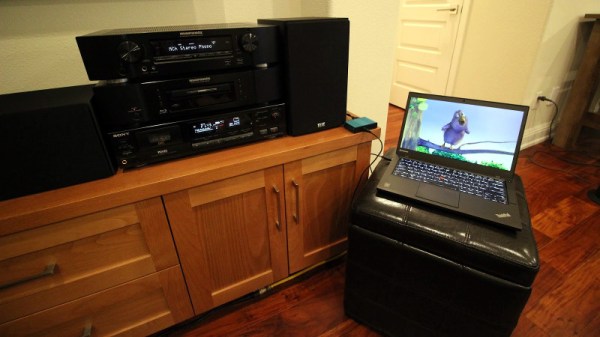
[Andrew]’s hack involves using the SPDIF digital interface on his Sony DAT player to carry compressed video data. SPDIF is a mature and well-understood standard that he calculated has a bandwidth of 187.5 kB/s, plenty to carry HD video using the H.265 compression scheme. The SPDIF data is brought into the computer via a USB sound card, and from there his software could either stream or retrieve the video. The stream is encoded into frames following the RFC1662 format to ensure synchronization, and he demonstrates it in the video below with a full explanation.

Continue reading “DAT, The HD Video Tape Format We Never Knew We Had”

Flying Convenience Not So Convenient

It’s a situation that plays out every day, all over the world – you walk into work, and there’s a full-scale foam toilet sitting on the bench, demanding to be used in a crackpot project. This time, it happened to be at the [FliteTest] workshop, and naturally, they set about making it fly.

The team at [FliteTest] are well resourced, with a laser cutter being used to quickly produce a set of custom foam board wings. However, after wing failures on their previous projects, this time the team opted for a riveted aluminium wing spar to add strength. A twin-boom tail is used to try to avoid the cistern from interfering with airflow over the elevator, and careful attention is paid to make sure the center of gravity is in the right position for stable flight.

Despite the team’s laudable efforts, the toilet (somewhat unsurprisingly) flies like crap. It just goes to show, you can strap a brushless power system on to just about anything, but aerodynamics will still be standing ready to bring it all crashing down to Earth.

We’ve seen some great builds from [FliteTest] over the years – before the throne, it was an IKEA chair that soared amongst the clouds. Video after the break.

[Thanks to Baldpower for the tip!] Continue reading “Flying Convenience Not So Convenient”

Charging LiPos With USB Power Delivery

DC power bricks were never a particularly nice way to run home electronics. Heavy and unwieldy, they had a tendency to fall out and block adjacent outlets from use. In recent years, more and more gadgets are shipping with USB ports for power input. However, power over USB has always been fraught with different companies using all manner of different methods to communicate safe current limits between chargers and hardware.

These days, we’re lucky enough to have the official USB Power Delivery standard in place. Even laptop chargers are using USB now, and [FPVtv DRONES] decided to see if it was possible to use such a device as a high current power supply to charge batteries.

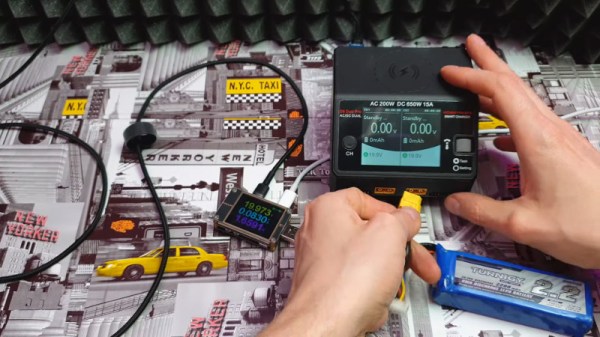
The test starts with a MI brand USB C laptop charger. A USB power meter is plugged inline to determine voltage and current output of the charger, while a small microcontroller device is used to speak with the laptop charger and set it to high voltage, high current delivery mode. A lithium battery charger is then plugged in, and the setup is tested by charging two large 4-cell LiPos at over 1.4 amps concurrently.

The setup demonstrates that, with the right off-the-shelf modules, it’s possible to use your laptop charger to run high-current devices, as long as you can spoof it into switching into the right mode. This is the natural evolution of USB power technology – a road which started long ago with projects like the MintyBoost, way back when. Video after the break.

Continue reading “Charging LiPos With USB Power Delivery”

The PC Speaker Lives On As A New Album

The speaker in the original IBM PC is nearly the worst electronic musical instrument ever created. This isn’t because amazing works of art were never created for the PC speaker; no, that’s been done, and it’s amazing. The PC speaker is terrible because of how limited it is. It does one note at a time, only square waves, driven by an 8253 Programmable Interval Timer. Polyphony? Forget about it. Volume control? Nope. These aren’t really shortcomings, because music is art, and you can write a novel without using the letter ‘E’; the trick is in how you manage to do it.

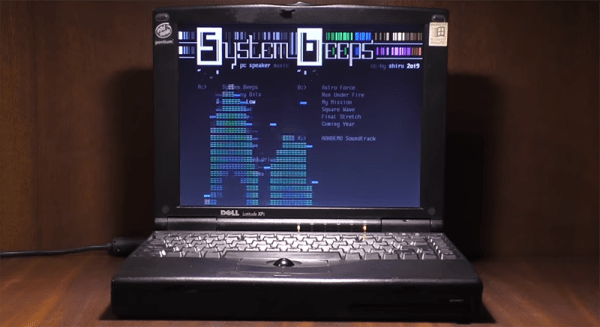
[shiru8bit] took a deep dive into the PC speaker and decided to make an album. The video, with the completely necessary CRT graphic display, can be seen here. This alone is impressive, but what makes it amazing is how this album happened.

If you want to play more than a simple melody on a PC speaker, there are two or two and a half ways to do it. The first is to (virtually) set up two (or more) channels, loaded up with frequency values. At set intervals, the CPU changes the 8253 to output one frequency, then in the next chunk of time, sets the 8253 to another frequency. It sounds ‘bubbly’ for lack of a better term, but the results can be amazing; just check out the PC speaker version of Monkey Island. The 8253 can also be turned into a rudimentary DAC, but this was a rare technique thanks to patents, and by the time the patents expired everyone already had a Soundblaster. Oh well.

[shiru8bit]’s album uses the first technique, cycling through monophonic square waves at 120 Hz, but the real trick here is how the individual channels were composed. This required creating a VSTi plugin called PCSPE. This emulates a PC speaker, and sort of, kind of, implements arpeggios, pitch, and priority of different channels. Effectively, it’s a PC Speaker tracker.

The result is classic chiptune goodness, made on an instrument that really shouldn’t be used for music. It can be played on DosBox, but the weirdness of the real hardware including transients and the inefficiencies of a tiny speaker make real hardware almost a necessity here. You can check out the entire album below.

Continue reading “The PC Speaker Lives On As A New Album”

Art Deco Control Panel Looks Out Of Metropolis

Bakelite, hammertone gray finish, big chunky toggle switches, jeweled pilot lights – these are a few of [Wesley Treat]’s favorite retro electronics things. And he’ll get no argument from us, as old gear is one of our many weak spots. So when he was tasked by a friend to come up with some chaser lights for an Art Deco-themed bar, [Wesley] jumped at the chance to go overboard with this retro-style control panel.

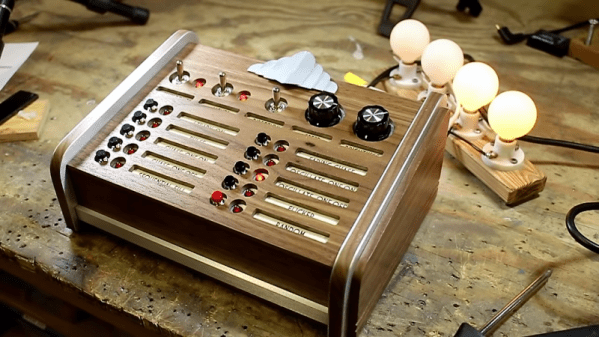
Granted, the video below pays short shrift to the electronics side of this build in favor of concentrating on the woodworking and metalworking aspects of making the control panel. We’re OK with that, too, as we picked up a ton of design tips along the way. The control panel is all custom, with a chassis bent from sheet aluminum. The sides of the console are laminated walnut and brushed aluminum, which looks very chic. We really like the recessed labels for the switches and indicators on the front panel, although we’d have preferred them to be backlighted. And that bent aluminum badge really lends a Chrysler Building flair that ties the whole project together.

All in all, a really nice job, and another in a long string of retro cool projects from [Wesley]. We recently featured his cloning of vintage knobs for an old Philo tube tester, and we’ll be looking for more great projects from him in the future.

Continue reading “Art Deco Control Panel Looks Out Of Metropolis”

Raspberry Pi Revives Stand-Alone DivX Player

It might seem almost comical to our more fresh-faced readers, but there was a time when you could go into a big box retailer and purchase what was known as a “DivX Player”. Though they had the outward appearance of a normal DVD player, these gadgets could read various digital video file formats off of a CD-R or DVD-R, complete with rudimentary file browser. Depending on how much video compression you could stomach, a player like this would allow you to pack an entire season of a show or multiple movies onto a single disc. Before we started streaming everything online, that was kind of a big deal.

Room to grow.

[Roberto Piva] got his hands on one of these early digital media players, a KiSS DP-500 circa 2003, and decided that it was too unique to send off to the recycling center. Not only was he curious about what made it tick, but he thought it would be interesting to try converting it into a Raspberry Pi powered streaming media player. One might say there’s something almost perverse about taking the carcass of one of these devices and stuffing it full of the same technology that made it obsolete in the first place, but who are we to judge?

Upon opening the vintage set top box, [Roberto] was immediately struck by how empty the thing was. He got the impression the device was a rush job, pushed out to capitalize on a relatively short-lived trend. Looking at it, we have to agree. It’s almost as though they got a deal on some old VCR chassis laying around in a warehouse someplace and decided to stick some (at the time) modern electronics in it. It even uses what appears to be a standard IDE optical drive rather than something purpose built.

[Roberto] hoped that he could tap into the player’s original power supply, but upon testing found that it wasn’t quite up to the task to reliably running a modern Pi. So into the cavernous enclosure went a powered USB hub, which he wired up to the original power switch on the player’s front panel. The original PSU couldn’t handle the Pi, but it does work nicely to spin up an IDE hard drive that he mounted to the top of the optical drive with zip ties.

This was enough to get a nice Kodi set top box that’s capable of pulling media from the Internet or the internal HDD, but [Roberto] has more plans for the future. He wants to try and get the optical drive working through a USB-to-IDE adapter so the device can come full circle and once again play burned discs full of video files, and mentions he would like to reverse engineer the front panel and IR receiver to control Kodi.

While this isn’t the first time we’ve seen a DVD player get an internal Raspberry Pi, the fact that this one is using an IDE drive is an interesting spin and should make for a very clean final product. We’ve also seen how integrating the original physical controls can really help sell the experience with these Pi-infused players. If you’ve got the space in your entertainment for one of these early 2000’s leviathans, they might make an ideal base for your own Pi set top box build.

OptoGlitch Is An Optocoupler Built For Distortion

When we are concerned with the accurate reproduction of a signal, distortion and noise are the enemy that engineers spend a great deal of time eliminating wherever possible. However, humans being the imperfect creatures that we are, we sometimes desire a little waviness and grain in our media – typically of the analog variety, as the step changes of digital distortion can be quite painful. Tired of Instagram filters and wanting to take a different approach, [Patrick Pedersen] built the OptoGlitch – a hardware solution for analog distortion.

Changing the number of samples per pixel varies the accuracy of reproduction of the original image, left.

The concept of operation is simple – pixel values of a digital image are sent out by varying the intensity of an LED, and are then picked up by a photoresistor and redigitized. The redigitized image then bears a variety of distortion and noise effects due to the imperfect transmission process.

In the OptoGlitch hardware, the LED and photoresistor are intentionally left open to ambient light to further allow noise and distortion to happen during the transmission process. A variety of calibration methods are used to avoid the results being completely unrecognizable, and there are various timing and sampling parameters that can be used to alter the strength of the final effect.

It’s possible to introduce distortion more intentionally, too – such as this project that hides metadata in malformed glyphs.