Tech In Plain Sight: Field Guide To Power Plugs

It is the bane of worldwide travel: there isn’t just one way to get AC power from the wall. The exact connector — and what you can expect when you plug in — differs from country to country. Even if you stay home, you must account for this if your designs go places and expect to plug into the wall. If you’ve ever looked at a universal adapter, it is full of prongs and pins like a metallic porcupine. Where do all those pins go?

Of course, there are some easy ways to sidestep the whole issue if you don’t need AC power. Much low-power gear now just provides a USB or barrel connector. Then you can use an area-appropriate adapter or charger to power your device. Batteries work, too. But if you need to plug in, you will run into other kinds of plugs.

Switching power supplies have helped. In the old days, many things expected either 125V or 250V and didn’t work with the opposite voltage. Switching power supplies often allow a wide input range or have a switch to select one range or the other. These two voltages will cover almost any situation. If you have something that must have one voltage or the other, you’ll need a transformer — also called a converter — to step the voltage up or down. But most often, these days, you just need an adapter. There are slight variations. For example, some countries supply 100V or 110V, but that usually doesn’t make much difference. You also need to understand if your equipment cares if the AC is 50 Hz or 60 Hz.

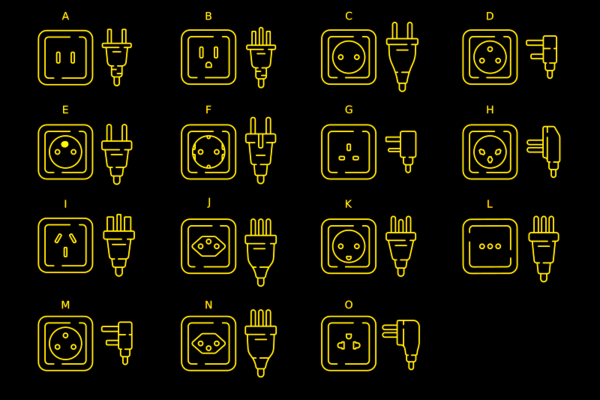
Most of the power sockets you’ll find around the world will fall into one of several categories. The categories range from A to N. Even among these, however, there are variations.

Type A

For example, the common type A plug and socket are what Americans call “two prong.” If you live in the US, you’ve probably noticed that the plug is polarized. That is, one pin is slightly wider than the other so the plug can only go in one way. The wide pin is connected to the circuit neutral. The maximum load for this connector is 15A. It is difficult to find type A sockets anymore, other than on cheap extension cords or things like lamps that pass through their electrical connections to a second socket. Type B is far more common and type A plug will fit in a type B socket.

Continue reading “Tech In Plain Sight: Field Guide To Power Plugs”

Signed Distance Functions: Modeling In Math

What if instead of defining a mesh as a series of vertices and edges in a 3D space, you could describe it as a single function? The easiest function would return the signed distance to the closest point (negative meaning you were inside the object). That’s precisely what a signed distance function (SDF) is. A signed distance field (also SDF) is just a voxel grid where the SDF is sampled at each point on the grid. First, we’ll discuss SDFs in 2D and then jump to 3D.

SDFs in 2D

A signed distance function in 2D is more straightforward to reason about so we’ll cover it first. Additionally, it is helpful for font rendering in specific scenarios. [Vassilis] of [Render Diagrams] has a beautiful demo on two-dimensional SDFs that covers the basics. The naive technique for rendering is to create a grid and calculate the distance at each point in the grid. If the distance is greater than the size of the grid cell, the pixel is not colored in. Negative values mean the pixel is colored in as the center of the pixel is inside the shape. By increasing the size of the grid, you can get better approximations of the actual shape of the SDF. So, why use this over a more traditional vector approach? The advantage is that the shape is represented by a single formula calculated at many points. Most modern computers are extraordinarily good at calculating the same thing thousands of times with slightly different parameters, often using the GPU. GLyphy is an SDF-based text renderer that uses OpenGL ES2 as a shader, as discussed at Linux conf in 2014. Freetype even merged an SDF renderer written by [Anuj Verma] back in 2020. Continue reading “Signed Distance Functions: Modeling In Math”

The UK’s ST40 Spherical Tokamak Achieves Crucial Plasma Temperatures

As the race towards the first commercially viable nuclear fusion reactor heats up, the UK-based Tokamak Energy has published a paper on its recent achievements with its ST40 spherical tokamak. Most notable is the achieving of plasma temperatures of over 100 million Kelvin, which would put this fusion reactor firmly within the range for deuterium-tritium fusion at a rate that would lead credence to the projection made by Tokamak Energy about building its first commercial fusion plants in the 2030s.

The ST40 is intended to provide the necessary data to construct the ST80-HTS by 2026, which itself would be a testing ground for the first commercial reactor, called the ST-E1, which would be rated at 200 MWe. Although this may seem ambitious, Tokamak Energy didn’t come out of nowhere, but is a spin-of of Culham Centre for Fusion Energy (CCFE), the UK’s national laboratory for fusion research, which was grounded in 1965, and has been for decades been involved in spherical tokamak research projects like MAST and MAST-Upgrade, with STEP as its own design for a commercial fusion reactor.

The advantage offered by spherical tokamaks compared to regular tokamaks is that they favor a very compact construction style which puts the magnets very close to the plasma, effectively making them more efficient in retaining the plasma, with less power required to maintain stable plasma. Although this makes the use of super-conducting electromagnets not necessary, it does mean that wear and tear on these magnets is significantly higher. What this does mean is that this type of tokamak can be much cheaper than alternative reactor types, even if they do not scale as well.

Whether or not Tokamak Energy will be the first to achieve commercial nuclear fusion remains to be seen. So far Commonwealth Fusion’s SPARC and a whole host of Western and Asian fusion projects are vying for that gold medal.

A Miniature MNT For Every Pocket

Last time Hackaday went hands on with a product from German company MNT, it was the Reform laptop; a full size computer with a full feature set and fully open source design. Now they’re back with the same value proposition and feature set crammed into a much more adorable (and colorful!) package with the MNT Pocket Reform. If you want the big Reform’s open source philosophy in a body fit for a coat pocket, this might be the computing device for you.

To refresh your memory, MNT is a company that specializes in open source hardware and the software to support it. They are probably best known for the Reform, their first laptop. Its marquis feature is a fully open design, from the mechanical components (designed with OSS tools) to the PCBAs (designed with KiCad) to the software (designed with, uh, software). When originally shipped that product packed a DIMM-style System On Module (SOM) with a default configuration containing a quad core NXP i.MX8M Quad and 4GB of RAM, as well as mini PCIe Card and M key m.2 2280 slots on the motherboard for storage and connectivity. That computer was designed to be easily serviceable and included a plethora of full sized ports along with easy to source cylindrical battery cells. The Pocket Reform takes the same intent and channels it into a much smaller package.

Continue reading “A Miniature MNT For Every Pocket”

The Real John Wick-Style Bullet Proof Suit

If you’ve seen the John Wick movies, you’ve probably had to suspend your disbelief about many things, but the bulletproof suits are perhaps the hardest thing to swallow. They look like stylish suits but are impervious to just about anything at any range. What’s more is when you are hit, they seem to absorb all impact with no effect on the wearer at all.

You can keep running, firing, or karate kicking while the suit takes all of the bullets. You can even pull your jacket up over your face if you want to protect that million-dollar smile. Physics, of course, tells us that a suit like this is pretty much impossible. Except that they actually exist. Granted, the real-life suits don’t have the magic physics-defying powers of Mr. Wick’s suit, but if you have the cash, you can get a smart-looking suit that protects you from getting killed by a bullet.

Real Life, Part I

In the movies, the suits supposedly have Kevlar in them just like a real piece of ballistic body armor. The problem is, Kevlar is bulky. However, most of the real body armor you see — like a vest on a SWAT team operative — is made from Kevlar or similar ballistic fibers like Twaron, Goldflex, or Dyneema. They also have plates made of metal or ceramic. Continue reading “The Real John Wick-Style Bullet Proof Suit”

Share Your Projects: Take Pictures

Information is diesel for a hacker’s engine, and it’s fascinating how much can happen when you share what you’re working on. It could be a pretty simple journey – say, you record a video showing you fixing your broken headphones, highlighting a particular trick that works well for you. Someone will see it as an entire collection of information – “if my headphones are broken, the process of fixing them looks like this, and these are the tools I might need”. For a newcomer, you might be leading them to an eye-opening discovery – “if my headphones are broken, it is possible to fix them”.

There’s a few hundred different ways that different hackers use for project information sharing – and my bet is that talking through them will help everyone involved share better and easier. Let’s start talking about pictures – perhaps, the most powerful tool in a hacker’s arsenal. I’ll tell you about all the picture-taking hacks and guidelines I’ve found, go into subjects like picture habits and simple tricks, and even tell you what makes Hackaday writers swoon!

To start with, here’s a picture of someone hotwiring a car. This one picture conveys an entire story, and a strong one.

Continue reading “Share Your Projects: Take Pictures”

Retrotechtacular: Voice Controlled Typewriter Science Project In 1958

Hackaday readers might know [Victor Scheinman] as the pioneer who built some of the first practical robot arms. But what was a kid like that doing in high school? Thanks to a film about the 1958 New York City Science Fair, we know he was building a voice-activated typewriter. Don’t believe it? Watch it yourself below, thanks to [David Hoffman].

Ok, we know. Voice typing is no big deal today, and, frankly, [Victor’s] attempt isn’t going to amaze anyone today. But think about it. It was 1958! All those boat anchor ham radios behind him aren’t antiques. That’s what radios looked like in 1958. Plus, the kid is 16 years old. We’d say he did pretty darn good!

Continue reading “Retrotechtacular: Voice Controlled Typewriter Science Project In 1958”