KiCad Video Series: From Concept To Manufacture

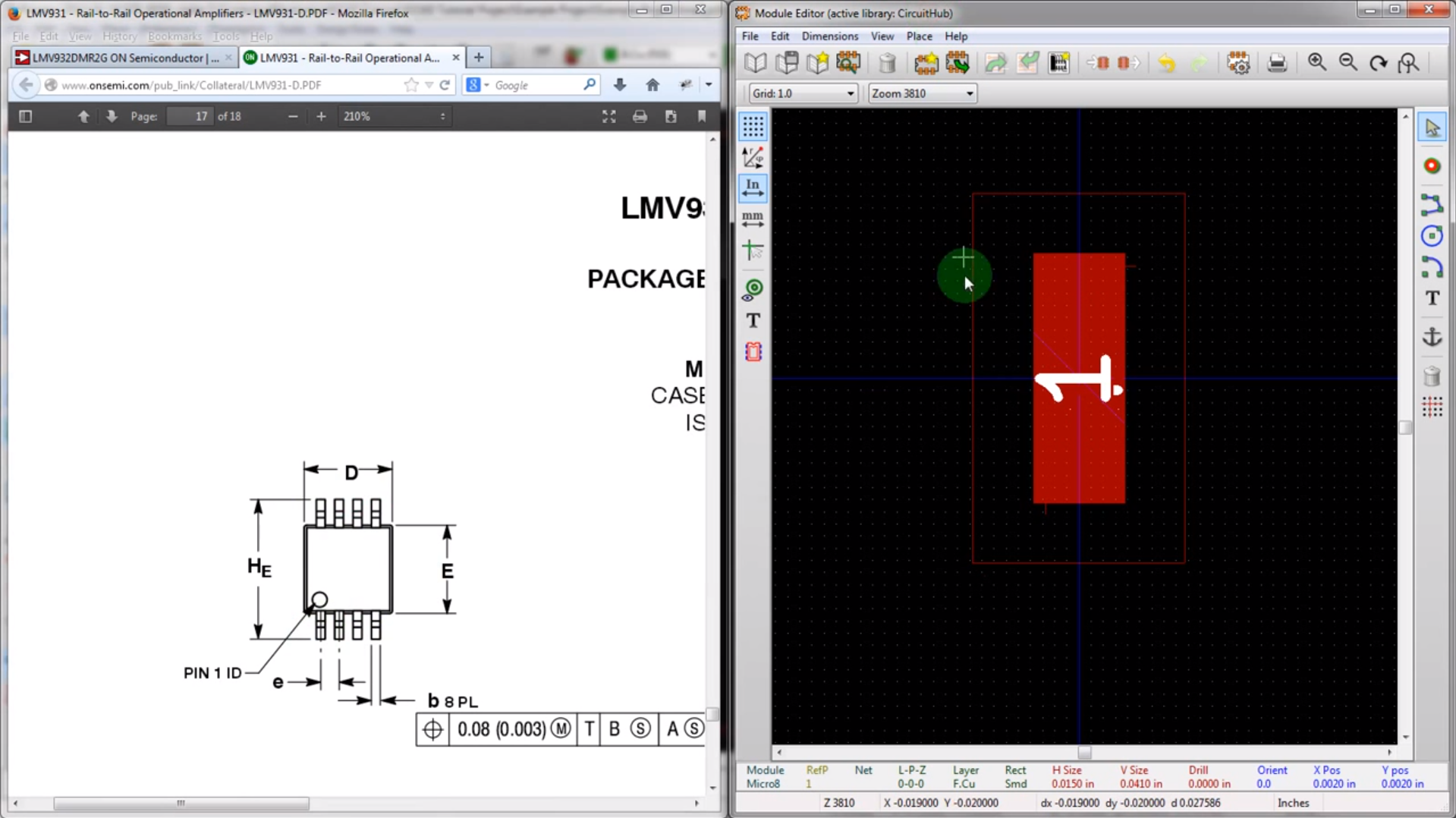
Many of our readers took the habit of using Eagle to design their PCBs. Even if you’ll find plenty of support for this software as well as a lot of parts libraries, the software comes with limitations. The useable board area is limited to 4×3.2 inches, only two signal layers can be used and more importantly the schematics editor can only create one sheet. On the other side, some of you may already know KiCad, a free open source and unrestricted schematics and layout software. [Chris] just tipped us of a video series he made, showing people how to design and build their very first PCB using this software. It’s a simple 555 circuit, but goes through all the steps necessary to design a PCB that costs only $5 through OSHpark… and will blink by the end. All the videos are also embedded after the break.

Continue reading “KiCad Video Series: From Concept To Manufacture”
DIY Doggy Doorbell

doggy doorbell

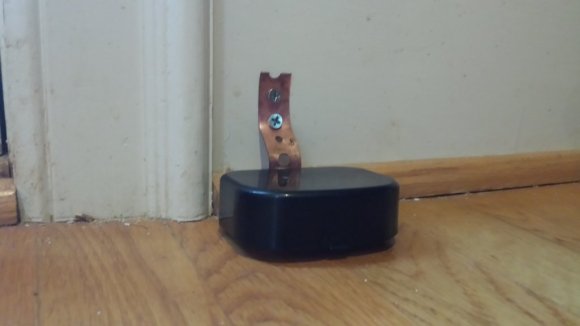
Is your dog the strong silent type? Ever wish he or she could tell you when it is time to go do their business? This Reddit r/DIY user found a simple solution — a doggy doorbell!

The dog in question isn’t very vocal, so his owner sought a simple solution, similar to Pavlov’s bells — the only problem? He needed some range on it, as you can’t always hear a few bells throughout the entire house. The solution? A wireless doorbell that he repackaged into a dog friendly button!

Compared to our last post on an automatic pet watering system, this one is a very simple hack that requires absolutely no electrical experience. It could be improved upon quite easily though, by wiring a second switch in parallel so the dog can ring the doorbell from the outside of the house too!

According to the owner, it only took a few treats to get the pooch trained well enough to use it whenever he needs to go out!

[Via Reddit]

DIY Pneumatic Skeleton And Air Horn Gag To Scare Those Trick-Or-Treaters

Horn_Skeleton_Gags

[Rick Osgood] has been busy making more scaring gags for Halloween. This week he’s sharing great ideas for an air horn and pneumatic jumping skeleton, both actuated by 24 V sprinkler valves. These two new gags can easily be activated using [Rick’s] cardboard floor plate switch and three 9 V batteries cleverly snapped together in series for a 27 V supply (we can’t resist dropping in this link to a 2196 V supply from 9 V batteries just for fun).

The air horn construction is quite unique using a latex balloon strategically located as a reed valve for the air to vibrate over as it rushes out making a very loud honking sound. [Rick] then connected his manual bicycle pump to an air supply so that when an air valve is actuated the bicycle pump handle with a skeleton wired to it pops up. It then lowers back down via a bleed hole in the air line. Both the air horn and pneumatic pop-up skeleton seem simple to construct and his tests show them functioning perfectly.

Being the air storage chambers are small the re-trigger setup seems too repetitive to be practical for a continuous stream of Trick-Or-Treaters. Perhaps one could hide an air compressor with a long feed line to supply the gags? Plus, using an air compressor would come in handy for other scary blasts of air. Of course you would want to lower the compressor’s output regulator to safe levels so you don’t risk blowing apart your pop-up skeleton rig or any pipes.

Follow along after the break to see how to build these two great gags and get some tips from Mr. Safety.

Continue reading “DIY Pneumatic Skeleton And Air Horn Gag To Scare Those Trick-Or-Treaters”

Build A Sensorless Brushless DC Motor Controller

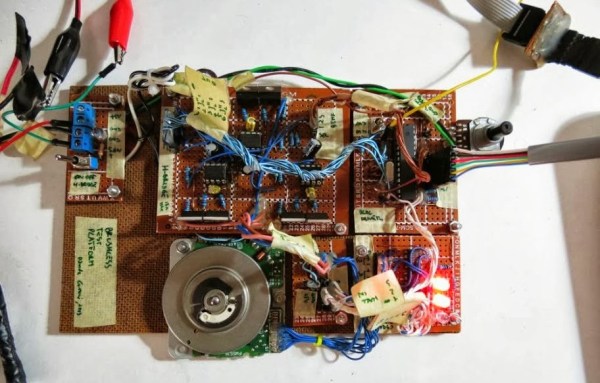
[Davide Gironi] shows us how to implement a sensorless brushless DC motor controller (sensorless BLDC) using an ATmega8 microcontroller. In order to control a BLDC motor you need to know its rotational sequence position and speed so you can calculate and apply the correct current phase sequence to the motor windings at just the right time.

Simply said, sensorless BLDC means you’re not using a purpose built sensor to determine the motor’s position and speed, however, you are sensing the motor’s sequence position using the back EMF signal coming from one of motor’s coils that is not currently receiving power. When this back EMF signal crosses zero voltage a microcontroller can calculate the rotational speed and when to switch to the next power sequence. This technique is not good for position control motors but is great for continuous motors like computer fans and drives were the slightly reduced wiring costs make this type of BLDC control favored.

If you want to build a BLDC controller we recommend starting with [Davide’s] last project on sensor controlled BLDC motors. You can also checkout these interactive demonstrations for more understanding on the different BLDC configurations.

Follow along after the break to watch the video demonstration of [Davide’s] sensorless BLDC controller controlling a motor from CD-ROM drive.

Continue reading “Build A Sensorless Brushless DC Motor Controller”

DIY HHO Mini Torch

Fascinated by hydrolysis apparatuses? Me too. Here’s a cool how-to that might convince you to make one! It’s a very simple and easy to build HHO torch using plumbing parts from the hardware store.

The entire build uses almost all standard readily available parts — except for the nozzle assembly. It’s an easy modification though, under the copper pipe endcap is a brass M6 nut that has been soldered in place – this allows you to switch out the MIG welding tips at any time.

[Peter] also shows off another useful tip that allows you to reduce the orifice size of the MIG welding tip – simply hammer a ball bearing into it. Seriously, check out the Instructable and see for yourself! This allows him to reduce the orifice size down to non-standard sizes which in turn allows him to increase the intensity of his HHO flame.

Now all you need is a source of HHO — but don’t worry, we’ve covered that before too!

[via Reddit]

GuruBrew’s 15 Minute Windows 8 Survival Guide

GuruBrew Windows 8 Survival Guide

One thing very common to all of us is our reliance on operating systems in our hobby life. If that OS is Windows then you could be in for quite a shakeup with Windows 8. Many readers are Linux or Apple users and couldn’t care less if Microsoft is releasing an entire paradigm shift in desktop navigation. However, you just might find yourself facing this new OS and you’ll look like you’re on training wheels if you don’t get acquainted now, and considering the number of computers being released with Windows 8 its inevitable that day will come soon.

So if you haven’t been behind the wheel of Windows 8 then checkout [Steve’s] Windows 8 Survival Guide from the Guru Brew Tech Show. This is an excellent overview of the new touch screen navigation methods you’ll find in the Windows 8 desktop including hotspots, charms and tiles to name just a few. You’ll also learn tips to get around with a mouse and keyboard. It’s not a complete tutorial on using Windows 8 but you’ll at least know how to navigate, search for apps, work with multiple apps and find tools like task manager, control panel, file explorer as well as your familiar desktop.

Follow the break to watch the short survival guide video.

Continue reading “GuruBrew’s 15 Minute Windows 8 Survival Guide”

Talkbot: An Arduino-driven Robot For Beginners

talkbotguts

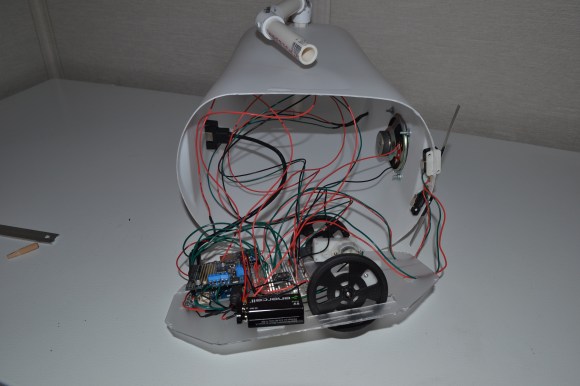
It isn’t exactly WALL-E, but [Bithead’s] affordable introduction to robots — Talkbot — is made out of a trash can. This little guy runs off an Arduino and comes packed with features, including a voice chip, a motor shield, and a pair of bump sensors. Talkbot will cruise around until a bump sensor slams into an obstacle. One of his prerecorded messages will then play through the speaker while he backs up, turns, and tries to find a clearer path.

According to [Bithead’s] build log, tracking down the right bargain voice chip was a bit of a hassle; he skipped over the text-to-speech options only to be stalled by vendor issues. He finally settled on a clone of Sparkfun’s WTV020SD chip sourced from eBay, which allows you to access pre-recorded WAV files stored on a Micro-SD card. The robot’s body comes straight off the hardware store shelf, with PVC pipe for arms and a polystyrene base to hold all the parts.  At the bargain price of $110, [Bithead’s] students will have a true hacker experience cobbling the Talkbot together rather than using a prefab kit.

Be sure to see Talkbot  in a video below, performing either his green-eyed “friendly mode” or red-eyed “grumpy mode,” which dictates how pleasantly he responds to obstacles. Need something more advanced? Check out the tentacle robot, just in time for Halloween.

Continue reading “Talkbot: An Arduino-driven Robot For Beginners”