How Low Can You Go?

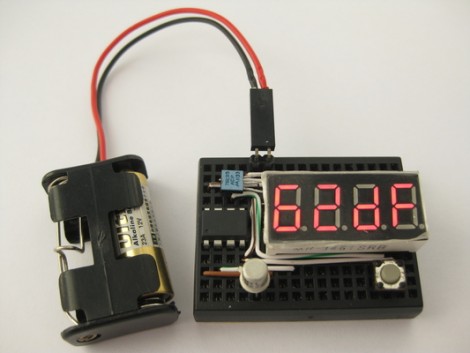
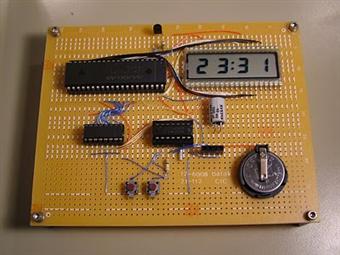
That’s exactly what [Kenneth Finnegan] figured out with his original investigation into low powered MSP430-based circuits. He was able to keep a count-up timer running off of 20F worth of capacitors for over 10 weeks. Although quite impressive by its own merit, many people left comments that questioned whether similar results would be seen in a circuit with functionality more advanced than simply incrementing a single digit on an LCD. Well folks, [Kenneth] has stepped it up again with this ultra low power LCD clock.

The biggest challenge in creating this clock was finding an efficient way to drive the 28 LCD segments off of the limited number of pins on his MSP430G2231 chip while still having open pins for button inputs as well. An ICM7211 LCD driver is definitely up for the task (with a few clever modifications to drive the auxiliary characters such as the center colon), but requires 8 pins to drive it. A standard 74HC595 latching shift register brings this number down to a more manageable number of 3 total pins.

Once completed the total current consumption was found to be around 12μA – low enough for a claimed run-time of approximately two and a half years from the 3V 200mAh CR2032 coin cell used. If true, a set of standard AA alkaline cells in series as found in many clocks would run this little circuit for decades.

Stick around for a short video after the break and make sure to check out the original blog entry for schematics and the complete source code!
Continue reading “How Low Can You Go?”

Sequencer Built On A Cycle II FPGA Board

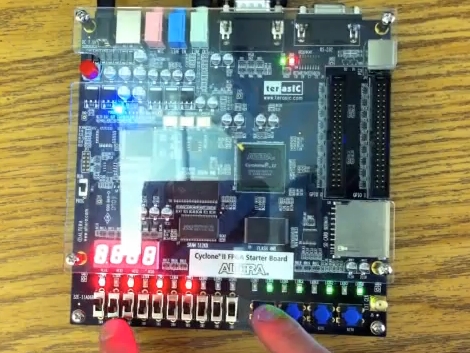
[Matt’s] finishing up his computer science degree. As part of a class assignment he programmed his own sequencer which runs on a Cyclone-II FPGA development board. We’ve embedded a video below the fold that shows you what it can do. The buttons and LEDs offered on the board actually allowed him to create a nice user interface. Each slide switch has a surface mount LED above it, giving feedback for which beats in the loop are on and off. There’s also a bank of momentary-push buttons seen in blue above. [Matt] uses these to tweak settings like the pitch that is stored for each slide switch. He even puts on a light show with the VGA output.

We’ve seen this Altera board before, used to drive a falling sands game. The hardware will run you around $200 but that’s not bad considering all of the fun things you can do with it.

Continue reading “Sequencer Built On A Cycle II FPGA Board”

Simulating VHDL Of An AVR8 Soft Processor

Okay, now we’re beginning to feel a bit like [Alice]. This tutorial shows you how to simulate VHDL code. This code is intended to run on an FPGA and includes a software-only version of the AVR 8-bit microcontroller core. Essentially, you’ll simulate VHDL code that simulates AVR hardware. Wrap your mind around that!

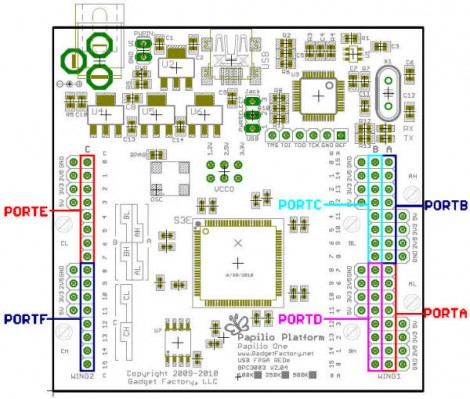
The code is intended to run on a Papilio Field Programmable Gate Array development board. We saw an early version of this board running the AVR8 core about a year ago. However, you don’t need to have any hardware to follow along and recreate this simulation yourself. It might be a great way to get your feet wet with FPGA programming before making that first hardware buy. Five different screencasts take you through the process of getting the AVR8 code, using an altered Arduino IDE for it, setting up a free version of Xilinx ISE to run the simulation, then setting it free and interpreting the data that the simulator spits out the other end.

AVR HVSP On A Tiny Breadboard

AVR chips are convenient because you can program them in circuit at their operating voltage. That is, unless you screw up the fuse settings and they’ll no longer listen to an In System Programmer. If you find yourself facing this problem, just build this circuit on a breadboard and ‘unbrick’ by holding down the button.

The circuit seen above is a High Voltage Serial Programmer. This is one of two high voltage protocols used by AVR chips; HVSP is for chips that don’t have enough pins to use High Voltage Parallel Programming. This rendition uses a 12V power source, which is the level necessary for the high voltage method. A 7805 linear regulator joins the mix to provide operational voltage, along with one transistor, an ATtiny2313 to control the circuit, a four-digit 7-segment display for feedback, and one button for control.

Watch the video after the break to see an ATtiny13 programmed to disable the reset pin using a breadboarded programmer. That chip is then easily rescued, having been automatically recognized by using its device signature.

Continue reading “AVR HVSP On A Tiny Breadboard”

Keep Fun In Check With A Parental Count Down Timer

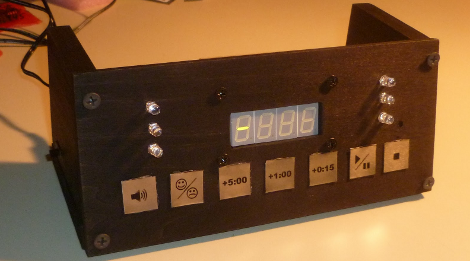
Gaming industry software engineer [Pedantite] writes in to let us know about his latest endeavor, an AVR based parental assistant timer: Good Times.   Looking for a new project that would be both useful and interesting, his wife suggested a “time out/ time’s up timer”. Like most of us [Pedantite]’s children are well studied in the arts of procrastination and mischief.  In the kids’ case this leads to time outs and break time running amok. The solution, in this case, is pretty much an advanced DIY egg timer with fun sounds.

The timer sports all of your basic countdown-timer functions including a 4 digit 7-segment LED output display, stop light style LED indicators, and controls to start/pause and stop the count down. The count down time can be input via the +5 minute, +1 minute, and +15 second buttons. There is even a happy/sad button to toggle between “time out” and “break time” modes. Two Atmel micros power the device, an AT Tiny 2313V for the capacitive touch keypad and an AT Mega 644P for the display, audio, and time measurement.  There are a lot of excellent techniques used in the build, some which we have covered here:  Four 595 Shift registers for the display; A 4 bit r2r DAC for audio output.

[Pedantite] is still in the process of writing up the project in multiple posts, and would love to know what you all want to hear about. Check out his blog for details and a quick video of the timer in action! Also, if you are interested in capacitive buttons, check out part 2 of the writeup.

Power-sipping MSP430 Mini Alarm Clock

msp430_alarmclock

[Markus] had a TI MSP430 sitting around from the LaunchPad kit he bought a while back. He didn’t know what to do with it, but eventually decided that it would make a great miniature alarm clock.

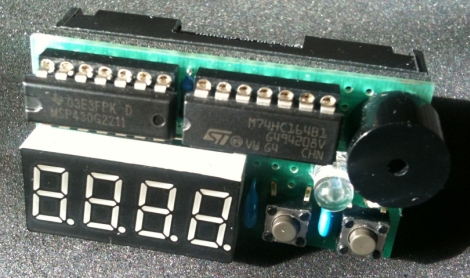
He added a shift register to the mix in order to drive his 7-segment LCD display, using two of the MSP430’s output pins in the process. Four more pins were tied to the display’s cathodes, while the remaining two pins are connected to push buttons which register user input.

He crammed the clock’s logic as well as an alarm tune into the chip’s scant 2KB of memory space, literally occupying everything up to the last available byte. The clock is quite a power-miser, using just 2 µA in standby mode. According to [Markus’] calculations, that should enable the clock to use one set of batteries for 10+ years.

While this isn’t the first MSP430 clock we have seen, it certainly is the smallest and most simple.  Stick around to see a quick video of his clock in action.

Continue reading “Power-sipping MSP430 Mini Alarm Clock”

Propeller-Android Communications Using Debug Mode

Here’s a new way to connect an Android phone and a Propeller microcontroller. It’s called the PropBridge and uses a very simple circuit with a voltage regulator, a couple of transistors, and a few resistors. The trick to this method lies in creative use of software features that already exist on Android hardware, the Android Debug Bridge (ADB). The ADB was added with development in mind, but since it provides low-level control of certain parts of these devices it was just waiting to be incorporated into a hack.

The Propeller itself uses firmware to make Android think it is one of two different externally connected hardware devices. It can act like a PC running the ADB client or it can mimic a TCP connection. There’s still plenty of room on the uC to add your own firmware, and the majority of the I/O pins are unneeded for the basic connection. Check out the video after the break for a quick overview of the system.

If you need a little help with Android programming before you’re able to use this in your own projects, check out our Android development series.

Continue reading “Propeller-Android Communications Using Debug Mode”