Circuit Challenge: Two Transistor 3.3V Regulator

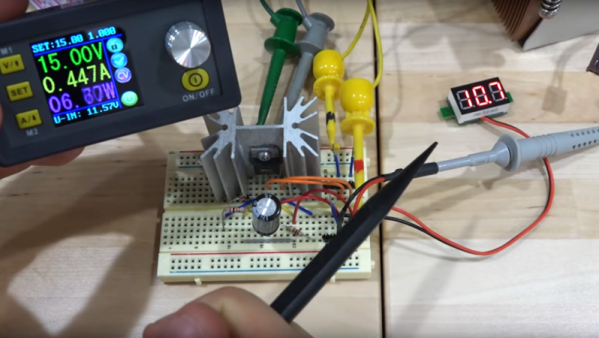
[Kevin Darrah] wanted to make a simple 3.3V regulator without using an integrated circuit. He wound up using two common NPN transistors and 4 1K resistors. The circuit isn’t going to beat out a cheap linear regulator IC, but for the low component count, it is actually pretty good.

In all fairness, though, [Kevin] may have two transistors, but he’s only using one of them as a proper transistor. That one is a conventional pass regulator like you might find in any regulator circuit. The other transistor only has two connections. The design reverse biases the base-emitter junction which results in a roughly 8V breakdown voltage. Essentially, this transistor is being used as a poor-quality Zener diode.

Continue reading “Circuit Challenge: Two Transistor 3.3V Regulator”

Why Wait? Just Plate Your Own PCB Vias

[Jan Mrázek] is a pro when it comes to rolling his own PCBs. He can crank out a 6/6 mil double-sided PCB in 45 minutes flat. As a challenge to his prowess, he decided to experiment with plating through-hole PCBs at home, because sometimes you just can’t wait for China to deliver the goods.

The key here is to make a non-conductive surface—the walls of holes drilled in a sheet of copper clad–conductive. While there are some established ways of doing this at home, the chemicals are difficult to source. When his local supplier started stocking colloidal graphite paint, which is used to prevent ESD and fix non-working remote control buttons, he decided to try it.

[Jan] drilled up a board with holes ranging from 0.1mm up to 8mm, polished it, and gave it an acetone bath. He sprayed each side with graphite and cured it at 100 °C for 20 minutes. At this point, wall hole resistance measured 21 Ω. [Jan] wet-sanded away the graphite and set up an electroplating bath. Right away, he could see a layer of copper forming on the holes. After 90 minutes, he polished the board again and separated the vias to prepare for the real test: solder. This time, every hole except the smallest size reported a resistance of 0.1 Ω. But they all sucked solder through the vias, making this experiment a success.

[Jan] concluded that this is a simple and effective process, but is rarely worth the effort. We wonder how the simplicity of this method compares to drilling wells instead of holes, filling them with conductive ink, and then drilling the rest of the via.

Via [Dangerous Prototypes]

Graphene Biosensors Are Extra Quiet

Graphene has attracted enormous interest for electrically detecting chemical and biological materials. However, because the super material doesn’t act like a normal semiconductor, transistors require multiple layers of the material, and that’s bad for 1/f noise especially when the transistors operate at maximum transconductance. Researchers have found a way to operate graphene transistors at a neutral point, significantly reducing 1/f noise while not impacting the sensor’s response.

The team created a proof-of concept sensor that could detect an HIV-related DNA hybridization. The sensor was able to detect very tiny concentrations of the material.

Continue reading “Graphene Biosensors Are Extra Quiet”

Making Braille Signs Out Of PCBs

[jg] recently passed some damaged Braille signs and took on the challenge of repairing them. Informed by his recent work on PCB lapel pins, [jg] immediately thought of using circuit boards for this project. He’d noticed that round solder pads made for uniform hills of solder, and this reminded him of the bumps in Braille.

He began by reading up on the standards of the Braille Authority of North America, which stipulates a dot height of 0.6mm. He loaded up the PharmaBraille font system and laid it out the dots in photoshop, then and imported it into KiCad and laid out the boards. When the PCBs had arrived from OSH Park, [jg] soldering up the pads (lead free, but of course) to see if he could get the hills to 0.6mm. He’s experimenting with different methods of melting the solder to try to get more even results.

Braille interfaces crop up a surprising amount in hacker projects. This refreshable Braille display and keyboard and the Braigo LEGO Braille printer are prime examples.

[thanks, Drew!]

Scratchbuilt Cryptex Would Make Da Vinci Weep

Here’s a fun fact, the kind of thing that you might (but we definitely did not) find out when writing a blog post: Dan Brown actually made up the cryptex for his book, The Da Vinci Code. We therefore have Mr Brown, with a bit of help from the filmmakers over at Sony, to thank every time we see somebody make their own version. To follow that line of logic to its conclusion, we believe you’ll agree that the following is without question the greatest thing Dan Brown has ever done in his life.

Created by [Stephen Peduto] as a ring box for an exceptionally lucky young lady, it required an estimated 127 hours to complete over the course of two months. From the incredible job [Stephen] did photographing and documenting the build, we don’t doubt it for a second. Expertly combing milled aluminum and lathe-turned bocote wood, this has got to be the most gorgeous ring “box” ever made.

Frankly, it’s hard to do justice to what [Stephen] has created in so short a space, and you really should browse through the 140+ images in his gallery. But the short version is that after some furious white board sketching, [Stephen] moved over to AutoCAD and then SolidWorks to design all the parts which would eventually get machined out of aluminum. As a very clever touch, he wisely added 17° slop in the locking mechanism so that the recipient wouldn’t fumble too much at the big moment.

When the machining was all said and done, [Stephen] then switched over to the woodworking part of the project. Rather than numbers or letters for a combination, this cryptex uses the grain pattern in the turned piece of wood. This gives the final product a more organic feel, while at the same time avoiding the head-scratching problem of getting the characters printed or engraved into the wheels.

Towards the end of construction there was a worrying moment when the newly made wooding rings warped so badly that the aluminum inserts would no longer fit. As a last resort, the rings were placed in a box with a humidifier for a week and slowly worked back into shape. [Stephen] says he’s still surprised it worked.

Even if some may argue that a cryptex is nothing but a prettied-up bike lock, people sure do love them. We’re no stranger to high quality cryptex builds here, though even mere mortals can play along if they’ve got a well calibrated 3D printer.

Water Slide + Ferris Wheel = SlideWheel

This might be German engineering at its funnest. [Wiegand Maelzer GmbH] have created a new type of amusement park ride that combines the thrill of a water slide with the gentle revolutions of a Ferris wheel.

Inspired by the wish of a young Swiss boy in 2012, the whimsical feat of engineering known as the SlideWheel was realized this year. This is isn’t quite the giant sloshing drowning machine it appears to be on first blush, though. It begins and ends at the same shallow pool, where three- and four-person rafts are lifted into the ride by conveyor belt. What happens next is difficult to describe. It’s easier just to watch the first-person video below that demonstrates the pendulum-like motion that comes from floating while rotating.

SlideWheel moves at a modest 3 RPM, though this can be adjusted. Travel speed through the tube maxes out at 40 KPH/ 25 MPH, but will vary depending on the raft’s location, the position of the wheel, and gravity. The ride can handle up to three rafts at a time and delight 720 people per hour. A trip through the tube lasts a mere two minutes, but all those who’ve tried it say the experience seems much longer. [Wiegand Maelzer] have already received a few orders and are working on a dry version for malls and indoor amusement parks.

Not enough of an engineering feat, you say? Here’s a car-juggling robot.

Continue reading “Water Slide + Ferris Wheel = SlideWheel”

Large hi-res pressure sensor mat

Hi-Res, Body-Sized Pressure Sensor Mat

Hackers often find uses for pressure sensitive materials, detecting footfalls during walking or keypresses in a synthesizer being two examples. [Marco Reps] decided he’d make a hi-res, body-sized pressure sensitive mat mainly for computer-guided physiotherapy, though he wouldn’t rule out using it for gaming (twister anyone?). That meant making the equivalent of a body-sized matrix circuit of around 7000 sensors, as well as a circuit board with a multitude of shift registers. The result has a surprisingly good resolution, capable of making clearly distinguishable the heel, arch and front part of a foot.

His choice of pressure sensitive material was Velostat, a polymeric foam available as large sheets. The foam is impregnated with carbon black to make it electrically conductive, but being a foam, its resistance changes when pressure is applied. The first layer of the mat is made up of one centimeter wide strips of copper tape laid out lengthwise and spaced one centimeter apart. That’s followed by the Velostat and then another layer of copper tape oriented horizontally this time. The pressure sensors are the sandwiches formed by where the tapes overlap. In the first video below he shows how he measured and graphed the Velostat’s dynamic range to help decide to use one centimeter squares. He also puts together a smaller prototype, with good results.

Testing the mat
Testing the mat

For the body-sized mat, we count around 50 by 140 overlapping areas for a total of around 7000 one square centimeter sensors. And of course to measure each sensor in that large matrix, as you can imagine, he made up a custom circuit board with shift registers. The board works by applying positive voltage to the columns one-by-one, while each time going through all the rows and reading their voltages. Making the board was in itself was an adventure, taking a chance on a Chinese manufacturer asking only $2. But watch the second video below where he evaluates the result, including trying unsuccessfully to delaminate a board. Sadly he forgot to include places on the board for diodes, one for each column, and fixing that is another adventure he walks us through. Patience was definitely a prerequisite here, not only for making the mat, and fixing the diode problem, but also for connecting up 96-pin ribbon cables. We applaud his efforts, and his results. Check out the second video below for the making of the large mat and the circuit board.

Continue reading “Hi-Res, Body-Sized Pressure Sensor Mat”