
Many of us have experienced the pain that is a Raspberry Pi with a corrupted SD card. I suspect the erase-on-write nature of flash memory is responsible for much of the problem. Regardless of the cause, one solution is to use PXE booting with the Raspberry Pi 3. That’s a fancy way to say we’ll be booting the Raspberry Pi over the network, instead of from an SD card.
What does this have to do with Hacking My House? As I discussed last time, I’m using Raspberry Pi as Infrastructure by building them into the walls of every room in my house. You don’t want to drag out a ladder and screwdriver to swap out a misbehaving SD card, so booting over the network is a really good solution. I know I promised we’d discuss cabling and cameras. Think of this as a parenthetical article — we’ll talk about Ethernet and ZoneMinder next time.
So let’s dive in and see what the Preboot Execution Environment (PXE) is all about and how to use PXE with Raspberry Pi.
Continue reading “Hack My House: Running Raspberry Pi Without An SD Card”



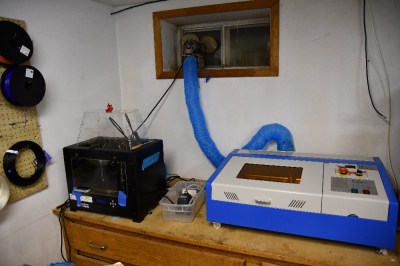 Over the last decade or so things have changed. China got involved, and suddenly there were cheap lasers on the market. Currently, there are several low-cost laser models available in various power levels. The most popular is the smallest – a 40-watt model, dubbed the K40. There are numerous manufacturers and there have been many versions over the years. They all look about the same though: A blue sheet metal box with the laser tube mounted along the back. The cutting compartment is on the left and the electronics are on the right. Earlier versions came with Moshidraw software and a parallel interface.