Building New Interfaces With An IPad

There’s a word – synchronicity – to describe two disparate events that occur together in a meaningful way. We see this a lot in the Hackaday tip line; two people send in somewhat similar hacks solving similar problems in similar ways nearly simultaneously. Here’s two builds by [Bryce] and [spektakx] that hit our inbox within minutes of each other that both implement existing interfaces with iPads.

iPad turntable controller

[spektakx] sent in an iPad powered DJ MIDI controller he built as a prototype to test out the size, orientation and layout for an upcoming build. The turntable controllers are simple USB affairs made to jog and scratch records digitally. Although [spektakx] admits it’s a little unfinished, it’s still just a prototype. Also, he can use a Windows 7 tablet laptop for ‘more suited’ hardware. Check out [spektakx]’ video demo after the break.

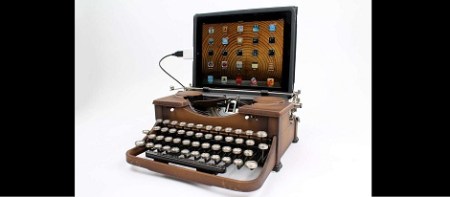
an iPad cash register

[Hacktheory] found [Bryce]’s Flickr photolog of a DIY ‘Square’ cash register. The electronics part of this build is practically non-existent; it’s just an iPad with a credit card readers that plugs into the headphone jack. Yes, we just saw these ‘Square’ credit card readers this last week. The fabrication portion of this build is incredible – [Bryce] has a few wonderful pieces of walnut there, and did an exceptional job with the wood work. It’s probably not well suited to high-volume retail, but we couldn’t think of a better cash register for a boutique shop.

Continue reading “Building New Interfaces With An IPad”

Miniaturized N64 Controller Fits The Tiniest Of Hands

n64-controller-mod

The controllers that came with the Nintendo 64 don’t exactly measure up to the “Duke” of Xbox fame, but they’re not the smallest in the world either. Made by Bacteria forum member [Bungle] says that his girlfriend has incredibly tiny hands, so he thought he might try trimming some of the fat from an N64 controller by cramming its components into an N64 cartridge.

He tore down a 3rd-party N64 controller, tossing out the D-Pad, plug, and rumble motor, retaining all of the other buttons. After gutting the game cartridge, he heated the back side under a lamp and stretched the plastic over a roll of electrical tape to make room for the N64’s trademark “Z” button. Having only removed the rumble motor due to size constraints, he found a suitable replacement at Radio Shack, which fills in for the original nicely.

After a good amount of careful trimming, wiring, and mounting, he came up with the little gem you see above. We’re sure [Bungle’s] girlfriend is pleased with his work, and he seems happy with how it came out as well.

Continue reading to see a short video showing off [Bungle’s] latest creation.

[Thanks, Chris Downing]

Continue reading “Miniaturized N64 Controller Fits The Tiniest Of Hands”

Reading Credit Cards With A Tape Head

A company called Square is giving out free credit card readers that turn any iPhone or iPad into a Point of Sale terminal. [Steve] got a hold of one of these tiny peripherals and did what any sane person would do: tear it apart and learn how it works. This bit of hardware is a little unimpressive; unsurprising because Square is giving them away. With simplicity comes an ease in understanding, and [Steve] was able to successfully read his own credit card with this tiny and free credit card reader.

[Steve]’s work in decoding credit card data builds off [Count Zero]’s article from the bbs days. Basically, each credit card has two or three tracks. Track three is mostly unused, whereas track one contains the card holder name, account number, cvc code and other ancillary data. Track two only contains the credit card number and expiration date.

The only components in the Square card reader are a head from a tape player and a 1/8″ microphone jack. The magnetic head in the Square card reader is positioned to only read track two. With a small shim, it’s possible to re-align the head to get the data from track one. After recording an audio file of him sliding his card though the Square reader, [Steve] looked at the number of times the waveform flipped from positive to negative. From this, he was able to get the 1s and 0s on the card and converted them to alphanumeric using the 6-bit ANSI/ISO alpha format.

[Steve] isn’t going to share the code he wrote for Android just yet, but it should be relatively easy to replicate his work with the Android tutorial he used. Also, yes, we did just pose the question of how these Square credit card readers work just hours ago. Good job being on the ball, [Steve]. Tips ‘o the hat go out to [Bobby], [Leif], [Derek] and anyone else we might have missed.

EDIT: [Stephen] sent in his teardown minutes after this post went live. Hackaday readers are too fast at this stuff.

An ITunes Rating Box For Everyone

If you’ve ever scoffed at the idea of opening up iTunes every four minutes to rate a song, [Steve] is the guy to talk to. He built a small hardware box with five illuminated buttons to rate the current song playing on iTunes.

This build comes after [Steve]’s earlier Arduino-based rating box that was functional, but didn’t have the level of polish he desired. To get to the current iteration, [Steve] designed a custom board around a PIC18F microcontroller programmed as a USB HID device. After a great deal of frustration soldering teeny SMD components, [Steve] had a functioning USB five-star iTunes rating box. With a custom acrylic case the build was finally completed.

We’re very impressed with the finished version of [Steve]’s TuneConsole, as he calls it. We can certainly imagine other people wanting a similar device. Whether that comes from releasing the schematics and boards or selling PCBs on Seeed Studio is something we’re eager to find out.

Separating A Working Scanner From Its Broken Printer

The laser printer portion of this all-in-one machine gave up the ghost and [Entropia] couldn’t get it working again. But the scanner was still functioning so he decided to separate the scanner from its dead printer module.

The model in question is a Samsung SCX-4200. The design is actually perfect for separation because the scanner sits on top of the out feed tray of the printer. It can even be lifted to allow more room for printed pages to pile up. All he has to do is separate the hinged connector and reroute the flat cables. But the real question in [Entropia’s] mind was whether or not the control board would work without the laser printer components connected to it.

He carefully disassembled the unit, spilling toner here and there which is left over from a catastrophic knock-off toner cartridge incident. A quick test showed him that although the drivers complain that the paper tray is open, the scanner does still work. He glued the controller board seen on the left to the bottom of the scanner enclosure, and added some felt feet. Now his scanner is closer to the size you’d expect. And on the plus side he gained a geared stepper motor, laser scanning unit, exhaust fan, and a couple of solenoids to use in future projects.

Trumpet Hero

[Evilsigntist] combined an old cornet with an old PS2 guitar hero controller to produce the Trumpet Hero. The fragile looking conglomeration really brings a smile to our faces. Just make sure the instrument has already seen the end of its days before drilling holes to mount the various parts.

In the image above you can see that the three valve buttons have been painted to correspond to frets on the original guitar controller. The orange and blue frets are positioned for the left hand to operate. There seems to be a couple of different version because there is a diagram showing a mute in the bell that can be twisted for whammy bar input, but that’s not shown here. Strumming is accomplished by blowing through the mouthpiece, but as you can see in the video after the break, no buzzing is necessary.

Using actual instruments as game inputs is a lot of fun. We always think back to the flute and drum set controllers for Rock Band.

Continue reading “Trumpet Hero”

Doppler-effect Lets You Add Gestures To Your Computer

What if you could add gesture recognition to your computer without making any hardware changes? This research project seeks to use computer microphone and speakers to recognize hand gestures. Audio is played over the speakers, with the input from the microphone processed to detect Doppler shift. In this way it can detect your hand movements (or movement of any object that reflects sound).

The sound output is in a range of 22-80 kHz which is not audible to our ears. It does make us wonder if widespread use of this will drive the pet population crazy, or reroute migration paths of wildlife, but that’s research for another day. The system can even be used while audible sounds are also being played, so you don’t lose the ability to listen to music or watch video.

The screen above shows the raw output of the application. But in the video after the break you can see some possible uses. It works for scrolling pages, double-clicking (or double-tapping as it were), and there’s a function that detects the user walking away from the computer and locks the screen automatically.

[Sidhant Gupta] is the researcher who put the video together. In addition to this project (called SoundWave) he’s got several other interesting alternative-input projects on his research page. Continue reading “Doppler-effect Lets You Add Gestures To Your Computer”