Turning A Raspi Into AdBlock

pi

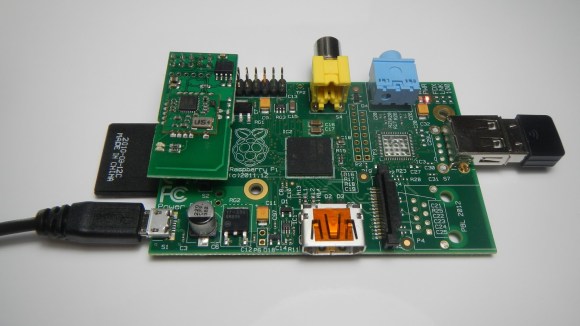
There’s nothing quite as annoying as seeing bandwidth wasted on unimpressive flash animations, irrelevant ads, and animated GIFs. The bad news is these ads are the sole source of income for a lot of your favorite websites – Hackaday included. The good news is you can turn these ads off with a Raspberry Pi, a WiFi adapter, and a little bit of fun in the terminal.

This build creates a wireless access point with a WiFi adapter plugged in to a Raspberry Pi. With an Ethernet cable plugged in, this effectively turns the Raspi into a wireless router.

To configure the software to block ads, it’s a simple matter of installing dnsmasq from the command line and making sure all the ads on your favorite webpages time out. This means a fairly big hit on the performance of your new DIY router, but with the installation of Pixelserv you can host a 1-pixel transparent GIF image that replaces all the ads and renders them invisible.

It’s a great project if you don’t like watching ads on your PS3, XBox, tablet, or other non-PC Internetting device. If people stealing your wireless connection is a problem, it shouldn’t be hard to make every image upside down or blurry for those rogue WiFi pirates.

Tooth Fairy Goes Pneumatic

pneumaticToothFairy

Kids’ fantasy figures are long overdue for some tech upgrades, so MAKE’s [Jeff Highsmith] carved a few holes in the walls and built a pneumatic transport system for his children to deliver their teeth to the Tooth Fairy. The project uses a system of 1.5″ PVC pipe with a central vacuum in the attic and two endpoint stations, one in each child’s room. Alternating which station has the closed valve and open door dictates the airflow path and shuttles a small plastic travel bottle from one station to the next.

Each station has its own iPhone interface that sends data to a Raspberry Pi and relays information, including a simulated map indicating the travel path taken by the tooth. Apart from controlling the vacuum via one of the Pi’s GPIO, the phone serves primarily as a visual distraction for the children while one parent sneaks off into the other room and replaces the tooth with some pocket change. [Jeff] made sure to add a locking door on each station to limit access and hopefully keep the mystery alive.

Watch his son’s face light up with sheer glee at the whole event in the video below, and regret that your childhood happened before the maker revolution. Then celebrate your adulthood with a beer fetching robot.

Continue reading “Tooth Fairy Goes Pneumatic”

NES: Nixie Entertainment System

nixieNES

[Bradley W. Lewis] is no stranger to Nixie clock builds, and he felt his latest commission was missing something. Instead of merely mounting the Nixie clock into a case resembling an NES console, he goes full tilt and makes it into an NES console emulator. After some work on the milling machine, a wooden box has room to squeeze in a few new components. [Bradley] originally planned to mount only an Arduino with an ArduNIX shield to handle the Nixie clock, but the emulator demands some space saving. Flipping the Arduino on its side freed up plenty of room and the shield still easily connects to the adjacent Nixie tube board.

A Raspberry Pi serves as the console emulator and was mounted close to the side of the case to allow access to its HDMI port. The other ports from both the Arduino and RasPi stick out of the back, including an extension to the Pi’s RCA video out and buttons to set both the hour and minutes of the clock. The two surplus NES buttons on the front of the case control power to the RasPi and provide a reset function for the Nixie clock.

If that isn’t enough Nixie to satisfy you, check out the WiFi Nixie counter.

Web Connectivity And Other Addons For An Automatic Schnauzer Feeder

web-enabled-automatic-dog-feeder

[Ben Miller] and his dad combined forces to create this automatic dog feeder. It not only keeps their two schnauzers happy, but gives them peace of mind as they can double-check that he feeding happened by pulling up an image on the Internet. Make sure you make it through all three posts of the build to get the entire picture.

The project started with some research which turned up a project that used a commercially available automatic feeder. That one used Arduino, but because of the cost the board plus a WiFi shield is a bit high, [Ben] went with a Raspberry Pi and a USB WiFi dongle instead. The Pi is much more powerful and adds the functionality for capturing images via a webcam.

After a convoluted process of connecting the Pi to the existing button traces on the automatic feeder it was time to start coding. The system runs from a Perl script which monitors a Gmail account for remote commands (in addition to a regular feeding schedule). The final touch is a bit of mechanical engineering which splits the output into two bowls so the dogs each have their own serving.

We still use the Autodine we built several years back but its single-serving limitation has always kept a second version on our project list. Hopefully seeing a well-executed system like this will motivate us to get building!

Build A File Server Inside An Old External Optical Drive Enclosure

This one nearly ended up in today’s Links post, but on second look we think it deserves a feature of its own. [Profezzorn] designed some mounting brackets to house a file server inside of an external drive enclosure. Click on the instructions tab to get a bit more of the story.

The enclosure that he’s using is meant for a 5.25″ optical drive. It comes with a USB to SATA converter which is how he connects the hard drive to the Raspberry Pi serving the files. His mounting system uses the original holes in the enclosure, the threaded holes of the drive, and the holes in the RPi PCB to mount everything with just ten screws. The enclosure included a Molex power connector. He sacrificed an old connector to make a custom cable for the Pi’s power.

Add a portable power supply, do a little work with the Linux configuration, and you could easily turn this into a pirate box.

A One Third Scale Macintosh

minimac

Released in 1984, the original Macintosh was a wonder – not only did it have a GUI and a mouse, it was actually one of the smaller computers of the day. Now that we’re nearly 30 years past the release of the OG Mac, it follows that a smaller version should be possible. [John] did just that by creating a 1:3 scale replica of the original 128k Mac.

As you would expect, this tiny Mac is powered by a Raspberry Pi running Mini vMac, an emulator for these olde tymie 68k Macs. The display is a 3.5″ LCD with a resolution of 300×200, not quite up to the standard classic mac resolution of 512×342. At least this version has color, though.

Also inside the carefully crafted PVC case are a WiFi and Bluetooth dongle, along with an off-the-shelf phone charger. It’s a remarkable piece of craftsmanship, and given the games and applications (i.e. Photoshop 1.0) available for these old Macs, its possibly more useful for general computing than a stock Raspberry Pi.

You can check out the video walkthrough of everything this tiny little Mac can do below.

Continue reading “A One Third Scale Macintosh”

Put In Pocket Change, Get Bitcoins

bitcoin

[gbg] put together a neat little project to get people familiarized with Bitcoins. A lot of techies know what Bitcoins are, but the impetus to download the Bitcoin client and start mining is a bit too much for some. [gbg] has a solution for this – a Bitcoin vending machine. Just dump your pocket change in the coin slot, and out comes a QR code that allows you to add Bitcoins to your wallet.

Inside this Bitcoin briefcase is a Raspberry Pi that connects to a local WiFi connection. Every five seconds, the Raspi looks at the current conversion rate of USD to Bitcoins. Once coins are deposited into the briefcase, a receipt complete with a scannable QR code is printed on a small thermal printer.

When [gbg] took this to the latest DEFCON, a lot of people were interested in the project and started shoveling change into the machine. So many people were interested that [gbg] and his compatriots are planning on turning this into a proper open-source device, complete with a bill reader and possibly an ASIC miner so the Pi can sell the coins it produces.

Check out the video below for some more info.

Continue reading “Put In Pocket Change, Get Bitcoins”