Build A Fungus Foraging App With Machine Learning

As the 2019 mushroom foraging season approaches it’s timely to combine my thirst for knowledge about low level machine learning (ML) with a popular pastime that we enjoy here where I live. Just for the record, I’m not an expert on ML, and I’m simply inviting readers to follow me back down some rabbit holes that I recently explored.
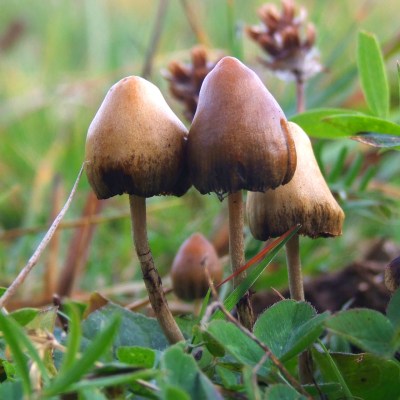
But mushrooms, I do know a little bit about, so firstly, a bit about health and safety:

  • The app created should be used with extreme caution and results always confirmed by a fungus expert.
  • Always test the fungus by initially only eating a very small piece and waiting for several hours to check there is no ill effect.
  • Always wear gloves  – It’s surprisingly easy to absorb toxins through fingers.

Since this is very much an introduction to ML, there won’t be too much terminology and the emphasis will be on having fun rather than going on a deep dive. The system that I stumbled upon is called XGBoost (XGB). One of the XGB demos is for binary classification, and the data was drawn from The Audubon Society Field Guide to North American Mushrooms. Binary means that the app spits out a probability of ‘yes’ or ‘no’ and in this case it tends to give about 95% probability that a common edible mushroom (Agaricus campestris) is actually edible. 
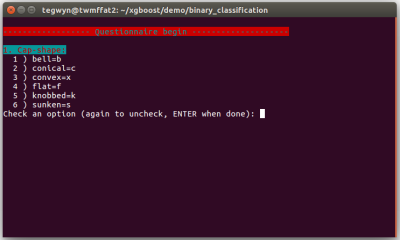
The app asks the user 22 questions about their specimen and collates the data inputted as a series of letters separated by commas. At the end of the questionnaire, this data line is written to a file called ‘fungusFile.data’ for further processing.

XGB can not accept letters as data so they have to be mapped into ‘classic LibSVM format’ which looks like this: ‘3:218’, for each letter. Next, this XGB friendly data is split into two parts for training a model and then subsequently testing that model.

Installing XGB is relatively easy compared to higher level deep learning systems and runs well on both Linux Ubuntu 16.04 and on a Raspberry Pi. I wrote the deployment app in bash so there should not be any additional software to install. Before getting any deeper into the ML side of things, I highly advise installing XGB, running the app, and having a bit of a play with it.

Training and testing is carried out by running bash runexp.sh in the terminal and it takes less than one second to process the 8124 lines of fungal data. At the end, bash spits out a set of statistics to represent the accuracy of the training and also attempts to ‘draw’ the decision tree that XGB has devised. If we have a quick look in directory ~/xgboost/demo/binary_classification, there should now be a 0002.model file in it ready for deployment with the questionnaire.

I was interested to explore the decision tree a bit further and look at the way XGB weighted different characteristics of the fungi. I eventually got some rough visualisations working on a Python based Jupyter Notebook script:
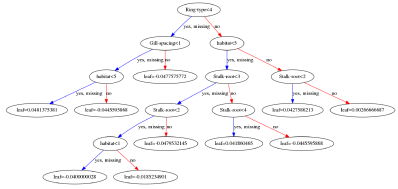
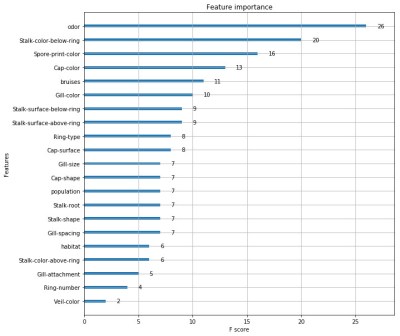


Obviously this app is not going to win any Kaggle competitions since the various parameters within the software need to be carefully tuned with the help of all the different software tools available. A good place to start is to tweak the maximum depth of the tree and the number or trees used. Depth = 4 and number = 4 seems to work well for this data. Other parameters include the feature importance type, for example: gain, weight, cover, total_gain or total_cover. These can be tuned using tools such as SHAP.

Finally, this app could easily be adapted to other questionnaire based systems such as diagnosing a particular disease, or deciding whether to buy a particular stock or share in the market place.

An even more basic introduction to ML goes into the baseline theory in a bit more detail – well worth a quick look.
Dirty Tricks For 6502 Programming

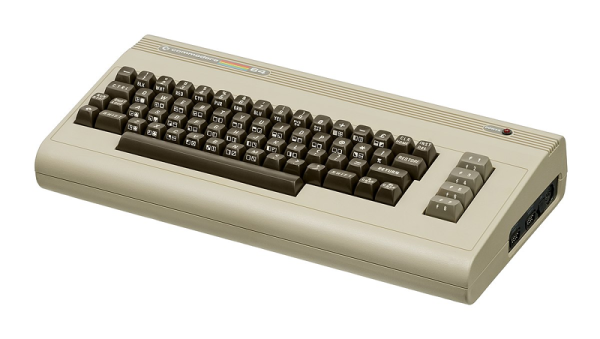
We know the 6502 isn’t exactly the CPU of choice for today’s high-performance software, but with the little CPU having appeared in so many classic computers — the Apple, the KIM-1, The Commodores, to name a few — we have a real soft spot for it. [Janne] has a post detailing the eight best entries in the Commodore 64 coding competition. The goal was to draw an X on the screen using the smallest program possible. [Janne] got 56 bytes, but two entrants clocked in at 34 bytes.

In addition to the results, [Janne] also exposes the tricks people used to get these tiny programs done. Just looking at the solution in C and then 6502 assembly is instructive. Naturally, one trick is to use the existing ROM code to do tasks such as clearing the screen. But that’s just the starting point.

Continue reading “Dirty Tricks For 6502 Programming” →

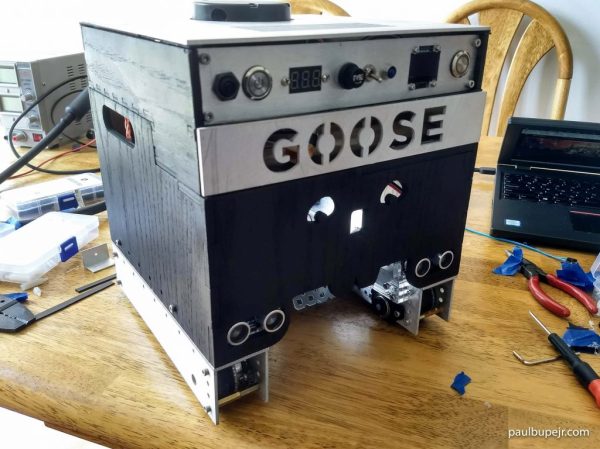
Designing An Advanced Autonomous Robot: Goose

Robotics is hard, maybe not quite as difficult as astrophysics or understanding human relationships, but designing a competition winning bot from scratch was never going to be easy. Ok, so [Paul Bupe, Jr’s] robot, named ‘Goose’, did not quite win the competition, but we’re very interested to learn what golden eggs it might lay in the aftermath.

The mechanics of the bot is based on a fairly standard dual tracked drive system that makes controlling a turn much easier than if it used wheels. Why make life more difficult than it is already? But what we’re really interested in is the design of the control system and the rationale behind those design choices.

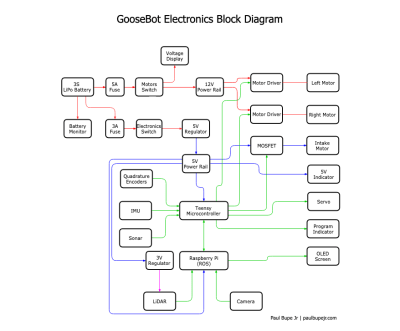
The diagram on the left might look complicated, but essentially the system is based on two ‘brains’, the Teensy microcontroller (MCU) and a Raspberry Pi, though most of the grind is performed by the MCU. Running at 96 MHz, the MCU is fast enough to process data from the encoders and IMU in real time, thus enabling the bot to respond quickly and smoothly to sensors. More complicated and ‘heavier’ tasks such as LIDAR and computer vision (CV) are performed on the Pi, which runs ‘Robot operating system’ (ROS), communicating with the MCU by means of a couple of ‘nodes’.

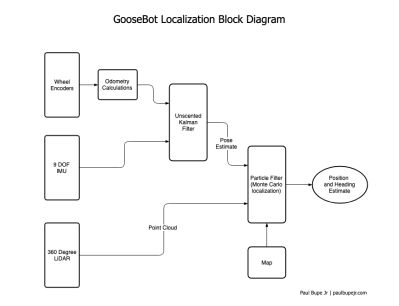
The competition itself dictated that the bot should travel in large circles within the walls of a large box, whilst avoiding particular objects. Obviously, GPS or any other form of dead reckoning was not going to keep the machine on track so it relied heavily on ‘LiDAR point cloud data’ to effectively pinpoint the location of the robot at all times. Now we really get to the crux of the design, where all the available sensors are combined and fed into a ‘particle filter algorithm’:

What we particularly love about this project is how clearly everything is explained, without too many fancy terms or acronyms. [Paul Bupe, Jr] has obviously taken the time to reduce the overall complexity to more manageable concepts that encourage us to explore further. Maybe [Paul] himself might have the time to produce individual tutorials for each system of the robot?

We could well be reading far too much into the name of the robot, ‘Goose’ being Captain Marvel’s bazaar ‘trans-species’ cat that ends up laying a whole load of eggs. But could this robot help reach a de-facto standard for small robots?

We’ve seen other competition robots on Hackaday, and hope to see a whole lot more!

Video after the break: Continue reading “Designing An Advanced Autonomous Robot: Goose” →

A Tiny Train Departure Board, Just Like The Real Thing

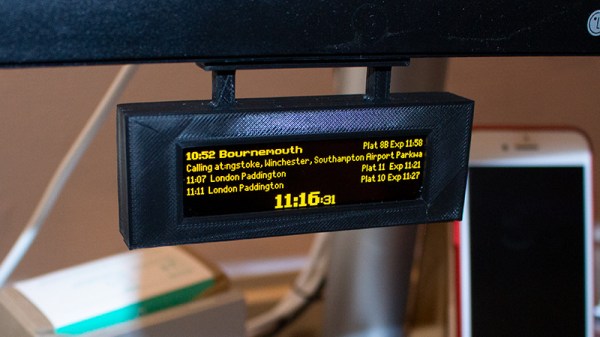
If you travel on the British rail system, you’ll be familiar with the ubiquitous orange dot-matrix departure display boards. At a glance they tell you the expected arrival times of the next few trains, where they are headed, and at the bottom the current time.  [Chris Crocker-White] was inspired by a Tweet to recreate one of these displays in miniature and hang it under his monitor.

The hardware is a Raspberry Pi Zero with an OLED screen, in a custom 3D-printed case. A soldered USB cable takes power from the monitor’s USB ports. Software wise it’s a demonstration vehicle for the Balena cloud service that pulls its data from their transport API, but the choice of dot matrix typeface is perfect and absolutely looks the part.

There is some question as to whether a project such as this one should need a cloud service as its backend, and of course it serves as a demonstration piece rather than a definitive way to enact a departure board. It does however bring a ready-packaged API for transport data, which given that many data sources can be opaque, is a useful feature.

Train time displays seem to be a popular choice on the Eastern side of the Atlantic, here’s another British one, and one from Ireland.

Thanks [Pyrofer] for the tip.

BootBasic Fits Your Favorite Language In The Boot Sector

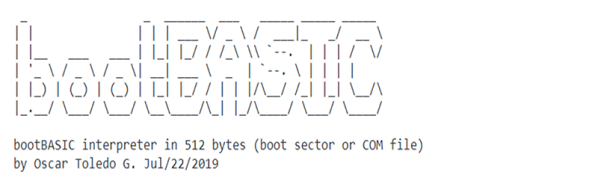
Humans seem to have a need to do things that aren’t practical. Make the biggest ball of twine. Engrave the Declaration of Independence on a grain of rice. We want to make things bigger, smaller, faster, or whatever. That might explain why [nanochess] put out bootBASIC.

The 8088 (or later) assembly code gives you a very restricted BASIC interpreter that you can boot up. That means it has to fit in the 512-byte boot block that the hardware loads to get an operating system running. How restricted? Keep in mind it fits in 512 bytes. Each line can only have 19 characters or less. Backspace works, but doesn’t update the screen. Line numbers range from 1 to 999 and there are only 26 integer variables named a through z that hold 16 bits. All statements are in lower case.

Continue reading “BootBasic Fits Your Favorite Language In The Boot Sector” →

Neural Network In Glass Requires No Power, Recognizes Numbers

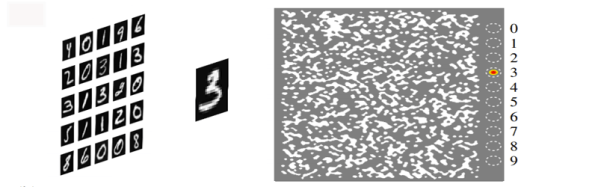
We’ve all come to terms with a neural network doing jobs such as handwriting recognition. The basics have been in place for years and the recent increase in computing power and parallel processing has made it a very practical technology. However, at the core level it is still a digital computer moving bits around just like any other program. That isn’t the case with a new neural network fielded by researchers from the University of Wisconsin, MIT, and Columbia. This panel of special glass requires no electrical power, and is able to recognize gray-scale handwritten numbers.

Continue reading “Neural Network In Glass Requires No Power, Recognizes Numbers” →

ESP32 Gets Advance Windowed Apps Using This VGA GUI Library

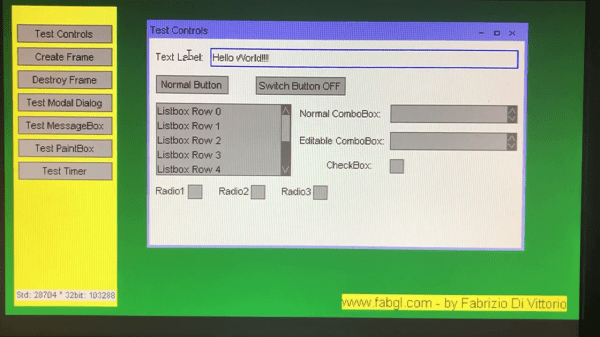
We featured [Fabrizio Di Vittorio]’s FabGL library for the ESP32 back in April of this year. This library allows VGA output using a simple resistor based DAC (3 resistors for 8 colors; 6 resistors for 64 colors), and includes functions for PS/2 mouse and keyboard input, a graphics library, and many of the miscellaneous functions you might need to develop games on the ESP32. Now, a GUI interface library has been added to ease application development.

The GUI, of course, runs on the VGA output. The library includes what you’d expect from a minimal windowing GUI, like keyboard and mouse support, windows with the usual minimize/maximize/close controls, and modal and message dialog boxes. For input controls, there are labels, text boxes, buttons, radio buttons, checkboxes, normal and editable combo boxes, and listboxes — you know, pretty much everything you need to develop a modern GUI application. All the code is open-source (GPL 3.0) and in the GitHub repo.

While the original FabGL had a game-development orientation, the addition of this new GUI functionality opens up a new range of applications. If you want to find out more about using the FabGL library, you can check out our previous coverage of the mostly game-oriented functions.

You can get a look at the new GUI functions in action in the video, after the break.

Continue reading “ESP32 Gets Advance Windowed Apps Using This VGA GUI Library” →