Picture of a monitor with a fake "ransomware" banner on it, and a PC with the ESP32 VGA devboard mounted into it in the foreground

ESP32 Pretends To Be GPU; Gives You A Ransomware Scare

Sometimes a piece of hardware meets a prank idea, and that’s how the fun Hackaday articles are born. [AnotherMaker] shows us some harmless entertainment at the expense of an IT enthusiast in your life – programming an ESP32-powered devboard with a VGA output to show an ever-feared “all your files are encrypted” screen on a monitor connected to it. The ASCII text in its 8-bit glory helps sell this prank, making it look exactly like a BIOS-hijacking piece of malware it claims to be; akin to UIs of the past that skilled hackers would whip up in x86 assembly. The devboard’s integration into a PCI card backplate is a cherry on top, a way to seamlessly integrate this into a PC case, making it look not particularly different from an old graphics card. In such a configuration, we don’t doubt that this would be a head-scratcher to a certain kind of an IT department worker.

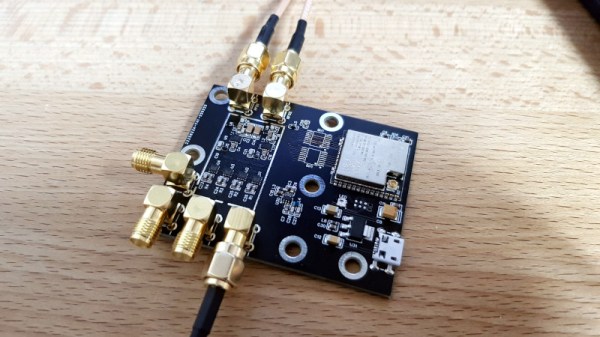
If you already have someone in mind as a target for this prank, you’re in luck, since [AnotherMaker] has shared his source code, too, and all you need is a ESP32 with a VGA port set up. You can get the same devboard, or you can even solder it all together with an ESP32 breakout and resistors, if you’re on a time or money budget, since the schematics for the LilyGO devboard are public. Not all devboards gets such a fun application, but it’s always fun to see when someone thinks of one – a perfect prank scenario that calls for a very specific devboard.

Wondering how it’s even possible to output VGA from the ESP32? We’ve covered this in the past – like this R&D project done by [bitluni], who then went ahead and expanded on it by connecting six displays at once. If you’ve connected your ESP32 to a VGA port and ran some test sketches, a UI library will help you upgrade your idea into a ready project in no time.

Continue reading “ESP32 Pretends To Be GPU; Gives You A Ransomware Scare”

Google’s T-Rex Game Ported To The ESP32

Most Chrome users will have come across a neat little Easter egg when their Internet connection has gone down – a game known as “T-Rex” where a dinosaur must be jumped over cactii. Whether or not this is accurate in terms of the evolutionary timeline, it’s a bit of fun, and Volos Projects educator [Danko Bertović] decided to port the game to the ESP32.

The game runs on the LILYGO TTGO T-Display development board, which pairs the powerful microcontroller with a 1.14-inch color LCD. His clone goes as far as authentically replicating the “No Internet” page from within Google Chrome, before kicking into the game at the press of a tactile button.

The game is built using a sprite-based engine, which enables gameplay with a minimum of flickering on the screen. Transparency is included to stop the sprites from occluding other screen elements unnecessarily. [Danko] hasn’t yet released a full tutorial on using sprites on the ESP32, but code is available for your own digestion.

It’s not the first time we’ve seen [Danko]’s ESP32 games, as he’s developed a few over the years. Others have gone so far as coding 8-bit emulators for the platform. Video after the break.

Continue reading “Google’s T-Rex Game Ported To The ESP32”

3D printed moon lamp

3D Printed Lithographic Moon Lamp

After years of being a software developer, [Chris] was excited to get back into embedded development and we’re glad he did. His 3D printed lithographic moon lamp combines a number of hacker and maker skills, and is sure to impress.

3D-printed lithographic moons have gotten pretty popular these days, so he was able to find a suitable model on Thingiverse to start with. Gotta love open-source. Of course, he needed to make a few modifications to fit his end design. Namely, he put a hole at the bottom of the moon, so he could slide the LED and heatsink inside. The 3 watt LED is pretty beefy, so he definitely needed a heat sink to make sure everything stayed cool.

Otherwise, the circuit itself is pretty straightforward. He has an ESP32 to drive the RGB LED through a transistor, and fitted the components onto a custom-designed circuit board to ensure everything stayed neat and organized. You don’t want a ton of loose wires and breadboards cluttering this build. Since he used an ESP32, he was able to create a simple web interface to control the color of the LEDs. Gotta make it connected somehow, right?

What’s great is in addition to the project write-up, [Chris] includes video tutorials, walking the readers through each individual step of the build. By doing so he really makes it easy for readers to follow along and reuse his work. If you’re still looking for ideas, one of these could make a really good Christmas present.

Continue reading “3D Printed Lithographic Moon Lamp”

ESP32 board with battery and nearby antenna

How To Easily Set Up Secure OTA Firmware Updates On ESP32

After an electronic IoT device has been deployed into the world, it may be necessary to reprogram or update it. But if physical access to the device (or devices) is troublesome or no longer possible, that’s a problem.

OTA updates allow a device to download new firmware, install it, and reboot itself into the new version. Convenient? Yes. Secure? It definitely needs to be.

Fortunately, over-the-air (OTA) firmware updates are a thing, allowing embedded devices to be reprogrammed over their wireless data connection instead of with a physical hardware device. Security is of course a concern, and thankfully [Refik] explains how to set up a basic framework so that ESP32 OTA updates can happen securely, allowing one to deploy devices and still push OTA updates in confidence.

[Refik] begins by setting up a web server using Ubuntu Linux, and sets up HTTPS using a free SSL certificate from Let’s Encrypt, but a self-signed SSL certificate is also an option. Once that is done, the necessary fundamentals are in place to support deploying OTA updates in a secure manner. A bit more configuration, and the rest is up to the IoT devices themselves. [Refik] explains how to set things up using the esp32FOTA library, but we’ve also seen other ways to make OTA simple to use.

You can watch a simple secure OTA firmware update happen in the video, embedded below. There are a lot of different pieces working together, so [Refik] also provides a second video for those viewers who prefer a walkthrough to help make everything clear. Watch them both, after the break.

Continue reading “How To Easily Set Up Secure OTA Firmware Updates On ESP32”

Bring A Minitel Terminal Back To Life WIth An ESP32

Most of us who are old enough are likely to have had our first experience of an online service some time in the 1990s, either through the likes of Compuserve or via an ISP. For our French readers the online experience will have come much earlier, as a forward-thinking telecommunications environment led to every household in the country receiving a viewdata terminal. The Minitel system as it was called was a runaway success, and was only finally turned off as late as 2012. Many of the terminals survive to make a great basis for projects, and it’s one of these that [Louis H] has taken and enhanced with an ESP32.

One of the special things about this project is that unlike so many other Minitel conversions it doesn’t involve tearing into the terminal itself. Instead the PCB plugs into the socket on the back of the unit and emulates the line for the terminal to talk to. It can then be used as an SSH terminal over WiFi, or as a serial terminal for the ESP32 itself for example running a MicroPython firmware. If you can handle the French AZERTY keyboard there is no easier way to drag a viewdata terminal into the 2020s, as you can see in the video below the break.

Chez Hackaday, we love these nostalgic gems from the 1980s. Indeed we like this classic French public network so much that we’ve featured it quite a few times. Here for example is a similar project using an Arduino. Continue reading “Bring A Minitel Terminal Back To Life WIth An ESP32”

ESP32 Brings Air Purifier Online With Home Assistant

A lot of hackers are rightfully concerned about the privacy issues that surround many of today’s “smart” gadgets, but it’s hard to argue that the ability to remotely control devices around your home isn’t convenient. Enter self-hosted, open source projects like Home Assistant. This provides the framework for building out a home automation system without having your soul information sold, but as you might expect, you’re going to have to put some effort in to get the most of it.

For example, take a look at this Phillips AC4014 air purifier that [Anton] connected to Home Assistant by way of an ESP32. Rather than getting too bogged down in reverse engineering the purifier’s surprisingly complex internal electronics, he took the easy way out and wired a couple of relays across the power and fan speed buttons; this allows the device to be easily controlled by the microcontroller, without impacting the functionality of the original controls.

But since those front panel controls still work, that meant [Anton] needed a way for the ESP32 to detect the device’s status and report that to Home Assistant so everything stayed in sync. So he looked around on the PCB for a trace that got powered up when the air purifier was up and running, which he connected to a pin of the microcontroller through a transistor. This let’s the firmware determine if the machine is running or not just by checking if the appropriate pin has gone high.

Speaking of the firmware, [Anton] decided to use ESPHome rather than trying to write his own code from scratch. This project allows you to rapidly add new devices to Home Assistant by providing the firmware with a relatively simple YAML configuration file, which he’s provided as an example. In fact, he’s provided quite a lot of examples with this project, down to an annotated image of the PCB that shows where to tap your wires into. He’s done quite a service for anyone who’s got this same model of air purifier.

This unit doesn’t appear to have any capability of actually checking the quality of the air in the room, but we’ve recently seen a low-cost IKEA product that can do exactly that. Even better, it can be easily modified to report its findings over the network using the ESP8266.

An array of open-source clocks that play Pac-Man (or Mrs. Pac-Man).

ESP32 Pac-Man Clock Keeps Track Of How Long You Watch It

There are so many elements that make a good clock worth looking at for much longer than necessary. Not only is this clock quite cool to behold, it plays Pac-Man around the time! Yes, of course you can interact with the Pac-Man — touching the edges of the screen will make him go left, right, up, or down accordingly. You can also change to Ms. Pac-Man and make all the animations go normal speed, fast, or crazy-fast.

[TechKiwiGadgets] built a Pac-Man clock a few years ago that was well-received, but not cheap or easy to mimic. Since then, they have ported the code to the ESP32 and made a new version that has fewer and friendlier components. Not only that, they have great instructions for building the ESP32 shield on protoboard and also offer the shield as an open-source fab-able PCB. Still too much work? The complete kit version is available over on Tindie. Be sure to check it out in crazy speed mode action after the break.

Although this isn’t the first Pac-Man clock we’ve seen, it devotes equal attention to the time and the game, whereas this one is more about the game itself.

Continue reading “ESP32 Pac-Man Clock Keeps Track Of How Long You Watch It”