Under-desk RGB Keyboard Lighting

[Jay Collett] was having trouble seeing his keyboard when the room was dim. But throwing a light under the desk just didn’t seem cool enough. Instead he built an RGB light board that is controlled by his desktop. The board is based around an ATmega328 with the Arduino booloader. He etched a single-sided PCB to connect it to a group of five RGB LEDs, with a programming header for an FTDI cable. The board communicates with a PC via serial connection, with a C# control application that [Jay] coded to control the color. We’ve embedded a couple of videos after the break but check his page for a package of code and hi-res pictures.

If you want something cool that’s a little bit less work to build check out the EL-wire keyboard from this links post.
Continue reading “Under-desk RGB Keyboard Lighting”

Wireless Doorbell Rings A Real Bell

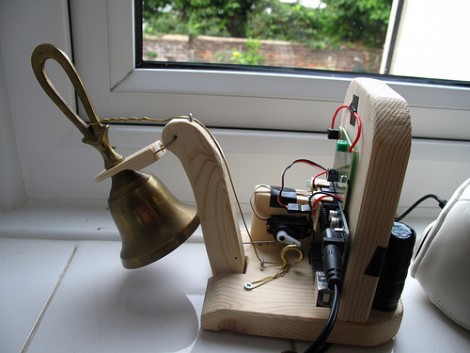
Tired of hearing that flat sounding wireless doorbell when visitors happen to come by? Don’t get rid of it, improve it by adding a real bell. This hack rigs up a small hand bell to the wireless doorbell receiver. It was prototyped using LEGO pieces to shake the sound out of the bell, but the finished version uses a servo motor on a wooden frame. An Arduino monitors the wireless receiver, driving the servo when a transmission from the front door button is received.

Traditionally door bells have actually been chimes that are struck with solenoids. We appreciate this rendition because it adds an element of kinetic art to the home, laying bare the functional hardware instead of hiding it in a box. Don’t miss the demonstration after the break.

Continue reading “Wireless Doorbell Rings A Real Bell”

Home Automation Without Pulling Wires

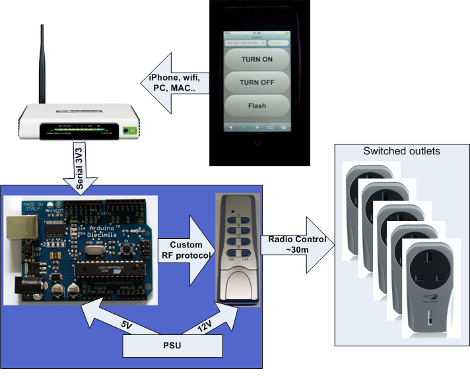
Here’s a bit of simple home automation using hacks with which we’re become pretty familiar. [Mrx23] combined OpenWRT, a microcontroller, and a set of RF controlled outlet switches to add automation to his plug-in devices. An RF remote that controls the switched outlets has been connected to an Arduino. The router communicates with the Arduino via a serial connection. And the router is controlled by a web interface which means you can use a smartphone or other web device to control the outlets.

The best thing about this system is the power that the router wields. Since it has an underlying Linux kernel you have the option of setting CRON jobs to turn lighting on and off, and group settings can be established to set up a room’s lighting level for watching movies, hosting guests, etc. Combine this with the fact that OpenWRT can use port forwarding for Internet control and the possibilities really start to open up.

[Thanks Arpad]

Water Use Feedback Changes Behavior

How much water do you use when showering, or washing your hands, or washing the dishes? Not how much does the average person use, but how much to you use? That’s what the team over at Teague Labs set out to find with this water usage feedback system. The sensor used is a Koolance flow meter which is intended to measure coolant flow in PC liquid cooling systems. At $20, it makes a nice low-cost sensor which was paired with a WiFi enabled Arduino. In the image above they’re using an iPad as a screen so that you can see how much water you’re using (or wasting) as you wash your hands. This resulted in saving 1/2 gallon of water every time someone washed their hands.

The project code, schematic, and board files are all available for download. Along with the hardware build there’s some nice server-side software that gathers and graphs the data over time. We’ve seen a lot of power-meter hacks, but it’s nice to have the option to track water usage, even if this is tailored to just one tap at a time.

Halloween Prop: Mario Bros. With Full Sound Effects

Creativity abounds in putting together this pair of Super Mario Bros. costumes. [Rob] and his wife didn’t stop with a well-assembled troupe of familiar wardrobe items, but decided to go for authentic sound effects as well. It started by finding a few of his favorite Mario sounds on the Internet. From there he grabbed a greeting card that allows you to record several message. He recorded each of the sounds and removed the electronics from the card. From there an Arduino mini was connected to the playback buttons and to a Wii nunchuck. After the break you can see that when the kids press a button, the card plays back the sound of jumping, shooting fireballs, etc. So far it’s the best use of an audio greeting card that we think eclipses its intended use.

Continue reading “Halloween Prop: Mario Bros. With Full Sound Effects”

Futuristic 3D Mouse Originally Arduino Powered And 3D Printed

We usually shy away from posting about commercial products. Strap on a bib to protect your shirt from the drool, watching the video after the break will show you why we had to post about this. [Valentin Heun] and his cohorts developed this three-dimensional controller using tools common to the hacker community. The patent-pending device uses a sphere for rotational input but can also be nudged for movement on 3 axes.

You may remember that [Valentin] as involved with that 10,000 watt flourescent lamp display. His Arduino skills were honed with that installation and used during the development of this mouse. Also joining in the prototyping fun was a 3D printer used to make the parts. From project to production, we figure the skills you use when hacking are breaking down the barriers that inventors have traditionally faced when looking to marked useful products.

This would be fantastic for 3D cad, modelling, etc. But we think it would also go well with Eagle, like the other 3D mouse hack did.

Continue reading “Futuristic 3D Mouse Originally Arduino Powered And 3D Printed”

Typewriter As I/O; Lets You Play Zork

Okay, for many the fact that this typewriter plays Zork on paper instead of a CRT is the fascinating part of this hack. But we love the implementation that makes the keys of the device an input and output.

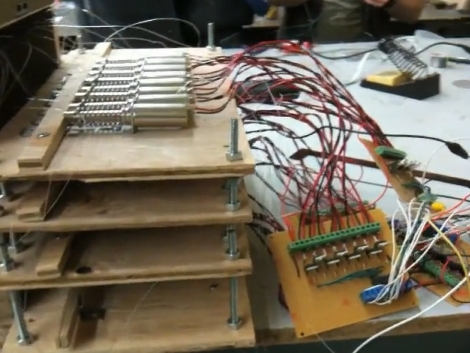
The electric typewriter has been fitted with a solenoid for each key (wow, that’s a lot of work). In the image above you can see they are housed on plywood platforms behind the typewriter and connect using a piece of mono-filament fishing line. This flexible connection means the solenoids have no adverse effect when you want to do the typing instead of the Arduino which drives the solenoids. [Johnathan M. Guberman] took advantage of this, adding a resistor for each key. When depressed the key completes a circuit with the resistor, acting as the input. In this way, you can play Zork with a piece of paper as the monitor, typing for the input, and watching the typewriter magically pound out responses. See it happen after the break.

Continue reading “Typewriter As I/O; Lets You Play Zork”