Wire-wrapping An LED Matrix

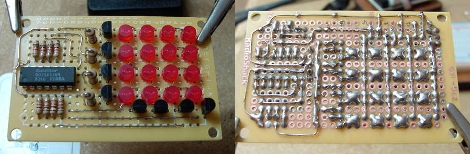
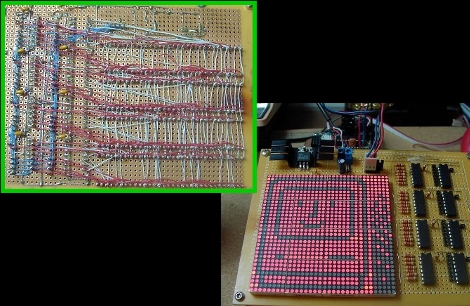
Regular reader [Osgeld] built a 1024 LED display matrix. This is a proof-of-concept design and he admittedly has overloaded the components. Most notably, the 595 shift registers (featured over the weekend) are sourcing too much current if all eight pins are active. That’s easy enough to fix in the next design by moving up to cascading LED drivers. Instead of soldering every connection in the display, [Osgeld] soldered the components in place and then used wire wrapping to make the point-to-point connections. This must have saved him a ton of time and frustration. We can’t wait to see what comes out of this first prototype.

Easy Data Input For LabVIEW

[youtube http://www.youtube.com/watch?v=9cKBdn4uHyY%5D

Props go to [Michael Nash] for establishing an interface between National Instrument’s labVIEW and an Arduino (an example video using a potentiometer is above). Personally, from the one time we were forced to use labVIEW, we hated every second of it.

One reason it’s so terrible, is the Data Acquisition Modules cost well into the hundreds of dollars, yet the documentation and help resources are very scarce. By using an Arduino instead of the modules, the price and difficulty decrease a considerable amount. Which begs the question why has it taken so long to get a decent (and so simple) of a setup working?

HDSPs And Playstation 2 Controllers On Arduinos

There were a couple short Arduino tips in the mailbox this morning. We’ve combined them in this post since both are fairly short and sweet.

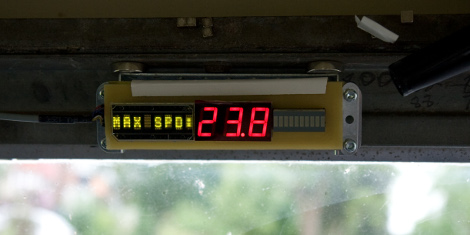
Over at Evil Mad Scientist Laboratories, they’ve posted a quick breakdown of how to interface those neat little HDSP LED displays with an Arduino. This specific instance is for Mr. Stabby. Source code and schematic are included.

For those who would like a nice familiar input device for their Arduino, how about a Playstation2 controller? [Bill Porter] has written up the code and shown how to wire it up. This even includes the ability to read the analog stick correctly. Source code and schematic are available on the project page.

[via Littlebird electronics]

RC Car Taunts Man’s Best Friend

[Arkos] gutted an RC car from his childhood and made it into a dog-taunting remote platform. An Arduino replaces the original circuitry with a Bluetooth module for connectivity. He uses an Xbox 360 controller and has added a small speaker to act as a siren. But for our money it’s the camera that makes this hack. It streams video back to a laptop and because it’s mounted on a couple of servos the left stick controls where the lens is looking. The next evolution should replace the Arduino for a standalone microcontroller but what he’s come up with as a first prototype is delightful. See Fido run in terror after the break.

Continue reading “RC Car Taunts Man’s Best Friend”

Embedding An Accelerometer And XBee In A Guitar

[JP Carrascal] hacked his guitar by adding motion control while removing the need for wires. He’s using a dual-Arduino system with an Mini Pro inside the guitar and a Duemilanova for the receiver connected to a computer. Wireless is provided by the XBee module seen above and a gutted Wii remote accelerometer is in there for motion sensing. Check out the artfully blurry demonstration of the motion effects after the break.

While he added some potentiometer-based controls there is also an automatic power-down feature. [JP] replaced the mono pickup with a stereo one and used the extra conductor as a switch to activate the additional electronics. We wonder if he also winds his own pickups or builds his own effects pedals.

Continue reading “Embedding An Accelerometer And XBee In A Guitar”

USB Morse Code Keyboard

Looking for motivation to practice morse code [BenB] built this morse code keyboard. It uses USB and is recognized as a standard keyboard thanks to the V-USB stack running on the ATmega168. The project is rounded out with a clean look thanks to the chewing gum container that serves as an enclosure.

His design is simple enough that any morse key you have on hand can be used. You could even adapt that glove coder you built a couple of years back.

Power Drill Solder Spooler

[youtube=http://www.youtube.com/watch?v=cF4cw41SMvY]

[Scott] over at curiousinventor.com has posted an instructable detailing how to use an Arduino and a power drill to spool solder. The Arduino senses the speed that the drill is going via an opto interrupter and a laser and adjusts with a servo hooked to the trigger. While we don’t think many people will be dying to spool some solder, this system might beĀ usefulĀ for all kinds of things, like winding yarn or making coils.