
As your embedded applications get more complicated an On-Chip Debugger will save you a lot of time when things don’t run quite right. On-Chip Debugging (OCD) is just what it sounds like — a way to run your program on the target chip that lets you pause execution to examine values and change them if need be. The Arduino has no built-in method of using OCD, but the AVR chips used by the boards do. The caveat is that you need a proper AVR programmer to access the Debug Wire protocol, or a JTAG interface for some of the larger chips. In this case I’m going to be using an STM32 Discovery Board to give you an overview of OCD. But this will work the same way for any chip that has hardware debugging capabilities. Many IDE’s have debugging support built right in so that you can use a nice GUI as you work. But often these are just a front end for the command line tools I’ll be using. Join me after the break and we’ll get started.
arm387 Articles
Hackaday Links: September 21, 2012
And then Obi-wan said, “you were supposed to be the chosen one!”

Yesterday, a little bird told us Makerbot will be moving to a closed source model for their newest printer. This was confirmed, and now [Zach Smith] a.k.a. [Hoeken] – creator of the RepRap Research Foundation and co-founder of Makerboth Industries is weighing in with his take on the situation.
Hey! Free stuff!

Remember that DIP28 ARM chip with BASIC? Remember how I told you Coridium will be giving a few hundred away as samples? Yeah, that’s happening now.
Replacing a scroll wheel with titanium

[Rhett] has been using a Logitech mouse for a few years now. Recently the scroll wheel became corroded, so [Rhett] replaced it with a titanium version. The perfect match for the trusty battle axe, theIBM Model M keyboard.
Web-based IDE for the Raspi

[Phil Torrone] sent in a video of something he and [ladyada] are working on. It’s a web-based IDE for the Raspberry Pi. We’ll do a full review of this when it’s released.
Intro to software defined radio
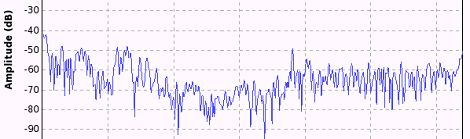
So you have one of those TV tuner dongles and want to get in to software defined radio. Where do you start? [Al Williams] over at Dr. Dobbs has a great introduction to SDR, and gives a few pointers that should help you get that cool looking waterfall plot very quickly. Thanks for sending this in, [Chris].
Programming An ARM With BASIC
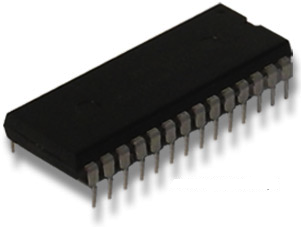
For those of us old enough to remember the beginnings of the microcomputer revolution, we can look back fondly on ‘the programming environment is the OS,’ a ton of BASIC programs, and typing in small programs found in the backs of computer magazines. It’s a whole new world now with cell phones and Linux computers the size of credit cards, but some companies still remember the beginning.
Coridium is releasing an ARM microcontroller in the vein of old fashioned microcomputers updated for the 21st century. Based on the LPC1114 Cortex M0 ARM microcontroller stuffed into a DIP28 package, the Coridium ARM BASIC provides a programming environment in the firmware.
The ARM BASIC is a complete system on a chip, with Rx and Tx connections to connect to a serial terminal. To get this BASIC microcontroller up and running, all you’ll have to do is connect 3.3 Volts of power. Then, it’s a simple matter of plugging in an FTDI cable and pretending it’s 1989.
Coridium is planning on giving away a few hundred of these ARM BASIC chips to makers in a few days. I’ll put up the announcement of free microcontrollers up in a few days, but [Bruce] at Coridium is sending me one very shortly. Hopefully I’ll be able to do a demo before the stock of free chips is completely depleted.
Regarding The Development Files That Accompany TI’s Microcontroller Offerings
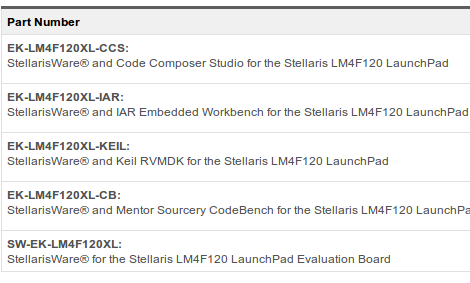
We received a tip from [Fabien] that Texas Instruments had posted a set of IDEs for the Stellaris Launchpad on their download page. At first we skipped right over the link, but then decided to take a look and see if things had changed any since the MSP430 Launchpad had been released. As we expected, there’s really no help on this page if you’re looking to develop for the hardware without using one of these IDEs.
Why would we want to forego the preconfigured development environments TI supplies? For one thing, they offer only trial licenses. When you go to download one of the packages you have to wade through a eyebrow-raising non-export agreement. When we made it that far, the ~500 MB Sourcery package we downloaded was quite slow. And we don’t see any option for installing any of these on a Linux machine. No matter what OS you choose, we think you should be able to develop for any architecture using the same development environment — be it Eclipse, GNU Emacs, Notepad, or whatever . We don’t want to download a huge package just to try out a new chip.
We know you can develop for Stellaris ARM chips using a vanilla cross compiler like arm-none-eabi (we use Sourcery CodeBench Lite — formerly CodeSourcery G++ lite). We hope that TI is planning on adding a barebones package that supplies a simple Makefile, Linker Script, and base libraries for the hardware. But we won’t hold our breath. After all, it is an industry standard to leave out Linux support.
Help Create A Universal ARM Programmer
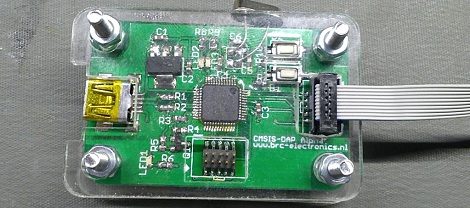
The new crop of ARM Cortex M0/M3/M4 microcontrollers have a lot of interesting features for developers. In addition to supporting drag and drop programming via USB, the same hardware can also be used as a debugger. Setting breakpoints and inspecting memory at any point in the code is a wonderful feature, but not all the new ARM dev boards we’ve seen support this feature.
The folks over on SimpleCortex have a solution to this problem, but they need your help. To get their CMSIS-DAP hardware working with Open Source tools, they’re looking for a few good programmers and hardware developers to build a toolchain.
Right now, the hardware only works with Keil development tools. A closed source development environment is no good to anyone, so if you have some experience writing drivers and such, send the guys at SimpleCortex an email. They’ll give you a free board in return for a contribution to building an open source ARM toolchain.
Common sense requires us to mention that you should probably only send these guys an email if you actually plan on working on this problem. Still, it’s a great opportunity to contribute to open hardware.
STM32 F3 Discovery Dev Board Includes Some Extras
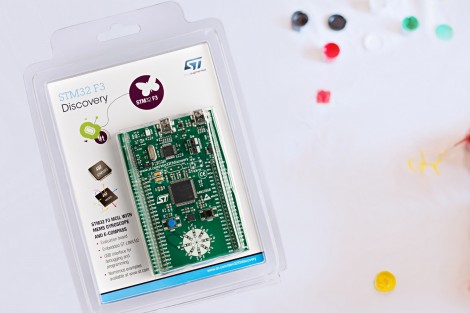
ST Microelectronics keeps kicking out development boards to show off their new ARM processor line. Yesterday they issued a press release announcing the STM32 F3 Discovery Board. As their naming scheme implies, this carries an ARM Cortex-M3 processor, but compared to the F0 Discovery board (which we loved) it’s got several extra goodies built into it.
We took a look at the F3 Discovery product page and it doesn’t look like you can order these quite yet. But click-through to the pricing and you’ll see they’ve set it at $10.90. Digikey lists the board at that price point, Mouser lists it at about $16, but neither supplier has any available. We also didn’t see a link for free boards like when the F0 model was released. If you do come across a giveaway link please tip us off about it.
Okay, now let’s discuss those extras. We think this dev kit could be used as an IMU for applications like a quadcopter or a self-balancing robot. That’s because it has a gyroscope and an accelerometer. It’s also got ten LEDs, eight of which are arranged on that white circle. We’d guess that layout is for displaying orientation data from the IMU sensors. There’s also a second USB port to use when developing USB applications for the chip.
Like the other boards in the Discovery family this has the STlinkV2 built-in to use as a programmer. We don’t know if OpenOCD has support for the F3 chipset yet, which is what we’ve been using to program STM chips in a Linux environment.
Drag And Drop Code Onto This ARM Dev Board
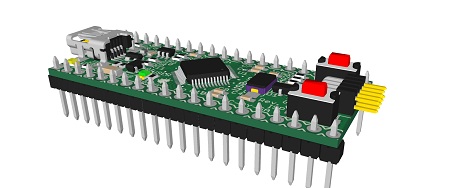
On the continuing list of homebrew ARM dev boards we’ve seen over the past few months, [Squonk42]’s USBug is one of the best we’ve seen. Like many other ARM boards, it breaks out a member of the Cortex M0/M3 family into a 40-pin DIP, but unlike all the others, [Squonk] designed it so you can drag and drop code onto the microcontroller just like a USB thumb drive.
[Squonk]’s trick relies on a certain breed of NXP LPC11xx/LPC13xx microcontrollers. These chips feature a ROM-based mass storage, meaning you can compile code on your desktop and simply shuffle it over to the USBug, no external programmer required. Here’s the relevant app note (PDF in a zip file. Double whammy).
Of course, the USBug features the I/O you’d generally expect from the current crop of Cortex-M3 devices, all while serving up 64 kB of Flash and 12 kB of RAM.
[Squonk] says he’d like to put the USBug on Kickstarter, but unfortunately he’s not a US citizen. In the spirit of Open Hardware, perhaps some maker-based electronics manufacturer will pick up where [Squonk] is forced to leave off.









