Color Object Tracking With An 8-bit Microcontroller

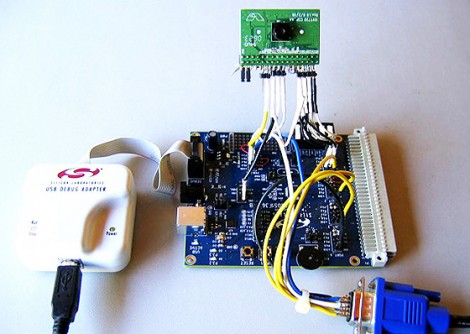
[Craig] sent in a link to this project which manages to implement color tracking on an 8-bit microcontroller at 60 frames per second. That’s some pretty incredible performance, but we’re also not talking about using a hobby-grade microcontroller. The C8051F360 is an ARM microcontroller with 100 MIPS throughput and with a system clock that can operate at up to 100 MHz. You also must consider that the chip will be able to do nothing else while in the tracking mode. Even with those gotchase, it’s still pretty incredible.

The setup uses an Omnivision OV7720 camera module. It has its own 24 MHz clock, which is used as the clock signal on the microcontroller’s PLL to generate a 96 MHz system clock. The code, which is written in a combination of C and assembly language, pushes captured tracking data to a PC via a serial port connection. After the break you can watch a bare-bones demo video that illustrates what the camera sees and what data shows up on the PC.

If you had the system in hand, what would you use it for? Perhaps it’s a perfect addition to that paintball sentry gun at which you’ve been hacking away?

Continue reading “Color Object Tracking With An 8-bit Microcontroller”

Advanced Robotic Arm Control Using Kinect

kinect_teleoperation

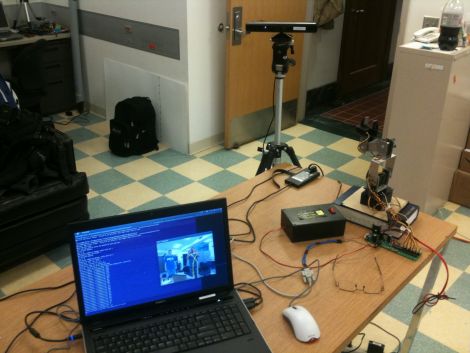
[Ryan Lloyd], [Sandeep Dhull], and [Ruben D’Sa] wrote in to share a robotics project they have been keeping busy with lately. The three University of Minnesota students are using a Kinect sensor to remotely control a robotic arm, but it’s not as simple as it sounds.

Using OpenNI alongside PrimeSense, the team started out by doing some simple skeleton tracking before working with their robotic arm. The arm has five degrees of freedom, making the task of controlling it a bit tricky. The robot has quite a few joints to play with, so the trio not only tracks shoulder, elbow, and wrist movements, but they also monitor the status of the user’s hand to actuate the robot’s gripper.

When everything was said and done, the results were pretty impressive as you can see in the video below, but the team definitely sees room for improvement. Using inverse kinematics, they plan on filtering out some of the joint tracking inaccuracies that occur when the shoulders are moved in a certain way. They also plan on using a robotic arm with even more degrees of freedom to see just how well their software can perform.

Be sure to check out their site to see more details and videos.

Continue reading “Advanced Robotic Arm Control Using Kinect”

Tiny Atari 810 Disk Drive Upgrade

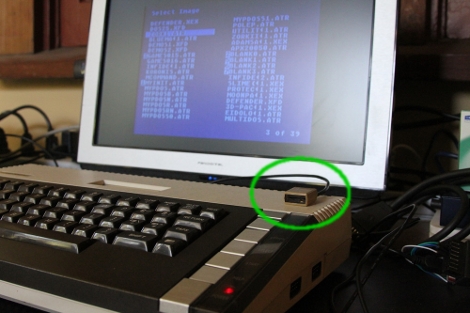
Everything gets smaller as technology improves. [Rossum] reduced the space needed for an Atari 810 disk drive by building this tiny replacement. Of course it doesn’t use floppy disks, but takes a microSD card instead. And it doesn’t stand in the place of one floppy drive, but can emulate up to eight different drives. The best part is that [Rossum] went to the trouble of designing an enclosure and having it fabricated via 3D printing in order to look just like a doll house version of the original hardware. It uses an LPC1114 ARM Cortex-M0 microprocessor to translate data transmissions to and from the Atari hardware, storing it on the 8 GB card.

As usual, you’ll soon find the schematic, board artwork, and code up on his git repository soon.

Real-time Robotic Arm Control With Blender

robotic_arm

Last year, [Justin Dailey] was coming down the home stretch of his senior year as a Computer Engineering student and needed to build a final design project. He always wanted to construct a robotic arm, and figured that there was no better way to legitimize such a project, than to claim that it was “homework”.

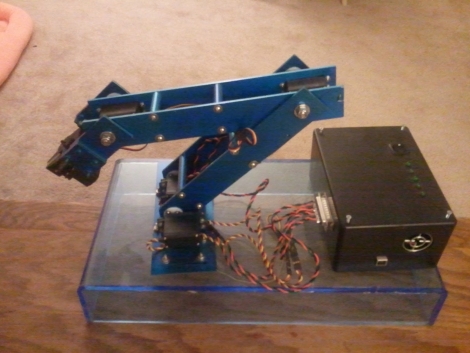
While he originally wanted to control the arm with a joystick, he had been messing with Blender quite a bit leading up to his final project, and thought it would be pretty cool to let Blender do the work. He started out by testing his ability to control a single servo with Blender, then slowly increased the complexity of the project. He prototyped the arm using cardboard, and satisfied with his progress thus far, began constructing the arm out of aluminum.

Once he had all six of his servos attached to the arm’s joints and wired to his Roboduino, he got busy constructing a 3D model in Blender. Using a few Python scripts, the movements inside Blender are translated to serial data in real-time, which is relayed to the Roboduino in order to control the arm.

Check out his site if you get a chance – there’s plenty of code to be had, as well as several videos of the arm in various stages of construction and testing.

Internet-controlled Robotic Arm

internet_robotic_arm

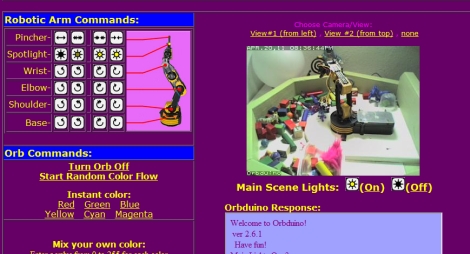
[Trav] was pondering virtual reality and decided it was no longer all that it was cracked up to be, so he created an experience in what he calls “Remote Reality”. While we have seen many installations over the years that allow people to remotely interact with objects across the globe, his Orbduino project consists of more than simply toggling lights on and off (though he’ll let you do that too).

In his house, he has set up a robotic playground of sorts that allows anyone who visits a chance to play around with the robotic arm he has installed there. The arm is situated in a pen filled with random objects which can be stacked and moved around. He also promises to show you something fun, provided you can guide the arm to pick up an object and hold it against the target positioned outside the pen.

He didn’t forget the obligatory remote light controls either. You can turn the overhead lights on and off, as well as control a multi-colored orb situated in the corner of the room. Most of the project’s interface is done with an Arduino Mega, which handles the robot arm interface, as well as messing with the light installations.

If you have some free time, swing by his site and give the robotic arm a try. It’s a fun little time waster that you will likely enjoy.  Just make sure to take it easy on his web server!

TI Adds Some Linux Support For Evalbot – We’ve Got Hardware Coupon Codes For You!

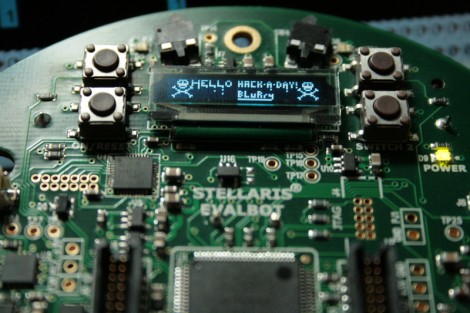
In case you missed it, Texas Instruments sells a little robot called the Evalbot as a development platform for ARM Cortex-M3 microcontrollers. Since its release we’ve seen a few hacks on the hardware; the image above is a proof of concept for developing for the device under Linux. We have criticized TI in the past for not natively supporting Linux with their IDEs. We’re not sure how it will play out, but they have added new software package options to go along with the hardware. You’ll notice on their PR page that there is now an option to use CodeSourcery. It is a trial of the full version, but at least it is a step in the GNU direction from their previous offering.

The Hackaday team has been talking off and on with TI about the hardware. We’re happy to say that they’ve been listening to the Internet community about their likes and dislikes; following various online groups that have sprouted up to talk about Evalbot projects. It sounds like they’re thinking about hosting a contest using the hardware. So maybe you want to get your hands on one so that you can familiarize yourself and hit the ground running if/when that contest starts. You’re in luck, we can help save you a few bucks.

The first time that Texas Instruments tried out a $125-off coupon code the deal got away from them. It had been meant for attendees of the ESC Boston conference. They honored the deals that went through before the proverbial run-on-the-bank got shut down. This time around they’re using serialized deal codes to limit the number of give-aways. We’ve got 200 of them just waiting for our loyal readers to use. One code will let you purchase one Evalbot for just $25 (instead of $150).

Please take a moment to decide if you actually want (and will use) one of these robots, and decide if you are willing to shell out the $25 to order it. You see, we don’t want this deal going to waste. If you decide this is for you, send an email requesting a code to:We’re all out! We’ll dish out the deal on a first-emailed-first-served basis. We will update this post when all 200 have been claimed.

We will not tolerate anyone gaming the system and so we reserve the right to disqualify any email submission for any reason in an attempt to maintain some semblance of fairness. Also… if you’re planning to pick this up just to resell it for cash you’re a loser.

[update: Those who emailed us requesting a code should begin receiving replies this evening or tomorrow.]

[Update 2: here is the specific bot you should be trying to buy. ]

Earthquake Alert System


[Roteno’s] submission for the 555 timer design contest is an Internet connected earthquake alert system. It monitors the USGS website for earthquake data and plays a tune when an earthquake occurs. The data is available as a feed in the form of a TXT file which is pretty easy to parse using cURL. He chose an LPCXpresso board (which is an ARM development platform that can run a Linux kernel) along with an XPORT module to handle the Ethernet traffic.

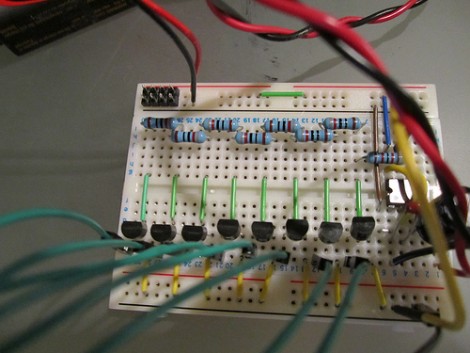
So where does the 555 timer see some action? It is responsible for playing the tone when an earthquake is detected. But playing just one pitch isn’t much fun. Instead, [Roteno] built the circuit above which creates a resistor network switched by a series of transistors. This way he can use GPIO from the microcontroller to choose different pitches. Check out the video after the break to hear the results. At power-up all eight pitches are played as a test, and the alert sound varies in pitch and tempo based on the magnitude of the earthquake.

Continue reading “Earthquake Alert System”