What Can You Run On A 1960s Univac? Anything You’re Willing To Wait For!

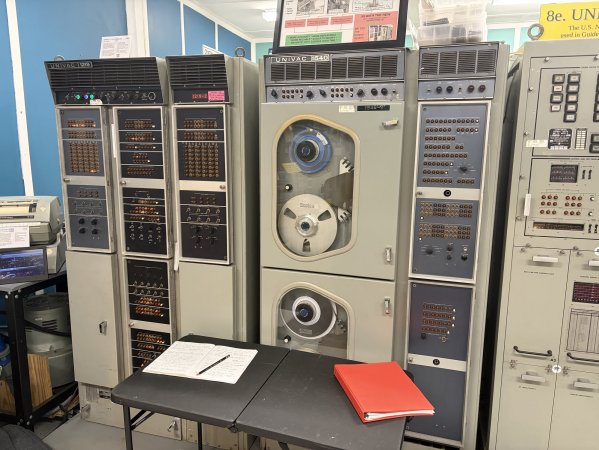
There are two UNIVAC 1219B computers that have survived since the 1960s and one of them is even operational. [Nathan Farlow] wanted to run a Minecraft server on it, so he did. After a lot of work, of course, which is described in a detailed blog post, and, a YouTube video by [TheScienceElf] we’ve embedded below.

The UNIVAC is a seriously weird architecture by modern standards: it’s got eighteen-bit words — yeah, not even a power of two — and one’s compliment arithmatic with a weird signed zero thing going on. There’s one 36-bit and one 18-bit register, and only 40,960 words of memory. Eighteen-bit words. Yeah, it was the 1960s and they were making it up as they went along.

[Nathan] wasn’t, entirely, as this weird system is both well-documented and already had an emulator — in BASIC, of all things. [TheScienceElf] used the docs and the existing emulator to recreate his own in Rust so he could test their somewhat crazy plan without wasting cycles on real hardware. The plan? Well, there are really only two options if you want to build modern software for a niche architecture: one is to add niche support to something like GCC, and the other is to write a RISC V emulator and compile to that. We’ve seen that second one before, and that’s the route [Nathan] took.

Of course, [Nathan] is a machine learning guy, so he made the best possible use of LLMs — though it’s interesting to see that unlike Z80 Assembly, Claude Code really couldn’t wrap its virtual head around the UNIVAC’s assembly language, and [Nathan] had to bang out the RISC V emulator himself. Emulator in hand, [Nathan] and friends had code to run on the museum UNIVAC. A single frame of an NES game took 40 minutes, but hey, at least it finished before they got back from lunch.

[TheScienceElf]’s YouTube treatment teases hosting Minecraft, but it wasn’t a full server, just the login portion. That they were able to get TCP/IP over serial and set up a handshake between a 2020s laptop and a 1960s computer is still mighty impressive. Just the work the Vintage Computer Federation put in to get and keep this antique running is mighty impressive all on its own, but it’s wonderful they let people play with it.

Continue reading “What Can You Run On A 1960s Univac? Anything You’re Willing To Wait For!”

Compiling Four Billion If Statements

With modern tools, you have to try very hard to do something stupid, because the tools (rightly) recognize you’re doing something stupid. [Andreas Karlsson] can speak to that first hand as he tried to get four billion if statements to compile.

You may ask what state space requires four billion comparisons to evaluate? The answer is easy: the range of an unsigned 32-bit integer. The whole endeavor started with a simple idea: what if instead of evaluating whether an integer is even or odd with a modulo or bit mask, you just did an if statement for every case? Small ranges like 0-10 are trivial to write out by hand, but you reach for more automated solutions as you pass 8 bits and move towards 16. [Andreas] wrote some Python that outputs a valid C program with all the comparisons. For 16 bits, the source only clocks in at 130k lines with the executable less than 2 MB.

Of course, scaling to 32 bits is a very different problem. The source file balloons to 330 GB, and most compilers barf at that point. Undeterred, [Andreas] modified the Python to output x86_64 assembly instead of C. Of course, the executable format of Windows (PE) only allows executables up to 4 GB, so a helper program mapped the 40 GB generated executable and jumped into it.

What’s incredible about this whole journey is how performant the program is. Even large numbers complete in a few seconds. Considering that it has to thrash 40 GB of an executable through memory, we can’t help but shake our heads at how even terrible solutions can work. We love seeing someone turn a bad idea into an interesting one, like this desoldering setup.

A Lightweight AVR IDE

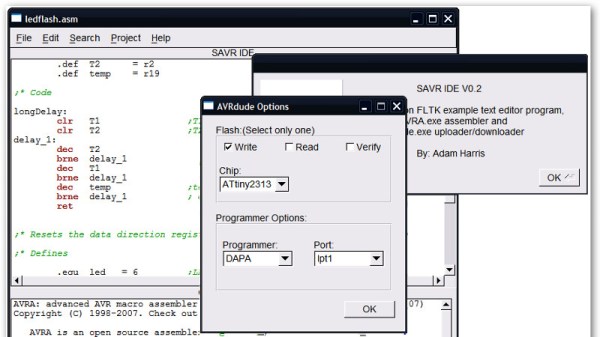
It’s entirely possible to do your coding in vim or emacs, hammering out hotkeys to drive the interface and bring your code to life. While working in such a way has its charms, it can be confronting to new coders, and that’s before even considering trying to understand command line compiler settings. The greenhorn coder may find themselves more at home in the warm embrace of an IDE, and [morrows_end] has now built one for those working with AVR assembly code.

The IDE goes by the name of Simple AVR IDE, or savr_ide for short. Programmed in C++ with the FLTK widget library, [morrows_end] has tested it on Windows XP, but notes that it should successfully compile for Linux, Unix, and even MacOS too.

All the basic features are there – there’s syntax highlighting, as well as integration with the AVRA assembler and AVRDUDE for programming chips. It’s a tool that could make taking the leap into assembly code just that little bit easier.  For another taste of bare metal coding, check out [Ben Jojo]’s discussion of x86 bootloaders.