In a previous article, I discussed LEDs in general and their properties. In this write-up, I want to give some examples of driving LEDs and comparing a few of the most commonly used methods. There is no “one size fits all” but I will try and generalize as much as possible. The idea is to be able to effectively control the brightness of the LED and prolong their life while doing it. An efficient driver can make all the difference if you plan to deploy them for the long-haul. Let’s take a look at the problem and then discuss the solutions. Continue reading “Control Thy LED”
circuit59 Articles
The Science Behind Boost Converters
[Ludic Science] shows us the basic principles that lie behind the humble boost converter. We all take them for granted, especially when you can make your own boost converter or buy one for only a few dollars, but sometimes it’s good to get back to basics and understand exactly how things work.
The circuit in question is probably as simple as it gets when it comes to a boost converter, and is not really a practical design. However it helps visualize what is going on, and exactly how a boost converter works, using just a few parts, a screw, enameled wire, diode, capacitor and a push button installed on a board.
The video goes on to show us the science behind a boost converter, starting with adding a battery from which the inductor stores a charge in the form of an electromagnetic field. When the button is released, the magnetic field collapses, and this causes a voltage in the circuit which is then fed through a diode and charges the capacitor a little bit. If you toggle the switch fast enough the capacitor will continue to charge, and its voltage will start to rise. This then creates a larger voltage on the output than the input voltage, depending on the value of the inductor. If you were to use this design in a real life application, of course you would use a transistor to do the switching rather than a push button, it’s so much faster and you won’t get a sore finger.
This is very basic stuff, but the video gives us a great explanation of what is happening in the circuit and why. If you liked this article, we’re sure you’ll love Hackaday’s own [Jenny List] explain everything you need to know about inductors.
(updated thanks to [Unferium] – I made a mistake about the magnetic field collapsing when the button is pressed , When in reality it’s when the button is released that this happens. Apologies for confusion.)
Brake Light Blinker Does It With Three Fives
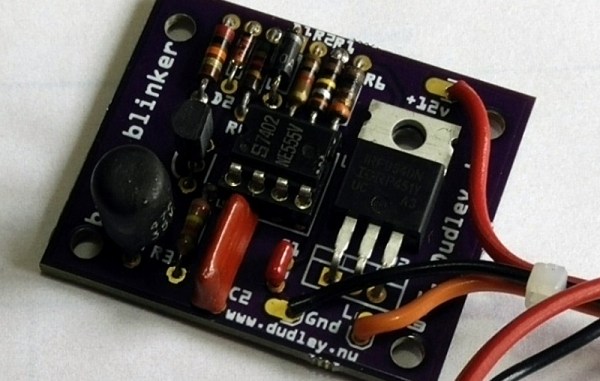
Sometimes you use a Raspberry Pi when you really could have gotten by with an Arudino. Sometimes you use an Arduino when maybe an ATtiny45 would have been better. And sometimes, like [Bill]’s motorcycle tail light project, you use exactly the right tool for the job: a 555 timer.
One of the keys of motorcycle safety is visibility. People are often looking for other cars and often “miss” seeing motorcyclists for this reason. Headlight and tail light modulators (circuits that flash your lights continuously) are popular for this reason. Bill decided to roll out his own rather than buy a pre-made tail light flasher so he grabbed a trusty 555 timer and started soldering. His circuit flashes the tail light a specific number of times and then leaves it on (as long as one of the brake levers is depressed) which will definitely help alert other drivers to his presence.
[Bill] mentions that he likes the 555 timer because it’s simple and bulletproof, which is exactly what you’d need on something that will be attached to a motorcycle a be responsible for alerting drivers before they slam into you from behind.
We’d tend to agree with this assessment of the 555; we’ve featured entire 555 circuit contests before. His project also has all of the tools you’ll need to build your own, including the files to have your own PCB made. If you’d like inspiration for ways to improve motorcycle safety in other ways, though, we can suggest a pretty good starting point as well.
No-Etch Circuit Board Printing
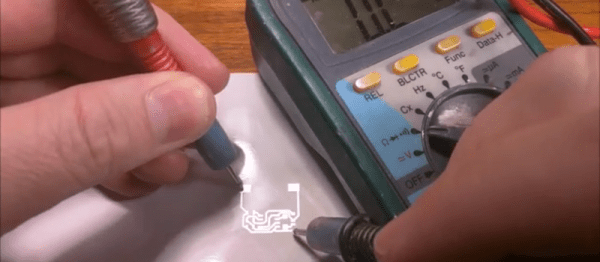
If you’ve ever tried to build a printed circuit board from home, you know how much of a pain it can be. There are buckets of acid to lug around, lots of waiting and frustration, and often times the quality of the circuits that can be made traditionally with a home setup isn’t that great in the end. Luckily, [Rich] has come up with a way that eliminates multiple prints and the acid needed for etching.
His process involves using a laser printer (as opposed to an inkjet printer, as is tradition) to get a layer of silver adhesive to stick to a piece of paper. The silver adheres to the toner like glitter sticks to Elmer’s glue, and allows a single pass of a laser printer to make a reliable circuit. From there, the paper can be fastened to something more solid, and components can be reflow soldered to it.
[Rich] does post several warnings about this method though. The silver is likely not healthy, so avoid contact with it, and when it’s applied to the toner an indeterminate brown smoke is released, which is also likely not healthy. Warnings aside, though, this is a great method for making home-made PCBs, especially if you don’t want tubs of acid lying around the house, however useful.
Thanks to [Chris] for the tip!
Etching A PCB In Ten Minutes.
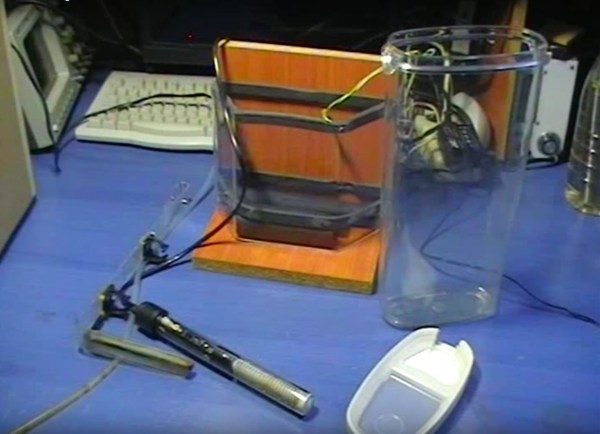
Most circuit boards any maker could need for their projects can be acquired online at modest cost, but what if you need something specific? [Giorgos Lazaridis] of pcbheaven.com has designed his own etching bath complete with a heater and agitator to sped up the process of creating your own custom circuit boards.
[Lazaridis] started by building a circuit to control — in a display of resourcefulness — a fish tank heater he would later modify. The circuit uses a PIC 16F526 microcontroller and two thermristors to keep the temperature of the etching bath between 38 and 41 degrees Celsius. The fish tank heater was gingerly pried from its glass housing, and its bimetallic strip thermostat removed and replaced with a wire to prevent it shutting off at its default 32 degrees. All of it is mounted on a small portable stand and once heated up, can etch a board in less than 10 minutes.
Retrofitted Retro Radio
In a world full of products that are only used for a brief time and then discarded, it gives a lot of us solace to know that there was a time when furniture was made out of solid wood and not particle board, or when coffee makers were made out of metal and not plastic. It’s hard to say exactly what precipitated the change to our one-time-use culture, but in the meantime there are projects that serve to re-purpose those old, durable products from another time so that they can stay relevant in today’s ever-changing world. [Jose]’s new old radio is a great example of this style of hack.
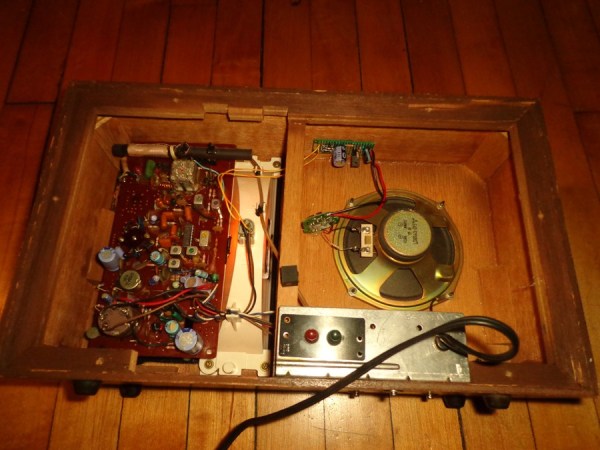
[Jose] had a 1970s-era single-speaker radio that he found in a thrift store. The first thought that he had to get the aesthetically pleasing radio working again was to install a Bluetooth receiver into the radio’s amplifier. This proved to be too time-consuming of a task, and [Jose] decided to drive the Bluetooth module off of the power circuit for the light bulb. He built a 6V AC to 4.2V DC circuit, swapped over the speaker cable, and started listening to his tunes. The modifications he made aren’t destructive, either. If he wants, he will be able to reconnect the original (and still functional) circuitry back to the speaker and pretend he’s back in 1970.
While this isn’t the most intricate hack we’ve ever featured, it’s always refreshing to see someone get use out of an old piece of technology rather than send it off to the landfill with all of our Pentium IIs or last year’s IKEA shelves that have already fallen apart. And even if the 70s aren’t your era of choice, perhaps something newer will inspire you to bust a move.
Overthinking Solenoid Control
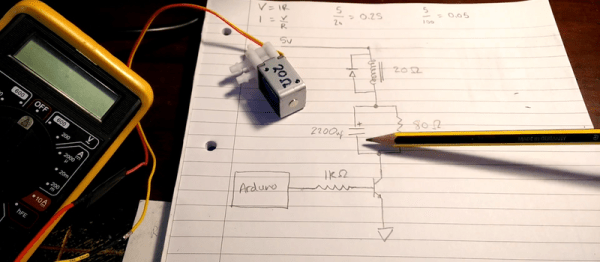
No circuit is so trivial that it’s not worth thinking hard about. [Charles Wilkinson] wanted to drive a solenoid air valve that will stay open for long periods of time. This means reducing the holding current to prevent wasting so much power. He stumbled on this article that covers one approach in a ridiculous amount of depth.
[Charles] made two videos about it, one where he debugs the circuit and learns things live on camera, and another where he sums it all up. We’ll be walking you through the long one, but feel free to skip around.