LiveLight Is An Expertly Crafted Ambilight Clone

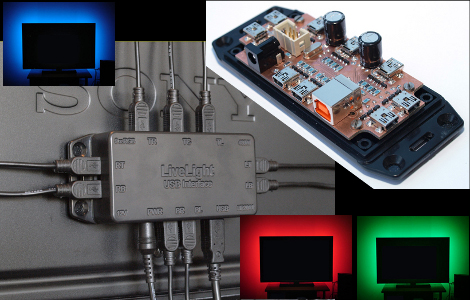
[SunWind] (Edit 2018: who now goes as [nerdaxic]) developed his own version of the Phillips Ambilight system which he is calling LiveLight. We’ve seen more than a few of these hacks, many of them are based around Arduino, and most use LED strip lighting. [Nerdaxic] is using strip lighting as well, but his design is clean and polished quite a bit more than anything else we’ve seen. In our minds this would be welcomed by even the most discriminating of A/V enthusiasts.

He found just the right size of project box and managed to fit everything in on a nicely milled PCB. The enclosure itself has also been milled to allow the mini USB B connectors for each of the nine RGB LED strips. But he didn’t stop there, the top of the enclosure has labels milled into it to help when hooking everything up.

An ATmega32 addresses the LED strips based on data pushed in from a computer. An on-board FTDI chip adds USB connectivity and [nerdaxic] used a hack to rewrite the EEPROM on that chip so that it enumerates with the name “LiveLight USB Interface”. A program called Boblight gathers the data from the currently playing video. You can see the final project in the video embedded after the break.

Continue reading “LiveLight Is An Expertly Crafted Ambilight Clone”
Shop Lighting: Weighing Cost And Efficiency

[Ben Krasnow] wanted to upgrade his shop lighting but before he made any decisions he decided to educate himself about the options that are out there. Luck for us, he shares the facts about different lighting in terms of cost and efficiency.

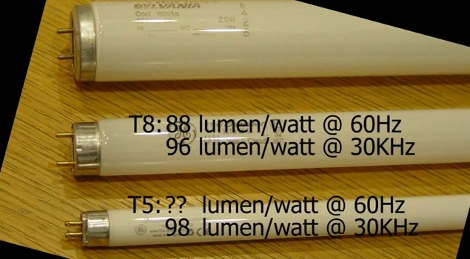
His old setup uses fluorescent light fixtures with T12 bulbs. These are rather bulky and inefficient bulbs. Many folks, ourselves included, would think of LED as a logical replacement. [Ben] started by looking into the various high-intensity LED modules that are available. He grabbed a catalog and started doing a couple of different calculations to compare Lumens/dollar for the upfront cost, and Lumens/Watt for the operational costs. Hands down, newer fluorescent bulbs come in cheaper on both counts and provide a wider spectrum of light.

The next decision was between purchasing the newer T5 bulbs which are rated at very high efficiencies, or to go with T8 bulbs which are better than the T12 standard but can use the same fixtures. After doing some digging he found that T5 is not much more efficient than T8, but they use an electronic ballast to boost efficiency. He ended up replacing his old magnetic ballasts with electronic ones to get high T8 efficiency at a cost that was lower than buying new T5 fixtures.

See [Ben’s] own recount of this process in the clip after the break.

Continue reading “Shop Lighting: Weighing Cost And Efficiency”

Warm Tube Clock, Take 2

warm_nixie_v2

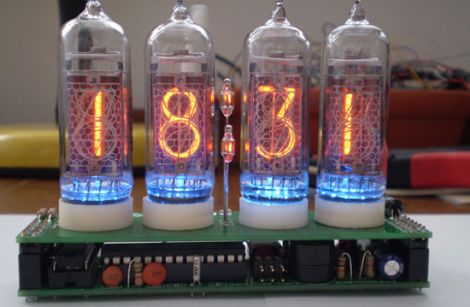
[Mure] wrote in to let us know he has put the finishing touches on the second iteration of his Warm Tube Nixie clock. We featured his original creation here last year, and while many things remain the same, he has still found a few things that he was able to improve on.

The first notable feature is the new real time clock. Instead of using a discrete crystal to keep time and a temperature sensor for compensation, he has opted to use a DS3231 RTC IC. It is far more accurate than the crystal, and it features a built-in temperature sensor as well. The alarm functionality has been simplified too, moving the controls into firmware rather than having to use a sliding switch to do so.

With the mainboard redesign, it would have been easy to leave behind the nixie “shields” he created for his first clock, but with a focus on interoperability, he chose to make this clock fully compatible with version one’s shields and vice versa.

While the changes aren’t groundbreaking, it’s nice to see a project like this undergo continued refinements. If you want to build a clone of this clock, [Mure] has made sure that all of the schematics and source code are available on his site.

Continue reading to see a brief video demo of the clock in action.

Continue reading “Warm Tube Clock, Take 2”

Hackaday Links: Monday, May 30th

Huge, fully functional NES game pad replica

huge_nes_pad

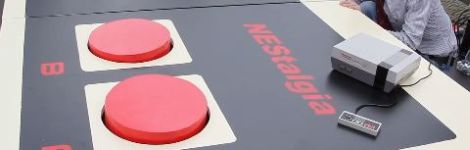
Students at Dutch TU Delft university recently built a huge replica of the original NES controller (Google Translation), which is fully functional and can be used to play games on a large display screen they also installed. How big is it, you ask? It’s about 6 meters wide – over 30 times the size of the original NES game pad and requires participants to jump on the buttons to play.


Convert any image to G-code

bitmap_to_gcode

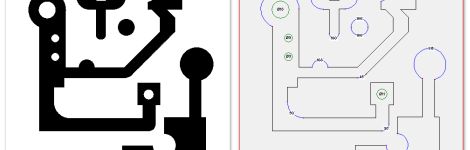
Members of [Forskningsavdelningen], a Swedish hackerspace, are working on software that will allow users to vectorize bitmap images in order to convert them to G-code files for CNC milling. A good portion of the project is complete, but there is still a bit of work to do, so you won’t see it in action for a while. When it’s ready, we’ll be sure to let you know.


Convert your lame Dead Space plasma cutter into a bonafide laser weapon

dead_space_laser

If you forked out big bucks for the special edition of Dead Space 2, you know how lame the included plasma cutter replica is. Check out this video, that shows you how to convert your LED toy to a dual laser, fire starting, laser pistol. The process is pretty simple, so what are you waiting for?


Synchronized, LED-lit juggling balls

led_balls

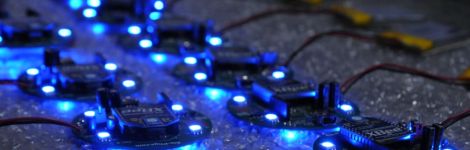
[Jonathan] wrote in to share a project he and some friends have just finished. He’s not sharing a ton of details at the moment, but he has put up a video showing off their wireless LED juggling balls. All we know is that they use bright RGB LEDS, Zigbees for communication, and that they are awesome. We can’t wait to hear more about them!


Water cooled PS3 Laptop

watercooled_ps3

[Pirate] recently unveiled his latest work, a water-cooled Playstation 3 laptop. It looks pretty sharp, and can undoubtedly rival some of Ben Heck’s work, even if it does have an external PSU. Obviously having a separate power component isn’t necessarily ideal, but when you are cramming all of that water cooling goodness into such a small package, something has to give!

Displaying Video And Gifs On RGB LED Matrices

led_matrix

[Mathieu] was on holiday in China and picked up some fun toys while perusing the numerous electronics markets there. The most interesting things he discovered were a pair of RGB LED matrices. They came in two different flavors, one made for indoor and one for outdoor displays, sporting a 64×32 and 32×16 resolution, respectively.

If you’ve read his blog before you know he is a big fan of LED matrices, so it’s only natural that bought a whole bunch of them and started experimenting once he got home. Using the same Atmel FPSLIC LED matrix control board he showed off in this previous hack, he was able to get the LED matrices up and running in no time. He adapted his webcam project to utilize the new panels, and he added a whole new feature as well. Via MatLab, he can now display any sort of animated gif on the panels, as you can see in the video below. The panels look great, and if we had a few of these around, there’s no doubt we would probably play this video on infinite repeat.

He says that the despite their somewhat questionable origins, the panels are of top notch quality, and he is willing to organize some sort of group buy if others are interested.

Continue reading “Displaying Video And Gifs On RGB LED Matrices”

Awesome Custom Disco Basement

led_shelves

[Evan] is one of those neighbors you only wish you had.

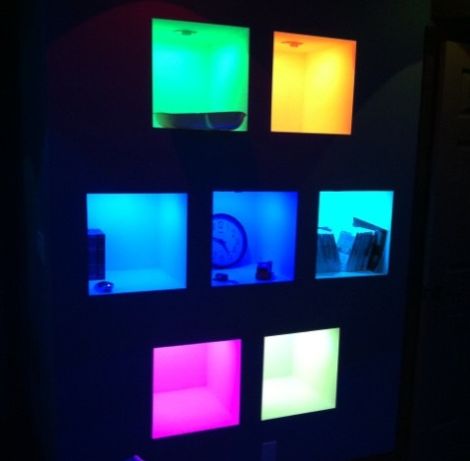
His neighbors were renovating their basement for use as home theater, and he stopped by to check out how things were coming along. While there, he suggested they add some LED lighting to their shelving unit to make them pop. His neighbors were game, so he sourced some cheap RGB LEDs online and began working on the circuits and firmware needed to control the lights. His neighbors wrote some custom software that interfaces with iTunes to create a neat visualization in the shelving unit whenever music is played.

Once everything was complete, his neighbors informed him that they wanted an additional 20 overhead can lights and a set of 4 wall sconces wired up as well. Needless to say he was pretty excited, so he got busy wiring up the remainder of the basement.

He pushed the installation’s PIC microcontroller about as far as he possibly could, resulting in the awesome show seen in the video below.

Needless to say, it’s pretty impressive, though we wish we could have a peek at the code used to run everything. Wink, wink, nudge, nudge.

Continue reading “Awesome Custom Disco Basement”

Dimming Control For An Ikea Solar Desk Lamp

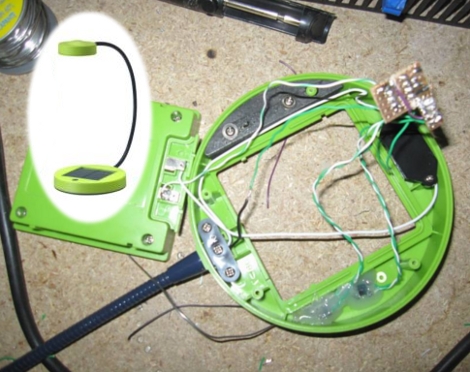
[Frank] decided to augment his desk lamp’s features by adding dimming controls (translated). Since the light source is a triad of LEDs the best method of dimming their intensity is to use Pulse Width Modulation. That’s the method that he went with, and luckily the SUNNAN lamp from Ikea which he’s using as the donor for the project has just enough room to squeeze in the parts necessary for this hack.

You need two main bits to use PWM with a lamp like this; a microcontroller (or possibly a timer chip like the 555) and a transistor to protect that chip from the current necessary to run the LEDs at full brightness. [Frank] went with an ATtiny13 and a 2N2222 transistor, both quite common and very inexpensive (you can even pull the microcontroller from a light bulb if you know where to look). Two buttons were added to the top of the lamp base which allow for up and down controls. There’s even an SOS function which is triggered by pressing both buttons at the same time. [Frank’s] happy to show off the completed project in the clip after the break.

Continue reading “Dimming Control For An Ikea Solar Desk Lamp”