Help Me Reverse Engineer An LED Light Bulb

hack LED bulb

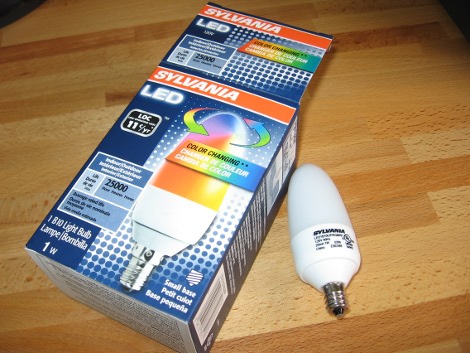
I went to the last monthly meeting of Sector 67, a hackerspace in Madison, WI. One of the things shown off was a color changing LED light bulb that Menards was clearing out for $1.99. Inside there’s two RGB LEDs controlled by an ATtiny13 and powered by an AC/DC buck converter. An ATtiny13 will run you around $1.25 by itself so this price is quite amazing. I grabbed a couple of these bulbs and set to work on them. Join me after the break to see what I’ve got so far.

Update: read a follow-up to this post.

Continue reading “Help Me Reverse Engineer An LED Light Bulb”

Under-desk RGB Keyboard Lighting

[Jay Collett] was having trouble seeing his keyboard when the room was dim. But throwing a light under the desk just didn’t seem cool enough. Instead he built an RGB light board that is controlled by his desktop. The board is based around an ATmega328 with the Arduino booloader. He etched a single-sided PCB to connect it to a group of five RGB LEDs, with a programming header for an FTDI cable. The board communicates with a PC via serial connection, with a C# control application that [Jay] coded to control the color. We’ve embedded a couple of videos after the break but check his page for a package of code and hi-res pictures.

If you want something cool that’s a little bit less work to build check out the EL-wire keyboard from this links post.

Continue reading “Under-desk RGB Keyboard Lighting”

Beginner Concepts: LEDs And Laws

Adafruit has a new LED tutorial for people wanting to get started with electronics. It is full of useful diagrams, pictures, and quizzes to help make sure you are understanding the concepts. This is the real basic stuff here: LEDs, resistors, and the laws from Kirchhoff, and Ohm. It starts out explaining the parts of an LED. Then variations of LEDs: illumination versus indication, clear versus diffused, brightness, color, and size. The mass of the tutorial covers how and why an LED’s brightness can be changed by a resistor and why a resistor is needed to keep an LED from burning out. Such as how Kirchhoff’s Voltage Law works with Ohm’s Law to help you determine the proper resistor for an LED. If you found useful the other beginner concepts posts about Analog Circuits and Electronics basics from the Giz, you should find this tutorial to be useful.

AVR Controlled RGB LED Matrix Plays Tetris

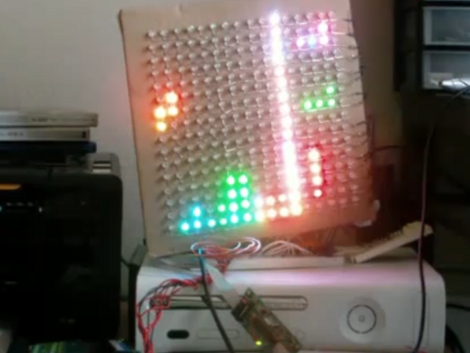
[Stan] built this LED matrix using a 16×16 grid of RGB LEDs. He built the hardware and wrote some subroutines to randomize the colors. He’s not using PWM because frame buffering is not feasible for the 1k SRAM limit of the ATmega168 he used. Instead, shift registers drive the lights which can be mixed to achieve eight different colors (including off for black) reducing the framebuffer size to just 96 bytes. After he got done with the build he realized this is sized well for a game of Tetris. We’ve seen AVR tetris, PIC Tetris, and Tetris using composite video but it’s always a pleasure to see a new display build.

After the break we’ve embedded [Stan’s] demo video, several pictures, and a schematic. He’s using many of the same principles outlined in our How to Design an LED matrix tutorial.

Continue reading “AVR Controlled RGB LED Matrix Plays Tetris”

Machine Your Own Ring Light

[Alan] acquired a stereo microscope from eBay, and decided to save some more money by designing, machining, and assembling his own arc reactor ring light to go along. After finding an LED driver board sitting around as well as ordering some surface mount LEDs, he set about using a lathe to cut away a block of lexan, making sure to include slots for the lights as well as the microscope mount point. Follow the link to see the detailed build photos, as well as some comparison shots with and without the ring light.

A month or two earlier though, and [Alan] would have had a fantastic start to an Iron Man costume.

Swapping Speedometer Needle For LEDs

[Ah2002] didn’t like the shaky needle in his car’s speedometer so he replaced it with a ring of LEDs. The old speedometer had a cable which rotated along with the gearbox for mechanical speed measurement. By connecting the stepper motor from a printer instead of this cable, a voltage is generated that fluctuates with the speed of the car. The fluctuation is linear so a given voltage measurement can be directly associated with one particular speed. By using a trimpot to calibrate the input voltage, [Ah2002] connected the signal to an LM3914 dot/bar display driver. These can be chained together, lighting a string of outputs based on the single voltage input. The result is the board seen above, which was covered with a printed paper graph in the final assembly.

Judging from the video after the break, we’d bet there was some distracted driving during the calibration process. The driver appears to be holding the video recorder, and since a cellphone GPS was used during calibration we wonder if [Ah2002] was adjusting the trimpot, looking at the GPS, and driving all at once. It’s a fairly awesome hack, but do be careful when you’re working on something like this.

Continue reading “Swapping Speedometer Needle For LEDs”

RGB Stroboscopic Guitar Tuning

This is [Michael Ossmann’s] RGB LED stroboscopic guitar tuner. If his name is familiar that’s because we mentioned he’d be giving a talk with [Travis Goodspeed] at ToorCon. But he went to DefCon as well and spent the weekend in his hotel room trying to win the badge hacking contest.

Despite adversity he did get his tuner working. It’s built into a toy guitar that he takes on road trips with him. By adding a row of RGB LEDs between two of the frets he can use the vibration frequency of an in-tune string to flash the three different colors. If the string is not in tune the three colors will dance around but matching it with the LED frequency produces a stable color. He then uses that big yellow button to advance to the next string. See his demonstration after the break.

This is basically a built-in plectrum tuner that uses one LED package instead of two.

Continue reading “RGB Stroboscopic Guitar Tuning”