BackTrack 3 Final Is Out


OpenSuse and Ubuntu are perfectly serviceable Linux distros, but we’ve had a soft spot for BackTrack from the very start. Good news for us, since yesterday was the long awaited release of BackTrack 3 Final. It uses the same 2.6.21.5 kernel as before (to maintain WiFi injection compatibility) and Nessus is still out, but it is not without a great deal of other improvements. Its forensic capabilities are better than ever, largely due to included apps like a fully functional version of SAINT and a special version of Maltego made just for BackTrack. The download is free, but Remote-Exploit is asking users not to distribute it without notifying them first, because they’re trying to keep track of the number of downloads.

[via Midnight Research Labs]
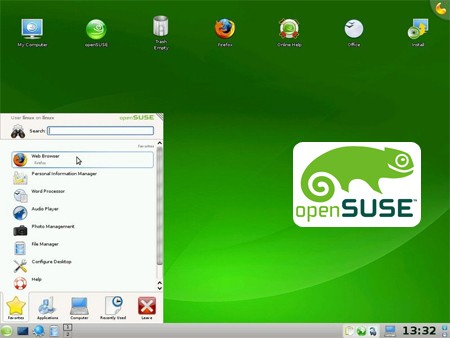
OpenSUSE 11.0 Reviewed


Download squad has posted a thorough review of OpenSUSE 11.0. Previous versions of the Linux distro were plagued by thorny and confusing installations, but OpenSUSE 11.0 installs much more easily and cleanly. After a few standard configuration screens, the user has several options for admin accounts, disk partitions, dual-boot setups, and more. The installation of the OS files takes about 20 minutes from there, followed by a quick reboot and first boot, making for a highly customizable yet speedy install from start to finish.

The other major problem with previous versions was the inconsistent speed of their package handling system. In 11.0, though, a new command line app called Zypper makes installing updates, patches, and other packages much faster.

The final verdict is that OpenSUSE 11.0 has become a viable alternative to Ubuntu; the overall quality of the open source distro was never in question, but now that speed has gone from being its biggest deficiency to being one of its biggest strengths, we expect to see a lot more chameleons in the wild.

Asus WL500GP Audio Hack


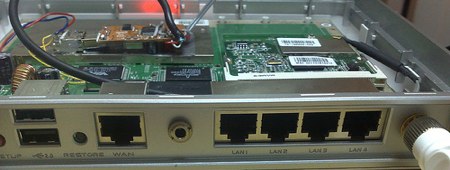
The Asus WL500GP wireless router runs Linux and has two USB ports. [equinoxfr] wanted to install audio support internally to the router though (translated). Luckily, it uses a VIA VT6212 4port USB controller. So, he was able to wire two more internal ports. A Brando USB soundcard is plugged into one of those ports and wired to an external headphone jack. He wanted dual RCA connectors, but they just wouldn’t fit. The router is running OpenWRT Kamikaze. MPD is used to serve music with the wymypy frontend since it has its own lightweight webserver.

Linux Web Development Tools


Download Squad has been publishing an informative series on switching to Linux, and their latest article is about the benefits of web tools on Linux.

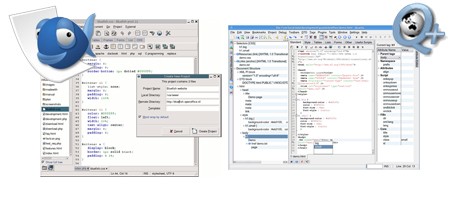
HTML editors like Bluefish and Quanta do not have all the features of Dreamweaver, but with many modern CMSes these features aren’t really necessary.

Other benefits include testing out web pages on your Linux home environment, and adding webhosts as remote locations. This makes management, testing, and deployment easier, and can eliminate the need for FTP software.

Bear in mind that the article is only the first part of an ongoing series on Linux web tools, which is itself part of a larger series about switching to Linux.

Using Multiple Browsers For Security


[Rich] over at Securosis takes us through some of his browser paranoia exercises. He uses different browser profiles for different types of web activities. Based on potential risk, various tasks are separated to protect from CSRF attacks and more. Everyday browsing with low risk passwords is done in one. RSS reading with no passwords is done in another. He runs his personal blog in a browser dedicated just to that.

For high risk research, he uses virtual machines to further minimize any potential nasty code getting through. Very high risk sites are browsed through a non-persistent read-only Linux virtual machine. While these techniques can be less effective if the entire OS is comprised, they can still provide a few layers of additional security.

Fellow browser paranoia sufferers may want to consider Firefox plug-ins like NoScript and memory protection from Diehard.

How-To: Super Simple Serial Terminal

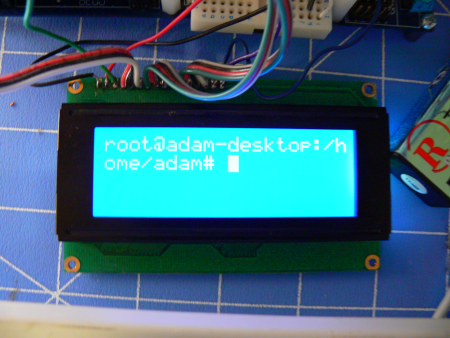
This hack shows how to make a dumb terminal out of a keyboard, LCD screen, and an 8-bit microcontroller. From time to time, a portable dumb terminal can be handy for when you have to rescue a headless server that’s acting up or if you are building a minicomputer out of a WRT, or if you just want to learn how to run a keyboard and LCD screen with a microcontroller. This super simple serial terminal will use RS-232 to control a headless linux system. Additionally, you might want to check into some of the command line interface programs that allow web browsing, AIM and IRC chatting and more directly from the terminal, but nothing beats being able to track your pizzas with this device.

The Linux system in question here will be Linux Mint. It’s a young distro based on Ubuntu that’s gaining a lot of attention lately, though the principles can be used for other Linux distros.

Continue reading “How-To: Super Simple Serial Terminal” →

IKEA Linux Cluster


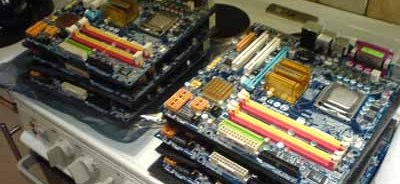
Building a render cluster doesn’t mean you have to spend a lot of money, even if you’re buying brand new hardware. [Janne] built this 6 unit cluster inside of a 6 drawer IKEA Helmer cabinet. He wanted the cluster to be low power and low cost. After finding a good price on 6 65nm Intel Core 2 CPUs, he found 6 cheap Gigabyte motherboards. The memory on each board was maxed at 8GB. With 24 2.4GHz cores consuming 400W, the power consumption and cost isn’t much more than a high end PC. Each board is running Fedora 8 and mounts an NFS share. Dr Queue is used to manage the render farm’s processes. [Janne] says jobs that previously took all night now only require about 10-12 minutes. The estimated capacity is 186Gflops, but plans are already in motion for a12Tflop version.

His site also has plans for an underwater camera housing like our recent post. If you want to see more IKEA abuse, check out IKEA Hacker, even if it’s not very technical.

[via Hackzine]

[UPDATE: yep, we duped ourselves]