Linux Fu: The Linux Shuffle

Computers are known to be precise and — usually — repeatable. That’s why it is so hard to get something that seems random out of them. Yet random things are great for games, encryption, and multimedia. Who wants the same order of a playlist or slide show every time?

It is very hard to get truly random numbers, but for a lot of cases, it isn’t that important. Even better, if you programming or using a scripting language, there are lots of things that you can use to get some degree of randomness that is sufficient for many purposes. Continue reading “Linux Fu: The Linux Shuffle”

Understand Linux Htop Visually

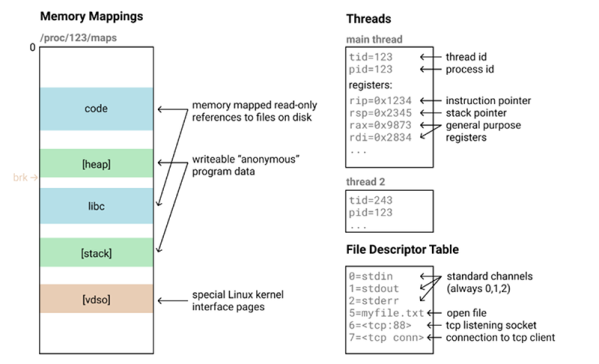
If you want to know exactly what’s going on in your Linux system, some of you might reach for top. For the connoisseur of system monitors, nothing less than htop will do. Not familiar with htop? [Umer Mansoor] did a beautiful job of explaining it graphically.

We’ve mentioned htop in a previous Linux Fu, but we’ve never gotten a chance to dig into it. And now, we don’t have to.  Like top, the htop program is still text-based, but it has a much nicer interface with colors, and easier way to send signals to processes, and support for tree displays. You can even use the mouse with it if you want to.

[Umer] did a lot of work to take screenshots of htop at work and annotate them. Sure, you could read the man page, but we think this is a lot better.

Of course, there are other improvements to top. Glances is pretty interesting, for example. For serious system administration help, you can try Webmin or Cockpit.

Maze Solving Via Text Editing

Linux scripters usually know about sed — the stream editor. It has a simple job: transform text as it whizzes from input to output. So if you wanted to solve a maze, this wouldn’t be the tool you’d think to use, right? Well, if you were [xsot], you’d disagree.

You build a maze using spaces for empty space and # for walls. There’s an S to mark the start position and an E to mark the end. Of course, the maze can also contain newlines. The sed script does an amazing job of solving the problem.

Continue reading “Maze Solving Via Text Editing”

Linux Fu: Leaning Down With Exec

Shell scripting is handy and with a shell like bash it is very capable, too. However, shell scripting isn’t always very efficient. Think about it. If you run grep or tr or sort to do some operation in a shell script, you are spawning a whole new process. That takes time and resources. But there are some answers to reducing — but not eliminating — the problem.

Have you ever written a program like this (in any language, but I’ll use C):

int foo(void)
{
  ...
  bar();

}

You hope the compiler doesn’t write assembly code like this:

_foo: 
....

      call _bar
      ret

Most optimizers should pick up on the fact that you can convert a call like this to a jump and let the ret statement in _bar return to foo’s caller. However, shell scripts are not that smart. If you have a shell script called MungeData and it calls another program or shell script called PostProcess on its last line, then you will have at one time three processes in play: your original shell, the shell running MungeData, and either the PostProcess program or a shell running the script. Not to mention, the processes to do things inside post process. So what do you do?

Continue reading “Linux Fu: Leaning Down With Exec”

Think You Know CURL? Care To Prove It?

Do you happen to remember a browser-based game “You Can’t JavaScript Under Pressure”? It presented coding tasks of ever-increasing difficulty and challenged the player to complete them as quickly as possible. Inspired by that game, [Ben Cox] re-implemented it as You Can’t cURL Under Pressure!

In it, the user is challenged in their knowledge of how to use the ubiquitous curl in a variety of different ways. Perhaps this doesn’t sound terribly daunting, especially if your knowledge of curl is limited to knowing it is a command-line tool to fetch something from a web server. But curl has a staggering number of features. The man page is over 4500 lines in length. The software’s main site offers a (free) 250+ page guide on how to use curl and libcurl. Reflecting on this is exactly what led [Ben] to create his challenge.

It’s a wonderful piece of work, but things get really interesting once [Ben] starts talking about the infrastructure behind it all. At its core the game works by giving the user a problem and a virtual machine, and catching outgoing HTTP calls to see whether they look correct. If the outgoing HTTP call is the right solution for the problem, terminate the current VM and start up the next one with the next problem. He’s put a lot of work into getting suitable VMs up and running quickly, securely, and properly isolated. The code can be found on the project’s GitHub repository for those who want a closer look.

But that’s not all. [Ben] says that in the past he’s had a bad habit of presenting interactive features in his blog posts that can’t keep up with sudden demand. So to address that, the system auto-scales as needed with a small Linux cluster; small brick-sized PCs are started and shut down automatically to meet demand. Hey, the only thing cooler than a functioning cluster is a cluster doing an actual job, like this one that detects NSFW images.

Now Even Your Business Card Can Run Linux

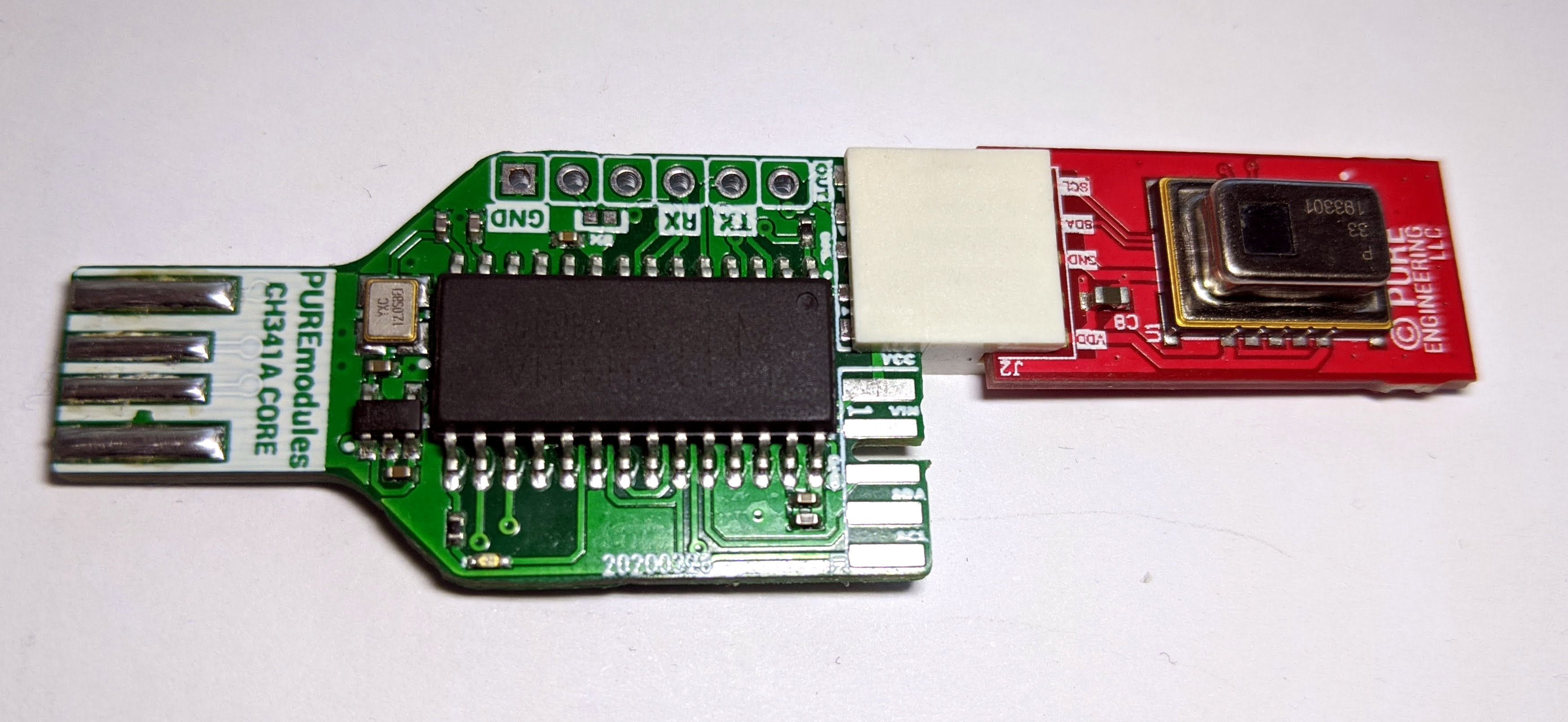
It takes a lot of work to get a functional PCB business card that’s thin, cheap, and robust enough to be practical. If you can even blink a few LEDs on the thing and still hand them out with a straight face, you’ve done pretty well for yourself. So you can imagine our surprise when [George Hilliard] wrote in to tell us about his $3 business card computer that boots into a functioning Linux environment. If this were a bit closer to April, we might have figured it was just a joke…

Of course it helps that, as an embedded systems engineer, [George] literally does this kind of thing for a living. Which isn’t to say it was easy, but at least he keeps close enough tabs on the industry to find a suitable ARM solution at a price that makes sense, namely the Allwinner F1C100s. This diminutive chip offers both RAM and CPU in a single package, which greatly simplifies the overall design and construction of the card.

With a root filesystem that weighs in at just 2.4 MB, the environment on the card is minimal to say the least. There’s no networking, limited I/O, and forget about running any heavy software. But it does boot in about six seconds, and [George] managed to pack in a MicroPython interpreter and a copy of the classic Unix dungeon crawler rogue.

Oh yeah, and it also has his resume and some samples of his photography onboard. It is, after all, a business card. All the user has to do is plug it into the USB port of their computer and wait for the virtual serial port to pop up that will let them log into the system running on the card. It also shows up as a USB Mass Storage device for recipients who might not be quite as adept at the command line.

In addition to the high-level documentation for this project, [George] has also prepared a deeper write-up that goes into more technical detail for anyone who might be looking to follow in his footsteps. Thanks to all of the source code that he’s made available, it should be a lot easier for the next person to get their own disposable pocket computer up and running.

We’ve seen all manner of electronic business cards over the years, but never anything quite like this. Which, of course, is quite the point. If you’re ever given a business card that doubles as a computer running a full-fledged operating system on it, you aren’t likely to forget it anytime soon.

Linux Fu: WSL Tricks Blur The Windows/Linux Line

We have to admit, we have an odd fascination with WSL — the Windows subsystem for Linux. On the one hand, it gives us more options on Windows 10 for running the software we love. On the other hand, we wonder why we aren’t just running Linux. Sometimes it is because our cool laptop doesn’t work well on Linux. Other times we are using someone else’s computer that we aren’t allowed to reload or dual boot. Still, as long as we have to use Windows, we are glad to have WSL. A recent blog post by [Hanselman] shows some very cool tricks for using WSL that make it even better.

Exploring WSL

Did you know you can use WSL to run Linux commands in a Windows command shell? For example, you have a long directory and you want to run grep:

dir c:\archive\* | wsl grep -i hackaday

Of course, from bash you could access the same directory:

ls /mnt/c/archive | grep -i hackaday

Continue reading “Linux Fu: WSL Tricks Blur The Windows/Linux Line”