Upgraded Toy Guitar Plays Music

Getting the finishing details on a Halloween costume completed is the key to impressing friends and strangers alike on the trick-or-treat rounds. Especially when it comes to things like props, these details can push a good Halloween costume to great with the right touches. [Jonathan]’s friend’s daughter will be well ahead of the game thanks to these additions to a toy guitar which is part of her costume this year.

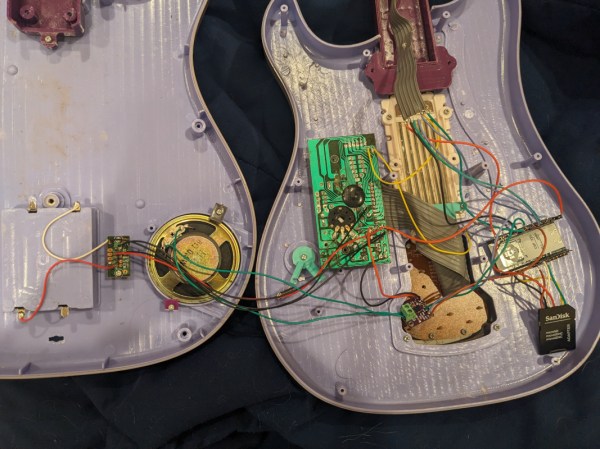
The toy guitar as it was when it arrived had the capability to play a few lackluster sound effects. The goal here was to get it to play a much more impressive set of songs instead, and to make a couple upgrades along the way as well. To that end, [Jonathan] started by dismantling the toy and investigating the PCBs for potential reuse. He decided to keep the buttons in the neck of the guitar despite their non-standard wiring configuration, but toss out the main board in favor of an ESP32. The ESP32 is tasked with reading the buttons, playing a corresponding song loaded on an SD card, and handling the digital to analog conversion when sending it out to be played on the speaker.

The project doesn’t stop there, though. [Jonathan] also did some custom mixing for the songs to account for the lack of stereo sound and a working volume knob, plus he used the ESP32’s wireless capabilities to set the guitar up as a local file server so that songs can be sent to and from the device without any wires. He also released the source code on the project’s GitHub page for anyone looking to use any parts of this project. Don’t forget there’s a Halloween contest going on right now, so be sure to submit the final version of projects like these there!

Continue reading “Upgraded Toy Guitar Plays Music”

An Effects Pedal For Keyboards (and Mice)

Effects pedals for musical instruments like electric guitars can really expand a musician’s range with the instrument. Adding things like distortion, echo, and reverb at the push of a button can really transform the sound of a guitar and add depth to a performance. But [Guy] wondered why these effects should be limited to analog signals such as those from musical instruments, and set about to apply a number of effects to the use of computer keyboards and mice with this HID effects pedal.

The mouse is perhaps the closer of the two to an analog device, so the translations from the effects pedal are somewhat intuitive. Reverb causes movements in the mouse to take a little bit of extra time before coming to a stop, which gives it the effect of “coasting”. Distortion can add randomness to the overall mouse movements, but it can also be turned down and even reversed, acting instead as a noise filter and smoothing out mouse movements. There’s also a looper, which can replay mouse movements indefinitely and a crossover, which allows the mouse to act as a keyboard.

For the keyboard, included effects are a tremolo, which modulates between upper- and lower-case at certain intervals; echo, which repeats keypresses; and a pitch-shift which outputs a “higher” character in the alphabet above whichever one has been pressed. Like the mouse, there’s also a crossover mode which allows the keyboard to be used as a mouse.

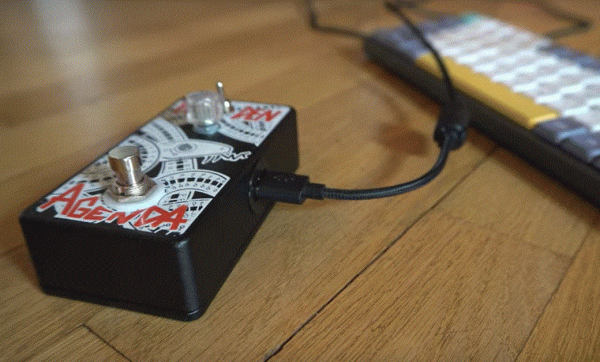
The device looks and feels like an effects pedal for a guitar would, with a RP2040 inside to intercept HID information, do the signal processing, and then output the result to the computer. And, while [Guy] admits this was a fun project with not many practical uses, there are a couple handy ones including potentially the distortion effect to smooth out mouse inputs for those with neuromuscular disorders or the mouse looper to act as a mouse jiggler for those with micromanaging employers. It’s also reprogrammable, and as we’ve seen since time immemorial having a programmable foot keyboard can be extremely handy for certain workflows.

Continue reading “An Effects Pedal For Keyboards (and Mice)”

Modeling A Guitar For Circuit Simulation

Guitar effects have come a long way from the jangly, unaltered sounds of the 1950s when rock and roll started picking up steam. Starting in large part with [Jimi Hendrix] in the 60s, the number of available effects available to guitarists snowballed in the following decades step-by-step with the burgeoning electronics industry. Now, there are tons of effects, from simple analog devices that would have been familiar to [Hendrix] to complex, far-reaching, digital effects available to anyone with a computer. Another thing available to modern guitarists is the ability to model these effects and guitars in circuit simulators, as [Iain] does.

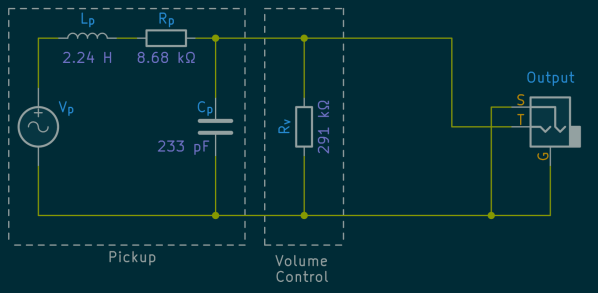
[Ian] plays a Fender Stratocaster, but in order to build effects pedals and amplifiers for it with the exact desired sound, he needed a way to model its equivalent circuit. For a simple DC circuit, this isn’t too difficult since it just requires measuring the resistance, capacitance, and inductance of the overall circuit and can be done with something as simple as a multimeter. But for something with the wide frequency range of a guitar, a little bit more effort needs to go into creating an accurate model. [Iain] is using an Analog Discovery as a vector network analyzer to get all of the raw data he needs for the model before moving on to some in-depth calculations.

[Iain] takes us through all of the methods of figuring out the equivalent impedance of his guitar and its cabling using simple methods capable of being done largely by hand and more advanced techniques like finding numerical solutions. By analyzing the impedance of the pickup, tone and volume controls, and cable, this deep dive into the complexities of building an accurate equivalent circuit model for his guitar could be replicated by anyone else looking to build effects for their specific guitars. If you’re looking for a more digital solution, though, we’ve seen some impressive effects built using other tools unavailable to guitarists in days of yore, such as MIDI and the Raspberry Pi.

GETMusic Uses Machine Learning To Generate Music, Understands Tracks

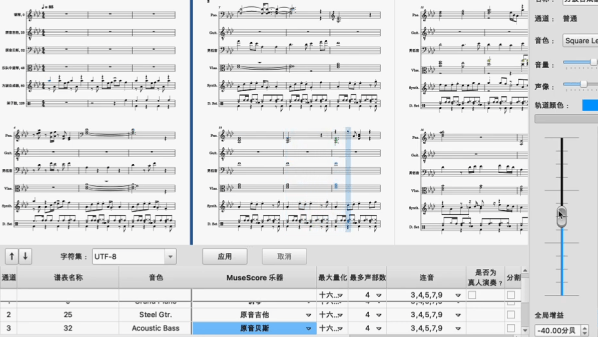
Music generation guided by machine learning can make great projects, but there’s not usually much apparent control over the results. The system makes what it makes, and it’s an achievement if the results are not obvious cacophony. But that’s all different with GETMusic which allows for a much more involved approach because it understands and is able to create music by tracks. Among other things, this means one can generate a basic rhythm and melody first, then add additional elements to those existing ones, leaving the previous elements unchanged.

GETMusic can make music from scratch, or guided from examples, and under the hood uses a diffusion-based approach similar to the method behind AI image generators like Stable Diffusion. We’ve previously covered how Stable Diffusion works, but instead of images the same basic principles are used to guide the model from random noise to useful tracks of music.

Just a few years ago we saw a neural network trained to generate Bach, and while it was capable of moments of brilliance, it didn’t produce uniformly-listenable output. GETMusic is on an entirely different level. The model and code are available online and there is a research paper to accompany it.

You can watch a video putting it through its paces just below the page break, and there are more videos on the project summary page.

Continue reading “GETMusic Uses Machine Learning To Generate Music, Understands Tracks”

Building The Cheapest MIDI Home Studio From 1988

These days, there is a plethora of cheap hardware and software which you can use to make digital music. Back in the 1980s, though, this was still a nascent field, with new gear changing the game for musicians. In his latest video, [cTrix] puts together a guide to building a budget MIDI home studio like it’s 1988.

The original Atari ST is the star of the show, which sold for around £300 back then. Unlike most contemporary computers, it came with MIDI ports built-in, and it quickly became a popular platform for music sequencing and controlling external synth hardware. It was often spotted in posh studios being used by big-time musicians, but [cTrix] wanted to look at how it was used by more humble users.

While the Atari ST could output some passable chiptunes, it was most powerful when paired with off-board gear. Industry magazines would readily talk up “DIY” setups worth thousands, but [cTrix] aimed for a budget in the low hundreds. In 1988, that might get you something like the 16-channel Yamaha PSS-580, which rocked full MIDI support and a ton of sounds and drumkits built in. It ran an OPL soundchip, and could play multiple instruments at once under MIDI control from software like Dr. T’s MIDI Recording Studio.

Of course, if you’ve ever played a keyboard like the PSS-580, you’ll have noted that the sound output can be more than a little chintzy. A cheap way to level up was to get yourself something like the Roland MT-32, which rocked a far higher-quality sound module. Everything from slap bass to solid electric pianos could be blasted out from the Roland, which also included a decent reverb unit, too. [cTrix] also dives into other budget heroes, like the rich and expansive Kawai K1 and the Yamaha EMT-10.

If you want to make music like it’s 1988 and you’re hunting for your first gold record, you’ll learn a lot here. We can’t wait for Part 2, that explores the next level of sophistication in this era. His previous lessons on how to make 90s dance bangers on the Amiga are a treat, too.

Continue reading “Building The Cheapest MIDI Home Studio From 1988”

Horror Instrument Is Truly Astounding To Listen To

Truly new musical instruments don’t come along every day; much of the low hanging fruit has already been taken. [Simon the Magpie] has been working on something that’s just a little innovative, and built what he refers to as an “Incredible Horror Instrument.” It’s all about feedback.

The build started with the Suzuki Andes 25F, a so-called “keyboard recorder.” It has the appearance of a melodion but produces flute-like sounds. [Simon]’s idea was to combine the breath-powered instrument with a talk box. If you’re unfamiliar, a talk box is designed for playing amplified guitar sounds through a tube that is placed in a player’s mouth so they can “shape” the guitar sound with their mouth.

In this role, though, the talk box’s input is hooked up to a microphone which captures the output of the Andes 25F. It then plays this back through a tube connected to the breath input of the Andes 25F. [Simon] thus created a feedback look that can effectively be “played” via the keyboard on the Andes 25F.

The audible results are eerie and haunting, and seem more than fitting for even a well-budgeted horror film. [Simon] also demonstrates some neat possibilities when combining the setup with a further feedback loop that feeds in other tones.

We’ve covered [Simon’s] work before; it’s often noisy and always entertaining. Video after the break.

Continue reading “Horror Instrument Is Truly Astounding To Listen To”

Ferrofluid Drum Synth Dances To The Beat

[Love Hultén]’s work often incorporates reactive sound elements, and his Ferrofluid drum synth is no exception. Sadly there are no real build details but have no fear: we’ve gathered plenty of DIY insights when it comes to ferrofluid-based projects.

Ferrofluid isn’t easy to work with, but there are plenty of DIY resources to make things easier.

First of all, ferrofluid is shockingly expensive stuff. But if you can get your hands on some old VHS tapes and acetone, you can make your own. Second, working with ferrofluid to make reactive elements is harder than it may look. Particularly, making the stuff dance to sound beats isn’t as simple as putting a container of the stuff in front of a speaker coil, but people have discovered a few ways that work more reliably than others.

[Love Hultén]’s drum synth was inspired by this custom Bluetooth speaker with dancing ferrofluid by [Dakd Jung], which drives an electromagnetic coil with frequencies selected from the audio with an MSGEQ7 equalizer. That way, only frequencies that work best for moving the fluid in interesting ways get used for the visualization. The MSGEQ7 spectrum analyzer chip is very useful for music-driven projects, as demonstrated by these sound-reactive LED shades which illustrate the audio element nicely.

The coils that create the electromagnetic field causing ferrofluid to move can take different forms, but two very interesting ones are this 12-layer PCB coil and for more intricate displays, there’s a 12×21 coil array that creates a dot-matrix-like display.

We have one last tip to share about enclosures. Some readers may have noticed that this drum synth project is housed in what looks like a piece of painted lumber. Wood is certainly a versatile material for making custom shapes, and for lettering and labels it turns out that toner transfer works just as well on wood as it does for making custom PCBs.

Continue reading “Ferrofluid Drum Synth Dances To The Beat”