Building Your Own LED-based Home Lighting

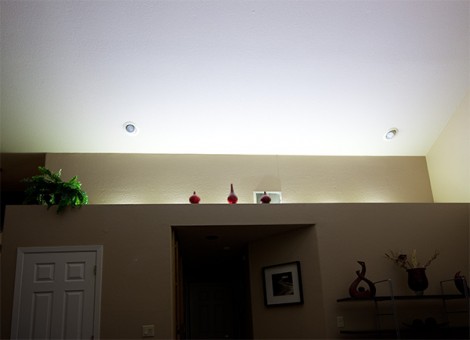
We see LEDs used in all kinds of projects but rarely does someone build a home lighting system from scratch with them. [Paulo Oliveira] decided to give the idea a try, included a fading power supply for the LEDs which he built himself. Here you can see the installation at full brightness, but his controller also offers a single lower setting.

We saw [Sprite_TM] use an RGB LED strip to light up his living room. [Paulo] went with individual LED modules instead, all the same color. They are Cree XM-L power LEDs so some thought needs to be put into heat dissipation. All six are mounted along an aluminum strip which serves as the heat sink. They’re wired in series and powered by an old laptop power supply. A PIC 12F683 uses PWM to dim the string via a MOSFET.

The control system for the two brightness levels uses the wall switch. When turned on, the LEDs fade in to full brightness. If you turn the switch off and back on before they are all the way on, the dimmed setting takes over. This was complicated by the capacitance of the PSU but [Paulo] solved that by adding a power resistor.
PIC-based USB Conversion For An NES Controller

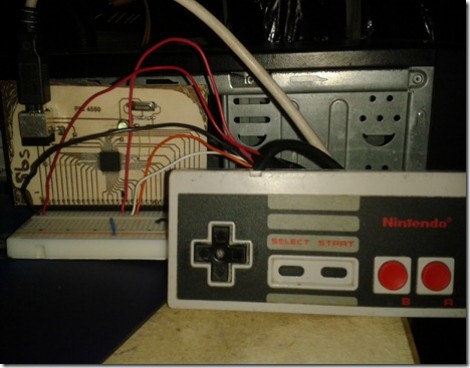
[Andres] wrote in to share his USB for NES controller project (translated). It enumerates as a USB keyboard and is easily mapped on most emulators. Over the weekend we looked in on an AVR programmer used for this purpose. [Andres] went a different direction, using a PIC microcontroller and eventually incorporating his circuit into the body of the controller.

The prototype circuit can be seen above. [Andres] uses a breakout board for the PIC 18F4550 to test the circuit. The chip has native USB support, and reading the button states from the controller’s shift register is a snap. You can see him using this test rig to play Super Mario Bros. on an emulator in the video after the break.

The second iteration of the project moves from breadboard to a soldered circuit. A 18F2550 is used as it comes in a rather small DIP package. If the legs are flattened there’s room inside the controller case for it, along with a few capacitors and a crystal. The original controller cord is removed to make way for a USB cable.

Continue reading “PIC-based USB Conversion For An NES Controller”

Volt Meter Clock Also Displays The Temperature

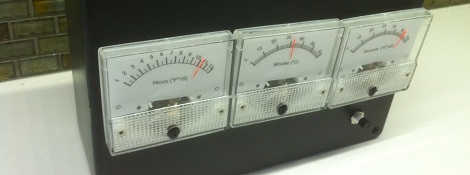
[IronJungle] got around to putting together every tinkerers favorite project: a clock with a strange way of displaying the time. For his clock, [Jungle] took a trio of voltmeters and turned them into a clock that displays the current hour, minute, and second on custom paper dials.

[IronJungle] connected a PIC 14M2 microcontroller to a DS1307 real time clock to keep track of the current time. As for display, [Jungle] took a trio of volt meters and wired them in to the PWM outputs on his PIC. With this, he was able to precisely control the position of the needle in the meter, and thus display the time.

In addition to displaying the time, [IronJungle] added a small temperature sensor to his build. By pressing a button below the seconds display, the clock is able to display the current temperature in Fahrenheit, Celsius, and Kelvin.

After the break you can check out a time-lapse video of [IronJungle]’s voltmeter clock going through the hours.

Continue reading “Volt Meter Clock Also Displays The Temperature”

PIC 18F4550 Dev Board

[Natsfr] was looking for a single-sided PCB to host a PIC 18F4550. Not finding one he designed his own in Kicad and is sharing (translated) the spoils of his labor.

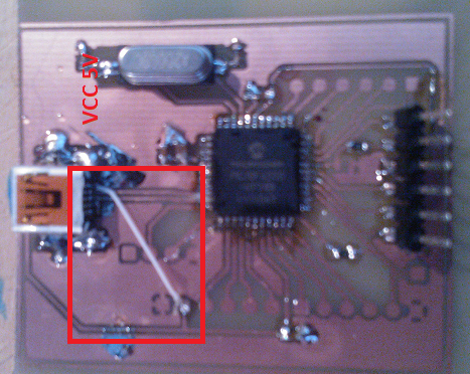
This chip has USB capabilities which is why we see it used in a ton of projects. Almost all of them (including this USB input device post) use a very large DIP package. [Natsfr] went a different route, designing for the TQFP package to keep the drilling ot a minimum. The layout includes a crystal and USB-mini port, but it also breaks out the I/O pins on the chip. The red box above shows the quick fix he used on the VCC line as the board trace was shorting on the USB jack housing.

He didn’t drill out the holes for most of the breakout pins on this prototype. There’s just one header populated for programming the PIC chip. But he does have some plans for the first board. He’s going to use [Texan’s] AVR programming firmware for PIC to turn it into a USB AVR ISP programmer.

Raspberry Pi As A PIC Programmer

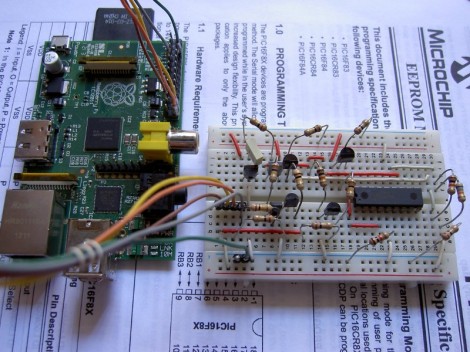
[Giorgio Vazzana] turned his Raspberry Pi into a PIC programmer using a rather small collection of common parts. It supports about a dozen different chips from the 16F family. But we’d guess that software is the limiting factor when it comes to supporting more chips.

Generally the problem with PIC programming is the need for a 12V supply. He chose to use an external 12V supply and a 78L05 linear regulator to derive the 5V rails from it. With the power worked out there are some level conversion issues to account for. The RPi provides 3.3V on the GPIO header pins, but 5V logic levels are needed for programming. He built transistor and voltage divider circuits to act as level converters. The programming software bit bangs the pins with a write time of less than eight seconds per 1k words of program data. So far this does not work with ICSP, but he plans to add that feature in a future version.

Cat Palace With An Automatic Heat Lamp

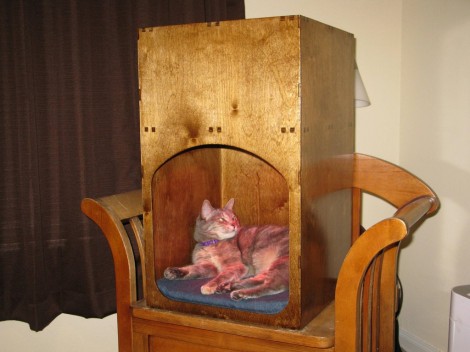
[Herpity] was getting tired of his cat manipulating him into turning on a lamp above her bed every time she wanted a nap. She likes the warmth put off by the light bulb but he knew he could do better than that so he built a bed which includes an automatic heat lamp. To help introduce her to the new enclosure he set it on the chair where she normally naps.

The bed has two parts, the lower chamber acts as the sleeping area. There is a false bottom underneath the blanket which acts a platform for the weight sensors which detect when the cat is ready for a nap. A PIC microcontroller monitors two sensors and switches on mains voltage to a heat lamp once the pre-calibrated weight threshold has been reached. The upper part of the enclosure holds all of the electronic components and makes room for the recessed light housing. [Herpity] included an exhaust fan for the upper chamber but it turns out a grating is all he needs to keep the temperature at an acceptable level.

[via Reddit]

Work Station Includes A Smartcard Lock For USB Ports

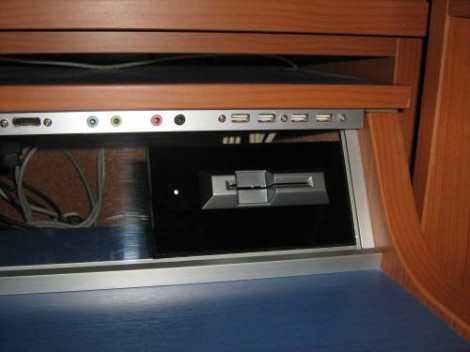
The USB ports on this work station are locked. In order to use a USB device you’ll need to insert a Smartcard into the reader seen above. The interesting thing here is that this shouldn’t affect your ability to charge a USB device. When you visit the link above make sure to check out the worklog tab as it contains nine pages worth of build information.

The device is conceived of in two parts. There is one board which does the USB switching, and another that takes care of the Smartcard reader. That reader is based on a PIC 16F1939. It readers the Smartcard, verifies the data, then controls the USB switching board via SPI. An ADG714 chip completes the circuit on eight data lines making up the four USB ports. There is also a mechanical relay on the board which can cut USB power. Since this is separate from the data switching, the power could be left on for charging or toggled separately by a card that has permission to charge but not to use the data ports. You can see a demonstration of the system embedded after the break.

Continue reading “Work Station Includes A Smartcard Lock For USB Ports”