A Curiously Strong Z80 In Your Pocket

Like many hackers, [Tom Szolyga] has soft spot for the venerable Z80. The number of instructions and registers made it relatively easy to program in ASM, and he still has fond memories of the refreshingly straightforward CP/M operating system he used to run on them back in the day. In fact, he loves Z80 computers so much he decided to build one that he could carry around in his pocket.

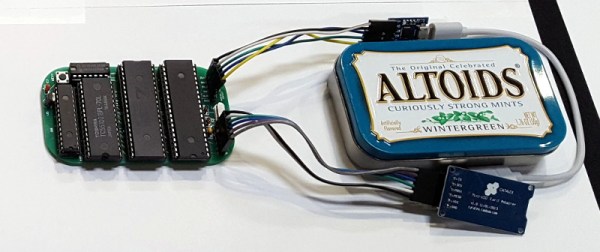
The result is the Minty Z80, so-called because it lives inside a tin formerly inhabited by every hacker’s favorite curiously strong mint. But the goal of this build wasn’t just to make it small, but also make it convenient to work with. [Tom] is using a ATmega32A to help interface the Z84C0008 microprocessor with the modern world, which allows for niceties such as support for a micro SD card. There’s no onboard USB-to-serial capability, but with an external adapter connected to the Minty’s header, it’s easy to use log into this microcosm of classic computing with a terminal emulator running on a computer or mobile device.

[Tom] has provided the schematics and Bill of Materials for the Minty Z80 on the project’s Hackaday.io page, but as of the latest update, he’s holding off on releasing the board files until he’s sure that all the bugs have been worked out. There’s no word yet if he found any show stoppers in the first iteration of the board design, but he’s posted a picture of the fully assembled miniature retrocomputer in all its glory which seems like a good sign.

The design of the Minty Z80 is similar to that of the Z80-MBC2 by [Just4Fun], but on an even smaller scale. It’s encouraging to see several projects leveraging modern design and components to prevent classic computing from becoming little more than a distant memory.

Teaching A Vintage Line Printer To Make Music, All Over Again

Sit next to any piece of machinery long enough and you get to know it by the sounds it makes. Think about the sounds coming from any 3D-printer or CNC machine; it’s easy to know without looking when the G code is working through the sines and cosines needed to trace out a circle, for instance.

It was the same back in the day, when bored and bright software engineers heard note-like sounds coming from their gear and wrote programs to turn them into crude music machines. And now, [Ken Shirriff] details his efforts to revive a vintage IBM 1403 line printer’s musical abilities. The massive 1960s-era beast is an irreplaceable museum piece now, but when [Ken] and his friends at the Computer History Museum unearthed stacks of punch cards labeled with song titles like “Blowin’ In the Wind” and “The Blue Danube Waltz,” they decided to give it a go.

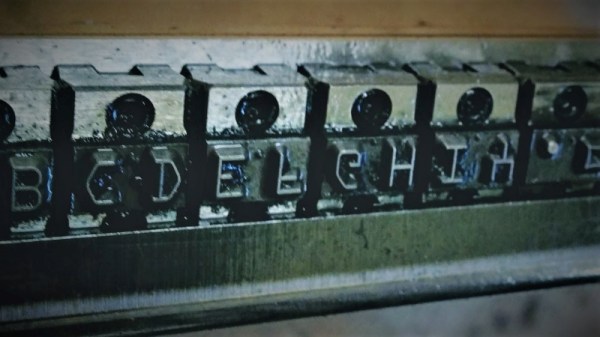
The 1403 line printer has a unique chain-drive print head, the inner workings of which [Ken] details aptly in his post. Notes are played by figuring out which character sequences are needed to get a particular frequency given the fixed and precisely controlled speed of the rotating chain. The technique is quite similar to that used by musical instruments such as the Floppotron, or when coercing music from everyday items including electric toothbrushes.

Lacking the source code for the music program, [Ken] had to reverse engineer the compiled program to understand how it works and to see if playing music would damage the chain drive. The video below shows the printer safely going through a little [Debussy]; audio clips of songs originally recorded back in 1970 are available too.

Continue reading “Teaching A Vintage Line Printer To Make Music, All Over Again”

Vintage Console Becomes The Calculator It Appears To Be

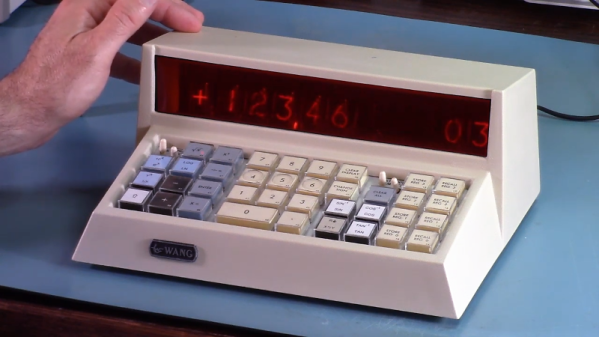
What’s sitting on [Bob Alexander]’s desk in the video below did not start out life as the desktop calculator it appears to be. Turning it into a standalone calculator with features the original designers couldn’t imagine turned out to be an interesting project, and a trip down the retrocomputing rabbit hole.

A little explanation is in order. Sure, with its Nixie display, calculator keypad, and chunky mid-century design, the Wang 360 desktop console looks like a retro calculator. But it’s actually only a dumb terminal for a much, MUCH bigger box, called the Electronic Package, that would fit under a desk. The foot-warming part that was once connected to [Bob]’s console by a thick cable that had been unceremoniously lopped off by a previous owner. [Bob] decided to remedy the situation with modern electronics. The console turned out to have enough room for a custom PCB carrying a PIC32, some level-shifting components, power supply modules that include the high-voltage supply for the Nixies, and a GPS module because Nixies and clocks just go together. The interesting bit is the programming; [Bob] chose to emulate the original Wang methods of doing math, which include multiplication by logarithmic addition. Doing so replicates the original look and feel of the calculator down to the rapid progression of numbers across the Nixies as the logarithms are calculated using the display registers.

We normally frown on vintage gear being given modern guts, but in this case [Bob] hit just the right balance of new and old, And given that the Electronic Packages these consoles were connected to go for $1500 or more on eBay, it was a better choice than letting the console go to scrap. A similarly respectful approach was taken with this TRS80 Model 100 revival.

Continue reading “Vintage Console Becomes The Calculator It Appears To Be”

Circuit VR: Advanced Falstad Logic With Geniac

I find that if I’m trying to make a point with a student or a colleague about a circuit, sometimes the Falstad online simulator is worth a few thousand words. You can draw the circuit, play with the values, and even see the current flow in an intuitive way as well as make traditional measurements. The simulator not only handles analog but also digital circuits. At first glance, though, the digital functions appear limited, but if you dig deeper, there is a custom logic block that can really help. I dug into this — and into how switches work in the simulator — the other day in response to a Hackaday post. If you use Falstad, read on!

Continue reading “Circuit VR: Advanced Falstad Logic With Geniac”

An MSX With A Nintendo Controller

Console owners inhabit their own individual tribes depending upon their manufacturer of choice, and so often never the twain shall meet. But sometimes there are those what-if moments, could Mario have saved the princess more quickly through PlayStation buttons, or how would Sonic the Hedgehog have been with a Nintendo controller? [Danjovic] is finding the answer to one of those questions, with an interface between Nintendo 64 controllers and MSX hardware including the earlier Sega consoles.

In hardware terms, it’s a pretty simple device in the manner of many such projects, an Arduino Nano, a resistor, and a couple of sockets. The clever part lies not in its choice of microcontroller, but in the way it uses the Nano-s timing to ensure the minimum delay between button press and game action. The detail is in the write-up, but in short it makes use of the MSX’s need to attend to video lines to buy extra time for any conversion steps.

The MSX computers have had their share of controller upgrade courtesy of Nintendo hardware in the past, we’ve seen a Wii nunchuck controller talk to them before, as well as a SNES one.

Header image: [mboverload] (Public-domain).

Maybe The Oldest Computer, Probably The Oddest

[Tadao Hamada] works for Fujitsu Tokki, a subsidiary of the more famous Fujitsu. In 1956, Fujitsu decided to compete with IBM and built a relay-based computer, the FACOM128. The computer takes up 70 square meters and weighs about 3 tons. By 1959, they’d learned enough to make a FACOM128B model that was improved. [Hamada’s] job is to keep one of these beasts operational at Fujitsu’s Numazu plant. According to the Japanese Computer Museum, it may be the oldest working computer.

Continue reading “Maybe The Oldest Computer, Probably The Oddest”

A New Motherboard For Amiga, The Platform That Refuses To Die

If you go out and buy a computer right now, how many choices do you really have? Generally speaking, there’s PC or Mac. If we were being generous you could consider Chromebook and perhaps even mobile, but let’s be honest, computing is a two-party system with the ability to dump the OS and run Linux as the obvious third-party disruptor. It wasn’t always like this.

In the early years of personal computing there were a slew of serious contenders. A PC, a Mac, an Atari ST, an Amiga, and several more that all demanded serious consideration on the general purpose desktop computer market. Of all these platforms, the Amiga somehow stubbornly refuses to die. The Amiga 1200+ from [Jeroen Vandezande] is the latest in a long procession of post-Commodore Amigas, and as its name suggests it provides an upgrade for the popular early-1990s all-in-one Amiga model.

It takes the form of a well-executed open-source PCB that’s a drop-in replacement for the original A1200 motherboard. CPU, RAM, and video are broken out onto daughterboards, with PCMCIA replaced by an SD card slot. The catch: it does require all the custom Amiga chips from a donor board.

The original Amiga 1200 was a significant upgrade to the architecture of the 1980s originals, and this certainly provides a much-needed enhancement to its underwhelming 68EC020 processor. It’s fair to say that this is the Amiga upgrade we’d all have loved to see in about 1996 rather than waiting until 2019. It’s still a delight for a retrogaming enthusiast; many of those who keep it alive remember the Amiga was the best multimedia platform that could be had for a few glorious years.

We’ve brought you a host of Amiga projects over the years, including the resurrection of an A500 and of course another A1200 PCB.

Thanks to [Eric Hill] for the tip.