Time And Date Clock Does It With RGB LED Strips

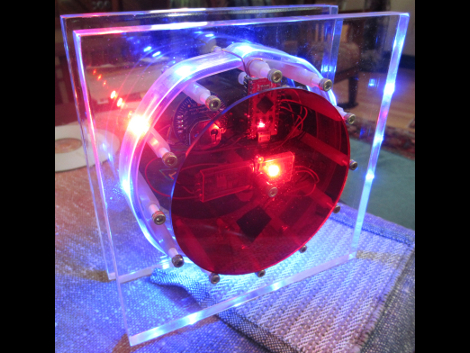
[Craig’s] color clock really came together quite nicely. The majority of the body is acrylic, with two large clear squares and a pair of colored discs. All are held in place by a ring of hardware with spacers in them, and the RGB LED strip that is used to display time and date wraps around those spacers. This hides the components in the center, with a USB cord connecting to the Arduino compatible board to power the device.

Hours are displayed in red, with minutes shown in green, and blue used as a background color. In the center you can see one of two red LEDs which alternate like a pendulum to mark the passing seconds. There are timed events every ten , fifteen, and thirty minute. At the fifteen minute mark the clock switches to display the date. The other two events are animations to keep things interesting. All of the settings for the clock are accessed using just two momentary push buttons mounted on the back of the clock.

Continue reading “Time And Date Clock Does It With RGB LED Strips”

Motion Sensitive RGB Lamp Can Standby For 3 Years

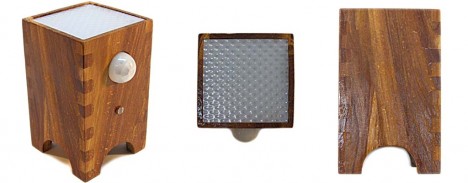
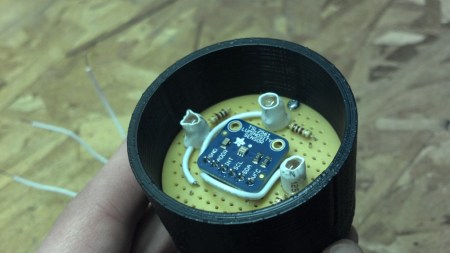
Ooooh, nice enclosure! This is a little motion sensing lamp which [Krazatchu] built a few years back as a Mother’s Day gift. The PIR sensor is easy enough to see as the white dome on the front of the case. But look closely below that and you’ll see the LDR which it uses to keep the thing asleep during the day. This is intended to save on batteries but the original version still ate through them like crazy. This year he gutted it and worked out a much more power-friendly design.

He moved to a TLC1079 OpAmp which greatly reduced power consumption when reading from the PIR sensor. The microcontroller was also upgraded from an ATtiny13 to an ATmega328, making the new version Arduino compatible. It puts itself to sleep and keeps the lights out during the day, drawing just 0.08 mA. When driving the RGB LED the lamp pulls about 50 mA. That should still last a while on three AA batteries but we’d still recommend using rechargeables.

Continue reading “Motion Sensitive RGB Lamp Can Standby For 3 Years”

Huge Water And Light VU Meter Plus More

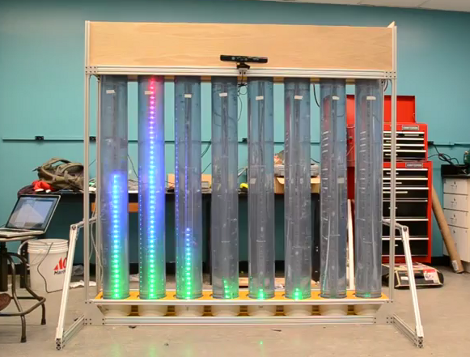
This is the senior design project for a group at the University of Vermont. It’s a wet, bubbly, blinky, interactive thing. Each column is a clear tube filled with water, with a string of fully addressable RGB LEDs suspended in the center. In idle mode, the lights scroll through a series of interesting patterns while the water is filled with bubbles to add some depth to the presentation. There is also a VU meter function, as seen here and during the Portal theme song that ends the video demo after the break.

A Teensy++ board is used to address the display. It’s set up to receive serial commands from a Processing script which is responsible for generating the animations. At the top of the frame you can see there’s a Kinect sensor. By standing in the standard post (we think it should be called the Kinect mug shot) the installation will automatically switch over to body control. We could see this thing making its way into a long airplane terminal hallway, following the travelers along their trek from one terminal to the next.

Continue reading “Huge Water And Light VU Meter Plus More”

LED Case Lights Reflect CPU Usage

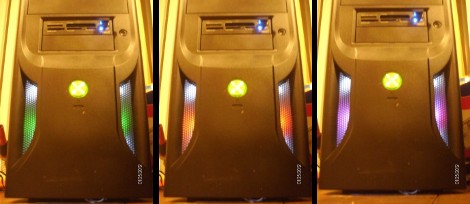
A lot of Linux users include system monitor information in their status panel so that they can see when the CPU is grinding away. [Kevin] is taking the concept one step further by changing his case lights based on CPU usage. Above you can see green, orange, and magenta, but [Kevin’s] implementation uses the full spectrum of color.

The project is based on an ATmega48. It’s running the V-USB stack and connects to one of the motherboard’s internal USB ports. This lets him easily push the CPU usage data over to the microcontroller where it is translated into color. One RGB LED has been installed behind each fan panel on the front of the case, with a white LED above and below as an accent. Pulse-width modulation via some MOSFETs lets him mix and match for just the right color. He’s powering the add-on off of the PSU rails rather than USB so that it turns off when the computer goes to standby.

Don’t miss [Kevin’s] explanation of the system, and a demo of it in action after the break.

Continue reading “LED Case Lights Reflect CPU Usage”

Text Adventures For Arduino Starting With Hunt The Wumpus

Let’s be honest, you’re going to have trouble getting kids to play text-based adventure games these days. But this is one way to get them interested. This weekend you should get together with niece, nephew, son, or daughter and help them build their own hardware and program it with an adventure game. One last project before school’s out and the weather’s nice.

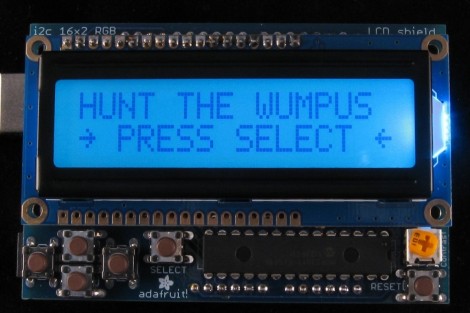
This is [Dan’s] shiny example of Hunt the Wumpus. He used Adafruit’s RGB LCD shield for Arduino. It’s got a character LCD and five buttons. But you can easily breadboard this yourself using a few tactiles plus a screen and uC of your own choosing. One nice touch with this one is the RGB backlight which is used to add an element of danger to the story line. He also mentions a few bugs in the Arduino language which he found while setting up the game.

We’ve been meaning to make our version of Zork using an Arduino, GLCD, and PS/2 keyboard ever since we read “Ready Player One”. This is just a bit more encouragement to get moving on that project.

[Thanks PT]

Color Changing Coaster Has A Built-in Drink Detector

[Robert] put together his own illuminated coasters that know when they hold a drink. They look fantastic, thanks to professionally produced PCBs and a layered, laser-cut acrylic case. They’re much like the pagers given to restaurant-goes who are waiting for tables, but this version is much fancier (and doesn’t include the vibrating/paging feature).

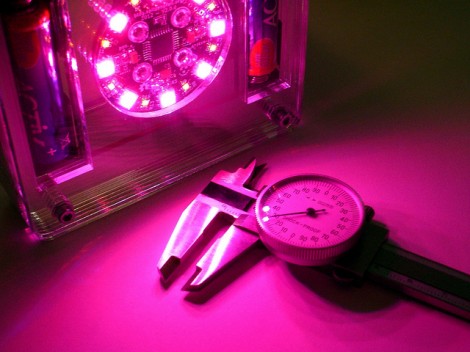
The RGB-LED board is a previous project which was developed using eight surface mount RGB LED modules around a circular board. It uses an ATmega168 paired with an MBI5168 constant-current LED sink driver. The coaster enclosure gave him room for a few more items, like the pair of AA batteries which work in conjunction with a boost converter to power the device. It also houses an IR reflectance sensor which is used to detect the presence of a drink on the coaster. This is important since an on-occupied coaster looks like it would be blindingly bright if there wasn’t a glass to diffuse the intensity of the LEDs.

He mentions that incandescent light bulbs mess with the IR reflectance sensor. But there must be some way to account for ambient conditions with the code, right?

Touch-based Wirless RGB Lamp Control

[Alex] built an add-on board for his TI launchpad that lets him use it as a wireless controller for an RGB lamp (translated). As you can see above, the board has a pair of female pin-headers which make it easy to install or remove the board. This way you can use it for other projects without any hassle.

The board itself doesn’t have any buttons. Instead, [Alex] etched a two-sided PCB, including pads for use as capacitive touch sensors. Here we only see the underside of the board, which hosts four RGB LED modules. These give feedback by showing the levels which are about to be set for each color. In the clip after the break you’ll get a good look at the touch sensors. There are two that act like buttons, scrolling through each color channel, and sending the updated values to the lamp via a wireless module mounted on that same side. There are also four pads which act as a slider. We didn’t see any code but apparently this uses one of TI’s touch sensor libraries.

Continue reading “Touch-based Wirless RGB Lamp Control”