Automating Mobile Games With A Robot Arm

My Singing Monsters is one of those mobile titles that has users play simple games to earn coins and gems in the usual way. [Anykey] found that his son was a fan of the game, but that sometimes it felt a little rigged. Thus, rather than waste time playing themselves, he set up a robot to do the job for them. (Super-boring video, embedded below.)

The player must complete a basic but time-consuming memory game. Upon winning, the player gets to choose a prize from 17 mystery cards. The top prize of 1,000 diamonds always seemed to be hidden under another card, leading to the aforementioned frustration.

In order to test if the game was rigged, [Anykey] set up a uArm Swift Pro to play the game, with the robot arm moving a small stylus over the iPad playing the game. The iPad’s video was piped to a PC via HDMI out, going into a Camlink capture card. A Python script using OpenCV was then created to play the game automatically, and log the results of prizes gained along the way. All the code is up on GitHub.

After over 100 attempts, the robot never managed to pick the right card to score 1,000 diamonds. Given that there are only 17 cards to choose from, one would expect the 1,000 diamond prize to come up several times in that many selections.

It seems then that the prize selection for completing the memory game may not actually be down to picking the right card. Instead, the prize given is selected by some other calculation entirely.

We love a robot playing games at Hackaday, even if it’s as simple as Tic-Tac-Toe. Video after the break.

Continue reading “Automating Mobile Games With A Robot Arm”

Bluetooth RC Car Packs In A Few Sensors

Have you ever been walking around the house, desperate to know the ambient temperature, humidity, and barometric pressure? Have you ever wanted to capture that data with a small remote-controlled platform? If so, this project from [TUENHIDIY] will be exactly what you’ve been looking for. 

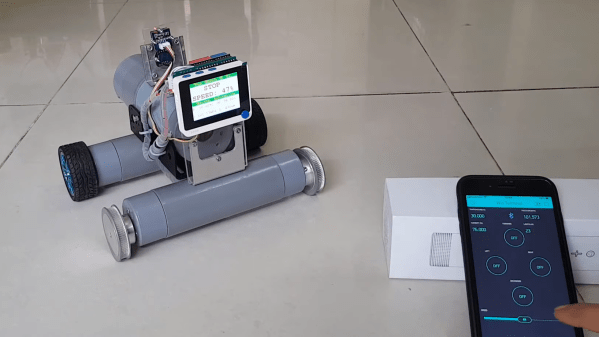
The little remote-control car is built around a Seeed Wio Terminal. This is a microcontroller platform that comes with a screen already attached, along with wireless hardware baked in and Grove connectors for hooking up external modules. Thus, the car adds a DHT11 temperature and humidity sensor, along with a BMP280 air pressure sensor using the Grove connectors.

Driving the car is done via a Blynk smartphone app that communicates with the Wio Terminal. Small DC motors at each wheel are driven via a DFRobot quad-motor shield. With the built-in screen, the RC car displays commands received from the smartphone app, as well as the temperature, humidity and pressure in the immediate environment.

We really like the simple PVC-based chassis design, and it’s a straightforward project that demonstrates how to build a Bluetooth-controlled car. Data collected by the sensors is also visible on the smartphone app, so if you need to sample conditions in the next room without getting off the couch, you could do that pretty easily.

Projects like these are a good way to get familiar with working with motors and sensors. It’d be a great base for simple robotics development, too. We’ve featured builds from [TUENHIDIY] before, too, like this great rotary plotter that can draw on bottles. Video after the break.

Continue reading “Bluetooth RC Car Packs In A Few Sensors”

Adding Brakes To Actuated Fingers

Building exoskeletons for people is a rapidly growing branch of robotics. Whether it’s improving the natural abilities of humans with added strength or helping those with disabilities, the field has plenty of room for new inventions for the augmentation of humans. One of the latest comes to us from a team out of the University of Chicago who recently demonstrated a method of adding brakes to a robotic glove which gives impressive digital control (PDF warning).

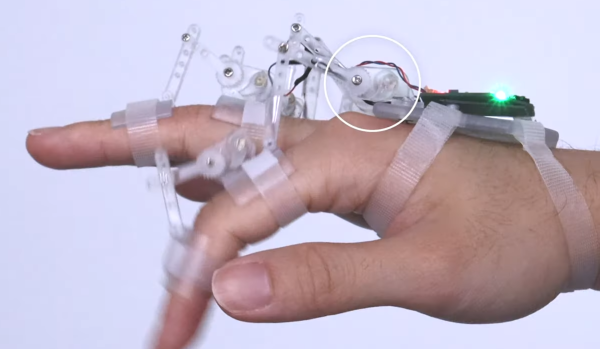
The robotic glove is known as DextrEMS but doesn’t actually move the fingers itself. That is handled by a series of electrodes on the forearm which stimulate the finger muscles using Electrical Muscle Stimulation (EMS), hence the name. The problem with EMS for manipulating fingers is that the precision isn’t that great and it tends to cause oscillations. That’s where the glove comes in: each finger includes a series of ratcheting mechanisms that act as brakes which can position the fingers precisely enough to make intelligible signs in sign language or even play a guitar or piano.

For anyone interested in robotics or exoskeletons, the white paper is worth a read. Adding this level of precision to an exoskeleton that manipulates something as small as the fingers opens up a brave new world of robotics, but if you’re looking for something that operates on the scale of an entire human body, take a look at this full-size strength-multiplying exoskeleton that can help you lift superhuman amounts of weight.

Continue reading “Adding Brakes To Actuated Fingers”

This Robot Can’t Keep Its Eyes Off The Money

Some say there’s no treasure quite as valuable as the almighty dollar. [Norbert Zare] likes alt-rock soundtracks on Youtube videos and robots obsessed with money, so set about building the latter.

The project is fundamentally a simple one. A Raspberry Pi 3B+ is outfitted with a Pi Camera, and set up to control twin servo motors attached to a simple pan/tilt assembly. The Pi runs OpenCV set up in a face-tracking mode. This allows the robot to readily track money in its field of view, as the vast majority of money out there has someone’s face on it. OpenCV is used to detect where the money is in the field of view, and guide the Pi’s camera towards the cash.

It’s a neat repurposing OpenCV’s face detection algorithm, and that’s much faster than training your own money-tracking system. However, it seems like the robot would also track regular human faces, too. Perhaps it could be optimised to do a color check, such that only greyscale or green faces were followed by the robot.

Does the project do anything useful or important? Arguably no, but if a robot can be this obsessed with money, perhaps we all can learn something. Alternatively, it might just have served as a useful project for [Norbert] to learn about programming and mechatronics projects. Either way, we dig it. Code is on Github for the curious.

Using OpenCV in this way has become common over the years. If you want to detect cats, however, maybe consider giving Tensorflow a try. Video after the break.

Continue reading “This Robot Can’t Keep Its Eyes Off The Money”

Hacking The Mekamon Robot To Add New Capabilities

The Mekamon from Reach Robotics is a neat thing, a robot controlled by a phone app that walks on four legs. [Wes Freeman] decided to hack the platform, giving it a sensor package and enabling some basic autonomous behaviours in the process.

[Wes] started out by using a packet sniffer to figure out the command system for controlling the Mekamon robot over Bluetooth. Then, he set about fitting a Raspberry Pi 3 on the ‘bot, along with a Pi Camera on a gimballed camera head.

Running OpenCV on the Raspberry Pi gives the Mekamon robot the ability to follow a colored ball placed in its field of vision. Later work involved upgrading the hardware to a Pi Compute Module 3, with its dual camera inputs allowing for the use of a stereo imaging setup.

All the parts simply ziptie on top of the original robot, with no permanent changes needed. It’s a neat way of hacking, by expanding the original capabilities without actually having to tamper within.

We’ve seen plenty of autonomous builds over the years, from farming robots to those designed to explore the urban environment. Video after the break.

Continue reading “Hacking The Mekamon Robot To Add New Capabilities”

This robot costume is really robotic!

Really Robotic Robot Costume Will Probably Win The Contest

Still don’t have anything to wear to that Halloween party this weekend? Or worse, your kid hasn’t decided on a costume that you both can agree on? Well, look no further than [Natasha Dzurny]’s Sally Servo the Really Robotic Robot Costume and accompanying multi-part build guide. You might want to start by raiding that recycle bin for cardboard, because you’re going to need a lot of it.

This realistic robot costume even has a sound-reactive mouth.What you won’t need a lot of is hard-to-source parts, at least if you build it the [Natasha] and Brown Dog Gadgets way. Even so, there are a ton of cool moving and blinking bits and bobs to be made with servos, LEDs, and RGB LEDs connected up to something kid-friendly like the Micro:bit and the Brown Dog Gadgets Bit Board — that’s a base for the :bit that lets users connect components via LEGO and conductive tape.

Between Sally’s robotic googly eyes and her light-up belt, there are plenty of ideas here to steal and make your own, and each one is packaged in a great-looking guide complete with paper printing templates.

Our favorite part has to be the infinity mirror heart, which appears to be beating thanks to clever programming. That, and the costume details, like the waist-area wires running between the upper and lower pieces.

Is the party at your house? There’s probably still enough time to put together a projector-based stomping game for the driveway.

A portrait-drawing robot on a table

Drawing Robot Creates Portraits Using Pen, Paper And Algorithms

Although the market for hand-drawn portraits largely collapsed following the invention of photography, there’s something magical about watching an artist create a lifelike image using nothing but a pencil, some paper, and their fine motor skills. Watching a machine do the same is a similarly captivating experience, though often the end result is not so great. Trying to fix this deficiency, [Joris Wegner] and [Felix Fisgus] created the Pankraz Piktograph which seems to do a pretty good job at capturing faces. They were inspired by classic picture-drawing automatons, and made a 21st-century version to be used in museums or at events like trade shows.

The operation of the Piktograph is very simple: you stand in front of the machine, look into the camera and take a selfie. If you like what you see, the robot will then begin to draw your portrait on a piece of paper. It does this using two human-like arms which are made from aluminium and driven by two stepper motors. An ordinary ballpoint pen is held in a spring-loaded carrier, which provides just enough pen-to-paper pressure to reliably draw lines without lifting off or scratching the paper. We can’t help but be impressed with the overall look of the machine: with a sleek, powder-coated aluminium case and a stainless steel stand it’s a work of art by itself.

Inside, the Piktograph is powered by a Raspberry Pi 3, which runs a rather sophisticated algorithm to generate a vector image which doesn’t take too long to draw, but still results in a recognizable image of the subject. The makers’ thesis goes into quite some detail to explain the process, which uses Canny edge detection to create an outline drawing, then fills in the empty bits to create bright and dark areas. A certain amount of noise and wigglyness is added to the lines to give it a more “handmade” feel, and the resulting drawing is divided into continuous lines for efficient drawing by the plotter.

We’ve seen several types of specialized art robots before, capable of drawing portraits with a pen, painting them, or even using an Etch-a-Sketch, but [Joris] and [Felix]’s creation seems to win on speed, workmanship, and the quality of the end result. Video embedded after the break.
Continue reading “Drawing Robot Creates Portraits Using Pen, Paper And Algorithms”