I/O Extender Board And Case For A Cheap WiFi Router

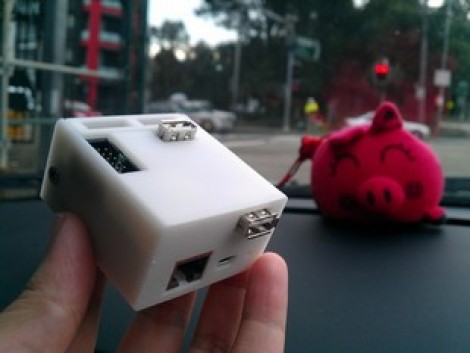
This 3d printed case houses the already small [TP-Link TL-WR703N] but also makes room for a custom expansion board. The expansion board is designed to make the device more hacker friendly, and who doesn’t need a nice case to hold it?

Since the router board already has a USB port (intended for use with USB 3G modems) the add-on acts as a USB hub. The stock USB connector is replaced by a pin header which mates with a DIL socket on the underside of the expansion board. Through the use of an FTDI chip the expander offers three USB ports and a 2×10 pin header to break out the GPIO pins from the router’s processor. Only two USB ports are visible in the image above. That’s because the third is recessed, and an opening has not been added to the enclosure. This struck us as odd until we read that the port is meant to be used with a low-profile thumb drive, essentially adding internal storage for the device.

[Thanks buZz]

Putting Scores Of Arduinos On The Internet With One Router

Like many hackers of late, [Rick] has been experimenting with connecting Arduinos to the Internet with a disused WiFi router and an installation of OpenWRT. Unlike his fellow makers, [Rick] thought it would be wasteful to dedicate a single router to one Arduino project, so he used a small, low power wireless module to connect up to 30 Arduinos to the Internet.

Just as in a few recent builds (1, 2), [Rick] found an old Fonera router sitting in a box at his local hackerspace. After installing OpenWRT, [Rick] connected a very small wireless module to the router’s GPIO pins and patched the firmware to put an SPI bus on the router.

Now, whenever [Rick] wants to connect an Arduino project to the Internet, all he needs is a $4 radio module. This radio module connects to the router, and the router handles the networking requirements of up to 30 DIY projects.

If you’re looking to build an Internet-enable sensor network, we honestly can’t think of a better or cheaper way of going about it. Nice job, [Rick].

Router Controlling Choo-choos Over The CAN Bus

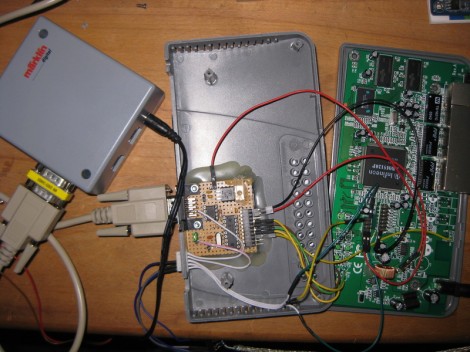
This setup is used to control a model railroad. Well, not entirely this setup. [Gerhard Bertelsmann] already has a proper railroad controller, and it just happens to offer CAN bus communications. He’s using OpenWRT and a cheap router to connect the bus to the network.

Originally he wanted to use a Raspberry Pi board for the project, but the incredible backorder  situation with that hardware led him to grab an old router. After loading OpenWRT he started working out how to connect a couple of ICs (MCP2515 and MCP2551) that will take care of the CAN bus communications. The hardware connections end up being pretty simple, with five data lines (and their pull-up resistors) connecting to the router’s serial header. From there it was a matter of mapping the device in software so that the hardware can be controlled over the network.

We like this example since CAN is used is a lot of other applications.

Adding A Router And Wireless Camera To A Remote Controlled Helicopter

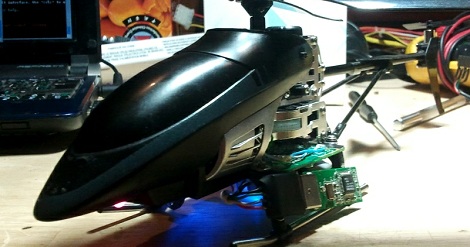
Last Christmas, [bonafide] received a WiFi enabled remote control helicopter from his employer. The heli is an interesting bit of kit, able to be controlled with an Android or iDevice. Being the good tinkerer he is, [bonafide] took a screwdriver to his Wi-Fli Bladerunner Helicopter and reengineered the toy to use an off-the-shelf wireless router.

The protocol used by the Wi-Fli helicopter is closed source, but a few people have had their hand at reverse engineering this cool toy. Instead of simply controlling the helicopter over WiFi, [bonafide] wanted to add a few unsupported features like sending images from a webcam. This isn’t supported in the toy’s firmware, so after a valiant attempt at flashing new firmware, [bonafide] decided to replace the electronics with a WiFi router.

In the stock configuration, the helicopter receives commands from an RT5350F-based WiFi module. This module communicates to the servos and motors with a serial connection. [bonafide] replaced the WiFi module with a very small router capable of running OpenWRT. The new router was easily configured to send commands to the motors, and allowed [bonafide] to add a small keychain webcam to stream video back to his desktop.

Interestingly, the makers of the WiFli helicopter, Interactive Toy Concepts, are putting out a streaming-video version of this toy next fall. The current version of the WiFli helicopter may hit the Toys ‘r Us clearance bin before that, so if you’d like your own unmanned aerial drone [bonafide]’s may be worth looking over.

Special thanks to [MS3FGX] for sending this one in. Also, the non-coral cache version of [bonafide]’s site is here, but try not to turn his server into a pile of molten slag.

Using A Router As A Wireless Embedded Platform

If you’re going to make your next project wireless, you don’t need an XBee, WiFi shield, or even a Bluetooth module. Turning old hardware into a dev board is extremely easy, as [Taikson] shows us by adding an I2C bus to a Fonera router. (Spanish, here’s the Google translation)

To add an I2C bus, [Taikson] took two pins that originally went to a router status pin and soldered on a pair of wires. [Taikson]’s router is running OpenWrt, so adding support for I2C devices is just a matter of changing a few kernel settings.

As for what you can do with a router development platform, the sky’s the limit. Last year, [Taikson] controlled a quadcopter from within a web browser with a similarly modified I2C-enabled router. It’s a clever hack, and with a little bit of work it should be possible to add a few sensors or even a camera to his quadcopter.

Copying Complex Objects In Wood

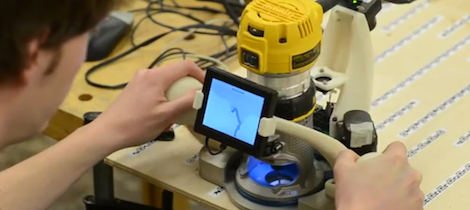
[Matthias], eminent woodworker he is, designed and built an awesome machine to make copies of just about any object imaginable. With a few scrap 2x4s, and a few bolts, screws, and skateboard bearings, you too can copy anything into a solid block of wood.

The theory of operations for [Matthias]’ copy carver is mounting a router and ‘follower’ to the same piece of wood. Put that on an XY table with a rotation axis, and just about any object can be copied in wood or plastic. It’s not too dissimilar to a Dulplicarver, a routing machine meant to copy everything from gun stocks to guitar and violin bodies.

So far, [Matthias] has copied a rotary phone and a sadly non-functional wrench.  It’s the perfect follow-up for [Matthias]’ 3 axis pantograph router that can copy and enlarge any random flat object you can throw at it.

via Make

A Personal Manufacturing Stack Exchange

Over on Stack Exchange, there’s a proposal for a new CNC/3D printer site. It’s a personal manufacturing stack exchange, and hopefully we’ll see some awesome discussion when it’s eventually created.

Stack Exchange is already well-known for hosting the most useful programming site as well as awesome sites/forums covering everything from LaTeX to grammar. The proposed Personal Manufacturing site is sure to provide a ton of advice and discussion covering the hardware, software, electronics, and toolchains of CNC routers, RepRaps and mills.

The personal manufacturing stack exchange hasn’t been created yet – a few more people still need to commit to use it. Once that’s done, though, we’re sure to see a lot of very helpful advice and discussion from the Stack Exchange community.

Kudos to [Michael] for sending this in.