Cheap And Easy Linear Supported Rail

Some of the very largest – and coolest – CNC machines use supported linear rail for their movement axes. For any home tinkerer trying to reproduce these supported rails, the problem of cost comes up very quick; these rails can run over $100 for just a few feet. [Michael] came up with a great way to build his own supported rail so he can build his very large CNC router.

There aren’t many tools needed to build [Michael]’s rail. He put a 90° notch in a 2×4 to support his 25mm rail, and clamped it down with a piece of plywood. After drilling a 5/16″ hole every 12 cm, he tapped these holes out to receive 3/8″ threaded rod. Yes, we also hate the mix of metric and imperial units in that description, but the results speak for themselves.

The now-supported rail was mounted to a piece of MDF with a few bolts and washers. MDF isn’t the most dimensionally stable material, so [Michael] will be covering the whole thing in a coat of epoxy very soon. Now, he’s one step closer to his gigantic CNC gantry router.

You can check out [Michael]’s demo video after the break.

Continue reading “Cheap And Easy Linear Supported Rail”

Never Miss Your Transport With This Bus Arrival Notifier

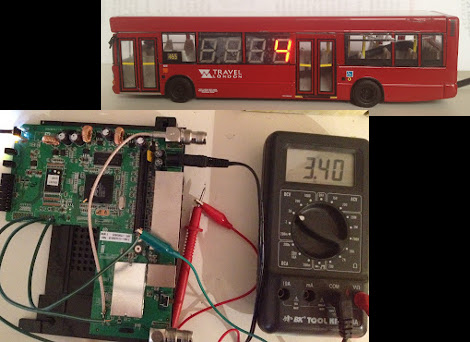
[John Graham-Cumming] was all set to start a new project based on the Raspberry Pi. Well, that was until shipment was delayed due to manufacturing issues. Not to fret, he transitioned over to a router board which displays the arrival countdown for mass transit bus service.

He based the build on a web page the Transport for London provided. You can load it up and see if your bus is running on time or not. There’s no published API, but by studying the source code from the site [John] was able to figure out how the JSON commands were formatted.

The next step is building a standalone device to pull the data and display it. The board seen above is from a Linksys WRT54GL router. This longtime favorite has a serial port header which can be driven from the Linux kernel. He wired up a jack on the router’s case, and uses an extension cable to get from it to the 7-segment displays mounted in a model of the bus. Since there’s four digits the display can tell you minutes until the arrival of two different buses.

[Thanks Pseudo Lobster]

Using Routers As Displays

Have you ever seen an LED display made out of routers? [Sean] took eight Netgear routers and made an 8×4 display out of them. Because that wasn’t cool enough, a very small version of Conway’s Game of Life was added to the build.

Each router is running a copy of OpenWrt, a Linux distro meant for limited hardware. Instead of an 802.11 protocol, each router runs the B.A.T.M.A.N. advanced mesh protocol. This protocol allows each router to communicate with all the other routers.

Instead of each router receiving data from a master, the routers calculate each step in the Game of Life independently.  Once the routers communicate their initial states, each router is responsible for displaying its four LEDs for each new generation. In the video after the break, you can see [Sean]’s routers calculating random Game of Life boards. Sadly, we didn’t notice a GoL oscillator being randomly generated, but with a 4×8 play field even a Glider wouldn’t last very long.

Continue reading “Using Routers As Displays”

A SOPA We Still Can’t Get Behind

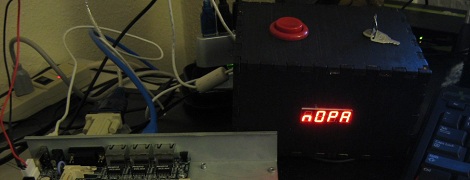
[Brad] had an extremely productive January 18th. Considering how many websites went dark to protest SOPA, we can’t blame him. While considering what he could get done if popular Internet time sinks went dark on command, [Brad] thought of the Stop Online Productivity Avoidance box. This build will redirect all traffic to sites like reddit, hacker news, and (gasp!) hack a day to a simple web page that asks the eternal question, “shouldn’t you be working right now?”

The box has two modes: in SOPA mode, the whole Internet is at [Brad]’s fingertips. In NOPA mode, an Arduino communicates with a Python script running on the router to pull up an Internet blacklist. A simple button would be too easy to override, so there’s a ‘nuclear mode’ that shuts off these time sinks for one hour. The only way around the blacklist is to restart the router, a process that takes 15 minutes and will kill the entire Internet for the duration. Not something you’d like to do if you’re slightly bored.

All the code for the SOPA box is up on github and you can check out [Brad]’s demo of the SOPA box after the break.

Continue reading “A SOPA We Still Can’t Get Behind”

Complete Guide To Compiling OpenWRT

Regular reader [MS3FGX] recently wrote a guide to compiling OpenWRT from source. You may be wondering why directions for compiling an open source program warrant this kind of attention. The size and scope of the package make it difficult to traverse the options available to you at each point in the process, but [MS3FGX] adds clarity by discussion as much as possible along the way.

OpenWRT is an open source alternative firmware package that runs on may routers. It started as a way to unlock the potential of the Linksys WRT54G. But the versatility of the user interface, and the accessibility of the Linux kernel made it a must-have for any router. This is part of what has complicated the build process. There are many different architectures supported and you’ve got to configure the package to build for your specific hardware (or risk a bad firmware flash!).

You’ll need some hefty hardware to ease the processing time. The source package is about 300 MB but after compilation the disk usage will reach into the Gigabyte range. [MS3FGX] used a 6-core processor for compilation and it still took over 20 minutes for a bare-bones distribution. No wonder pre-built binaries are the only thing we’ve ever tried. But this is a good way to introduce yourself to the inner workings of the package and might make for a frustrating fun weekend project.

Extreme Finger Painting With A Router

Most of the time, CNC machines are used for very precise and exacting. There is another way that allows for a more “hands on” approach to routers and mills that allows for a lot more creativity and freedom. The touchCNC these guys whipped up allows anyone to finger paint with a friggin router.

From the forum post the guys sent in, they wrote a simple Android app for a tablet that allows for router control via a touch interface. There are three parts to the software. An Android app sends finger positions to a java server running on the CNC computer. This server dumps gcode into a text file. A vbscript inside the router software keeps reading from the specified file. With all this, finger movements are translated directly into machine movements.

The controls are fairly simple, like a real-life representation of Microsoft Paint. Of course there’s a ‘tap GOTO’ command that moves the router to a specified position. The router bit is lowered onto the work piece with a ‘long tap’ and stays lowered until the finger is released.

You can check out the code for touchCNC, but the guys are working on a few additional features like converting the tablets gyro output to gcode. Until then, enjoy the videos the guys posted after the break.

Continue reading “Extreme Finger Painting With A Router”

RAM Upgrade For WRT300N Router

[Heli] had a WRT300N wireless router sitting around collecting dust. He decided to squeeze at bit more entertainment value out of it by seeing if he could pull off a RAM upgrade. He managed to double the router’s RAM and posted a walk through (translated) to help you do the same.

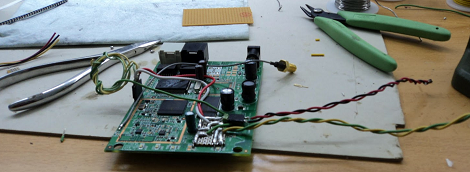
Swapping out surface mount RAM chips isn’t the easiest thing in the world and you must wondering what prompted this. It seems he wanted to run the LuCI package on the router but it was slow (or even incapable) of booting with the stock hardware’s 16 Mb. He first sourced some pin-compatible replacement chips from an old Pentium III computer. While his soldering iron was hot, he also wired up a JTAG header, which connects via the red wires just visible to the left. When he first fired up the unit he was happy that it was able to boot, but it still only detected 16 Mb.

It turns out you’re going to need to roll your own kernel to get it to take advantage of the upgrade. Source code for OpenWRT is easy to find and there’s plenty of guides for compiling it. If you try this, make sure to read [Heli’s] post carefully as he’s got some important configuration information that will help you to avoid bricking your router.