Unbricking And Upgrading An ASUS Wl520 Router

unbricking_upgrading_asus_wl520

[Andrew] has an ASUS wl520-gU router that he is pretty fond of, despite its numerous problems. CPU clock bug aside, the router only has 16MB or memory like many others on the market. While tooling around with the bootloader he bricked the device, so he decided it was time for an overhaul.

After some searching online, he found that the router could be unbricked by shorting out one of the pins on its flash chip. With an emergency unbrick button installed on the board, he can now reset it in seconds by power cycling the device.

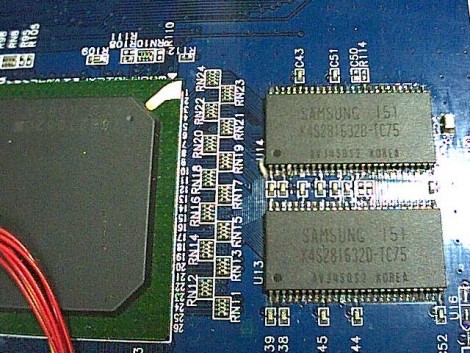
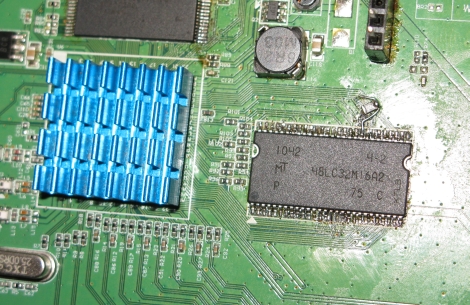
Now that he had a working router again, he proceeded to remedy his initial gripe – the lackluster amount of memory. He soldered in a 512Mbit (64MB) module in the original chip’s place, crossed his fingers and booted the router. It started up just fine, so he ran a few commands to instruct the router to recognize the new memory capacity. After rebooting, he found that it only recognized 32MB of RAM, which was remedied by soldering a 22 Ohm resistor to one of the module’s pins.

It did take a bit of careful soldering to get things upgraded and working, but we think it was well worth the effort.

Freakin’ Huge CNC Router

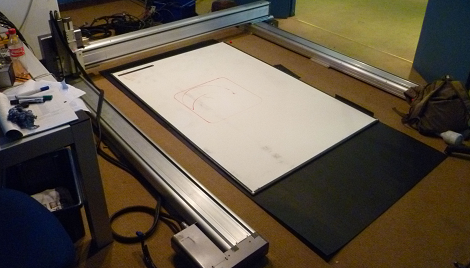
[Tom] sent in a gigantic 3-axis router that he pieced together during a 2 week-long work experience placement. Looking at this picture showing a 12-inch ruler on the work area, we realized that this may be the largest CNC router we’ve seen on Hack A Day.

[Tom]’s employer gave him some obsolete axes, so piecing the mechanical components together was very easy. The only real problem was interfacing the CNC controller to a computer. This meant [Tom] had to convert G Code to the code used by the antiquated NSK axes. Where G Code defines arcs with a start point, end point, and radius, the NSK code defines arcs with a start point, end point, and another point along the arc. It’s a tricky bit of math, but [Tom] built some software that did this in Visual Basic.

Right now, [Tom] only has a pen tool attached to the router; you can check that in action after the break. We’re trying to imagine what we would do with a 4 m² work area; this could easily be used to make a giant reprap or other 3D printer.

Continue reading “Freakin’ Huge CNC Router”

Cellphone Controlled Retro-radio Stores And Plays Your Digital Library

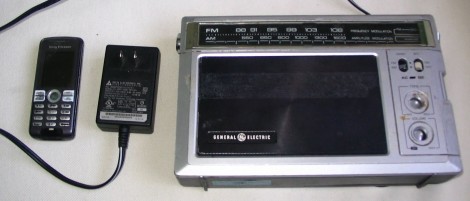
[Autuin] was worried about having desirable electronics stolen while on the road with his band. He didn’t want to take a laptop along on tour, but he didn’t want to be without his music either. To solve this problem, he built a music player inside of a cheap-looking radio. His write-up covers two different portable MP3 solutions, but it’s the second rendition that catches our attention.

After hollowing out the old radio he filled the void with an Asus WL-HDD 2.5. That hardware is meant to be an easy way to add network storage; it houses a laptop hard drive and has WiFi and Ethernet connectivity. But it also has one USB port, and can be hacked to add a second. [Autuin] did just that, using the two USB connections to add a Bluetooth dongle and a USB sound card. Music is synced with the hard drive via some cat-5 cable that’s hidden in the battery compartment of the vintage box. The NAS runs Linux, and the audio playback software is controlled though a Mobile Java application running on a somewhat broken cellphone. That’s an idea that might find its way into our next project.

Using A Router As A Linux-based PID Controller

espresso_machine_pid

[Nathan] had an small router kicking around and thought that he might as well put it to good use. He had always been interested in getting a better handle on his espresso machine, and figured that the router would be a perfect Linux-based PID controller.

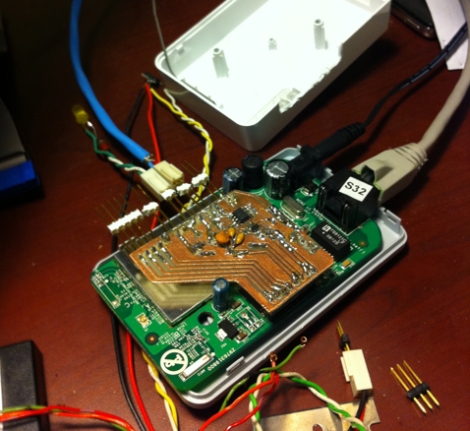
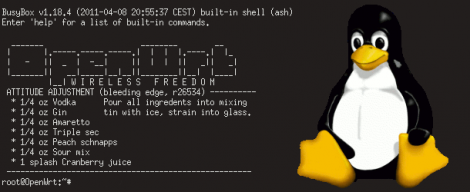
He installed OpenWRT on the router, then disassembled it in order to get access to the router’s GPIO pins. He built a small PCB that allows him to get temperature info from the machine to the router using i2c. [Nathan] put together a PID package for OpenWRT, allowing him to control the machine over SSH, though he may build in a user-friendly web interface sometime in the future.

He says that most espresso machine PID controllers he has seen come in the form of big ugly boxes slapped on the side of the machine’s case, though we have to disagree with him on that point. Opinions aside, he is going for a minimalist design, and while he says that he is only about half way through the project, we think things are looking promising so far.

When everything is said and done, we hope to get a much closer look at all of his code, schematics, and more information on the router he used as well.

Measuring Home Networks With BISMark

The Broadband Internet Service BenchMARK is an open source initiative to put tools in the hands of the common Internet user that will make measurement and analyzation of home network traffic easier. It targets LAN and WAN network utilization by measuring latency, packet loss, jitter, upstream throughput, and downstream throughput. Of course gathering data isn’t worth anything unless you have a way to present it, and to that end the Project BISMark team has been developing a web interface where you can view the usage of anyone who’s running the firmware.

The project builds on top of OpenWRT, which means that you should be able to run it on any router that’s OpenWRT compatible. This includes the ubiquitous WRT54G routers and many others. We remember when DD-WRT added bandwidth monitoring as part of the standard release, which really came in handy when the stories about ISP bandwidth capping started to hit. We’re glad to see even more functionality with this package as it can be hard to really understand what is going on in your network. After the break you’ll find a video detailing the features of BISMark.

Continue reading “Measuring Home Networks With BISMark”

Reverse Engineering VxWorks (which Replaces Linux On Newer Routers)

The Linksys router seen about is a WRT54G version 1. It famously runs Linux and was the source of much hacking back in the heyday, leading to popular alternative firmware packages such as DD-WRT and Tomato. But the company went away from a Linux-based firmware starting with version 8 of the hardware. Now they are using a proprietary Real Time Operating System called VxWorks.

[Craig] recently put together a reverse engineering guide for WRT54Gv8 and newer routers. His approach is purely firmware based since he doesn’t actually own a router that runs VxWorks. A bit of poking around in the hex dump lets him identify different parts of the files, leading to an ELF header that really starts to unlock the secrets within. From there he carries out a rather lengthy process of accurately disassembling the code into something that makes sense. The tool of choice used for this is IDA Pro diassembler and debugger. We weren’t previously familiar with it, but having seen what it can do we’re quite impressed.

[Image via Wikimedia Commons]

Retro-radio: Building On Another WiFi Radio Hack

[Jay Collett] likes listening to Internet radio stations and decided to build his own standalone hardware that lets him listen without being at his computer. But he wasn’t starting from square one on this project. [Jay] built on the epic instruction set that [Mighty Ohm] published when he first built his own WiFi radio.

Both of these radios used the same method of getting onto the internet; a hacked router. We kind of like this because it means you should be able to use the radio as a bridge for wired Ethernet devices. But we digress. [Jay] departs from the instructions by using an Arduino and its IDE to interface an LCD screen with a different line/column orientation than the original, and to implement a different control scheme. This makes the project a bit more approachable if you prefer not to roll your own electronics.

Take a look at the video after the break. The router takes quite a while to boot, but once it does it seems that the controls are both intuitive and responsive.

Continue reading “Retro-radio: Building On Another WiFi Radio Hack”