Custom Jig Makes Short Work Of Product Testing

When you build one-off projects for yourself, if it doesn’t work right the first time, it’s a nuisance. You go back to the bench, rework it, and move on with life. The equation changes considerably when you’re building things to sell to someone. Once you take money for your thing, you have to support it, and anything that goes out the door busted is money out of your pocket.

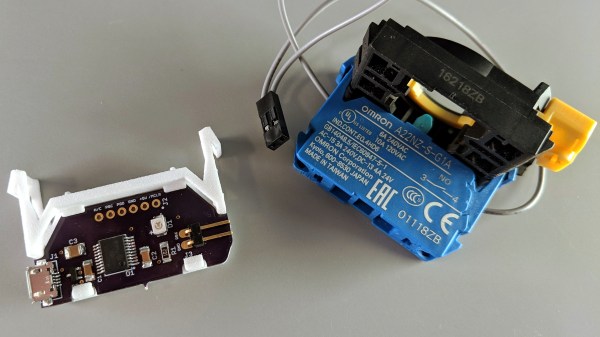
[Brian Lough] ran into this fact of life recently when the widget he sells on Tindie became popular enough that he landed an order for 100 units. Not willing to cut corners on testing but also not interested in spending days on the task, he built this automated test jig to handle the job for him. The widget in question is the “Power BLough-R”, a USB pass-through device that strips the 5-volt from the line while letting the data come through; it’s useful for preventing 3D-printers from being backfed when connected to Octoprint. The tester is very much a tactical build, with a Nano in a breakout board wired to a couple of USB connectors. When the widget is connected to the tester, a complete series of checks make sure that there are no wiring errors, and the results are logged to the serial console. [Brian] now has complete confidence that each unit works before going out the door, and what’s more, the tester shaved almost a minute off each manual test. Check in out in action in the video below.

We’ve featured quite a few of [Brian]’s projects before. You may remember his Tetris-themed YouTube subscriber counter, or his seven-segment shoelace display.

Continue reading “Custom Jig Makes Short Work Of Product Testing”

How A Microcontroller Hiding In A USB Port Became An FPGA Hiding In The Same

When you think of microcontroller development, you probably picture either a breadboard with a chip or a USB-connected circuit board. But Tim Ansell pictured an ARM dev board that is almost completely hidden inside of a USB port. His talk at the 2018 Hackaday Superconference tells that story and then some. Check out the newly published video, along with more details of the talk, after the break.

Continue reading “How A Microcontroller Hiding In A USB Port Became An FPGA Hiding In The Same”

A Scratch Instrument For Ants

If you think that this scratch instrument looks as though it should be at least… three times larger in order to be useful, you’d be wrong. This mighty pocket-sized instrument can really get the club hopping despite its diminuitive size. Despite that, the quality of the build as well as its use of off-the-shelf components for almost every part means that if you need a small, portable turntable there’s finally one you can build on your own.

[rasteri] built the SC1000 digital scratch instrument as a member of the portabilist scene, focusing on downsizing the equipment needed for a proper DJ setup. This instrument uses as Olimex A13-SOM-256 system-on-module, an ARM microprocessor, and can use a USB stick in order to load beats to the system. The scratch wheel itself uses a magnetic rotary encoder to sense position, and the slider is miniaturized as well.

If you want to learn to scratch good and learn to do other things good too, there’s a demo below showing a demonstration of the instrument, as well as a how-to video on the project page. All of the build files and software are open-source, so it won’t be too difficult to get one for yourself as long as you have some experience printing PCBs. If you need the rest of the equipment for a DJ booth, of course that’s also something you can build.

Continue reading “A Scratch Instrument For Ants”

Using FTDI Chips With Python

FTDI are a company known for producing chips for USB applications. Most of us have a few USB-to serial adapters kicking about, and the vast majority of them run on FTDI hardware (or, if we’re honest, counterfeit copies). However, FTDI’s hardware has a whole lot more to offer, and [jayben] is here to show us all how to take advantage of it using Python.

FTDI chips are an effective way to debug ARM projects, using the SWD protocol.

FTDI’s chips have varying capabilities, but most can do more than just acting as a USB-connected COM port. It’s possible to use the chips for SPI, I2C, or even bitbanging operation. [jayben] has done the hard work of identifying the best drivers to use depending on your operating system, and then gone a step further to demonstrate example code for sending data over these various interfaces. The article not only covers code, but also shows oscilloscope traces of output, giving readers a strong understanding of what should be happening if everything’s operating as it should. The series rounds out with a primer on how to use FTDI hardware to speak the SWD protocol to ARM devices for advanced debugging use.

It’s a great primer on how to work effectively with these useful chips, and we imagine there will be plenty of hackers out there that will find great use to this information. Of course, it’s important to always be careful when sourcing your hardware as FTDI drivers don’t take kindly to fake chips.

Open Hardware Board For Robust USB Power Monitoring

We’ve all seen the little USB power meters that have become popular since nearly every portable device has adopted some variation of USB for charging. Placed between the power source and the device under test, they allow you to see voltage and current in real time. Perfect for determining how long you’ll be able to run a USB powered device on batteries, or finding out if a USB power supply has enough current to do the business.

[Jonas Persson] liked the idea of these cheap little gadgets, but wanted something a bit more scientific. His design, which he refers to as UPM, is essentially a “smart” version of those ubiquitous USB gadgets. Instead of just showing the data on a little LCD screen, it can now be viewed on the computer and analyzed. His little gadget even allows you to cut power to the device under test, potentially allowing for automated testing of things such as inrush current.

Essentially the UPM works in much the same way as the simple USB meters: one side of the device goes towards the upstream power source, and the device under test plugs into the other side. Between the two devices is a 16 bit ADC and differential amplifier which measures the voltage and current. There’s a header on the board which connects to the ADC if you wanted to connect the UPM to an external microcontroller or other data logging device.

But most likely you would be using the internal microcontroller to analyze the output of the ADC over I2C, which [Jonas] very cleverly connected to the upstream port with an integrated USB hub. One side of the hub goes off to the device being tested, and the other to the microcontroller. So the host device will see both the UPM’s integrated microcontroller and the target device at the same time. From there, you can use the ncurses user interface to monitor and control the device in real-time.

While the hardware looks more or less finished, [Jonas] has some more plans for the software side of UPM, including support for remote control and monitoring over TCP/IP as well as robust logging capabilities. This is definitely a very interesting project, and we’re excited to see it develop further.

In the past we’ve seen homebrew USB power meter builds, and even commercial offerings which boasted computer-based logging and analysis, so it was only a matter of time before somebody combined them into one.

From SPIDriver To I2CDriver

Communicating with microcontrollers and other embedded systems requires a communications standard. SPI is a great one, and is commonly used, but it’s not the only one available. There’s also I2C which has some advantages and disadvantages compared to SPI. The problem with both standards, however, is that modern computers don’t come with either built-in. To solve that problem and allow easier access to debugging in SPI, [James Bowman] built the SPIDriver a few months ago, and is now back by popular demand with a similar device for I2C, the I2CDriver.

Much like the SPIDriver, the I2C driver is a debugging tool that can be used at your computer with a USB interface. Working with I2C is often a hassle, with many things going on all at once that need to sync up just right in order to work at all, and this device allows the user to set up I2C devices in a fraction of the time. To start, it has a screen built in that shows information about the current device, like the signal lines and a graphical decoding of the current traffic. It also shows an address space map, and has programmable pullup resistors built in, and can send data about the I2C traffic back to its host PC for analysis.

The I2CDriver is also completely open source, from the hardware to the software, meaning you could build one from scratch if you have the will and the parts, or make changes to the code on your own to suit your specific needs. If you’re stuck using SPI still, though, you can still find the original SPIDriver tool to help you with your debugging needs with that protocol as well.

Teensy Liberates The ThinkPad Keyboard

[Frank Adams] liked the keyboard on his Lenovo ThinkPad T61 so much that he decided to design an adapter so he could use it over USB with the Teensy microcontroller. He got the Trackpoint working, and along the way managed to add support for a number of other laptop boards as well. Before you know it, he had a full-blown open source project on his hands. Those projects can sneak up on you when you least expect it…

The first step of the process is getting your laptop keyboard of choice connected up to the Teensy, but as you might expect, that’s often easier said than done. They generally use a flexible printed circuit (FPC) “ribbon cable” of some type, but may also be terminated in any number of weirdo connectors. [Frank] goes over the finer points of getting these various keyboards connected to his PCB, from searching the usual suspects such as Aliexpress and Digikey for the proper connector to throwing caution to the wind and cutting off problematic nubs and tabs to make it fit.

You might be on your own for figuring out the best way to connect your liberated keyboard up, but [Frank] has done his part by designing a few PCBs which handle routing the appropriate connections to the Teensy LC or 3.2 microcontroller. He’s such a swell guy he’s even written the firmware for you. As of right now there’s currently a dozen keyboards supported by his software and hardware setup, but he also gives tips on how to get the firmware modified for your own board if you need to.

It should come as no surprise that it was a Thinkpad keyboard that got [Frank] going down this path; as we’ve documented over the years, hackers love their Thinkpads. From fitting them with more modern motherboards to going full on matryoshka and putting a second computer inside of one, it’s truly the laptop that launched a thousand hacks.

Continue reading “Teensy Liberates The ThinkPad Keyboard”